

nRF Wi-Fi driver
The nRF Wi-Fi driver implements the Wi-Fi® protocol for the nRF70 FullMAC Series of devices. FullMAC devices implement the Wi-Fi protocol in the chipset. The driver configures the chipset and transfers the frames to and from the device to the networking stack.
The nRF70 Series device is a companion IC and can be used with any Nordic Semiconductor System-on-Chips (SoCs), such as the nRF53 and nRF91 Series SoCs.
You can enable the driver by using the following Kconfig options:
When using Sysbuild (System build) to build your application, set the
SB_CONFIG_WIFI_NRF70Kconfig option toyin yoursysbuild.conffile.When not using Sysbuild (System build), set the
CONFIG_WIFI_NRF70Kconfig option toyin your application’sprj.conffile.
Architecture
The following figure illustrates the architecture of the nRF Wi-Fi driver.
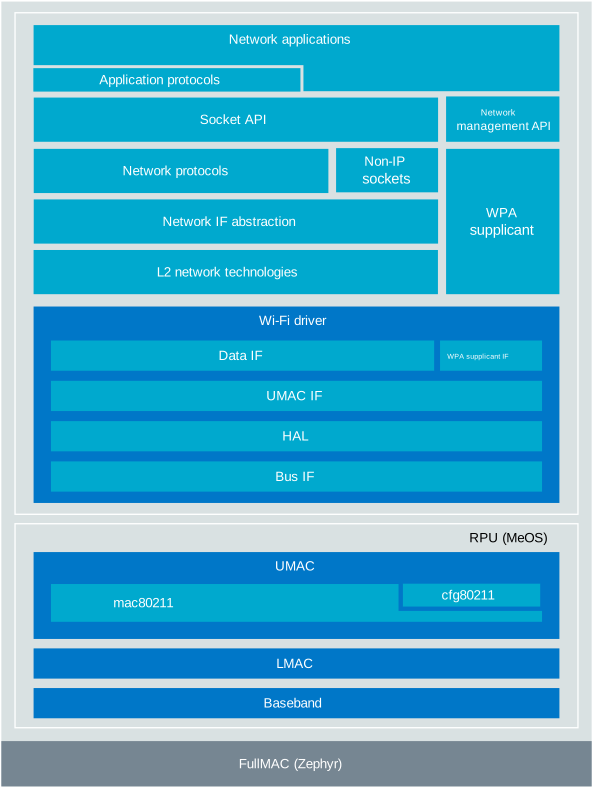
nRF Wi-Fi driver architecture overview
Design overview
The nRF Wi-Fi driver follows an OS-agnostic design, and the driver implementation is split into OS-agnostic and OS (Zephyr)-specific code.
The OS-agnostic code is located in the $ZEPHYR_BASE/../modules/nrf_wifi/ folder, and the Zephyr OS port is located in the $ZEPHYR_BASE/drivers/wifi/nrf_wifi/ folder.
The driver supports three modes of operation:
Wi-Fi mode
In this mode, the driver is designed to be used with the Zephyr networking stack. It is implemented as a network interface driver.
The driver supports the following IEEE 802.11 features:
Wi-Fi 6 (802.11ax) support
WPA3™/WPA2™ personal security
IEEE 802.11 Power Save modes
Scan-only mode
IEEE 802.11 Station mode (STA)
Wi-Fi Direct® (P2P) mode
Except for scan-only mode, the driver uses the host access point daemon (hostapd) to implement AP Media Access Control (MAC) Sublayer Management Entity (AP MLME) and wpa_supplicant to implement 802.1X supplicant.
Radio Test mode
The nRF Wi-Fi driver supports Radio Test mode, which you can use to test the RF performance of the nRF70 Series device.
This is a build time option that you can enable using the CONFIG_NRF70_RADIO_TEST Kconfig option.
For more details about using this driver in Radio Test mode, see Wi-Fi: Radio test (Multi domain).
Offloaded raw TX mode
The nRF Wi-Fi driver supports Offloaded raw TX mode, where the nRF70 Series device transmits frames at regular intervals with very low power consumption. Frame transmission is offloaded to the nRF70 device, minimizing host processing and memory requirements.
For more details about using this driver in Offloaded raw TX mode, see Offloaded raw transmit operation.
Driver to nRF70 Series device communication
The driver communicates with the nRF70 Series device using the QSPI/SPI interface. The driver uses the QSPI/SPI interface to send commands to the nRF70 Series device, and to transfer data to and from the device. The nRF7002 DK uses QSPI, whereas the nRF7002 EK uses SPI.
To connect the nRF7002 EK to the SoC, the nrf7002ek shield is required.
Configuration
The nRF Wi-Fi driver has the following configuration options:
Kconfig configuration
- CONFIG_WIFI_NRF70
(bool) nRF70 driver
Nordic Wi-Fi Driver
- CONFIG_WIFI_NRF7002
(bool)
- CONFIG_WIFI_NRF7001
(bool)
- CONFIG_WIFI_NRF7000
(bool)
- CONFIG_NRF70_QSPI_LOW_POWER
(bool) low power mode in QSPI
- CONFIG_NRF70_SCAN_ONLY
(bool) nRF70 scan only mode
Select this option to enable scan-only mode of the nRF70 driver. In this mode, the driver can only perform scanning operations to discover nearby Wi-Fi networks, but cannot establish connections or transmit/receive data. Mainly used for location accuracy improvement.
- CONFIG_NRF70_SYSTEM_MODE
(bool) System mode of the nRF70 driver
Select this option to enable system mode of the nRF70 driver. This is the normal operating mode that supports full Wi-Fi functionality including sub-modes like STA, AP, and P2P.
- CONFIG_NRF70_RADIO_TEST
(bool) Radio test mode of the nRF70 driver
Select this option to enable radio test mode of the nRF70 driver. This mode is used for testing RF performance and regulatory compliance. It provides direct control of the radio hardware for transmitting test patterns and measuring RF parameters.
- CONFIG_NRF70_OFFLOADED_RAW_TX
(bool) Offloaded raw TX mode of the nRF70 driver
Select this option to enable offloaded raw TX mode. In this mode, raw 802.11 frames can be transmitted directly without normal Wi-Fi protocol processing. The frame construction and transmission timing is handled by the Wi-Fi hardware, reducing CPU load.
- CONFIG_NET_L2_ETHERNET
(unknown)
- CONFIG_NRF70_STA_MODE
(bool) nRF70 STA mode
Select this option to enable STA mode of the nRF70 driver.
- CONFIG_NRF70_AP_MODE
(bool) Access point mode
- CONFIG_NRF70_ENABLE_DUAL_VIF
(bool) Dual virtual Wi-Fi interfaces
Enable support for two virtual Wi-Fi interfaces (VIFs). When enabled, the driver can operate two VIFs simultaneously, allowing use cases such as one interface in AP mode and another in STA mode.
- CONFIG_NRF70_P2P_MODE
(bool) P2P support in driver
- CONFIG_NRF70_SYSTEM_WITH_RAW_MODES
(bool) nRF70 system mode with raw modes
Select this option to enable system mode of the nRF70 driver with raw modes.
- CONFIG_NRF70_RAW_DATA_TX
(bool) RAW TX data path in the driver
- CONFIG_NRF70_RAW_DATA_RX
(bool) RAW RX sniffer operation in the driver
- CONFIG_NRF70_PROMISC_DATA_RX
(bool) Promiscuous RX sniffer operation in the driver
- CONFIG_NRF70_DATA_TX
(bool)
- CONFIG_NRF_WIFI_IF_AUTO_START
(bool) Wi-Fi interface auto start on boot
- CONFIG_NRF_WIFI_PATCHES_BUILTIN
(bool) Store nRF70 FW patches as part of the driver
Select this option to store nRF70 FW patches as part of the driver. This option impacts the code memory footprint of the driver.
- CONFIG_NRF_WIFI_PATCHES_EXTERNAL
(bool) Load nRF70 FW patches from external binary
Select this option to load nRF70 FW patches from an external tooling.
- CONFIG_NRF70_PATCH_DL_CHUNK_SIZE
(int) nRF70 firmware patch download chunk size (bytes)
Size of each chunk used when downloading the nRF70 firmware patches to the RPU over SPI/QSPI. Larger chunks load the firmware in fewer bus transfers, smaller chunks reduce the peak heap usage. The default is picked per SoC to stay within the bus DMA limits, so only lower this if your SoC is more constrained than the default already assumes.
- CONFIG_NRF_WIFI_LOW_POWER
(bool) Low power mode in nRF Wi-Fi chipsets
- CONFIG_NRF70_TCP_IP_CHECKSUM_OFFLOAD
(bool) TCP/IP checksum offload
- CONFIG_NRF70_REG_DOMAIN
(string) The ISO/IEC alpha2 country code for the country in which this device is currently operating. Default 00 (World regulatory)
- CONFIG_NET_MGMT_EVENT_STACK_SIZE
(unknown)
- CONFIG_NRF70_LOG_VERBOSE
(bool) Maintains the verbosity of information in logs
- CONFIG_WIFI_NRF70_LOG_LEVEL
(unknown)
- CONFIG_NRF70_2_4G_ONLY
(bool)
- CONFIG_NRF70_SR_COEX
(bool) Wi-Fi and SR coexistence support
- CONFIG_NRF70_SR_COEX_RF_SWITCH
(bool) GPIO configuration to control SR side RF switch position
Select this option to enable GPIO configuration to control SR side RF switch position. If this GPIO is asserted (1), the SR side RF switch is connected to the Wi-Fi side (shared antenna). If this GPIO is de-asserted (0), the SR side RF switch is connected to the SR side (separate antenna).
- CONFIG_NRF70_SR_COEX_SLEEP_CTRL_GPIO_CTRL
(bool) Configuration of GPIO control for coexistence
- CONFIG_NRF70_SR_COEX_SWCTRL1_OUTPUT
(int) Configure SWCTRIL1 as output
- CONFIG_NRF70_SR_COEX_BT_GRANT_ACTIVE_LOW
(int) Configure BT grant active low
- CONFIG_NRF70_BT_SLOT_TIME
(int) BT slot allocation time in Wi-Fi scan (ms)
Time allocated in milliseconds for SR between successive Wi-Fi channel scan.
- CONFIG_NRF70_WORKQ_STACK_SIZE
(int) Stack size for workqueue
- CONFIG_NRF70_WORKQ_MAX_ITEMS
(int) Maximum work items for all workqueues
- CONFIG_NRF70_MAX_TX_PENDING_QLEN
(int) Maximum number of pending TX packets
- CONFIG_NRF70_UTIL
(bool) Utility shell in nRF70 driver
- CONFIG_NRF70_DEBUG_SHELL
(bool) Debug shell in nRF70 driver
- CONFIG_NRF70_PCB_LOSS_2G
(int) PCB loss for 2.4 GHz band
Specifies PCB loss from the antenna connector to the RF pin. The values are in dB scale in steps of 1 dB and range of 0-4 dB. The loss is considered in the RX path only.
- CONFIG_NRF70_PCB_LOSS_5G_BAND1
(int) PCB loss for 5 GHz band (5150 MHz - 5350 MHz, Channel-32 - Channel-68)
Specifies PCB loss from the antenna connector to the RF pin. The values are in dB scale in steps of 1 dB and range of 0-4 dB. The loss is considered in the RX path only.
- CONFIG_NRF70_PCB_LOSS_5G_BAND2
(int) PCB loss for 5 GHz band (5470 MHz - 5730 MHz, Channel-96 - Channel-144)
Specifies PCB loss from the antenna connector to the RF pin. The values are in dB scale in steps of 1 dB and range of 0-4 dB. The loss is considered in the RX path only.
- CONFIG_NRF70_PCB_LOSS_5G_BAND3
(int) PCB loss for 5 GHz band (5730 MHz - 5895 MHz, Channel-149 - Channel-177)
Specifies PCB loss from the antenna connector to the RF pin. The values are in dB scale in steps of 1 dB and range of 0-4 dB. The loss is considered in the RX path only.
- CONFIG_NRF70_ANT_GAIN_2G
(int) Antenna gain for 2.4 GHz band
- CONFIG_NRF70_ANT_GAIN_5G_BAND1
(int) Antenna gain for 5 GHz band (5150 MHz - 5350 MHz)
- CONFIG_NRF70_ANT_GAIN_5G_BAND2
(int) Antenna gain for 5 GHz band (5470 MHz - 5730 MHz)
- CONFIG_NRF70_ANT_GAIN_5G_BAND3
(int) Antenna gain for 5 GHz band (5730 MHz - 5895 MHz)
- CONFIG_NRF70_BAND_2G_LOWER_EDGE_BACKOFF_DSSS
(int) DSSS Transmit power backoff (in dB) for lower edge of 2.4 GHz frequency band
- CONFIG_NRF70_BAND_2G_LOWER_EDGE_BACKOFF_HT
(int) HT/VHT Transmit power backoff (in dB) for lower edge of 2.4 GHz frequency band
- CONFIG_NRF70_BAND_2G_LOWER_EDGE_BACKOFF_HE
(int) HE Transmit power backoff (in dB) for lower edge of 2.4 GHz frequency band
- CONFIG_NRF70_BAND_2G_UPPER_EDGE_BACKOFF_DSSS
(int) DSSS Transmit power backoff (in dB) for upper edge of 2.4 GHz frequency band
- CONFIG_NRF70_BAND_2G_UPPER_EDGE_BACKOFF_HT
(int) HT/VHT Transmit power backoff (in dB) for upper edge of 2.4 GHz frequency band
- CONFIG_NRF70_BAND_2G_UPPER_EDGE_BACKOFF_HE
(int) HE Transmit power backoff (in dB) for upper edge of 2.4 GHz frequency band
- CONFIG_NRF70_BAND_UNII_1_LOWER_EDGE_BACKOFF_HT
(int) HT/VHT Transmit power backoff (in dB) for lower edge of UNII-1 frequency band
- CONFIG_NRF70_BAND_UNII_1_LOWER_EDGE_BACKOFF_HE
(int) HE Transmit power backoff (in dB) for lower edge of UNII-1 frequency band
- CONFIG_NRF70_BAND_UNII_1_UPPER_EDGE_BACKOFF_HT
(int) HT/VHT Transmit power backoff (in dB) for upper edge of UNII-1 frequency band
- CONFIG_NRF70_BAND_UNII_1_UPPER_EDGE_BACKOFF_HE
(int) HE Transmit power backoff (in dB) for upper edge of UNII-1 frequency band
- CONFIG_NRF70_BAND_UNII_2A_LOWER_EDGE_BACKOFF_HT
(int) HT/VHT Transmit power backoff (in dB) for lower edge of UNII-2A frequency band
- CONFIG_NRF70_BAND_UNII_2A_LOWER_EDGE_BACKOFF_HE
(int) HE Transmit power backoff (in dB) for lower edge of UNII-2A frequency band
- CONFIG_NRF70_BAND_UNII_2A_UPPER_EDGE_BACKOFF_HT
(int) HT/VHT Transmit power backoff (in dB) for upper edge of UNII-2A frequency band
- CONFIG_NRF70_BAND_UNII_2A_UPPER_EDGE_BACKOFF_HE
(int) HE Transmit power backoff (in dB) for upper edge of UNII-2A frequency band
- CONFIG_NRF70_BAND_UNII_2C_LOWER_EDGE_BACKOFF_HT
(int) HT/VHT Transmit power backoff (in dB) for lower edge of UNII-2C frequency band
- CONFIG_NRF70_BAND_UNII_2C_LOWER_EDGE_BACKOFF_HE
(int) HE Transmit power backoff (in dB) for lower edge of UNII-2C frequency band
- CONFIG_NRF70_BAND_UNII_2C_UPPER_EDGE_BACKOFF_HT
(int) HT/VHT Transmit power backoff (in dB) for upper edge of UNII-2C frequency band
- CONFIG_NRF70_BAND_UNII_2C_UPPER_EDGE_BACKOFF_HE
(int) HE Transmit power backoff (in dB) for upper edge of UNII-2C frequency band
- CONFIG_NRF70_BAND_UNII_3_LOWER_EDGE_BACKOFF_HT
(int) HT/VHT Transmit power backoff (in dB) for lower edge of UNII-3 frequency band
- CONFIG_NRF70_BAND_UNII_3_LOWER_EDGE_BACKOFF_HE
(int) HE Transmit power backoff (in dB) for lower edge of UNII-3 frequency band
- CONFIG_NRF70_BAND_UNII_3_UPPER_EDGE_BACKOFF_HT
(int) HT/VHT Transmit power backoff (in dB) for upper edge of UNII-3 frequency band
- CONFIG_NRF70_BAND_UNII_3_UPPER_EDGE_BACKOFF_HE
(int) HE Transmit power backoff (in dB) for upper edge of UNII-3 frequency band
- CONFIG_NRF70_BAND_UNII_4_LOWER_EDGE_BACKOFF_HT
(int) HT/VHT Transmit power backoff (in dB) for lower edge of UNII-4 frequency band
- CONFIG_NRF70_BAND_UNII_4_LOWER_EDGE_BACKOFF_HE
(int) HE Transmit power backoff (in dB) for lower edge of UNII-4 frequency band
- CONFIG_NRF70_BAND_UNII_4_UPPER_EDGE_BACKOFF_HT
(int) HT/VHT Transmit power backoff (in dB) for upper edge of UNII-4 frequency band
- CONFIG_NRF70_BAND_UNII_4_UPPER_EDGE_BACKOFF_HE
(int) HE Transmit power backoff (in dB) for upper edge of UNII-4 frequency band
- CONFIG_NRF70_RX_NUM_BUFS
(int) Number of RX buffers
- CONFIG_NRF70_MAX_TX_AGGREGATION
(int) Maximum number of TX packets to aggregate
- CONFIG_NRF70_MAX_TX_TOKENS
(int) Maximum number of TX tokens
- CONFIG_NRF70_TX_MAX_DATA_SIZE
(int) Maximum size of TX data
- CONFIG_NRF70_RX_MAX_DATA_SIZE
(int) Maximum size of RX data
- CONFIG_NRF70_TX_DONE_WQ_ENABLED
(bool) TX done workqueue (impacts performance negatively)
- CONFIG_NRF70_RX_WQ_ENABLED
(bool) RX workqueue
- CONFIG_NUM_METAIRQ_PRIORITIES
(unknown)
- CONFIG_NRF70_IRQ_WQ_PRIORITY
(int) Priority of the workqueue for handling IRQs
- CONFIG_NRF70_BH_WQ_PRIORITY
(int) Priority of the workqueue for handling bottom half
- CONFIG_NRF70_IRQ_WQ_STACK_SIZE
(int) Stack size of the workqueue for handling IRQs
- CONFIG_NRF70_BH_WQ_STACK_SIZE
(int) Stack size of the workqueue for handling bottom half
- CONFIG_NRF70_TX_DONE_WQ_PRIORITY
(int) Priority of the workqueue for handling TX done
- CONFIG_NRF70_TX_DONE_WQ_STACK_SIZE
(int) Stack size of the workqueue for handling TX done
- CONFIG_NRF70_RX_WQ_PRIORITY
(int) Priority of the workqueue for handling RX
- CONFIG_NRF70_RX_WQ_STACK_SIZE
(int) Stack size of the workqueue for handling RX
- CONFIG_NRF70_RPU_PS_IDLE_TIMEOUT_MS
(int) RPU power save idle timeout in milliseconds
- CONFIG_NRF70_RPU_EXTEND_TWT_SP
(bool) extending TWT service period
In case frames accepted before the beginning of SP are not transmitted before the SP completes, then typically they are dropped to conform to the SP window as per the specification that is, no transmission outside SP window. This feature mitigates frame loss by transmitting even after SP completion by using a standard contention mechanism, which is allowed in specification but not recommended. As the device is actively transmitting beyond SP, the power consumption increases depending on the amount of traffic available at the start of the SP. Note that if a frame is sent after the SP starts, it will be queued, and this mechanism is not used.
- CONFIG_WIFI_FIXED_MAC_ADDRESS
(string) Wi-Fi Fixed MAC address in format XX:XX:XX:XX:XX:XX
This option overrides the MAC address read from OTP. It is strictly for testing purposes only.
- CONFIG_WIFI_OTP_MAC_ADDRESS
(bool) Use MAC address from OTP
This option uses the MAC address stored in the OTP memory of the nRF70.
- CONFIG_WIFI_FIXED_MAC_ADDRESS_ENABLED
(bool) fixed MAC address
Enable fixed MAC address
- CONFIG_WIFI_RANDOM_MAC_ADDRESS
(bool) Random MAC address generation at runtime
This option enables random MAC address generation at runtime. The random MAC address is generated using the entropy device random generator.
- CONFIG_NRF70_RSSI_STALE_TIMEOUT_MS
(int) RSSI stale timeout in milliseconds
RSSI stale timeout is the period after which the driver queries RPU to get the RSSI value. If data is active (for example, ping), the driver stores the RSSI value from the received frames and provides this stored information to wpa_supplicant. In this case, a higher value will be suitable as the stored RSSI value at the driver will be updated regularly. If data is not active or after the stale timeout duration, the driver queries the RPU to get the RSSI value and provides it to wpa_supplicant. The value should be set to a lower value as the driver does not store it and requires RPU to provide the information.
- CONFIG_NRF_WIFI_GLOBAL_HEAP
(bool) Use Zephyr kernel heap for Wi-Fi driver
Enable this option to use K_HEAP for memory allocations in Wi-Fi driver.
- CONFIG_HEAP_MEM_POOL_ADD_SIZE_NRF70
(int)
- CONFIG_NRF_WIFI_CTRL_HEAP_SIZE
(int) Dedicated memory pool for control plane
- CONFIG_NRF_WIFI_DATA_HEAP_SIZE
(int) Dedicated memory pool for data plane
- CONFIG_NET_TX_STACK_SIZE
(unknown)
- CONFIG_NET_RX_STACK_SIZE
(unknown)
- CONFIG_NET_TC_TX_COUNT
(unknown)
- CONFIG_NRF_WIFI_USE_VARIABLE_NET_BUFS
(bool) Use variable network buffers
This option enables the use of variable network buffers in the nRF70 driver. Variable network buffers optimize RAM usage by allocating buffers of different sizes based on the data size. This option is enabled by default to optimize RAM usage. Samples and applications can override this option for higher performance.
- CONFIG_MAIN_STACK_SIZE
(unknown)
- CONFIG_SHELL_STACK_SIZE
(unknown)
- CONFIG_WIFI_MGMT_SCAN_SSID_FILT_MAX
(unknown)
- CONFIG_NRF_WIFI_SCAN_MAX_BSS_CNT
(int) Maximum number of scan results to return.
Maximum number of scan results to return. 0 represents unlimited number of BSSes.
- CONFIG_NRF_WIFI_BEAMFORMING
(bool) Wi-Fi beamforming. Enabling beamforming can provide a slight improvement in performance, whereas disabling it can provide better power savings in low network activity applications
- CONFIG_WIFI_NRF70_SCAN_TIMEOUT_S
(int) Scan timeout in seconds
- CONFIG_NRF_WIFI_ALL_BAND
(bool) Set operation band to all supported bands
- CONFIG_NRF_WIFI_2G_BAND
(bool) Set operation band to 2.4GHz
- CONFIG_NRF_WIFI_5G_BAND
(bool) Set operation band to 5GHz
- CONFIG_NRF_WIFI_IFACE_MTU
(int) MTU for Wi-Fi interface
- CONFIG_WIFI_NRF70_SKIP_LOCAL_ADMIN_MAC
(bool) Suppress networks with non-individual MAC addresses as BSSID in the scan results
Wi-Fi access points use locally administered MAC addresses to manage multiple virtual interfaces. For geo-location use cases, these networks from the virtual interfaces do not help in any way as they are co-located with the primary interface that has a globally unique MAC address. So, to save resources, this option drops such networks from the scan results.
- CONFIG_WIFI_NRF70_SCAN_DISABLE_DFS_CHANNELS
(bool) Disables DFS channels in scan operation
This option disables inclusion of the DFS channels in the scan operation. This is useful to reduce the scan time, as DFS channels are seldom used.
- CONFIG_NET_INTERFACE_NAME_LEN
(unknown)
- CONFIG_NRF_WIFI_AP_DEAD_DETECT_TIMEOUT
(int) Access point dead detection timeout in seconds
The number of seconds after which the AP is declared dead if no beacons are received from the AP. This is used to detect AP silently going down, for example, due to power off.
- CONFIG_NRF_WIFI_RPU_RECOVERY
(bool) RPU recovery mechanism
Enable the RPU recovery mechanism to recover from an RPU (nRF70) hang. This feature performs an interface reset (down and up), which triggers a RPU cold boot. The application’s network connection will be lost during the recovery process, and it is the application’s responsibility to re-establish the network connection.
- CONFIG_NRF_WIFI_RPU_RECOVERY_PROPAGATION_DELAY_MS
(int) RPU recovery propagation delay in milliseconds
Propagation delay in milliseconds to wait after RPU is powered down before powering it up. This delay is required to ensure that the recovery is propagated to all the applications and stack and have enough time to clean up the resources.
- CONFIG_NET_MGMT_EVENT_QUEUE_SIZE
(unknown)
- CONFIG_NRF_WIFI_RPU_RECOVERY_PS_ACTIVE_TIMEOUT_MS
(int) RPU recovery power save active timeout in milliseconds
Power save active timeout in milliseconds, after which the RPU recovery mechanism will be triggered. This timeout is used to ensure that the RPU attempts to enter power save mode in case of inactivity.
- CONFIG_NRF_WIFI_RPU_MIN_TIME_TO_ENTER_SLEEP_MS
(int) Minimum idle time to enter sleep in milliseconds
Minimum time the host should de-assert WAKEUP_NOW and let RPU enter sleep mode, assuming there is no activity. Please note that higher values of this value may increase the power consumption.
- CONFIG_NRF_WIFI_RPU_RECOVERY_DEBUG
(bool) RPU recovery debug logs
Enable RPU recovery debug logs to help debug the RPU recovery mechanism.
- CONFIG_NRF_WIFI_RPU_RECOVERY_QUIET_PERIOD_MS
(int) RPU recovery quiet period in milliseconds
Quiet period in milliseconds after RPU recovery is triggered. During this period, no new RPU recovery will be triggered.
- CONFIG_NRF_WIFI_RPU_RECOVERY_MAX_RETRIES
(int) Maximum number of consecutive RPU recovery retries, 0 to disable
Maximum number of consecutive RPU recovery retries before giving up and resetting the system. Set it to 0 to keep retrying indefinitely.
- CONFIG_NRF_WIFI_RPU_RECOVERY_RETRY_WINDOW_S
(int) RPU recovery retry window in seconds
Window in seconds during which the number of consecutive RPU recovery retries are counted. If the number of consecutive RPU recovery retries exceeds NRF_WIFI_RPU_RECOVERY_MAX_RETRIES within this window, the system will be reset.
- CONFIG_NRF_WIFI_RPU_RECOVERY_PS_STATE_DEBUG
(bool) RPU recovery power save state debug logs
Enable RPU recovery power save state debug logs to help debug the RPU recovery mechanism.
- CONFIG_NRF_WIFI_FEAT_WMM
(bool) WMM/QoS support
This option controls disable/enable of the WMM (Wireless Multi-Media) feature.
- CONFIG_NRF_WIFI_QOS_NOACK_POLICY
(bool) QoS No-ACK policy for Tx packets
Enable this option to set No-ACK policy for Tx packets with a specific TID. When enabled, all Tx frames for the configured TID will be marked with the No-ACK policy flag, indicating that the receiver should not send ACK frames for these packets. Use with caution: Enabling No-ACK for BE (Best Effort) or BK (Background) can cause link issues (ARP/IP failures due to no retries).
Recommended usage: Ideally for VI (Video) or VO (Voice) access category. The application must correctly encode TID via TOS to activate this feature.
- CONFIG_NRF_WIFI_QOS_NOACK_POLICY_TID
(int) TID (Traffic Identifier) for No-ACK policy
Specify the TID (Traffic Identifier) for which No-ACK policy should be applied. TID values range from 0 to 7, corresponding to different QoS priority levels. All Tx frames with this TID will be marked with the No-ACK policy flag.
- CONFIG_NRF_WIFI_PS_POLL_BASED_RETRIEVAL
(bool) PS-Poll frame-based mechanism to retrieve buffered data from AP
When the AP notifies about the availability of buffered data, the STA stays in power save and retrieves the frames one-by-one. This conserves more power but adds latency to the traffic. It is ideal for minimum number of frames.
- CONFIG_NRF_WIFI_QOS_NULL_BASED_RETRIEVAL
(bool) QoS null frame-based mechanism to retrieve buffered data from AP
When the AP notifies about the availability of buffered data, the STA comes out of power save, and then AP can deliver all buffered frames without any additional overhead or latency, but STA enters power save after a delay costing more power depending on the delay. It is ideal for heavy buffered traffic.
- CONFIG_NRF_WIFI_MGMT_BUFF_OFFLOAD
(bool) Management buffer offload
This option offloads the refilling of management buffers to the UMAC, saving the host from having to exchange commands and events for every management packet even if it is consumed by UMAC.
- CONFIG_NRF_WIFI_FEAT_KEEPALIVE
(bool) Wi-Fi keepalive feature for connection maintenance
Enable the Wi-Fi keepalive feature to keep the connection alive by sending keepalive packets to the AP. This feature is primarily intended to interoperate with APs that disconnect idle clients without any explicit checks. It slightly increases power consumption.
- CONFIG_NRF_WIFI_KEEPALIVE_PERIOD_S
(int) Keepalive period in seconds
Keepalive period in seconds to send keepalive packets to the AP.
- CONFIG_NRF_WIFI_PS_EXIT_EVERY_TIM
(bool) Exit power save every time to retrieve buffered data from AP
Exit power save every time to retrieve buffered data from AP. Entering back to power save mode might take some time and power.
- CONFIG_NRF_WIFI_PS_INT_PS
(bool) Exit power save based on an intelligent algorithm
Exit power save based on an intelligent algorithm to retrieve buffered data from the AP. The algorithm tracks the buffered data at the AP and then dynamically decides whether to stay in PS (for a lower amount of buffered data) or exit PS (for a higher amount of buffered data).
- CONFIG_NRF70_PASSIVE_SCAN_ONLY
(bool) Forced Passive scan
Enable this configuration to force passive scan on all channels. This will override application-specified scan type.
- CONFIG_NRF_WIFI_DISPLAY_SCAN_BSS_LIMIT
(int) Display scan bss limit
Number of BSS entries in scan result.
- CONFIG_NRF_WIFI_COEX_DISABLE_PRIORITY_WINDOW_FOR_SCAN
(bool) Force disable priority window for scan in the case of coexistence with Short Range radio
Enable this configuration to disable priority window for scan in the case of coexistence with Short Range radio.
- CONFIG_NRF_WIFI_DISPLAY_SCAN_ABORT_ON_BSS_LIMIT
(bool) Abort scan when display BSS limit is reached
Enable this configuration to abort display scan when the BSS limit is reached.
- CONFIG_NRF_WIFI_ZERO_COPY_TX
(bool) Zero copy Transmit path
Enable this configuration to use zero copy Transmit path. The driver will use the network buffer directly for transmission without copying the data to the driver’s buffer. This reduces the driver heap memory usage without much impact on the performance.
The application should configure the network buffers to ensure that the whole packet fits in a single buffer, else the driver will fallback to the normal copy path, but the memory requirements would still match to the zero copy path and may be sub-optimal for the normal copy path.
- CONFIG_NRF_WIFI_MAX_PS_POLL_FAIL_CNT
(int) Maximum number of PS-Poll failures
Maximum number of PS-Poll failures before entering qos null-based power save.
- CONFIG_NRF_WIFI_RX_STBC_HT
(bool) Receive packets encoded with STBC in HT (Wi-Fi4) mode
Receive packets encoded with STBC (Space-Time Block Coding) in HT (Wi-Fi4) mode.
- CONFIG_NRF_WIFI_DYNAMIC_BANDWIDTH_SIGNALLING
(bool) Dynamic bandwidth signalling for Wi-Fi
This option enables support for dynamic bandwidth signalling.
- CONFIG_NRF_WIFI_DYNAMIC_ED
(bool) Dynamic ED
This option enables support for proprietary algorithm to enhance performance in high-traffic channels.
- CONFIG_NRF_WIFI_TWT_SETUP_TIMEOUT_MS
(int) TWT setup timeout (ms)
Timeout duration (in milliseconds) for the TWT setup procedure. The STA will transmit a TWT setup request every 100 milliseconds, continuing until this timeout value is reached. If no response is received before the timeout expires, the TWT setup is considered failed.
Devicetree specification configuration
The maximum transmit power achieved on an nRF70 Series device-based product depends on the frequency band and operating channel. This varies across different Printed Circuit Board (PCB) designs.
Multiple calibrations and checks are implemented to ensure consistency across channels and devices. However, these values depend on PCB design, which may result in Error Vector Magnitude (EVM) and spectral mask failures. To avoid this problem, you can specify the power ceiling at which the EVM and spectral mask are met for a given PCB design. Additionally, build-time parameters are made available to drivers through the DTS overlay file.
The following code snippet shows an example of the DTS overlay file. Note that the numbers used in this following example do not represent any particular PCB design or package type.
You must replace these values with measurements obtained from transmitter testing on your own PCB designs.
The values are represented in 1 dB increments.
To configure 15 dBm, use the value 15.
&nrf70 {
   wifi-max-tx-pwr-2g-dsss = <21>;
   wifi-max-tx-pwr-2g-mcs0 = <16>;
   wifi-max-tx-pwr-2g-mcs7 = <16>;
   wifi-max-tx-pwr-5g-low-mcs0 = <14>;
   wifi-max-tx-pwr-5g-low-mcs7 = <14>;
   wifi-max-tx-pwr-5g-mid-mcs0 = <14>;
   wifi-max-tx-pwr-5g-mid-mcs7 = <14>;
   wifi-max-tx-pwr-5g-high-mcs0 = <14>;
   wifi-max-tx-pwr-5g-high-mcs7 = <14>;
};
See the DTS binding documentation for more information.
TX power calculation
This section describes how to determine the accurate transmit (TX) power on the nRF70 Series development platforms. The driver will always attempt to set the TX power to the maximum supported level, while ensuring the following constraints are met:
EVM and Spectral Emission Mask (SEM) for the modulation type or data rate (IEEE 802.11 requirement).
In-band regulatory power limits (FCC and CE certification requirements).
Out-of-band regulatory power limits (FCC and CE certification requirements).
You can calculate the TX power by using the following formula:
where the following parameters are used:
\(P_\text{reg}\) is the applicable regulatory power limit, as described in Operating with regulatory support.
AntGainis the compensation for the antenna gain in the TX direction, as described in Antenna gain compensation.EdgeBackoffis the backoff applied to band edge channels, as described in Band edge compensation.\(P_\text{max} = min (P_\text{ps} , P_\text{max-tx-pwr})\)
\(P_\text{ps}\) is the maximum power level for the package type, modulation, and band as described in Electrical specification for nRF7002.
\(P_\text{max-tx-pwr}\) is the sub-band power limit, dependent on the PCB design.