

Cellular PPP modem
Overview
Serial Modem can provide a Point-to-Point Protocol (PPP) link over a UART so that a host can use the nRF91 Series SiP as a cellular dial-up modem. This is typically used in one of the following ways:
Linux host - The host runs a standard PPP daemon (
pppd) and establishes a PPP network interface (ppp0). Optionally, you can use CMUX to keep an AT command channel available while PPP is running.MCU host (controlling chip) - The host runs embedded RTOS, for example, Zephyr, and uses its cellular modem driver. The host application uses the IP stack on the RTOS, while Serial Modem provides the modem control, CMUX, and PPP transport.
PPP and CMUX are controlled through AT commands. For details, see PPP AT commands and CMUX AT commands.
PPP and CMUX
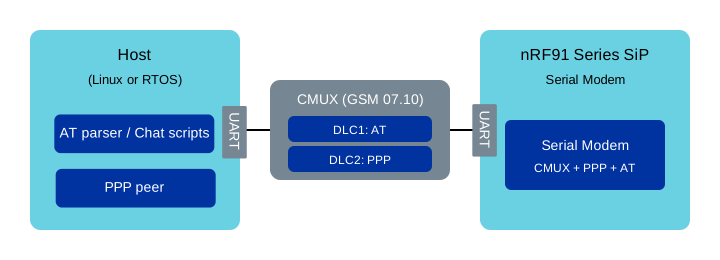
CMUX multiplexes AT and PPP over one UART using separate DLC channels.
Serial Modem supports PPP both with or without CMUX (GSM 07.10 multiplexing). This allows you to choose the setup that best fits your use case. The recommended setup for most modem use cases is to use CMUX, as it keeps AT control available while PPP is running.
PPP without CMUX
Without CMUX, PPP runs on the current UART.
Send AT+CFUN=1 to activate the modem, then AT+CGDATA to start PPP.
The modem responds with CONNECT and the UART immediately enters PPP data mode.
You cannot use the UART for AT commands until PPP is terminated by LCP negotiation.
No AT notifications are delivered over the UART while PPP is active.
Example
Switching UART from AT mode to PPP mode and back:
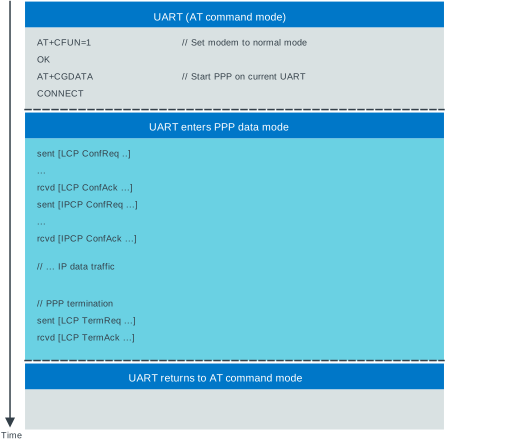
PPP session without CMUX.
PPP with CMUX
With CMUX, AT traffic and PPP traffic can share a single UART by using separate CMUX channels.
Start CMUX with AT+CMUX=0, then issue AT+CGDATA on the chosen DLC channel to start PPP on that channel.
The following example uses DLC channel 1 for PPP and DLC channel 2 for AT commands, with AT#XCMUXURC=2 directing URCs to DLC channel 2.
Example
Send AT#XCMUXURC=2 to route URCs to DLC channel 2, start CMUX with AT+CMUX=0, then start PPP on DLC channel 1 using AT+CGDATA:
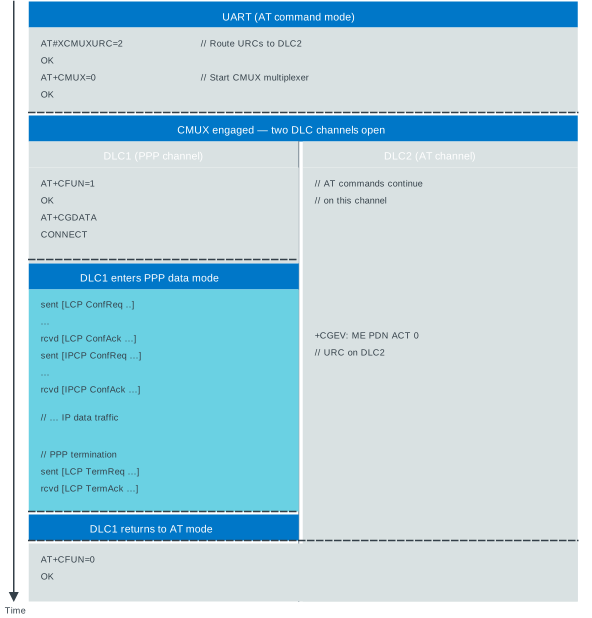
PPP on DLC1, AT commands and URCs on DLC2.
Note
The AT#XCMUXURC=2 is optional, but it is recommended to route URCs to a static channel.
When the URC channel is not selected, URCs are sent to the first open AT channel, which is not in data mode.
Note
The sequence diagrams in this section show +CEREG: and +CGEV: URCs on the AT channel for illustration.
By default, Serial Modem does not forward these URCs to the host.
Use case: Linux host
This section describes how to use an nRF91 Series SiP running Serial Modem as a PPP modem for a Linux device.
Prerequisites
Install the following packages on the Linux host:
pppd(PPP daemon)ldattach(from util-linux, needed only for the CMUX-based setup)
These packages are available on common Linux distributions.
Build and flash Serial Modem
Build and program Serial Modem with the PPP overlay enabled. For the CMUX-based setup, enable both PPP and CMUX:
ppp.confcmux.conf
If you change the UART baud rate in Serial Modem’s devicetree overlay, set the same baud rate in the host scripts or pppd command line.
Note
When using the standard Linux ldattach utility, CMUX MRU/MTU is set to 127 bytes and cannot be changed.
In that case, make sure Serial Modem uses CONFIG_MODEM_CMUX_MTU=127 (this is already configured in cmux.conf).
Option A: PPP over CMUX (recommended)
Serial Modem provides start and stop scripts for Linux in the application’s scripts directory.
The sm2_start_ppp.sh script uses standard 3GPP AT commands (AT+CMUX and AT+CGDATA) and is the recommended way to establish a PPP connection over CMUX.
If needed, adjust the serial port settings with command line parameters.
Run sm2_start_ppp.sh -h to see all available options.
Default settings assume that the modem is available at /dev/ttyACM0 with a baud rate of 115200.
Start the connection (requires superuser privileges for PPPD and CMUX):
$ sudo scripts/sm2_start_ppp.sh [-s serial_port] [-b baud_rate] [-t timeout]
Verify that the PPP interface is up (for example, with
ip addr show ppp0) and test connectivity.You may observe log messages similar to the following in
/var/log/syslog:pppd[xxxx]: sent [LCP ConfReq id=0x1 <options>] pppd[xxxx]: rcvd [LCP ConfAck id=0x1 <options>] ... pppd[xxxx]: local IP address <IP_address> pppd[xxxx]: remote IP address <IP_address>
You can now use the PPP connection for network communication.
Stop the connection:
$ sudo poff

# OR

$ sudo scripts/sm_stop_ppp.sh
Note
The scripts do not manage DNS settings.
Consult your distribution documentation if you need to configure DNS (for example, by using usepeerdns with pppd or by integrating with Network Manager or systemd-resolved).
Option B: PPP without CMUX (simple, but no AT control)
You can also run PPP directly on the UART without CMUX. This setup is useful for quick testing, but the UART cannot be used for AT commands while PPP is active.
$ sudo pppd noauth <UART_dev> <baud_rate> local crtscts debug noipdefault connect "/usr/sbin/chat -v -t60 '' AT+CFUN=1 OK AT+CGDATA CONNECT" nodetachReplace
<UART_dev>by the device file assigned to the Serial Modem’s UART and<baud_rate>by the baud rate of the UART. Typically, the device file assigned to it is/dev/ttyACM0for an nRF9151 DK. To run PPPD in background, remove thenodetachoption and observe the logs in/var/log/syslog.
After the PPP link negotiation has completed successfully, you should see log messages similar to the following:
sent [LCP ConfReq id=0x1 <options>]
rcvd [LCP ConfAck id=0x1 <options>]
...
local  IP address <IP_address>
remote IP address <IP_address>
You can now use the PPP connection for network communication.
Terminate the PPP connection with CTRL+C in the terminal where
pppdis running orsudo poffin another terminal.
Option C: PPP over CMUX with NTN support
When using NTN (Non-Terrestrial Network) cellular profiles, PPP cannot function while the modem is in NTN mode. It must be stopped and restarted on each mode transition between TN (Terrestrial Network) and NTN.
Option A manages CMUX and PPP as a single lifecycle: stopping PPP also issues AT+CFUN=0 and tears down CMUX.
For NTN scenarios, use the separate CMUX management scripts so that CMUX stays alive across PPP restarts:
sm2_start_cmux.sh- Starts CMUX only, then exits. Thegsmttychannels remain open.sm2_stop_cmux.sh- Stops CMUX and releases the serial port.sm2_start_ppp.shwith the-Cflag - attaches PPP to an already-running CMUX (DLC 1). When PPP stops, the modem and CMUX are left untouched.
When PPP is not running, all CMUX channels (gsmtty1 and gsmtty2) are available for AT commands.
This allows the host to reconfigure the modem (for example, switch profiles) through the AT channel while PPP is inactive.
Note
The -C flag prevents AT+CFUN=0 and AT#XCMUXCLD from being issued when PPP stops, so the modem and CMUX remain active.
Workflow:
Start CMUX (once, before the first PPP session):
$ sudo scripts/sm2_start_cmux.sh [-s serial_port] [-b baud_rate] [-B new_speed]
Start PPP in TN mode:
$ sudo scripts/sm2_start_ppp.sh -C [-s serial_port] [-a APN]
When switching to NTN mode, stop PPP without tearing down CMUX:
$ sudo poff
After PPP stops, both
gsmtty1andgsmtty2are available for AT commands. Use them to reconfigure the modem or monitor URCs while in NTN mode.When returning to TN mode, start PPP again:
$ sudo scripts/sm2_start_ppp.sh -C [-s serial_port] [-a APN]
When done with all PPP sessions, stop CMUX:
$ sudo scripts/sm2_stop_cmux.sh [-s serial_port]
Use case: Zephyr host
This section describes how to use Serial Modem as a modem that is controlled by Zephyr’s cellular modem driver. The controlling chip runs a Zephyr application, which uses Zephyr’s native IP stack.
Note
Zephyr’s cellular modem driver support has some limitations when used with an nRF91 Series SiP:
GNSS functionality is not available through the driver.
eDRX or PSM configuration through the driver is not supported. Requires manual changes of the modem settings through AT commands.
Power saving feature requires UART with DTR and RI pins connected between the controlling chip and the SiP. See UART configuration for more information.
System mode is not configured. See the %XSYSTEMMODE command in the AT command Reference Guide for more details.
User pipes for AT commands
Zephyr’s cellular modem driver provides user pipes for sending AT commands to the modem while PPP is active. User pipes are additional CMUX channels (DLC channels 3 and 4) that the host application can use for modem configuration, DFU/FOTA, or other AT command operations.
User pipe availability
User pipes are available only when the modem driver has all CMUX channels open. This occurs after the following conditions are met:
CMUX has been started with
AT+CMUX=0.The network interface is activated with
net_if_up(), which opens the CMUX channels, connects to the network, and establishes the PPP connection.
When the network interface is deactivated with net_if_down(), the PPP connection is closed and user pipes become unavailable.
Important
User pipes are not available when PPP is closed.
The modem driver is designed so that net_if_up() opens all CMUX channels, including user pipes, and net_if_down() closes them.
The DLC channel callback notifies the host application when a user pipe opens or closes.
Use cases for user pipes
User pipes allow the host application to send AT commands while maintaining an active PPP connection. Common use cases include:
Configuring eDRX and PSM settings (
AT+CEDRXS,AT+CPSMS).Performing modem firmware updates using
AT#XFOTAor DFU commands.Querying modem status and diagnostics.
Managing SMS or other modem features not exposed through the PPP interface.
Temporarily pausing PPP for maintenance operations.
Note
When using the nordic,nrf91-sm-v2 cellular driver, you can temporarily pause the PPP connection by issuing AT+CFUN=4 on a user pipe.
This command puts the modem into flight mode, which causes the cellular modem driver to wait for a network registration URC message.
The PPP connection remains paused until you restore normal operation with AT+CFUN=1, at which point the modem re-registers with the network and the PPP connection resumes.
This is useful for performing maintenance operations that require the modem to be offline temporarily.
Example
The Zephyr modem driver sends AT+CMUX=0 to start the CMUX, then uses DLC channel 1 for AT commands and DLC channel 2 for PPP.
User pipes on DLC channels 3 and 4 become available for host application AT commands once the network interface is up.
The dial script issues AT+CGDATA on DLC channel 2, which starts PPP on that channel and leaves DLC channel 1 free for AT commands and URCs.
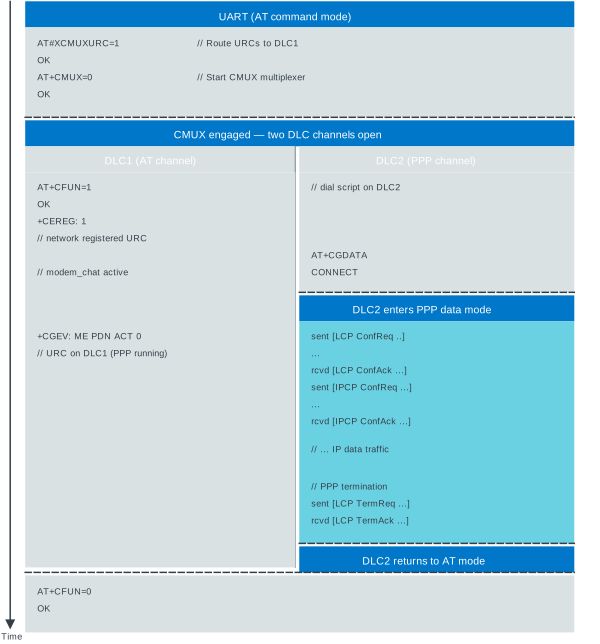
Zephyr modem driver uses DLC1 as the AT command channel and starts PPP on DLC2 using AT+CGDATA.
Configuration
Both sides must be compiled with matching configuration:
nRF91 Series SiP running Serial Modem
Include the following configuration overlays:
cmux.conf- Enable CMUX.ppp.conf- Enable PPP.external-mcu.overlay- Configure UART (pins, baud rate), DTR, and RI pins used between the MCU and the SiP.
Controlling chip running Zephyr
Start from the configuration files in the PPP shell sample sample. In particular:
prj.confenables the required Zephyr subsystems.boards/nrf54l15dk_nrf54l15_cpuapp.conf.confBoard-specific configuration.boards/nrf54l15dk_nrf54l15_cpuapp.overlay- Configure UART (pins, baud rate), DTR and RI pins used between the MCU and the SiP.
Depending on your hardware, a devicetree overlay is needed to describe the modem UART and power control pins.
The modem node in the overlay must use compatible = "nordic,nrf91-sm-v2" to select the Serial Modem modem driver:
&uart0 {
    status = "okay";
    current-speed = <115200>;
    hw-flow-control;

    modem: modem {
        compatible = "nordic,nrf91-sm-v2";
        status = "okay";
        mdm-ring-gpios = <&gpio0 0 (GPIO_ACTIVE_LOW | GPIO_PULL_UP)>;
        mdm-dtr-gpios  = <&gpio0 1 GPIO_ACTIVE_LOW>;
        cmux-enable-runtime-power-save;
        cmux-close-pipe-on-power-save;
        cmux-idle-timeout-ms = <5000>;
        autostarts;
    };
};
The nordic,nrf91-sm-v2 binding is compatible with Serial Modem application v2.0.0 and later.
Devicetree settings also control the CMUX power-saving behavior.
Flashing and running
Before using a Zephyr host to control the SiP, make sure the modem system mode is set to your desired configuration including PSM and eDRX settings. When the Zephyr’s modem driver starts up, it will perform the following steps:
Enable the UART interface.
Enable registration URC forwarding with
AT+CEREG=1and query modem information.Configure URCs to DLC channel 1 with
AT#XCMUXURC=1.Enable CMUX with
AT+CMUX=0.Set the modem to normal mode with
AT+CFUN=1.Start PPP on DLC channel 2 with
AT+CGDATA.
The Zephyr host can then use standard Zephyr networking APIs to use the PPP link for network communication. Only exception for normal network interfaces is that the PPP interface cannot be automatically started at boot. You must start the PPP interface manually when required.
struct net_if *ppp_iface = net_if_get_default();
net_if_up(ppp_iface);
Using legacy nrf91-slm Zephyr driver
Zephyr provides an older upstream cellular modem driver that uses compatible = "nordic,nrf91-slm".
It was developed for the Serial LTE Modem (SLM) sample application and is not recommended for new designs.
Unlike the nordic,nrf91-sm-v2 driver, the legacy nrf91-slm driver uses the proprietary AT#XCMUX=2 command to switch the AT command channel to DLC channel 2 at runtime and AT#XPPP=1 to allow PPP to start automatically on the secondary DLC channel.
This approach is unreliable in various recovery scenarios, because PPP startup and AT channel switching might run out of sync, leading to a loss of AT control.
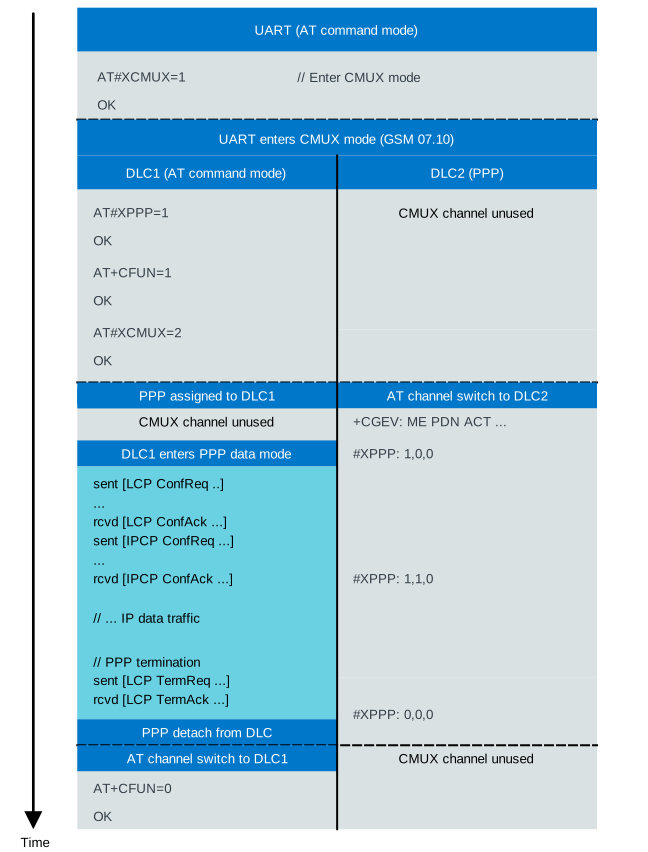
Legacy nrf91-slm driver starts CMUX using AT#XCMUX=1, then uses AT#XCMUX=2 to switch the AT channel to DLC2 and starts PPP on DLC1.
Operational notes
nRF91 Series SiP automatically activates the default PDP context. Manually configuring the APN is typically not required.
nRF91 Series SiP automatically restarts a network scan when connectivity is lost. Manual dial-up scripts are typically not required for LTE connection recovery.
When you use the proprietary
AT#XCMUX=1andAT#XPPP=1commands, CMUX channel allocation is static (by default, allocating DLC channel 1 to PPP and DLC channel 2 to AT). See CMUX AT commands and PPP AT commands for details.