
Setting up hardware
Before setting up the Sidewalk environment, make sure you have correctly set up the required hardware.
Development kit
Nordic Semiconductor’s development kit is required to run Sidewalk samples. For the list of supported DKs per sample, see the Samples overview.
Depending on the device, refer to the getting started guide for setup instructions:
Sub-GHz radio transceivers
Sidewalk samples use sub-GHz radio transceivers to support LoRa and (G)FSK modulation. You will need it to run LoRa and FSK applications.
The following radio shields are supported:
Semtech SX1262 - For LoRa and FSK applications
Semtech LR1110 - For LoRa, FSK, and location services (Wi-Fi and GNSS scanning)
nRF Sidewalk EB - Nordic Semiconductor expansion board with LR1110 for the nRF54L15 DK and nRF54LM20 DK
Semtech SX1262
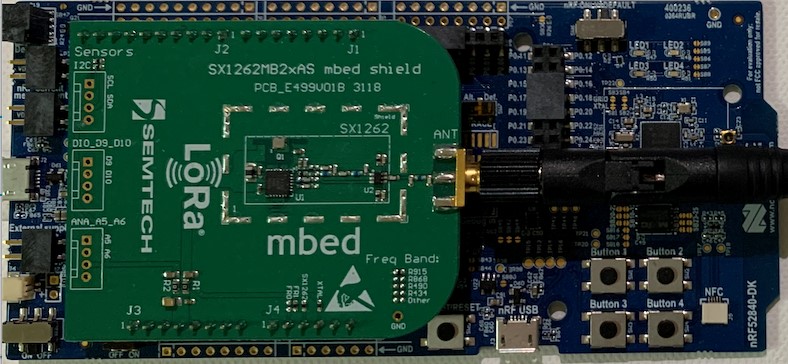
For evaluation, use the Semtech SX1262MB2CAS Arduino Shield.
Pinout
Connect the Semtech shield to the Arduino-compatible headers on the development kit.
Refer to the pinout assignment for the nRF52840 DK:
SX126X shield |
nRF52840 DK |
|---|---|
BUSY |
P1.4 |
DIO1 |
P1.6 |
NSS |
P1.8 |
ANT_SW |
P1.10 |
SPI MOSI |
P1.13 |
SPI MISO |
P1.14 |
SPI SCK |
P1.15 |
NRESET |
P0.3 |
The nRF54L15 DK does not have the Arduino-compatible header. The connection layout may differ depending on the revision of your DK. GPIO assignments are recommended by the Nordic Semiconductor.
The nRF54L15 DK operates on a lower voltage level (1.8V). The Semtech Shield is compatible with this voltage and can be safely provided to the pin marked as 3.3V. Due to the lower voltage, the Semtech radio cannot achieve the full transmit power, and it will reach a plateau at 15 dBm gain even when a higher value is configured. The specification of the Semtech module describes that it is possible to provide a separate, higher voltage source for radio while maintaining the lower voltage for communication. However, the recommended shield does not support this configuration.
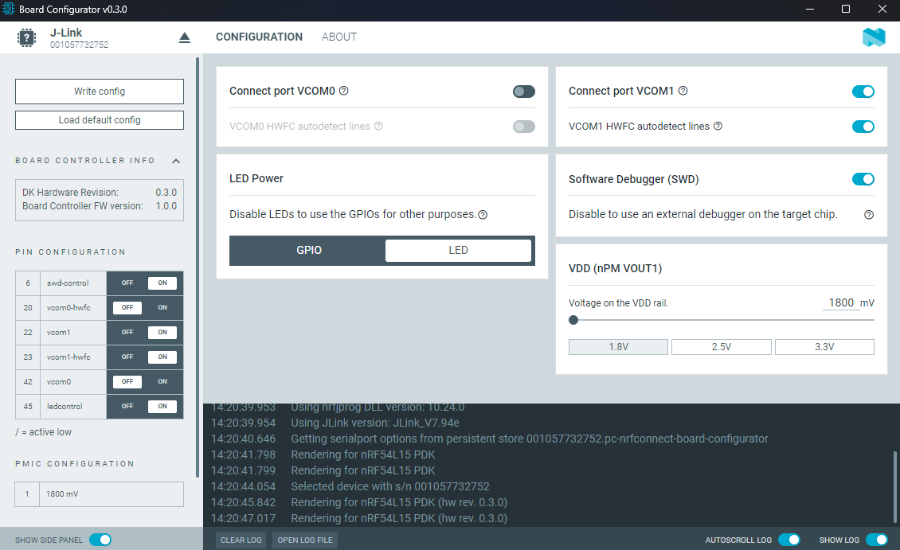
To use the suggested pins, disable UART0 (not used by Sidewalk samples) through the Board Configurator tool in the nRF Connect for Desktop. This step is required for the shield to work as some pins are connected to UART0 by default.
See a board configuration for the suggested pin layout:
|
SX126X shield |
nRF54L15 DK |
|---|---|
DIO1 |
P1.11 |
BUSY |
P2.6 |
NRESET |
P2.8 |
ANT_SW |
P2.10 |
NSS |
P0.0 |
SPI MOSI |
P0.1 |
SPI MISO |
P0.2 |
SPI SCK |
P0.3 |
Semtech LR1110
For evaluation, use the Semtech LR1110MB1LCKS Arduino Shield.
The LR1110 shield supports Wi-Fi and GNSS scanning for location services in addition to LoRa and FSK communication.
The minimum version of Semtech LR1110 firmware is 0x0401.
The version is reported in Sidewalk logs during sub-GHz radio initialization:
<inf> sidewalk: LR11xx: VER HW 0x22 FW 0x0401 type 1
If you need to update the LR1110 firmware, use LR11xx firmware update.
Pinout
Connect the Semtech LR1110 shield to the Arduino-compatible headers on the development kit.
Refer to the pinout assignment for the nRF52840 DK:
LR1110 shield |
nRF52840 DK |
|---|---|
NRESET |
P0.3 |
BUSY |
P1.11 |
DIO1/Event |
P1.13 |
Antenna |
P0.26 |
GNSS LNA |
P0.29 |
SPI NSS |
P1.15 |
SPI MOSI |
P1.13 |
SPI MISO |
P1.14 |
SPI SCK |
P1.15 |
The nRF54L15 DK requires the simple_arduino_adapter shield to connect the LR1110 shield.
Refer to the pinout assignment for the nRF54L15 DK with Arduino adapter:
LR1110 shield |
nRF54L15 DK |
|---|---|
NRESET |
P2.8 |
BUSY |
P2.6 |
DIO1/Event |
P1.11 |
Antenna |
P2.10 |
GNSS LNA |
P1.12 |
SPI NSS |
P0.0 |
SPI MOSI |
P0.1 |
SPI MISO |
P0.2 |
SPI SCK |
P0.3 |
nRF Sidewalk EB
The nRF Sidewalk EB connects to the nRF54L series DK expansion port. It includes an LR1110 radio module with LoRa, Wi-Fi, and GNSS antennas.
Set the -DSHIELD=nrf_sidewalk_eb option when building Sidewalk samples for these development kits.
For supported boards, pin assignment, and usage requirements, refer to nRF Sidewalk EB shield.
The minimum version of Semtech LR1110 firmware is 0x0401.
The version is reported in Sidewalk logs during sub-GHz radio initialization:
<inf> sidewalk: LR11xx: VER HW 0x22 FW 0x0401 type 1
If you need to update the LR1110 firmware, see LR11xx firmware update.
Sidewalk gateway
Note
Refer to the Amazon Sidewalk gateways for the complete list of available devices.
See the official Amazon Sidewalk documentation on Setting up a Sidewalk gateway.
Note
If you have multiple Echo devices registered under a single Amazon account, only one of those devices will be able to operate as an FSK gateway even if other devices have the same capability. If you need to operate multiple FSK gateways, we recommend setting them up under separate Amazon accounts.