

Introduction
Soft peripherals enable the emulation of a digital hardware peripheral (IP) by executing it on the Fast Lightweight Peripheral Processor (FLPR) through an application-controlled user interface. This functionality allows the soft peripheral to be used in a system where the hardware of a peripheral is not available. It also allows to include additional instances of a peripheral in case the platform lacks sufficient hardware peripherals.
In most cases, the features and performance of a soft peripheral are equivalent to those of a hardware peripheral. However, there may be some limitations. For more information, see the sQSPI limitations and sEMMC limitations pages.
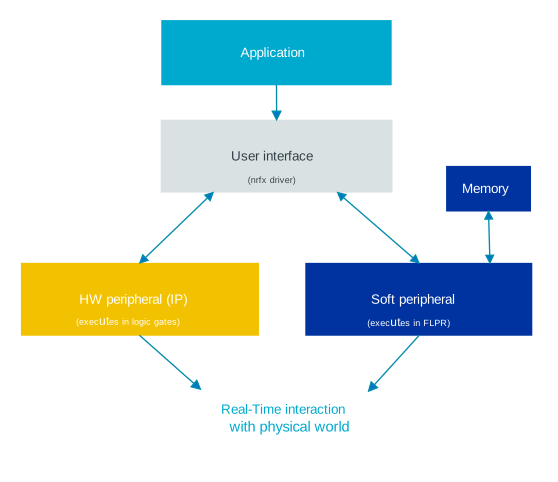
The operation of a soft peripheral is abstracted, and its control is facilitated through a user interface managed through the nrfx driver API. This user interface is a set of functions that the application can call to interact with the peripheral.
The following image shows the software stack of an application:
Note
Note that in both the documentation and source files, soft peripherals are referred to by prefixing the letter s before the name of the peripheral.
For example, sQSPI or sEMMC.
Platform support
The following table shows which soft peripherals and their versions are supported by each platform:
Soft peripheral |
Hardware platform |
Version |
|---|---|---|
sQSPI |
|
|
sEMMC |
|
|