

Verification and testing
Once you have successfully provisioned Aliro credentials, perform tests to ensure your device is functioning correctly.
Select tests for running
You can see the full list of available tests in the Aliro Certification Tool repository.
From the Test Suites list, choose the tests that have Reader in the name, for example, BLE Reader.
This will allow you to test the Bluetooth LE + UWB transport.
Note
You can upload the ncs-door-lock-and-access-control/docs/certification_assets/Aliro PICS v1.0.xml file to the Test Harness to automatically select tests for execution.
However, there is a known bug in this Test Harness revision that causes the PICS file to select some incorrect tests and skip others that are needed for execution.
Tests that should be executed (but might be skipped):
NFC_RDR_NEG_STEPUP_AD_SCHEDULE_IN_ACCESS_RULE_AND_READERNFC_RDR_NEG_STEPUP_AD_SCHEDULE_TIME_VERIFY_REQUIREDNFC_RDR_NEG_STEPUP_AD_TIME_VERIFICATION_REQUIREDBLEUWB_RDR_ADVERTISEMENT_FORMATNFC_RDR_EXCHANGE_RDR_DESCRIPTOR_TAGNFC_RDR_CONTROL_FLOW_RDR_DESCRIPTOR_TAGBLEUWB_RDR_CONTROL_FLOW_RDR_DESCRIPTOR_TAG
Always verify that the correct tests are chosen before executing them. If you do not upload the PICS file, you can choose the tests manually.
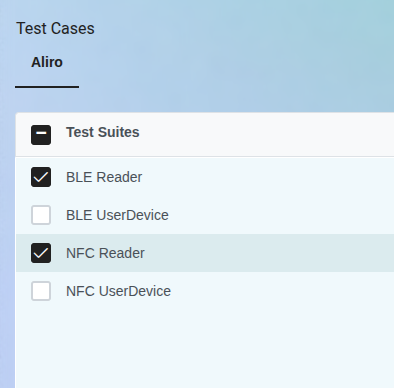
Test suites list.
The Test Harness device will be operating as the Aliro User Device and communicate with the Reader device. For verification, execute the following tests, based on the aliro-sve-v1.0 tag. The test results shown below were acquired on the nRF5340 DK build using the following command:
west build -b nrf5340dk/nrf5340/cpuapp applications/aliro-access-control-app -- -DCONFIG_DOOR_LOCK_BLE_UWB=y
Note
Bluetooth LE and UWB ranging requires a working UWB implementation. The in-tree stub built by default does not perform ranging; provide a UWB backend as described in Integrating a UWB implementation.
Test case |
Description |
Result |
Comment |
|---|---|---|---|
NFC_RDR_STANDARD_NO_CERT |
Verify conformance of Reader UT in AUTH1 command. |
PASS |
|
NFC_RDR_NEG_AUTH0_EXTRA_TAG |
Verify conformance of Reader UT in AUTH1 command. |
PASS |
|
NFC_RDR_NEG_AUTH1_EXTRA_TAG |
Verify conformance of Reader UT in AUTH1 command. |
PASS |
|
NFC_RDR_NEG_AUTH0_WRONG_VALUE |
Verify conformance of Reader UT in AUTH1 command. |
PASS |
|
NFC_RDR_NEG_SEL_RSP_NO_COMMON_EXPEDITED_PROTOCOL_VERSION |
Verify conformance of Reader UT in SELECT command. |
PASS |
|
NFC_RDR_NEG_AUTH1_WRONG_VALUES |
Verify conformance of Reader UT in AUTH1 command. |
PASS |
|
NFC_RDR_NEG_AUTH1_WRONG_UD_SIGNATURE |
Verify conformance of Reader UT in AUTH1 command. |
PASS |
|
NFC_RDR_STANDARD_CERT_IN_LOAD_CERT_WITH_CHAINING |
Verify conformance of Reader during NFC standard “transaction using LOAD CERT protocol”. |
PASS |
|
NFC_RDR_FAST |
Verify conformance of Reader UT in expedited fast phase. |
PASS |
|
NFC_RDR_NEG_STEPUP_AD_DEVICE_KEY_INFO_MISMATCH |
Verify rejection of Access Document not associated with the Access Credential. |
PASS |
|
NFC_RDR_NEG_STEPUP_AD_DOCTYPE_NOT_ALIROA |
Verify rejection of Access Document with invalid docType. |
PASS |
|
NFC_RDR_NEG_STEPUP_AD_INVALID_ACCESS_DATA_ELEMENT_VERSION |
Verify rejection of Access Document with incorrect Access Data Element version. |
PASS |
|
NFC_RDR_NEG_STEPUP_AD_INVALID_HASH_ISSUER_AUTH |
Verify rejection of Access Document with an invalid Data Element digest. |
PASS |
|
NFC_RDR_NEG_STEPUP_AD_INVALID_SIGNATURE_ISSUER_AUTH |
Verify rejection of Access Document with invalid IssuerAuth signature. |
PASS |
|
NFC_RDR_NEG_STEPUP_AD_ISSUER_CERTIFICATE_TIME_MISMATCH |
Verify rejection of Access Document with issuer certificate time mismatch. |
PASS |
|
NFC_RDR_NEG_STEPUP_AD_ISSUER_CERT_INVALID_SIGNATURE |
Verify rejection of Access Document with invalid issuer certificate signature. |
PASS |
|
NFC_RDR_NEG_STEPUP_AD_ISSUER_DOCTYPE_MISMATCH |
Verify rejection of Access Document with incorrect issuerAuth doctype. |
PASS |
|
NFC_RDR_NEG_STEPUP_AD_NO_ACCESS_RULE_FOR_READER_ACTION |
Verify rejection of Access Document with no Access Rule for the intended action. |
PASS |
|
NFC_RDR_NEG_STEPUP_AD_NO_DATA_ELEMENTS |
Verify rejection of Access Document with no data elements. |
PASS |
|
NFC_RDR_NEG_STEPUP_AD_NO_ISSUER_CERT_NO_KEY_ID |
Verify rejection of Access Document with no Issuer Certificate or Key Identifier. |
PASS |
|
NFC_RDR_NEG_STEPUP_AD_SCHEDULE_IN_ACCESS_RULE_AND_READER |
Verify rejection of Access Document with schedule in access rule and reader. |
PASS |
|
NFC_RDR_NEG_STEPUP_AD_SCHEDULE_TIME_VERIFY_REQUIRED |
Verify rejection of Access Document requiring schedule time verification. |
PASS |
|
NFC_RDR_NEG_STEPUP_AD_TIME_VERIFICATION_REQUIRED |
Verify rejection of Access Document requiring time verification. |
PASS |
|
NFC_RDR_NEG_STEPUP_AD_UNKNOWN_CRITICAL_ACCESS_EXTENSION |
Verify rejection of Access Document with unknown critical access extension. |
PASS |
|
NFC_RDR_NEG_STEPUP_AD_UNKNOWN_READER_RULE |
Verify rejection of Access Document with unknown reader rule. |
PASS |
|
NFC_RDR_NEG_STEPUP_AD_VALIDITY_ITERATION |
Verify rejection of Access Document with validity iteration. |
PASS |
|
NFC_RDR_STEPUP_AD_ACCESS_RULE |
Verify parsing of Access Document with Access Rule. |
PASS |
|
NFC_RDR_STEPUP_AD_ISSUER_CERT_KEY_ID |
Verify parsing of Access Document with Issuer Certificate Key ID. |
PASS |
|
NFC_RDR_STEPUP_AD_ISSUER_CERT |
Verify parsing of Access Document with Issuer Certificate. |
PASS |
|
NFC_RDR_STEPUP_AD_KEY_ID |
Verify parsing of Access Document with Key Identifier. |
PASS |
|
NFC_RDR_STEPUP_AD_UNKNOWN_NON_ACCESS_EXTENSION |
Verify parsing of Access Document with unknown non-access extension. |
PASS |
|
NFC_RDR_STEPUP_AD_UNKNOWN_NON_CRITICAL_ACCESS_EXTENSION |
Verify parsing of Access Document with unknown non-critical access extension. |
PASS |
|
NFC_RDR_EXCHANGE_RDR_DESCRIPTOR_TAG |
Verify conformance of Reader UT when exchanging the Reader Descriptor tag. |
PASS |
|
NFC_RDR_CONTROL_FLOW_RDR_DESCRIPTOR_TAG |
Verify conformance of Reader UT control flow using the Reader Descriptor tag. |
PASS |
Test case |
Description |
Result |
Comment |
|---|---|---|---|
BLEUWB_RDR_EXPEDITED_STANDARD_PHASE |
Verify conformance of Reader UT in standard phase expedited transaction. |
PASS |
|
BLEUWB_RDR_RANGING_SUSPEND |
Verify conformance of Reader UT in ranging suspend functionality. |
PASS |
|
BLEUWB_RDR_RANGING_RESUME |
Verify conformance of Reader UT in ranging resume functionality. |
PASS |
|
BLEUWB_RDR_NEG_FAILED_L2CAP |
Verify conformance of Reader UT in L2CAP connection failure handling. |
PASS |
|
BLEUWB_RDR_NEG_FAILED_SPSM_L2CAP |
Verify conformance of Reader UT in SPSM L2CAP failure handling. |
PASS |
|
BLEUWB_RDR_NEG_TIMEOUT_BEFORE_AUTH0 |
Verify conformance of Reader UT in timeout handling before AUTH0. |
PASS |
|
BLEUWB_RDR_TIMEOUT_EXTENSION |
Verify conformance of Reader UT in timeout extension handling. |
PASS |
|
BLEUWB_RDR_NEG_M2_MISMATCH_PARAMETER |
Verify conformance of Reader UT in M2 parameter mismatch handling. |
PASS |
|
BLEUWB_RDR_NEG_M4_MISMATCH_PARAMETER |
Verify conformance of Reader UT in M4 parameter mismatch handling. |
PASS |
|
BLEUWB_RDR_ADVERTISEMENT_FORMAT |
Verify conformance of Reader UT in advertisement format. |
PASS |
|
BLEUWB_RDR_NEG_SUSPEND_MISMATCH_PARAMETER |
Verify conformance of Reader UT in suspend parameter mismatch handling. |
PASS |
|
BLEUWB_RDR_STEPUP_PHASE |
Verify conformance of Reader UT in step-up phase. |
PASS |
|
BLEUWB_RDR_EXPEDITED_FAST_PHASE |
Verify conformance of Reader UT in expedited fast phase. |
PASS |
|
BLEUWB_RDR_CONTROL_FLOW_RDR_DESCRIPTOR_TAG |
Verify conformance of Reader control flow using the Reader Descriptor tag. |
PASS |
Running the test
Complete the following steps for the required tests:
Navigate to the project you created in the Test Harness web interface and click Go To Test-Run.
Click on Add New Test.
In the test suites, select either NFC Reader or BLE Reader and under the Test Cases section check the box of the test you wish to run.
Choose the operator and click Start.
Complete the test:
Position the Reader and Test Harness hardware close to each other, and align them to ensure optimal NFC communication.
A notification will appear asking you to set the Reader DUT in the appropriate mode and to place the devices next to each other for automatic NFC detection. Select Ok and click Submit.
Ensure the Reader is advertising and ready to accept Bluetooth LE connections from the Test Harness. You should see a notification requesting Bluetooth LE visibility for automatic detection.
Confirm that the Reader is advertising by checking the DUT console for logs indicating that advertising has started.
<dbg> L2CAP server registered with PSM: 0x0080Select Ok and click Submit. Restarting the Murata device, if prompted, is optional.
Note
At the start of each Bluetooth LE test, the firmware is uploaded to the Murata device, which may take some time. The Murata module (LBUA0VG2BP-EVK-P) is used by the Test Harness to establish and handle Bluetooth LE communication with the device under test.
Depending on the test you executed, you should see results similar to the following examples:
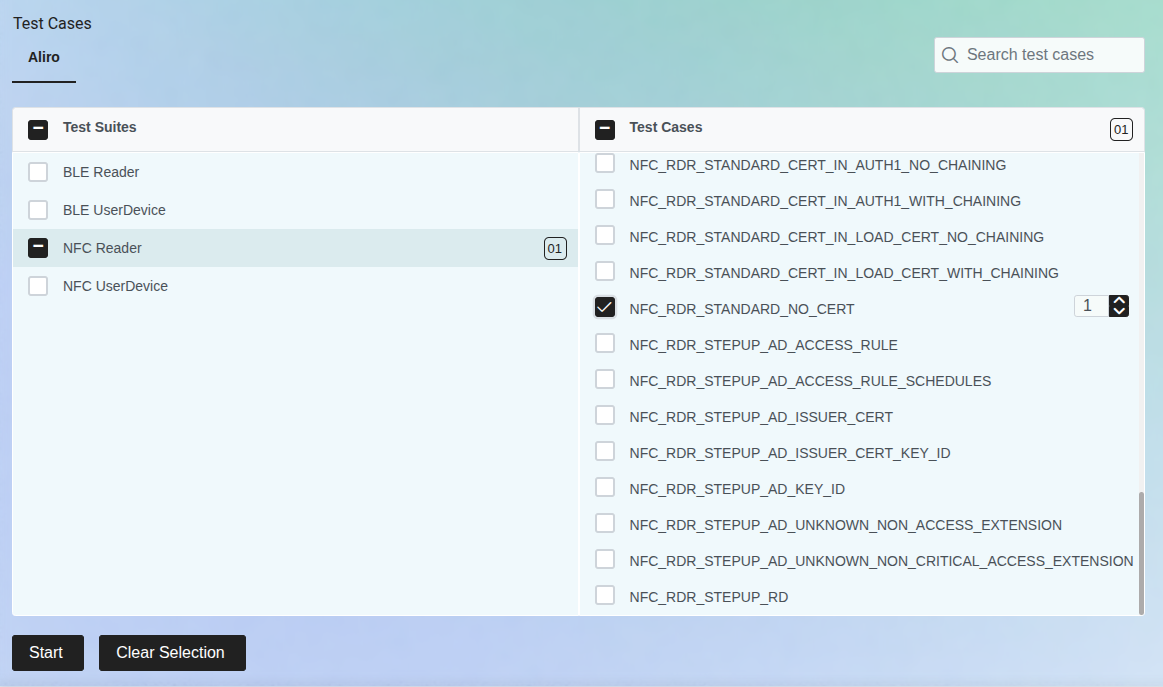
Tests selection view.
The Reader device will select the Test Harness User Device and initiate the Aliro Access Protocol commands exchange.
In the DUT’s serial console, you will see logs that indicate the state of the operation and the data payloads transmitted and received by the Reader. If the results show as
passed, you will see the following output in the Test Harness web interface: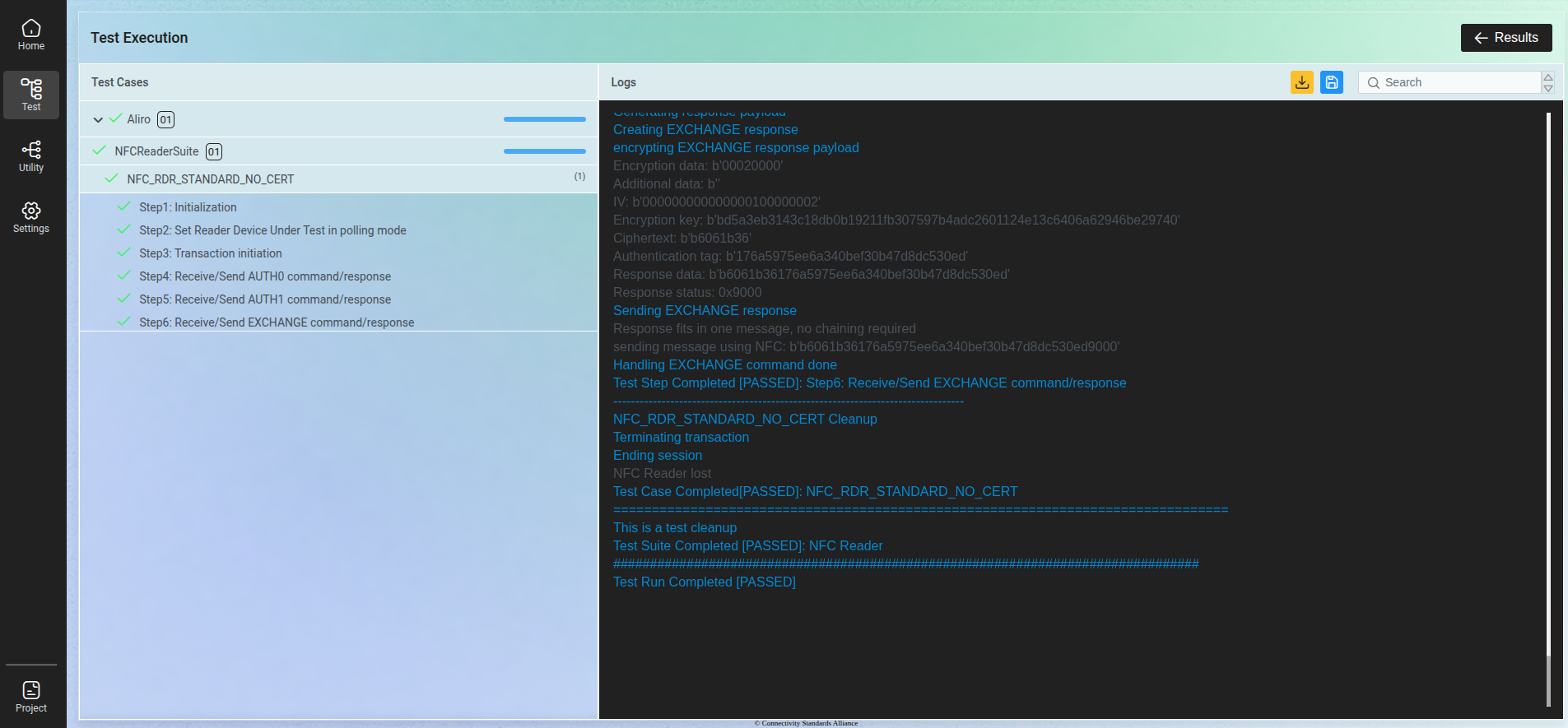
Example of the advanced test results.
After test execution is complete, you can check DUT logs to verify the communication and data exchange between the Reader and the test harness. The logs will provide detailed information about the test execution and authorization process (signature verification). When all installation and provisioning data provided in Setting up the Aliro Test Harness are correct, then you will see the following output in the DUT serial console:
ACCESS GRANTEDWhen access is granted and the lock is unlocked, the device signals this state by turning on a dedicated LED. For details, see the lock simulator section. When the provided Access Credential public key is incorrect, the following output will be displayed:
ACCESS DENIED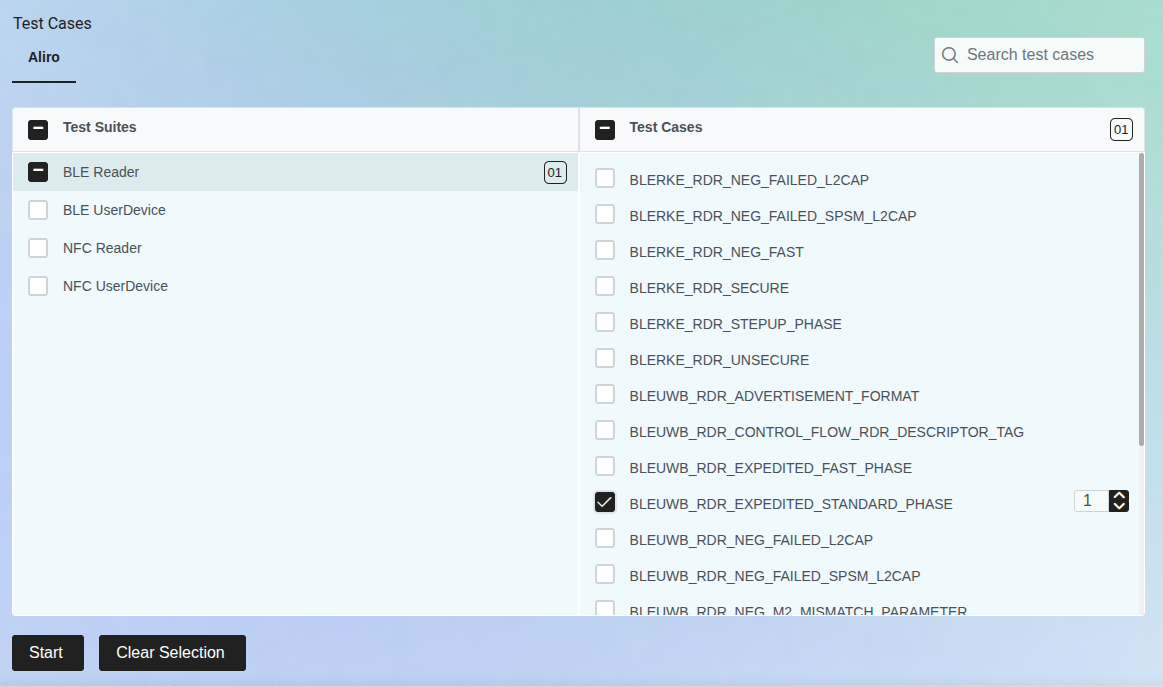
Tests selection view.
The Reader device will advertise over Bluetooth LE and the Test Harness will connect as a Bluetooth LE central device, initiating the Aliro Access Protocol commands exchange over Bluetooth LE.
In the DUT’s serial console, you will see logs that indicate the state of the Bluetooth LE connection, protocol execution, and the data payloads transmitted and received by the Reader. Additionally, the UWB connection will be configured and established. If the results show as
passed, you will see the following output in the Test Harness web interface: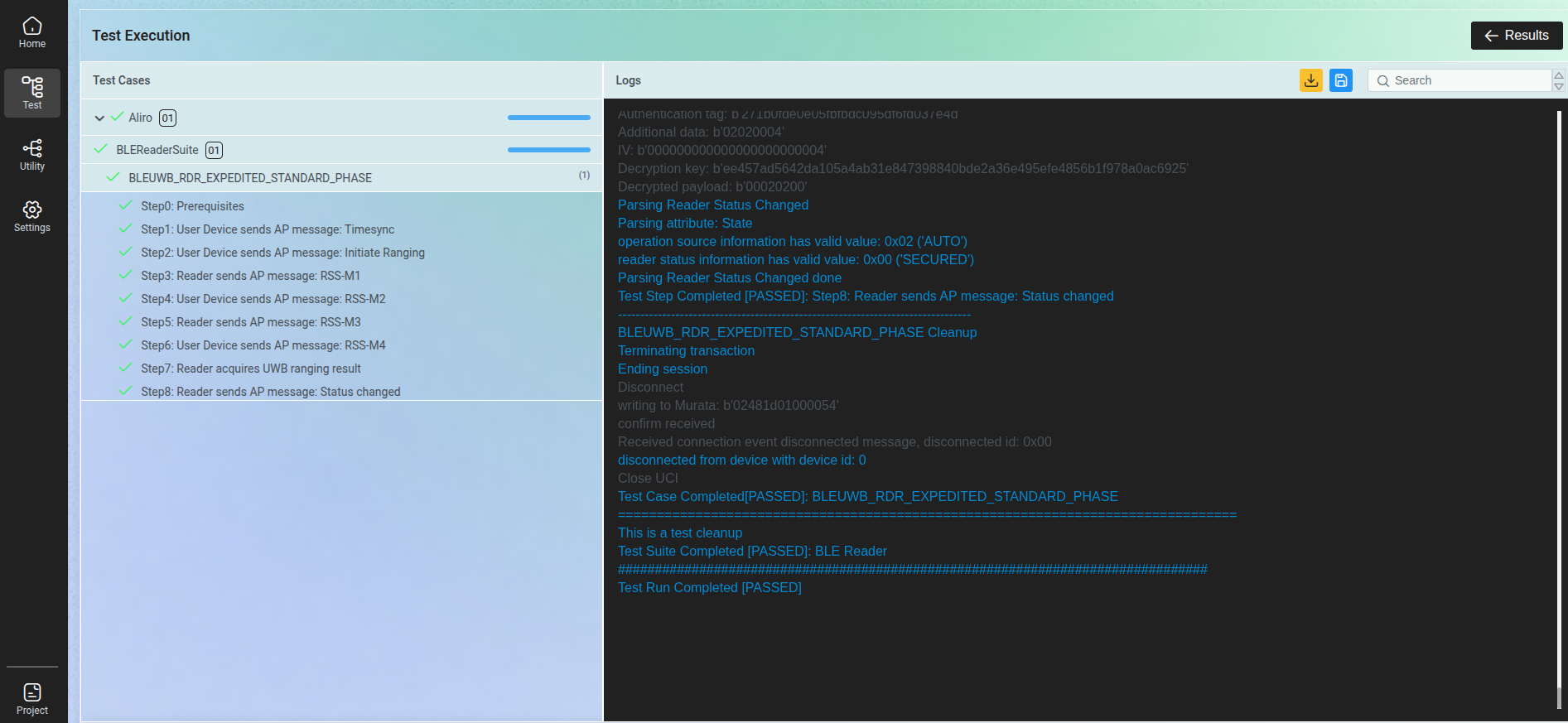
Basic test results view.
Note
If the application is built with Matter support, you can control the door lock remotely. For details on how to enable this feature, see the nRF Connect SDK door lock sample documentation in the Matter door lock remote access section.
Execute the Aliro certification tests
This guide assumes that you have uploaded the PICS file ncs-door-lock-and-access-control/docs/certification_assets/Aliro PICS v1.0.xml to the Test Harness.
You can also select tests manually.
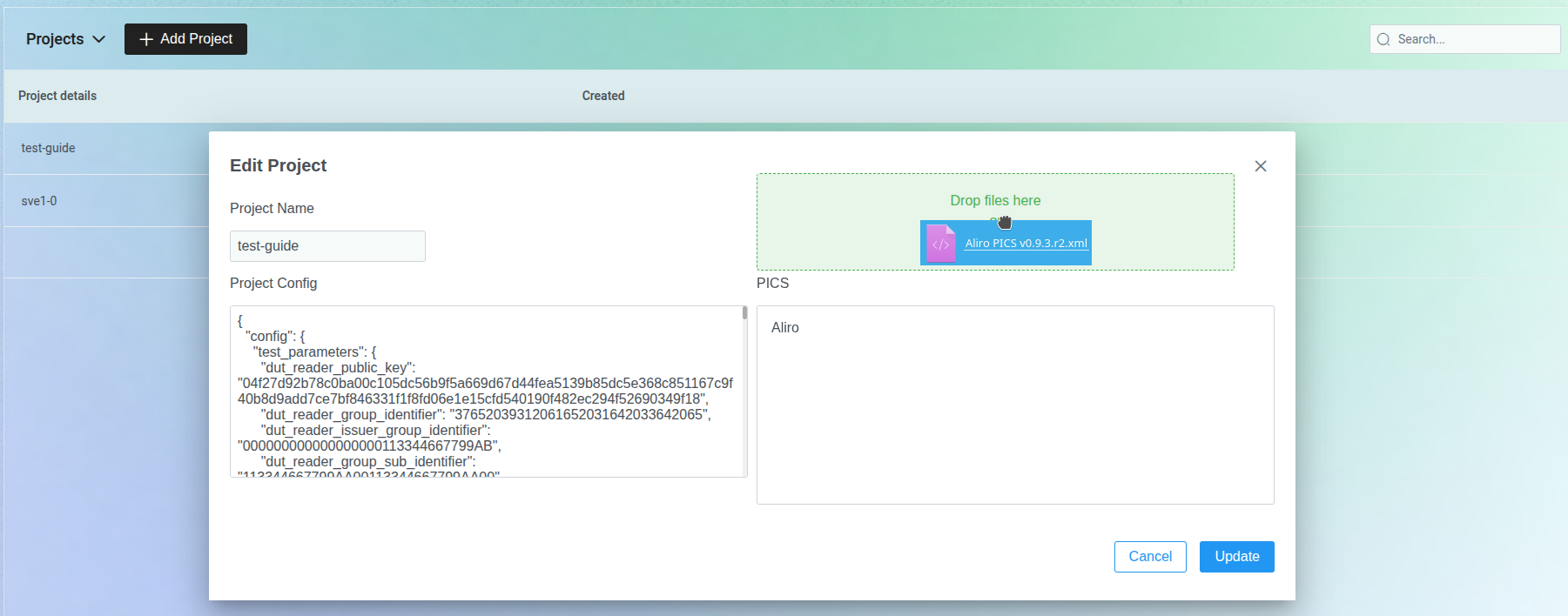
PICS file upload.
When the PICS file is uploaded, all required tests are selected automatically for NFC and Bluetooth LE Reader suites:
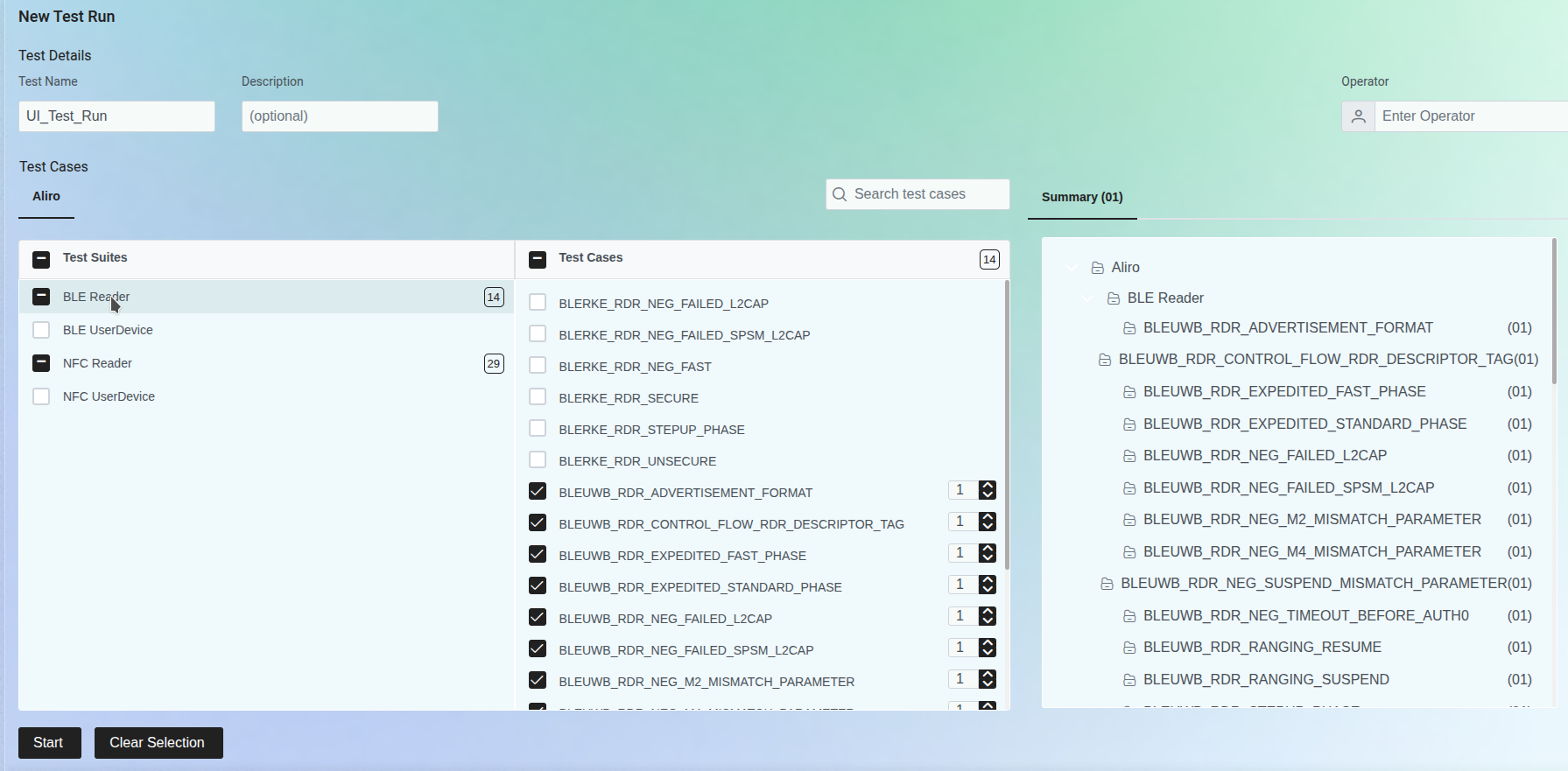
Bluetooth LE selected tests.
The following table explains what should be configured before running a specific test. Some tests may also require post actions.
Test case(s) |
Door Lock commands to execute |
|---|---|
ALL TESTS |
Before test session: |
|
|
NFC_RDR_FAST, NFC_RDR_NEG_AUTH0_EXTRA_TAG, NFC_RDR_NEG_AUTH0_WRONG_VALUE, NFC_RDR_NEG_AUTH1_EXTRA_TAG, NFC_RDR_NEG_AUTH1_WRONG_UD_SIGNATURE, NFC_RDR_NEG_AUTH1_WRONG_VALUES, NFC_RDR_NEG_SEL_RSP_NO_COMMON_EXPEDITED_PROTOCOL_VERSION, NFC_RDR_NEG_STEPUP_AD_DEVICE_KEY_INFO_MISMATCH, NFC_RDR_NEG_STEPUP_AD_DOCTYPE_NOT_ALIROA, NFC_RDR_NEG_STEPUP_AD_INVALID_ACCESS_DATA_ELEMENT_VERSION, NFC_RDR_NEG_STEPUP_AD_INVALID_HASH_ISSUER_AUTH, NFC_RDR_NEG_STEPUP_AD_INVALID_SIGNATURE_ISSUER_AUTH, NFC_RDR_NEG_STEPUP_AD_ISSUER_CERT_INVALID_SIGNATURE, NFC_RDR_NEG_STEPUP_AD_ISSUER_CERTIFICATE_TIME_MISMATCH, NFC_RDR_NEG_STEPUP_AD_ISSUER_DOCTYPE_MISMATCH, NFC_RDR_NEG_STEPUP_AD_NO_ACCESS_RULE_FOR_READ, NFC_RDR_NEG_STEPUP_AD_NO_DATA_ELEMENTS, NFC_RDR_NEG_STEPUP_AD_NO_ISSUER_CERT_NO_KEY_ID, NFC_RDR_NEG_STEPUP_AD_UNKNOWN_CRITICAL_ACCESS_EXTENSION, NFC_RDR_NEG_STEPUP_AD_UNKNOWN_READER_RULE |
Before test: |
|
|
Optional: |
|
|
|
NFC_RDR_NEG_STEPUP_AD_VALIDITY_ITERATION |
Before test: |
|
|
Optional: |
|
|
|
After test: |
|
|
|
NFC_RDR_STANDARD_CERT_IN_LOAD_CERT_WITH_CHAINING |
Before test: |
|
|
After test: |
|
|
|
NFC_RDR_STANDARD_NO_CERT |
Before test: |
|
|
NFC_RDR_STEPUP_AD_ACCESS_RULE, NFC_RDR_STEPUP_AD_ISSUER_CERT, NFC_RDR_STEPUP_AD_ISSUER_CERT_KEY_ID, NFC_RDR_STEPUP_AD_KEY_ID, NFC_RDR_STEPUP_AD_UNKNOWN_NON_ACCESS_EXTENSION, NFC_RDR_STEPUP_AD_UNKNOWN_NON_CRITICAL_ACCESS_EXTENSION |
Before test: |
|
Test case(s) |
Door Lock commands to execute |
|---|---|
ALL TESTS |
Before test:
|
BLEUWB_RDR_EXPEDITED_FAST_PHASE |
After test:
|
BLEUWB_RDR_STEPUP_PHASE |
Before test:
After test:
|