

nRF Edge AI Observability Library
The Edge AI Observability module tracks how a classification model performs at runtime. It collects stats from the model’s output probabilities and packages them as metric snapshots that can be sent to a monitoring backend. It works with any inference engine that produces a probability vector, including the nRF Edge AI Library, Axon NPU, and Edge Impulse deployments.
Overview
For a conceptual introduction to model observability, what it enables, and how it fits into the wider Edge AI model lifecycle, see Model lifecycle and observability.
Metrics are driven by two input streams.
Output metrics consume the model’s class-probability vector passed to nrf_edgeai_obsv_update_probs(), while input-feature metrics consume the extracted feature vector fed to the model and passed to nrf_edgeai_obsv_update_features().
Each metric declares which stream it consumes through its source field, and the library routes every update only to the metrics that match.
Note
nRF Edge AI Library does not currently expose the extracted feature vector through its API, so input-feature metrics are not yet available for models integrated through it. Support for capturing this data from nRF Edge AI Library is planned for a future release.
The module is organized as three cooperating layers:
Core (
lib/nrf_edgeai_obsv/nrf_edgeai_obsv_core.c) - A portable, mutex-free state machine that accumulates metric counters as inference results arrive. It has no Zephyr RTOS dependency and you can use it in bare-metal environments, other RTOSes, or host-side test builds.Zephyr wrapper (
lib/nrf_edgeai_obsv/nrf_edgeai_obsv.c) - Wraps the core in a mutex-protected context so that multiple threads can feed inferences and trigger encoding without data races, and integrates the library into the Zephyr build system (CMake, Kconfig, logging).Memfault CDR transport (
lib/nrf_edgeai_obsv_memfault/) - Encodes the accumulated metric snapshots as a CBOR blob and stages them as a Memfault Custom Data Recording (CDR) that the Memfault SDK packetizer uploads on the next transport drain cycle. For Memfault Kconfig, keys, and transports in nRF Connect SDK, see Memfault.
![skinparam shadowing false
skinparam roundcorner 0
skinparam backgroundColor #FFFFFF
skinparam defaultTextAlignment center
skinparam ArrowColor #0077C8
skinparam ArrowThickness 1
skinparam componentStyle rectangle
skinparam component {
BackgroundColor #13B6FF
BorderColor #13B6FF
FontColor #333F48
}
skinparam cloud {
BackgroundColor #C1E8FF
BorderColor #2149C2
FontColor #333F48
}
together {
component "Application" as App #D9E1E2;line:768692;text:333F48
component "nrf_edgeai_obsv\n(Zephyr wrapper + core)" as Obsv
component "Metrics\n(e.g. probability distribution)" as Metrics
}
component "nrf_edgeai_obsv_memfault\n(Memfault CDR transport)" as MfltTransport #0033A0;line:0033A0;text:FFFFFF
component "Memfault SDK" as MfltSDK #0033A0;line:0033A0;text:FFFFFF
cloud "nRF Cloud\n(Memfault)" as Cloud #0033A0;line:0033A0;text:FFFFFF
component "Monitoring tool\n(dashboard / ML pipeline)" as Dashboard #0033A0;line:0033A0;text:FFFFFF
App -right-> Obsv : inference results\n(class probabilities) [1]
Obsv -down-> Metrics : accumulate counters [2]
App -down-> MfltTransport : trigger collect [3]
MfltTransport -up-> Obsv : encode metrics as CBOR [4]
MfltTransport -right-> MfltSDK : stage CDR [5]
MfltSDK -right-> Cloud : upload via BLE or HTTP [6]
Cloud -right-> Dashboard : fetch CDR\n(REST API) [7]
legend right
Two independent flows start at "Application":
1-2 run on every inference.
3-7 run periodically, or on demand, to drain and upload the accumulated metrics.
endlegend](../_images/plantuml-f37b6873c49aeeaed50f93c301a2f623e294cfe6.svg)
High-level data flow from application inference through observability to nRF Cloud and downstream tools.
The following diagram shows the detailed call sequence between the observability layers, the application, and the Memfault SDK.
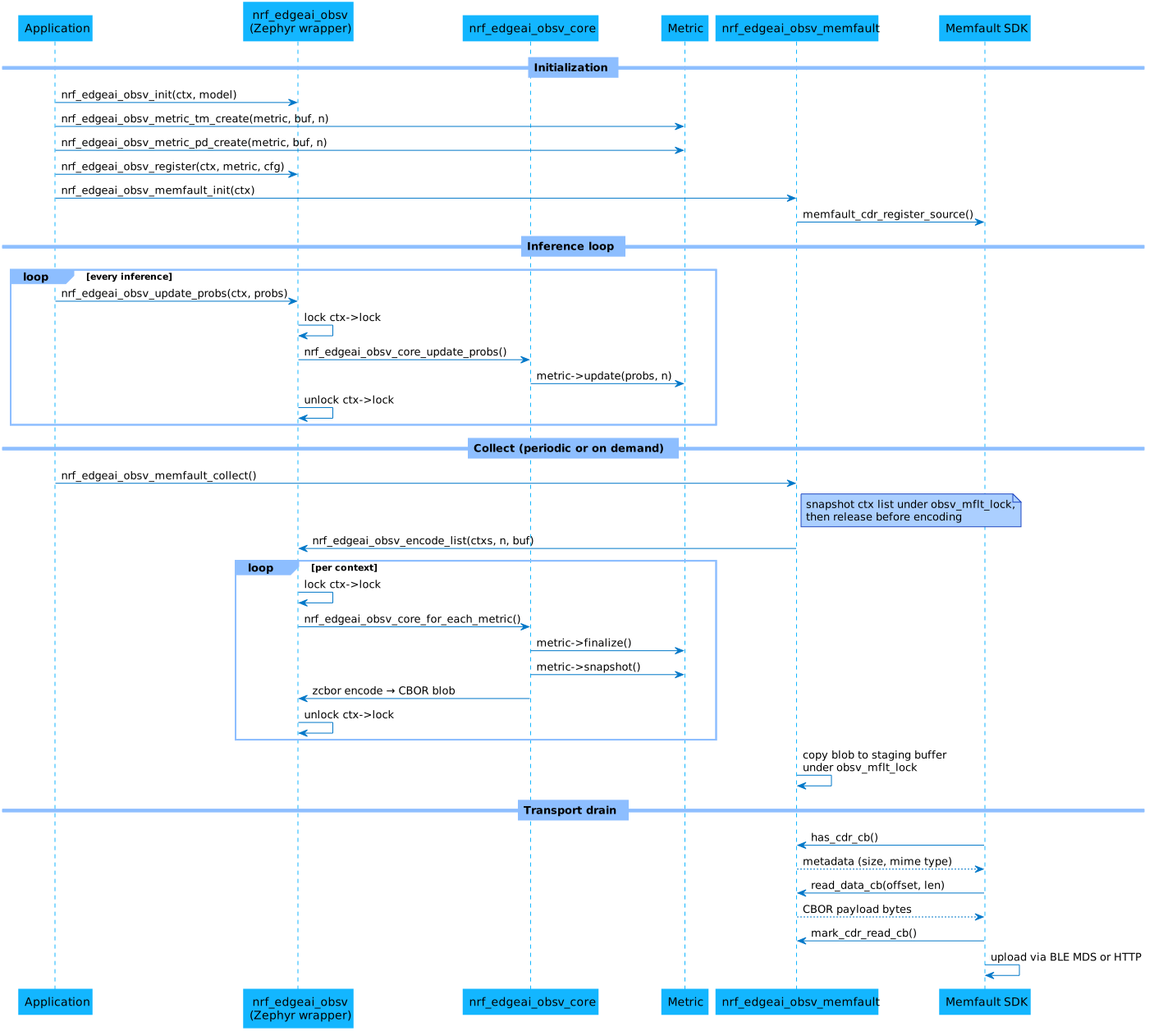
Call sequence for initialization, inference updates, Memfault collect, and CDR drain.
Metrics
The module exposes model behavior through metrics that are updated on every inference and exported as snapshots. Each metric is a self-contained unit with its own storage and callbacks, which means you can mix built-in metrics with your own custom ones. The module includes several ready-to-use built-in metrics, and provides an interface for adding your own.
Built-in metrics
The built-in metrics capture different aspects of model behavior over time. They fall into two groups by the input stream they consume: output metrics, which observe the model’s class-probability vector, and input-feature metrics, which observe the extracted feature vector fed to the model. See the Configuration section for the available options.
Transition matrix
The transition matrix counts how many times the dominant class (argmax of the probability vector) changed from class i to class j across consecutive calls to nrf_edgeai_obsv_update_probs().
The result is a square num_classes × num_classes matrix of uint32_t counters stored in row-major order, where row i is the previous class and column j is the current class.
The following table shows rows for the previous dominant class and columns for the current dominant class:
idle |
walk |
run |
jump |
|
|---|---|---|---|---|
idle |
0 |
38 |
3 |
1 |
walk |
36 |
0 |
12 |
2 |
run |
3 |
10 |
0 |
5 |
jump |
2 |
3 |
3 |
0 |
The illustrative counts suggest walk as the dominant class, frequent transitions between idle and walk, and little jump activity.
Probability distribution
The probability distribution metric builds a per-class histogram over the [0, 1] probability range.
Each call to nrf_edgeai_obsv_update_probs() function increments one bin per class based on that class’s output probability.
The result is a num_classes × bin_num matrix of uint32_t bin counts, where row i is the class and each column is a histogram bin.
The following table uses four uniform bins with inner edges at 0.25, 0.50, and 0.75. Each row is a class; each column is a probability bin.
[0, 0.25) |
[0.25, 0.50) |
[0.50, 0.75) |
[0.75, 1.0] |
|
|---|---|---|---|---|
idle |
85 |
22 |
14 |
20 |
walk |
18 |
25 |
31 |
67 |
run |
96 |
30 |
10 |
5 |
jump |
130 |
8 |
2 |
1 |
The illustrative counts suggest walk is often predicted with high confidence (67 counts in the top bin), a bimodal spread for idle, and mostly low confidence for run and jump, which may indicate confusion between those classes.
Prediction switching rate
The prediction switching rate tracks temporal instability: how often the dominant class (argmax of the probability vector) changes between consecutive inferences.
It exports two uint32_t counters as a 1 × 2 row, [switches, comparisons], from which the rate is derived off-device as switches / comparisons.
A high rate indicates an unstable or noisy input.
Probability entropy distribution
The probability entropy distribution builds a histogram of prediction uncertainty.
For each inference it computes the normalized Shannon entropy H(p) / ln(N) of the probability vector and bins it over [0, 1], producing a 1 × bin_num row.
High entropy flags uncertain predictions or out-of-distribution inputs; low entropy flags confident predictions.
Probability top-2 margin distribution
The probability top-2 margin distribution builds a histogram of prediction decisiveness.
For each inference it computes the margin between the two largest class probabilities, margin = p_top1 - p_top2, and bins it over [0, 1] as a 1 × bin_num row.
A low margin flags ambiguous predictions even when the dominant probability is high.
Class streak distribution
The class streak distribution builds a per-class histogram of streak lengths.
A streak length is the number of consecutive inferences for which the dominant class - the argmax of the probability vector - stays the same.
The result is a num_classes × bin_num matrix of uint32_t counters, where row i corresponds to class i and each column is a streak-length bin.
A streak is recorded only when it ends.
Up to CONFIG_NRF_EDGEAI_OBSV_CLASS_STREAK_DIST_TOLERANCE consecutive mismatching inferences are bridged without ending the streak (flicker tolerance).
These bridged inferences are not counted toward the streak’s length.
A longer run of mismatches ends the streak.
Streak lengths are binned uniformly over [1, TOP], with lengths of CONFIG_NRF_EDGEAI_OBSV_CLASS_STREAK_DIST_TOP or longer saturating the top bin.
Setting the tolerance to 0 reduces the metric to strict “N in a row” runs.
Because each streak contributes a single count only when it completes, the rows do not sum to the inference count. Instead, each row totals the number of finished streaks per class. This metric separates stable, sustained detections (streaks reaching the mid or top bins) from single-frame flicker (streaks pinned in the lowest bin). The per-inference probability metrics cannot make this distinction.
Input-feature metrics
The following metrics consume the input-feature stream fed through nrf_edgeai_obsv_update_features(), rather than the output probabilities.
They target audio mel-spectrogram features (for example, wake-word and keyword-spotting models), but apply to any non-negative feature vector.
Mel energy descriptor
The mel energy descriptor summarizes per-frame energy statistics of the input mel feature vector.
It produces a 4 × bin_num matrix with one [0, 1] histogram row per statistic: mean energy, max energy, dynamic range (q95 − q05), and the floor-bin ratio.
Feature values are normalized into [0, 1] against a configured percentile range [p01, p99] (CONFIG_NRF_EDGEAI_OBSV_MEL_ENERGY_DESC_SCALE_P01_MILLI and _SCALE_P99_MILLI, in thousandths of a feature unit), so the bins are comparable across devices.
Measure the percentiles offline on a representative dataset; the defaults are placeholders.
Mel spectral descriptor
The mel spectral descriptor summarizes per-frame spectral shape of the input mel feature vector.
It produces an 8 × bin_num matrix with one [0, 1] histogram row per statistic: low, mid, and high band energy ratios, spectral centroid, spread, entropy, flatness, and contrast.
Every statistic is scale-invariant (it divides by the total energy or the mean), so no amplitude calibration is needed.
Custom metrics
You can implement additional metrics by filling in an nrf_edgeai_obsv_metric_t operation table and registering it with the nrf_edgeai_obsv_register() function.
A metric consists of five callbacks, a source field, and a priv pointer to its own storage:
Callback |
Required |
Purpose |
|---|---|---|
|
yes |
Zero counters and apply optional configuration. |
|
yes |
Consume one vector from the metric’s source stream: class probabilities or input features. |
|
no |
Zero counters without touching configuration (called by |
|
no |
Compute derived values before a snapshot is taken. Set to |
|
yes |
Populate a read-only |
The snapshot exposes counters as a flat row-major uint32_t matrix of num_rows × num_cols elements.
Metrics with a single scalar value use num_rows = 1, num_cols = 1.
Set the source field to select the input stream the metric consumes: NRF_EDGEAI_OBSV_SOURCE_PROBS (the default, 0) for the class-probability vector, or NRF_EDGEAI_OBSV_SOURCE_FEATURES for the input-feature vector.
The update callback then receives that stream, and the n argument is the class count for probabilities or the feature-vector length for features.
Custom metric IDs
Choose an ID that does not collide with the built-in values defined in nrf_edgeai_obsv_metric_id.
Using values well above the built-in range (for example, 1000 and above) leaves room for future built-in additions.
Buffer sizing for CBOR encoding
When the Memfault transport (or nrf_edgeai_obsv_encode_list()) serializes all metrics, the encode buffer must be large enough to hold custom metric data in addition to the built-in ones.
You reserve this space through the CONFIG_NRF_EDGEAI_OBSV_EXTRA_ENCODE_BYTES Kconfig option (see Configuration).
The required value is the sum of NRF_EDGEAI_OBSV_ENCODE_METRIC_SIZE(n_rows, n_cols) across all custom metrics.
Because NRF_EDGEAI_OBSV_ENCODE_METRIC_SIZE is a C preprocessor macro, evaluate it at compile time and write the resulting integer directly in prj.conf.
To catch mismatches at build time, add a BUILD_ASSERT in your application code:
BUILD_ASSERT(CONFIG_NRF_EDGEAI_OBSV_EXTRA_ENCODE_BYTES >=
             NRF_EDGEAI_OBSV_ENCODE_METRIC_SIZE(1, MY_NUM_CLASSES),
             "EXTRA_ENCODE_BYTES too small for custom metric");
Example custom metric: class frequency counter
The following example shows a minimal custom metric that counts how often each class is the argmax across all inferences.
It produces a 1 × num_classes row of uint32_t counters, with storage passed through priv to match the built-in metric pattern.
#include <stdint.h>
#include <string.h>
#include <nrf_edgeai_obsv/nrf_edgeai_obsv.h>
#include <nrf_edgeai_obsv/nrf_edgeai_obsv_metrics.h>

#define MY_METRIC_ID   1000U
#define MY_METRIC_VER  1U
#define MY_NUM_CLASSES 4U


static void my_init(const void *cfg, void *priv)
{
    ARG_UNUSED(cfg);
    memset(priv, 0, MY_NUM_CLASSES * sizeof(uint32_t));
}

static void my_clear(void *priv)
{
    memset(priv, 0, MY_NUM_CLASSES * sizeof(uint32_t));
}

static void my_update(const float *probs, uint16_t n, void *priv)
{
    uint32_t *counts = (uint32_t *)priv;
    uint16_t argmax = 0;

    /* When probabilities tie for the maximum, the lowest index wins. */
    for (uint16_t i = 1; i < n; i++) {
        if (probs[i] > probs[argmax]) {
            argmax = i;
        }
    }
    counts[argmax]++;
}

static void my_snapshot(nrf_edgeai_obsv_metric_snapshot_t *out, void *priv)
{
    out->metric_id = MY_METRIC_ID;
    out->version   = MY_METRIC_VER;
    out->num_rows  = 1U;
    out->num_cols  = MY_NUM_CLASSES;
    out->counts    = (uint32_t *)priv;
}

/* buf: at least n_classes * sizeof(uint32_t) bytes, uint32_t-aligned. */
void my_metric_create(nrf_edgeai_obsv_metric_t *metric, void *buf, uint16_t n_classes)
{
    ARG_UNUSED(n_classes); /* stored implicitly via MY_NUM_CLASSES in callbacks */
    *metric = (nrf_edgeai_obsv_metric_t){
        .init     = my_init,
        .update   = my_update,
        .clear    = my_clear,
        .finalize = NULL,
        .snapshot = my_snapshot,
        .priv     = buf,
    };
}
Register it alongside the built-in metrics during initialization:
static uint32_t my_buf[MY_NUM_CLASSES];
static nrf_edgeai_obsv_metric_t my_metric;

my_metric_create(&my_metric, my_buf, MY_NUM_CLASSES);
nrf_edgeai_obsv_init(&obsv_ctx, &model);
nrf_edgeai_obsv_register(&obsv_ctx, &my_metric, NULL);
Configuration
To use the observability library, enable the CONFIG_NRF_EDGEAI_OBSV Kconfig option in your prj.conf file.
Enable at least one metric to start collecting data:
Built-in metrics:
For the transition matrix, enable
CONFIG_NRF_EDGEAI_OBSV_METRIC_TRANSITION_MATRIX.For the probability distribution, enable
CONFIG_NRF_EDGEAI_OBSV_METRIC_PROBS_DISTRIBUTION, and set the number of histogram bins throughCONFIG_NRF_EDGEAI_OBSV_PROBS_DISTRIBUTION_BIN_NUM.For the prediction switching rate, enable
CONFIG_NRF_EDGEAI_OBSV_METRIC_PREDICTION_SWITCHING_RATE.For the probability entropy distribution, enable
CONFIG_NRF_EDGEAI_OBSV_METRIC_PROBS_ENTROPY_DIST, and set the bin count throughCONFIG_NRF_EDGEAI_OBSV_PROBS_ENTROPY_DIST_BIN_NUM.For the probability top-2 margin distribution, enable
CONFIG_NRF_EDGEAI_OBSV_METRIC_PROBS_TOP2_MARGIN_DIST, and set the bin count throughCONFIG_NRF_EDGEAI_OBSV_PROBS_TOP2_MARGIN_DIST_BIN_NUM.For the class streak distribution, enable
CONFIG_NRF_EDGEAI_OBSV_METRIC_CLASS_STREAK_DIST, and set the bin count, the top-bin streak length, and the flicker tolerance through the matchingCONFIG_NRF_EDGEAI_OBSV_CLASS_STREAK_DIST_*options.For the mel energy descriptor, enable
CONFIG_NRF_EDGEAI_OBSV_METRIC_MEL_ENERGY_DESC, and set the bin count, the maximum feature length, and the[p01, p99]scaling percentiles through the matchingCONFIG_NRF_EDGEAI_OBSV_MEL_ENERGY_DESC_*options.For the mel spectral descriptor, enable
CONFIG_NRF_EDGEAI_OBSV_METRIC_MEL_SPECTRAL_DESC, and set the bin count throughCONFIG_NRF_EDGEAI_OBSV_MEL_SPECTRAL_DESC_BIN_NUM.
Custom metrics:
If you wish to implement custom metrics, set
CONFIG_NRF_EDGEAI_OBSV_EXTRA_ENCODE_BYTESto reserve buffer space for CBOR encoding. See Buffer sizing for CBOR encoding for how to calculate the value.
For a full list of available Kconfig options, refer to the following sections:
Core library
- CONFIG_NRF_EDGEAI_OBSV
(bool) Edge AI Observability
Enable the Edge AI observability library. Collects runtime metrics from class probabilities and exposes them as typed snapshots that transport layers can serialize as they wish.
- CONFIG_NRF_EDGEAI_OBSV_ENCODE
(bool) CBOR observability encoder
Builds nrf_edgeai_obsv_encode.c and enables nrf_edgeai_obsv_encode() in the Zephyr wrapper.
- CONFIG_NRF_EDGEAI_OBSV_EXTRA_ENCODE_BYTES
(int) Extra bytes reserved in the encode buffer for custom metrics
Additional bytes added to NRF_EDGEAI_OBSV_ENCODE_MAX_SIZE to accommodate custom metrics registered alongside the built-in ones. Set to at least the sum of NRF_EDGEAI_OBSV_ENCODE_METRIC_SIZE(n_rows, n_cols) evaluated for each custom metric. The Memfault staging buffer encode buffer are sized from NRF_EDGEAI_OBSV_ENCODE_MAX_SIZE, so they grow automatically.
- CONFIG_NRF_EDGEAI_OBSV_DIST_BINNING
(bool)
Selected by distribution-style metrics that share the histogram-binning helpers in metrics/nrf_obsv_dist_binning.c. Not user-selectable.
- CONFIG_NRF_EDGEAI_OBSV_MAX_CLASSES
(int) Maximum number of model output classes
Upper bound on model output classes tracked by observability metrics. Both metric counter storage and the CBOR encode buffer scale with the class count; the transition matrix grows as N^2.
- CONFIG_NRF_EDGEAI_OBSV_METRIC_PROBS_DISTRIBUTION
(bool) Probability distribution metric
Per-class histogram of inference probability values.
- CONFIG_NRF_EDGEAI_OBSV_PROBS_DISTRIBUTION_BIN_NUM
(int) Number of histogram bins
Number of bins in the probability histogram per class.
- CONFIG_NRF_EDGEAI_OBSV_METRIC_TRANSITION_MATRIX
(bool) Transition matrix metric
Tracks class-to-class transitions across consecutive inferences.
- CONFIG_NRF_EDGEAI_OBSV_METRIC_PREDICTION_SWITCHING_RATE
(bool) Prediction switching rate metric
Tracks temporal instability: how often the dominant class (argmax) changes between consecutive inferences. Exposes two raw counters, [switches, comparisons]; the rate is derived off-device as SwitchRate = switches / comparisons.
- CONFIG_NRF_EDGEAI_OBSV_METRIC_PROBS_ENTROPY_DIST
(bool) Probability entropy distribution metric
Histogram of prediction uncertainty. Per inference, computes the Shannon entropy H(p) = -sum p_i*ln(p_i) of the output probability vector, normalizes it to [0, 1] by ln(num_classes), and bins it. High entropy indicates uncertain predictions or out-of-distribution inputs.
- CONFIG_NRF_EDGEAI_OBSV_PROBS_ENTROPY_DIST_BIN_NUM
(int) Number of entropy histogram bins
Number of bins in the normalized-entropy histogram.
- CONFIG_NRF_EDGEAI_OBSV_METRIC_PROBS_TOP2_MARGIN_DIST
(bool) Probability top-2 margin distribution metric
Histogram of prediction decisiveness. Per inference, computes the margin = p_top1 - p_top2 between the two largest class probabilities and bins it over [0, 1]. A low margin indicates ambiguous predictions.
- CONFIG_NRF_EDGEAI_OBSV_PROBS_TOP2_MARGIN_DIST_BIN_NUM
(int) Number of margin histogram bins
Number of bins in the top-2 margin histogram.
- CONFIG_NRF_EDGEAI_OBSV_METRIC_CLASS_STREAK_DIST
(bool) Class streak distribution metric
Per-class histogram of prediction streak lengths: how many consecutive inferences the dominant class (argmax) stays the same. A streak is recorded when it ends. Distinguishes stable, held detections from flicker and shows how long each class is typically sustained. Consumes the class-probability stream (NRF_EDGEAI_OBSV_SOURCE_PROBS).
- CONFIG_NRF_EDGEAI_OBSV_CLASS_STREAK_DIST_BIN_NUM
(int) Number of streak-length histogram bins
Number of bins per class. Streak lengths are binned uniformly over [1, TOP], with the last bin catching lengths >= TOP.
- CONFIG_NRF_EDGEAI_OBSV_CLASS_STREAK_DIST_TOP
(int) Streak length saturating the top bin
Streak lengths >= this value falls into the last bin; bins span [1, TOP] uniformly, so a length of 1 lands in bin 0 and TOP (or longer) in the top bin. Set it around the longest streak worth resolving.
- CONFIG_NRF_EDGEAI_OBSV_CLASS_STREAK_DIST_TOLERANCE
(int) Flicker tolerance (consecutive mismatched frames bridged)
How many consecutive inferences whose dominant class differs from the active streak’s class may be skipped without ending the streak. Bridged frames are not counted into the streak length. 0 means any mismatch ends the streak (strict “N in a row”). One tolerance applies to all classes.
- CONFIG_NRF_EDGEAI_OBSV_METRIC_MEL_ENERGY_DESC
(bool) Mel energy descriptor metric
Per-frame summary statistics of the mel feature vector (mean energy, max energy, dynamic range, floor-bin ratio), each accumulated into a [0, 1] histogram. Feature values are normalized into [0, 1] against a configured percentile range [p01, p99] (see SCALE_P01/P99_MILLI below). Consumes the input-feature stream (NRF_EDGEAI_OBSV_SOURCE_FEATURES).
- CONFIG_NRF_EDGEAI_OBSV_MEL_ENERGY_DESC_BIN_NUM
(int) Number of histogram bins per descriptor row
Number of bins in each descriptor histogram row.
- CONFIG_NRF_EDGEAI_OBSV_MEL_ENERGY_DESC_MAX_FEATURES
(int) Maximum mel feature vector length
Upper bound on the feature vector length. Sizes a stack scratch buffer used for the per-frame quantile (dynamic range) computation.
- CONFIG_NRF_EDGEAI_OBSV_MEL_ENERGY_DESC_SCALE_P01_MILLI
(int) Lower scaling percentile (p01), in thousandths of a feature unit
Lower bound used to normalize feature values into [0, 1]: x_norm = clamp((x - p01) / (p99 - p01), 0, 1). Expressed in thousandths (e.g. 40 means 0.040 in feature units, where features are the float mel values passed to nrf_edgeai_obsv_update_features). Measure p01 offline on a representative dataset. Kconfig has no float type, hence the x1000 int.
- CONFIG_NRF_EDGEAI_OBSV_MEL_ENERGY_DESC_SCALE_P99_MILLI
(int) Upper scaling percentile (p99), in thousandths of a feature unit
Upper bound used to normalize feature values into [0, 1]; see NRF_EDGEAI_OBSV_MEL_ENERGY_DESC_SCALE_P01_MILLI. Must be greater than the lower bound. The default (4.0) is a rough order-of-magnitude placeholder for the mel feature range and MUST be recalibrated against a representative dataset: a value far below the true p99 saturates the mean/max/range rows into the top bin, while a value far above it collapses them into bin 0.
- CONFIG_NRF_EDGEAI_OBSV_METRIC_MEL_SPECTRAL_DESC
(bool) Mel spectral descriptor metric
Per-frame spectral-shape statistics of the mel feature vector (low/mid/high band energy ratios, spectral centroid, spread, entropy, flatness, contrast), each accumulated into a [0, 1] histogram. All rows are scale-invariant (they divide by total energy or mean), so no amplitude calibration is needed. Uses logf/expf/sqrtf (libm). Consumes the input-feature stream (NRF_EDGEAI_OBSV_SOURCE_FEATURES).
- CONFIG_NRF_EDGEAI_OBSV_MEL_SPECTRAL_DESC_BIN_NUM
(int) Number of histogram bins per descriptor row
Number of bins in each descriptor histogram row.
Memfault CDR transport
The Memfault module registers a CDR source with the Memfault SDK; see Memfault Custom Data Recording for callback semantics, payload metadata, and upload limits, Memfault for the vendor platform, and nRF Cloud powered by Memfault integration in nRF Connect SDK.
- CONFIG_NRF_EDGEAI_OBSV_MEMFAULT
(bool) Memfault transport for Edge AI Observability
Encodes observability snapshots as CBOR and publishes them to Memfault as a Custom Data Recording (CDR) binary blob.
- CONFIG_NRF_EDGEAI_OBSV_MEMFAULT_MAX_CONTEXTS
(int) Maximum number of observability contexts registered with Memfault
Upper bound on the number of nrf_edgeai_obsv_ctx_t instances that can be registered via nrf_edgeai_obsv_memfault_init(). Each additional context increases the staging buffer by NRF_EDGEAI_OBSV_ENCODE_MAX_SIZE bytes. The CDR payload is a CBOR array with one entry per context.
- CONFIG_NRF_EDGEAI_OBSV_MEMFAULT_AUTO_COLLECT
(bool) Periodically refresh the CDR payload
Spawns a delayable work item on the system workqueue that calls nrf_edgeai_obsv_memfault_collect() on a fixed interval. Use this when the transport drains opportunistically (BT_MDS, MEMFAULT_HTTP_PERIODIC_UPLOAD) and the application does not want to wire a timer itself. The first collect runs one interval after initialization.
When enabled (and whenever collect can run concurrently with inference), bind the transport with nrf_edgeai_obsv_memfault_init and drive inference through nrf_edgeai_obsv_update_probs (see nrf_edgeai_obsv.h) so encode inside collect does not race snapshot collection.
collect() allocates a NRF_EDGEAI_OBSV_ENCODE_LIST_BUFSZ-byte temporary buffer on the calling thread’s stack. When AUTO_COLLECT is enabled, that thread is the system workqueue, so increase CONFIG_SYSTEM_WORKQUEUE_STACK_SIZE accordingly (see nrf_edgeai_obsv/nrf_edgeai_obsv_encode_sizes.h for the exact value at your Kconfig dimensions). When calling collect() manually, ensure your thread’s stack is large enough.
- CONFIG_NRF_EDGEAI_OBSV_MEMFAULT_AUTO_COLLECT_INTERVAL_SEC
(int) Auto-collect interval (seconds)
How often the delayable work item refreshes the staged CDR payload.
Memfault’s backend accepts at most 1 CDR per device per day by default. The limit can be raised in the Memfault project settings, or bypassed entirely for devices in developer mode. The default matches the 1-per-day limit.
With HTTP periodic upload: align this interval with MEMFAULT_HTTP_PERIODIC_UPLOAD_INTERVAL_SECS so every upload finds fresh data.
With MDS (BLE GATT): the phone drives the drain cadence. Pick an interval short enough that the phone, whenever it connects, finds a recent-enough snapshot for your observability needs.
Usage
The observability library works with any inference engine that produces a probability vector per inference. For a complete example using the nRF Edge AI API, see nRF Edge AI API.
To integrate the library into your application, complete the following steps:
Initialize an observability context with model metadata using the
nrf_edgeai_obsv_init()function.Allocate metric storage and initialize each metric descriptor using the
nrf_edgeai_obsv_metric_tm_create()andnrf_edgeai_obsv_metric_pd_create()functions.Register the metrics with the context using the
nrf_edgeai_obsv_register()function.Bind the Memfault transport once at application startup using the
nrf_edgeai_obsv_memfault_init()function.Call the
nrf_edgeai_obsv_update_probs()function with the output probability vector after every inference.If you registered input-feature metrics, call the
nrf_edgeai_obsv_update_features()function with the extracted feature vector. This routes only to feature-source metrics and does not advance the inference counter.Call the
nrf_edgeai_obsv_memfault_collect()function periodically, or enable theCONFIG_NRF_EDGEAI_OBSV_MEMFAULT_AUTO_COLLECTKconfig option.
The following example shows minimal initialization with both built-in metrics and Memfault upload over Bluetooth using MDS:
#include <nrf_edgeai_obsv/nrf_edgeai_obsv.h>
#include <nrf_edgeai_obsv/nrf_edgeai_obsv_metrics.h>
#include <nrf_edgeai_obsv/nrf_edgeai_obsv_memfault.h>

#define NUM_CLASSES 4

static nrf_edgeai_obsv_ctx_t obsv_ctx;

/* uint32_t arrays give natural alignment required by the storage macros. */
static uint32_t tm_buf[NRF_EDGEAI_OBSV_TM_STORAGE_BYTES(NUM_CLASSES) / sizeof(uint32_t)];
static uint32_t pd_buf[NRF_EDGEAI_OBSV_PD_STORAGE_BYTES(NUM_CLASSES) / sizeof(uint32_t)];
static nrf_edgeai_obsv_metric_t tm_metric;
static nrf_edgeai_obsv_metric_t pd_metric;

void observability_init(void)
{
    const nrf_edgeai_obsv_model_info_t model = {
        .model_id    = 1,
        .num_classes = NUM_CLASSES,
        .version     = 1,
    };

    nrf_edgeai_obsv_init(&obsv_ctx, &model);

    nrf_edgeai_obsv_metric_tm_create(&tm_metric, tm_buf, NUM_CLASSES);
    nrf_edgeai_obsv_register(&obsv_ctx, &tm_metric, NULL);

    nrf_edgeai_obsv_metric_pd_create(&pd_metric, pd_buf, NUM_CLASSES);
    nrf_edgeai_obsv_register(&obsv_ctx, &pd_metric, NULL);

    /* Bind the Memfault transport. */
    nrf_edgeai_obsv_memfault_init(&obsv_ctx);
}

void on_inference_done(const float *probs)
{
    /* Feed inference result to all registered metrics. */
    nrf_edgeai_obsv_update_probs(&obsv_ctx, probs);
}
When CONFIG_NRF_EDGEAI_OBSV_MEMFAULT_AUTO_COLLECT is disabled, call nrf_edgeai_obsv_memfault_collect() manually at the interval that matches your transport’s drain cadence (for example, once per hour for HTTP, or before each Bluetooth LE connection).
When using a custom transport instead of Memfault, use nrf_edgeai_obsv_encode_list() to encode one or more contexts into a caller-supplied buffer in a single CBOR list:
uint8_t cbor_buf[NRF_EDGEAI_OBSV_ENCODE_LIST_BUF_SIZE(1)];
nrf_edgeai_obsv_ctx_t *ctxs[] = {&obsv_ctx};

size_t len = nrf_edgeai_obsv_encode_list(ctxs, ARRAY_SIZE(ctxs), cbor_buf, sizeof(cbor_buf));
if (len > 0) {
    my_transport_send(cbor_buf, len);
}
Thread safety
The following functions acquire ctx->lock internally and are safe to call from different threads:
The nrf_edgeai_obsv_memfault_collect() function uses two mutexes:
obsv_mflt_lockprotects the staging buffer and the registered context list.Each
ctx->lockis acquired bynrf_edgeai_obsv_encode_list()during encoding.
To avoid lock inversion, obsv_mflt_lock is released before encoding begins, so inference is never blocked by an ongoing collect.
Decoding CDR payloads
Use the scripts/decode_edgeai_obsv_cdr/decode_edgeai_obsv_cdr.py script on a host PC to inspect collected observability data as JSON (per-model counters and metric tables).
Run it on payloads that are already in Memfault, or on hex data captured from UART or Bluetooth LE when debugging transport and encoding.
The script accepts Memfault web UI downloads (--binary --file), Memfault API fetch (--from-cloud), hex-encoded chunks from UART or Bluetooth LE, and multi-chunk reassembly (--chunks).
Install the Python dependencies from the sdk-edge-ai tree root:
pip install -r scripts/decode_edgeai_obsv_cdr/requirements.txt
The following examples show common usage:
# Memfault web UI download
./scripts/decode_edgeai_obsv_cdr/decode_edgeai_obsv_cdr.py --binary --file recording.bin

# Hex from a serial log
./scripts/decode_edgeai_obsv_cdr/decode_edgeai_obsv_cdr.py 04a1b2c3d4...
Run --help on the script for the full option list and Memfault API authentication details.
Dependencies
Observability core with Zephyr wrapper
This module uses the following Zephyr libraries:
Memfault CDR transport module
This module uses the following Edge AI Add-on library:
lib/nrf_edgeai_obsv
This module uses the following Zephyr libraries:
This module uses the following nRF Connect SDK libraries: