
Data forwarder
This sample streams real sensor measurements from a development kit to a host computer. It uses a CBOR-based framing protocol for Data Forwarder Host tool, with an optional ASCII mode for Edge Impulse’s data forwarder CLI compatibility.
Requirements
The sample supports the following development kits:
Hardware platforms |
PCA |
Board name |
Board target |
|---|---|---|---|
PCA20072 |
|
When using Bluetooth LE transport, your host must be able to connect to the peripheral directly. If it cannot connect, you need a second development kit running the Central UART sample as a USB serial bridge.
The default configuration on the nRF54L15 TAG reads a 6-axis BMI270 IMU and appends environmental data from an on-board BME688 sensor.
Overview
The sample reads data from an on-board sensor and forwards it to a host over Nordic UART Service (NUS) (default) or UART.
By default, the sample uses CBOR messages wrapped in COBS framing, as defined in cddl/data_forwarder.cddl.
While a streaming session is active, session metadata is sent periodically so a host can join the stream.
The sample performs the following operations:
Initializes the sensor driver without starting periodic sampling.
Waits until the configured transport is ready to carry data.
Starts sensor sampling and a protocol session.
Encodes each sample and sends it through the transport.
If the sensor or the session fails to start while the link is up, the sample retries after the period configured with the CONFIG_DATA_FWD_START_RETRY_MS Kconfig option.
Transport
The sample can send protocol frames to the host over Bluetooth LE or UART.
Select the transport using the DATA_FWD_TRANSPORT Kconfig option.
- Bluetooth LE NUS
Sample uses Nordic UART Service (NUS) for sending the protocol frames. The sensors are sampled only while a central is connected and subscribed to the NUS TX characteristic notifications. Before that, advertising is enabled and the sensors remain stopped. When the central unsubscribes or the link drops, the sample stops the protocol session and the sensors, then waits for the next connection. This keeps the sensors off while no host is collecting data.
- UART transport
Sample uses UART for sending the protocol frames. The data link is always treated as connected, so sampling starts after initialization and continues until the device is reset.
Note
UART transport is not available on the nRF54L15 TAG device without any external UART-to-USB converter.
Increasing throughput
If you need higher streaming bandwidth, apply the following adjustments:
- Bluetooth LE with direct host connection
When using Data Forwarder Host tool over Bluetooth LE on the host:
Disconnect or move other Bluetooth devices off the same adapter. A single controller shares radio airtime across all active links, which reduces stream bandwidth.
Follow the Bluetooth LE throughput tuning procedure in
tools/data_forwarder_host/docs/ble_throughput_tuning.md.
- Bluetooth LE with Central UART on a second DK
On the development kit running the Central UART sample sample, set the following options in
prj.confto increase the NUS notification payload size:CONFIG_BT_L2CAP_TX_MTU=247 CONFIG_BT_BUF_ACL_RX_SIZE=251
The Data forwarder sample sets matching MTU values on the peripheral side. You may also increase the Central UART baud rate in its board overlay (for example,
current-speed = <921600>;on the relay UART node).- UART
Increase the baud rate of the data UART by setting the
current-speedproperty in the board overlay. For example, to use 921600 baud:&uart20 { current-speed = <921600>; };
Protocol
The sample encodes sensor readings into protocol frames before sending them to the host.
Zephyr sensor drivers return values stored in struct sensor_value.
These are typically physical values converted by driver from raw sensor readings.
Data forwarder protocol supports float and integer sample formats.
Sensor wrappers provided by the sample return physical value as a float, or as an integer in micro units, depending on the CONFIG_DATA_FWD_PROTO_INT32_VALUES Kconfig option.
Configuration
See Configuring and building for information about how to permanently or temporarily change the configuration.
The following sample-specific Kconfig options are used in this sample:
- CONFIG_DATA_FWD_PROTO
(bool) Data Forwarder protocol
- CONFIG_DATA_FWD_PROTO_RING_BUF_SIZE
(int) Ring buffer size in bytes
Size of protocol producer queue in bytes.
- CONFIG_DATA_FWD_PROTO_ASCII_MODE
(bool) ASCII output mode
Replaces CBOR binary framing with CSV output limited to just sensor values.
- CONFIG_DATA_FWD_PROTO_CRC
(bool) Append CRC-16 to every frame
Enabled for integrity checking on host side.
- CONFIG_DATA_FWD_PROTO_META_RESEND_S
(int) Session info resend period (s)
Periodic resend of session-info for late joining hosts.
- CONFIG_DATA_FWD_PROTO_MAX_CHANNELS
(int) Max number of sensor channels
Derived maximum count for zcbor generated arrays.
- CONFIG_DATA_FWD_PROTO_INT32_VALUES
(bool) 32-bit integers for channel values
Use 32-bit integers instead of floats in the protocol.
- CONFIG_DATA_FWD_TRANSPORT_BLE_NUS
(bool) Bluetooth LE NUS
- CONFIG_DATA_FWD_TRANSPORT_UART
(bool) UART
- CONFIG_DATA_FWD_SENSOR_BMI270
(bool) BMI270 (6-axis IMU)
- CONFIG_DATA_FWD_SENSOR_ADXL367
(bool) ADXL367 (3-axis accelerometer)
- CONFIG_DATA_FWD_SENSOR_BME688
(bool) BME688 (environmental)
- CONFIG_DATA_FWD_EXTRA_SENSOR_BME688
(bool) Append BME688 (duplication as upsampling)
Extend streamed samples with temperature, humidity, and pressure from BME688 at its native rate by upsampling (repeating the latest reading between fetches).
- CONFIG_DATA_FWD_START_RETRY_MS
(int) Sensor/session start retry interval (ms)
Delay between retries when sensor or protocol session start fails while a transport link is up.
Adapting the sample for other boards
To run the sample on a board that is not listed in sample.yaml, add a devicetree overlay for that board target.
See the following guides for the general workflow:
For this sample, you typically need to:
Add a board overlay under
boards/<board>_<soc>_<variant>.overlay.Configure or enable the required sensor device tree nodes (
bmi270,adxl367,bme688, or your own sensor).When using UART transport, set the
ncs,data-forwarder-uartchosen node to the UART used for data forwarding and assign a separate console output (for example, RTT or another UART).Update
sample.yamlwith the new board target when adding official support.
Adapting the sample for other sensors
To forward data from a sensor that is not supported out of the box, implement the sensor wrapper API:
Use src/sensor/bmi270.c, src/sensor/adxl367.c, or src/sensor/bme688.c as references.
Then:
Add a new
config DATA_FWD_SENSOR_*entry to theDATA_FWD_SENSORoption inKconfig.Add the source file to
CMakeLists.txtunder the correspondingCONFIG_DATA_FWD_SENSOR_*block.Set a
CONFIG_DATA_FWD_PROTO_MAX_CHANNELSdefault for the new channel count inKconfig.
Host-side setup
Complete the host-side setup for your chosen data collection workflow before building and running the sample.
The Data Forwarder Host tool decodes CBOR/COBS frames from the default sample build and is intended for use with Nordic Edge AI Lab data collection workflows.
Before running the sample, get the Data Forwarder Host tool.
The sample outputs comma-separated sensor values compatible with the edge-impulse-data-forwarder CLI tool when the CONFIG_DATA_FWD_PROTO_ASCII_MODE Kconfig option is enabled.
This replaces CBOR binary framing with CSV lines (one sample per line, values separated by commas, terminated with a CRLF line ending) compatible with the protocol specified by Edge Impulse’s data forwarder.
Before running the sample, complete the following setup:
Prepare your own project using Edge Impulse studio external web tool. See Edge Impulse integration for more information on using the tool.
Add the following options to sample configuration:
CONFIG_DATA_FWD_PROTO_ASCII_MODE=y
CONFIG_DATA_FWD_PROTO_CRC=n
CONFIG_DATA_FWD_PROTO_INT32_VALUES=n
Use a second development kit running the Central UART sample sample as a serial bridge.
Building and running
This sample can be found under samples/data_forwarder in the Edge AI Add-on folder structure.
To build the sample, follow the instructions in Building an application for your preferred building environment. See also Programming an application for programming steps and Testing and optimization for general information about testing and debugging in the nRF Connect SDK.
Testing
After programming the sample to your development kit, complete the following steps to test it:
Connect the kit to the computer using a USB cable. The kit is assigned a serial port. Serial ports are referred to as COM ports on Windows, /dev/ttyACM devices on Linux, and /dev/tty devices on macOS. To list Nordic Semiconductor devices connected to your computer together with their serial ports, open a terminal and run the
nrfutil device listcommand. Alternatively, check your operating system’s device manager or its equivalent.Open an RTT viewer (for example, in nRF Connect for VS Code extension) to view console output. After programming, you should see output similar to the following:
transport: Bluetooth LE NUS transport ready
data_forwarder: Data forwarder started
transport: Bluetooth LE connected
data_forwarder: Sampling session started (sid 8779774)
Sensor data is sent only after
Sampling session started. When the central unsubscribes from notifications or disconnects, the log continues with the following notifications:transport: Bluetooth LE disconnected data_forwarder: Transport link lost
The device then advertises again and waits for the next connection before sampling.
Collecting data on the host
Use one of the following workflows to capture sensor data on your host computer:
The Data Forwarder Host tool decodes CBOR/COBS frames from the default sample build and is intended for use with Nordic Edge AI Lab data collection workflows.
To collect data with the default configuration:
Run Data Forwarder Host tool on the host computer and connect to the device over Bluetooth LE.
Alternatively, if the host has no suitable Bluetooth LE adapter, use a second development kit running the Central UART sample as a serial bridge. Flash Central UART on the second kit, wait for it to connect to the peripheral, then connect the host tool to the Central UART USB serial port.
Enter a label and start a sampling session. For details refer to the Data Forwarder Host tool documentation.
To collect data:
Identify data interface. With the default Bluetooth LE setup, this is the Central UART bridge USB serial port. If you enabled UART transport, use the dedicated data UART instead. Do not open that port in a terminal when
edge-impulse-data-forwarderis running.Run the
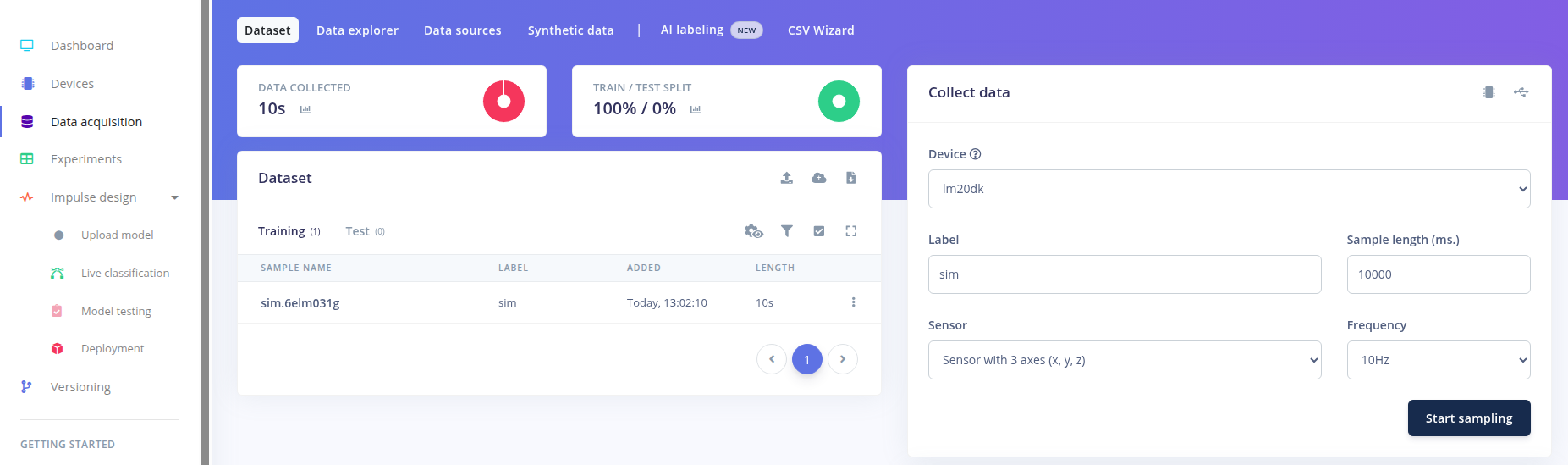
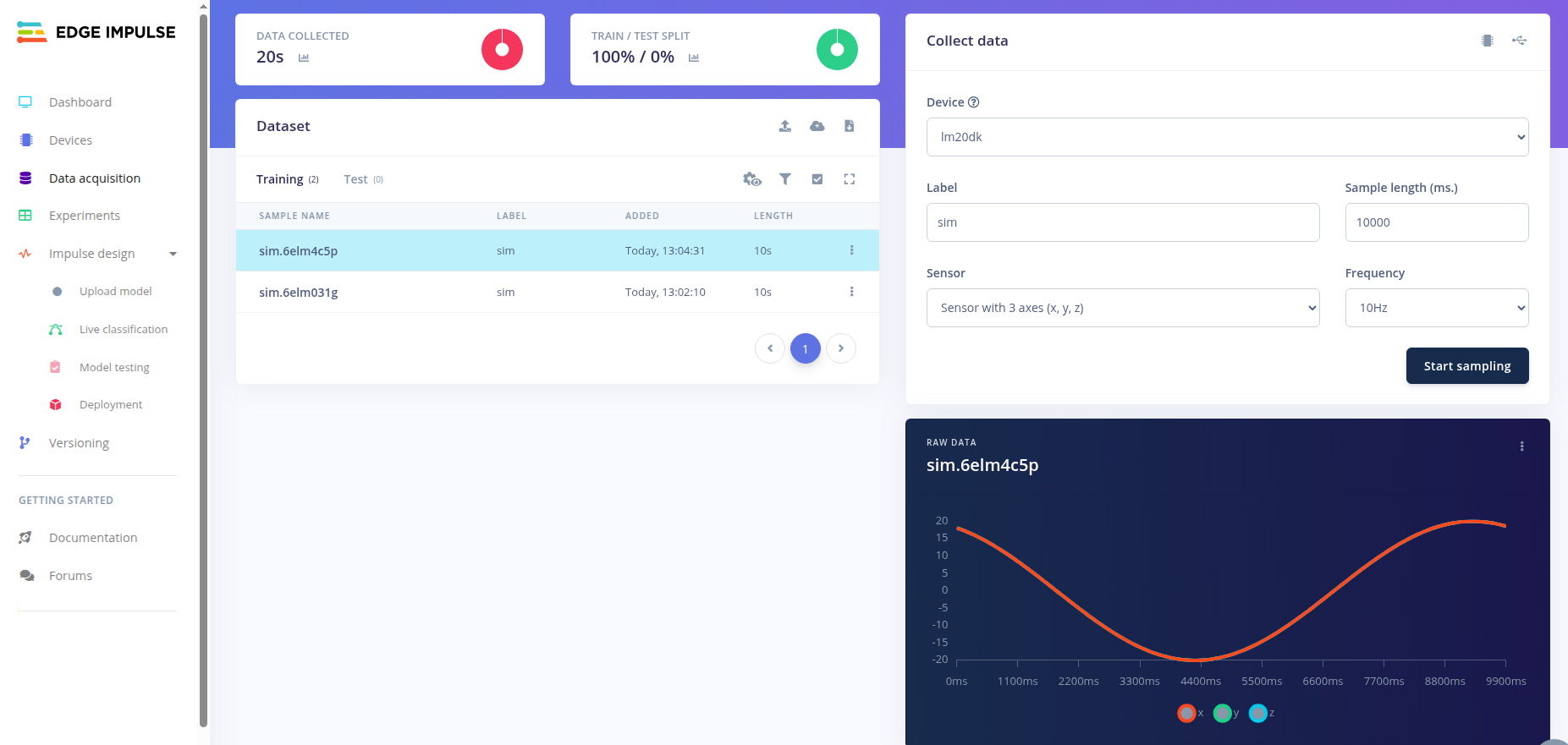
edge-impulse-data-forwardercommand line tool. The tool connects the device to your Edge Impulse project. When prompted for a UART port, provide the port carrying sensor data, not the console. See the Edge Impulse’s data forwarder documentation for guidance.Trigger sampling data from the device using Edge Impulse studio:
Dependencies
This sample uses the following nRF Connect SDK libraries:
This sample uses the following Zephyr libraries:
The data forwarder protocol uses the following Zephyr libraries:
include/zephyr/data/cobs.h