

Memory Partitioning for DFU
In order to successfully run the DFU process, the memory of the device must be first correctly partitioned to accommodate all required components.
Bare Metal uses Zephyr’s DTS system for memory partitioning. You can find a practical example of how to partition the memory in chapter Preparing the DFU-ready variant of your board.
Partitions overview
The following are detailed descriptions of each memory partition needed when running Firmware Over The Air (FOTA) updates with MCUboot as the Initial Root of Trust (IRoT).
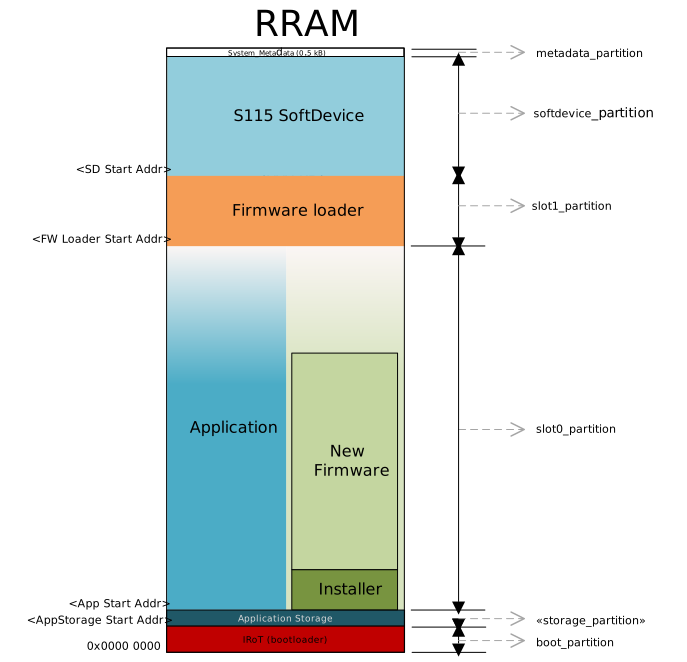
The memory in the device is divided into several partitions, each serving a specific function in the DFU process:
Partition name |
Purpose |
Details |
|---|---|---|
boot_partition |
Reserved exclusively for IRoT. |
Starts at address 0x0000, size is determined by the needs of the MCUboot firmware. |
slot0_partition |
Contains the main application firmware. |
Begins immediately after the storage partition or the IRoT partition if the storage is not enabled. The size is maximized up to the start of the firmware loader. |
slot1_partition |
Serves as the location for the DFU mode and contains the firmware loader. |
This partition contains the firmware loader that is validated by the IRoT. The firmware loader is started when entering the DFU mode. |
softdevice_partition |
Used by the SoftDevice. |
Includes an MCUboot header of size 0x800.
The SoftDevice is used by both the firmware loader and the application that is running from |
metadata_partition |
Utilized by the firmware loader and IRoT for storing metadata. |
Reserves 0.5 kB at the top of the memory. |
storage_partition (optional) |
Used for application data storage that persists across resets and firmware updates. |
Placement and size are configurable based on application requirements. |
Configuring MCUboot to be IRoT
Configuring MCUboot to act as Immutable Root of Trust (IRoT) is done using the immutable boot region configuration register UICR.BOOTCONF.
By default, this functionality is disabled, but it can be enabled with the SB_CONFIG_BM_BOOT_BOOTCONF_LOCK_WRITES sysbuild Kconfig option.
This is done by by creating a sysbuild.conf file in the project’s root folder and including SB_CONFIG_BM_BOOT_BOOTCONF_LOCK_WRITES=y.
Enabling this option sets the EXECUTE, READ, SECURE, and LOCK bits in the UICR.BOOTCONF register and sets the UICR.BOOTCONF.SIZE to the size of the boot_partition from the board files.
This enables write protection on the bootloader region and locks down the configuration registers for the immutable boot region.
Programming
With IRoT enabled, you must run an Erase All before programming certain parts of the memory.
In nRF Connect for VS Code extension, this is done by using the Erase and Flash to Board option, or, alternatively, by using the west flash command with the --erase or --recover arguments.
When IRoT is established, the device is blocked from performing write operations on the boot_partition without performing an erase all operation.
All other regions are open and can be programmed just like before the IRoT was established.
Note
Use nRF Util device version 2.15.0 or higher as older versions have a known issue related to ERASEALL and UICR.BOOTCONF on nRF54L.
Alternatively, use the Recover function to erase the device and remove the IRoT protection.
Requirement for MCUboot
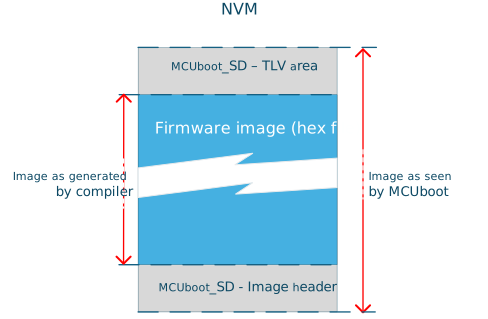
MCUboot requires that each firmware image includes metadata both before and after the firmware hex file. This metadata is crucial for the validation of the firmware image:
Image header: Placed at the beginning of the firmware image.
TLV area: Positioned after the firmware image to store metadata used for image validation.
Note
The size reserved for the image header and TLV area must be consistent across all MCUboot images in a project.
Vector table alignment
For images that are run as a main application that has its own interrupt vector table there is an Vector table requirement on how to place the interrupt vector table in memory. The table must be placed starting at the 2 kB boundary. An example of such images are application and firmware loader. The SoftDevice is not affected by this requirement.
SoftDevice placement
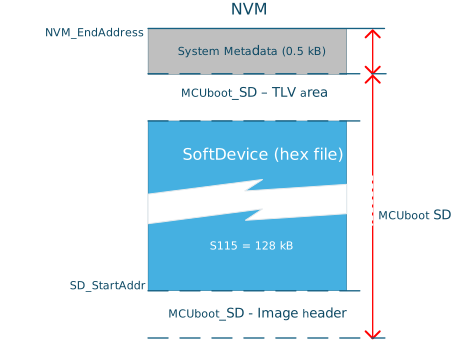
The placement of the SoftDevice in memory is predetermined and must align with specific requirements:
System Metadata: Reserves 0.5 kB at the top of the memory.
MCUboot_SD - TLV Area: Also reserves 0.5 kB.
SD_StartAddr: See the SoftDevice release notes for details on size and start address.
The size of the SoftDevice is adjusted taking into account the above alignment and space reservations.
Partition size reference
The table below lists the partition size information for configuration setup with single-bank Device Firmware Update (DFU). The recommended sizes are based on the configuration used in Bare Metal.
Partition name |
Content |
DK board |
Development |
Release |
|---|---|---|---|---|
|
MCUboot |
31 kB |
24 kB |
21 kB (using KMU) |
|
App data storage |
8 kB |
- |
- |
|
Main application |
- |
- |
- |
|
Firmware loader |
64 kB |
48 kB |
32 kB |
|
SoftDevice |
- |
- |
- |
|
Stores metadata |
0.5 kB |
- |
- |
Note
The sizes and configurations of slot0 and slot1 are asymmetrical.
DK board - Represents the partition size that you can find in the board definition files (
.dts) that have been defined for the MCUboot board target in Bare Metal. These sizes are not optimized but set large enough to provide enough memory for development on multiple domains without having to adjust the partition size.Development - Represents the partition size that can be used to maximize the application space (
slot0_partitionandstorage_partition) when running with default configuration of the MCUboot and firmware loader project. This setting does not include extra space in theslot1_partitionto accommodate for updates without the risk of having to adjust the partition size.Release - Represents the partition size recommended when the MCUboot and firmware loader projects are optimized for release. See Optimizing your project for release for details. The
boot_partition(MCUboot) cannot be updated after the release and the size should be set to match the project. The partition size set forslot1_partition(firmware loader) must contain extra space to accommodate for later updates.
Optimizing your project for release
You can achieve the reference sizes of MCUboot and firmware loader using the size-optimized configuration available in the MCUboot: Recovery entry sample.
For minimal size, amend the firmware loader configuration using the following Kconfig options:
Enable
CONFIG_LTODisable
CONFIG_LOGDisable
CONFIG_CONSOLEDisable
CONFIG_BM_UARTE_CONSOLEDisable
CONFIG_CRACEN_LIB_KMUDisable
CONFIG_PSA_WANT_ALG_CTR_DRBGDisable
CONFIG_PSA_USE_CRACEN_MAC_DRIVER
For minimal size, amend the MCUboot configuration using the following Kconfig options:
Disable
CONFIG_LOGDisable
CONFIG_CONSOLEDisable
CONFIG_BM_UARTE_CONSOLE
Note
Applying these configurations to the project might cause a few warnings on the log’s Kconfig assignments. You can ignore these warnings.
If you are not using a DK board target, refer to Preparing the DFU-ready variant of your board for how to partition the memory using the devicetree.