Migration notes - nRF5 SDK to nRF Connect SDK Bare Metal
This document outlines the high-level differences between nRF5 SDK and the nRF Connect SDK Bare Metal option.
It is meant to provide support when migrating an application built on nRF5 SDK to Bare Metal.
Project files
In nRF5, project files are tightly coupled with the SDK directory structure.
Typically, projects are placed inside the examples folder within the SDK and include header files, source files, and pre-built libraries in defined locations within the SDK.
These projects rely on embedded IDEs project files, such Keil µVision or IAR, or GNU Makefiles, which all have very limited dependency management.
Developers have to manually handle their project dependencies, adding libraries and their relative headers to their project by navigating the IDE’s menu, which can be tedious for large projects.
In an nRF5 SDK project, project configuration is achieved through the sdk_config.h file, which sets the configuration options present in the nRF5 SDK that are applicable to a given project.
When new dependencies are manually added to the project, their relative configuration entries in the project’s initial sdk_config.h file are missing, and must also be added manually.
In Bare Metal, projects can be organized more freely and managed more easily thanks to the new build system based on CMake and west.
An application can reside in any folder, and includes a CMakeLists.txt build system configuration file (for CMake) and a prj.conf project configuration file (for Kconfig, which is a tool that is part of the build system).
The purpose of the CMakeLists.txt file is to define the structure of the project, such as source files, libraries, dependencies, and build targets.
Specifically, this file is used to:
Define the name of your project.
Add source files:
Specify the source files for your application that need to be compiled. This includes main files, libraries, or any additional
.cor.cppcode.target_sources(app PRIVATE src/main.c src/other_module.c)
Include headers:
Add directories for custom include paths to ensure header files are correctly found.
target_include_directories(app PRIVATE include)
Link libraries:
Add external or custom libraries required for your project (such as math, custom vendor libraries).
target_link_libraries(app PRIVATE libfoo)
External modules and definitions:
If your project relies on external modules or additional functionality, include them.
add_subdirectory("path_to_directory")
Dependencies are added to the project configuration and incorporated into the build process automatically (you do not have to manually add files from specific locations), with the aid of a tool called Kconfig, in conjunction with CMake.
That is done using the prj.conf file that replaces the sdk_config.h file from the nRF5 SDK.
The entries in the prj.conf file are referred to as Kconfig options.
Unlike the sdk_config.h file that lists all the configuration options relevant for an application, even those whose values are unchanged from defaults, the prj.conf file only contains entries whose values must be manually set or to override the default.
The configuration options whose values are left as default are not present in that file, although when a project is built, a file containing all configuration options pertaining to the application (called autoconf.h) is created in the background.
The build system and the nRF Connect for VS Code extension extension both provide a way to conveniently browse and search all available project options and inspect their dependencies and read their help text (menuconfig/extension).
There is no distinction or taxonomy between Kconfig options that are applicable to regular nRF Connect SDK only and those that are only applicable to nRF Connect SDK Bare Metal option. Kconfig options that are applicable to the current application are shown and are selectable, while others are not.
There is no consistent mapping of the sdk_config.h entries to Kconfig options.
Some libraries that were ported from nRF5 have similar Kconfig options as the sdk_config.h entries they had in nRF5, but it is not a consistent rule.
In nRF5, the same application/sample had a project file for each supported board and IDE/compiler.
In Bare Metal, there is a single project file (consisting of CMakeLists.txt and prj.conf) that can be built for different boards with a different command-line instruction or by selecting a different board target in the VS Code extension.
If necessary, Kconfig options can be specified in a different .conf file that is then automatically appended to the default prj.conf file, thus realizing a dedicated configuration for a specific board.
Kconfig options appended in this way are referred to as Kconfig fragments.
Memory partitioning
In nRF5, memory partitioning was done using linker scripts. In Bare Metal, there are a few ready-made partitioning schemes that can be selected by compiling for specific board targets that cover the most common use cases. Partitioning can be tweaked by making simple changes to textual Devicetree files which define the layout of the memory. These can be edited in the board files, or applied to existing boards as overlays.
Non-volatile Memory (NVM)
The nRF51 and nRF52 devices supported by the nRF5 SDK utilized flash memory as their non-volatile memory (NVM) technology for storing program code and data. In contrast, the nRF54L devices employ RRAM, a different NVM technology.
To support the new RRAM storage technology, the Bare Metal introduces Bare Metal Zephyr Memory Storage (BM_ZMS), which is optimized for RRAM and replaces FDS. Unlike FDS, which uses a file/record ID indexing scheme based on flash pages, Zephyr Memory Storage uses a key-value indexing system that is better suited for RRAM’s access patterns and performance characteristics.
It is technically feasible to reuse a file system that expects flash behavior on a device that has RRAM. This can be done by adding an abstraction layer that emulates the flash behavior. However, this approach is generally not recommended for production-ready applications. Emulating flash memory behavior on RRAM can lead to a significant increase in write operations, potentially accelerating wear on the NVM.
For a robust, production-ready solution, it is recommended to adopt a storage or file system that natively supports RRAM technology. The nRF Connect SDK Bare Metal option environment integrates the Bare Metal Zephyr Memory Storage (BM_ZMS) system, which is designed to be compatible with various NVM technologies, including RRAM. This system ensures optimal performance and longevity for your applications.
Bluetooth LE libraries
Whereas nRF5 supported different short range protocols such as Gazell, ESB, and Ant, those are not supported by Bare Metal. In general, Bare Metal support focuses on Bluetooth Low Energy.
Bluetooth LE features that are natively offered by the SoftDevice are mostly unchanged from the nRF5, and the SoftDevice documentation highlights any differences. As for the collection of Bluetooth LE libraries that were available in the nRF5, Bare Metal offers a limited subset, where each service may have slightly different API and functionality compared to their respective nRF5 implementation.
The Bluetooth LE services currently offered in Bare Metal are the following:
Peripheral services:
Battery (peripheral)
Bond Management (peripheral, experimental)
Continuous Glucose Monitor (peripheral, experimental)
Device Information (peripheral)
Heart Rate Monitor (peripheral)
Human Interface Device (peripheral)
MCUmgr (peripheral)
Nordic UART (NUS) (peripheral)
Nordic LED Button (LBS) (peripheral)
Central services:
Heart Rate Service (central, experimental)
Utility libraries for Bluetooth LE are available in Bare Metal, though their collection may not be as complete, and their functionality and API may be slightly different than their respective nRF5 implementation.
See table below for a summary of supported libraries.
Name |
Supported |
New name |
Planned |
Comment |
|---|---|---|---|---|
|
Yes |
|
||
|
Yes |
Merged with |
||
|
Yes |
|||
|
Yes |
Name unchanged |
||
|
No |
No |
||
|
No |
No |
Out of scope |
|
|
Yes |
Name unchanged |
||
|
No |
No |
Using SoftDevice native API directly |
|
|
Yes |
Merged with |
||
|
Yes |
|
||
|
Yes |
|
||
|
Yes |
|
||
|
No |
No |
Functionality implemented manually where needed |
|
|
Yes |
Name unchanged |
||
|
Yes |
Name unchanged |
SoftDevice integration
The SoftDevice, serving as a Bluetooth Low Energy protocol stack, maintains a consistent API from the nRF5 SDK to the Bare Metal environment. For instance, the API functionalities in SoftDevice S115 and S145 are comparable to those in S113 and S140, respectively.
However, notable changes have occurred in how the SoftDevice is integrated within the system.
Memory placement and boot process
In the nRF5 SDK, the SoftDevice was bundled with the Master Boot Record (MBR) and positioned at the beginning of the non-volatile memory (NVM). This setup was crucial for the device’s booting process and interrupt handling. In contrast, in the Bare Metal environment, the SoftDevice is treated more like a peripheral driver that is initialized by the application. The MBR is no longer used, and the SoftDevice is now located at the top of the memory.
Interrupt Handling
The responsibility for interrupt handling has shifted in Bare Metal - the application must now manage interrupts and forward them to the SoftDevice as needed.
It is important to note that while the API remains compatible, the SoftDevices themselves are not binary-compatible between the two environments. SoftDevices from the nRF5 SDK cannot be reused in Bare Metal, and similarly, the S115 and S145 SoftDevices are not compatible with the nRF5 SDK.
Other libraries
Regarding other utility libraries unrelated to Bluetooth LE, like app_timer, a limited selection is available, often with a different name and slightly different API than their nRF5 variant.
Although sometimes a pattern can emerge on how to port from one to the other, no general rule is available and this must be done on a case-by-case basis. This is due to several factors, including:
Large number of libraries, with a mix of naming schemes such as
ble_,nrf_, no prefix.Large set of API, developed over the course of several years with little overall consistency with regards to error spaces, asynchronous events.
Different project configuration mechanism, inherently affecting how libraries are configured.
Different coding standard in the nRF Connect SDK (for example, limited use of
typedef).
Error codes
The nRF5 SDK mainly used the unsigned nRF errors defined in nrf_error.h for error handling, with NRF_SUCCESS for successful operations and errors such as NRF_ERROR_NO_MEM and NRF_ERROR_FORBIDDEN.
In addition to the generic nRF errors, the nRF5 also used Bluetooth LE SoftDevice errors defined in nrf_error_soc.h and nrf_error_sdm.h, and the errors from the nrfx header within the same error scope, but with a different base offset.
Bare Metal uses the nRF errors for Bluetooth LE related libraries and services, including the SoftDevice APIs.
For other libraries and drivers, including nrfx, the signed errno error space is used.
Defined as a signed integer (int), with 0 representing a successful operation and errors returned as negative values, for example -ENOMEM and -EPERM.
In Bare Metal, the return type of a function can be a good indication of the error space used, together with the header location:
If the header resides within the
bluetoothfolder, it is likely using the nRF error space. Otherwise, it is using theerrnoerror space.If the return type is
uint32_t, it is likely using the nRF error space. If the return type isint, it is likely using theerrnoerror space.For return values using the nRF error space, the variable is typically named
nrf_error. If the variable used to store the return variable is namederr,retval, orret, it is more likely to use theerrnoerror space.
Note
In Bare Metal NRF_SUCCESS is defined as 0.
You will therefore find checks such as if (nrf_error) in the code, though the generic solution would be if (nrf_error != NRF_SUCCESS).
DFU
The Device Firmware Update (DFU) mechanism has evolved from the nRF5 SDK to Bare Metal. While some core functionalities remain, they have been implemented differently.
Memory partitioning comparison
The following diagram shows the mapping of memory partitions in an nRF5 solution versus the Bare Metal solution.
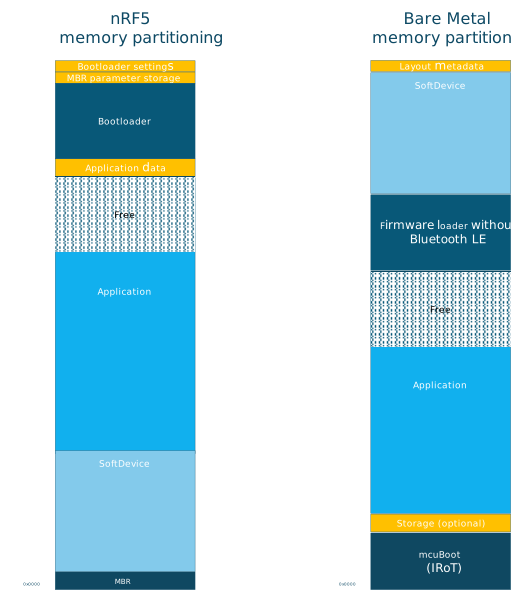
For more details about the two solutions, see nRF5 SDK DFU memory layout and Bare Metal Memory Partitioning for DFU.
Like the nRF5 SDK, the Bare Metal also supports single-bank DFU updates, as well as updates to the SoftDevice and the firmware loader.
Bootloader Changes
In the nRF5 SDK, the boot process involved two main components: the Master Boot Record (MBR), delivered with the SoftDevice, and the nRF5 Bootloader. The MBR served as a simple first-stage bootloader, responsible for jumping to either the application or the bootloader and supporting basic copy functionality for replacing the bootloader or the SoftDevice.
The nRF5 Bootloader was capable of downloading new firmware or combined SoftDevice and Bootloader images, which the MBR could then copy if needed.
In the Bare Metal solution, the bootloader has been replaced by the open-source MCUboot project, which serves as the first-stage (immutable) bootloader. MCUboot, also used in the nRF Connect SDK and other open-source projects, focuses primarily on image validation. It ensures that before an image is started, it has not been tampered with and is signed by the correct author.
Firmware loader changes
The firmware loader in Bare Metal is somewhat comparable to the nRF5 Bootloader in functionality. However, their roles differ slightly. While the nRF5 Bootloader managed both the download process and image validation, the firmware loader in Bare Metal is solely responsible for the download process. Image validation is handled by MCUboot.
The process for updating the SoftDevice and the firmware loader is similar in both the old and new solutions, requiring the reuse of application space as storage for the update. The key difference lies in how the update is moved from temporary storage to the correct partition. In the nRF5 SDK, this copy functionality was managed by the MBR, whereas in Bare Metal, it is handled by an installer image that is downloaded along with the new update.
Protocol Changes
The protocol used to upload new images to the device has also changed. The previous nRF5 SDK solution utilized a Nordic proprietary DFU protocol, while Bare Metal adopts the MCUmgr SMP protocol, which is also used in the nRF Connect SDK.
Tool Compatibility
The desktop and mobile tools available for the nRF Connect SDK are also compatible with the Bare Metal solution.
Drivers
For migration of nrfx drivers, see the nrfx 3.0 migration guide and the nrfx 4.0 migration guide. Bare Metal is using nrfx 4.0, although details from nrfx 3.0 migration guide might be required when migrating from nRF5.