

Developing with the nRF21540 EK
The nRF21540 Evaluation Kit (EK) is an RF Front-End Module (FEM) for Bluetooth® Low Energy, Bluetooth Mesh, 2.4 GHz proprietary, Thread, and Zigbee range extension. When combined with an nRF52 or nRF53 Series SoC, the nRF21540 RF FEM’s +21 dBm TX output power and 13 dB RX gain ensure a superior link budget for up to 16x range extension.
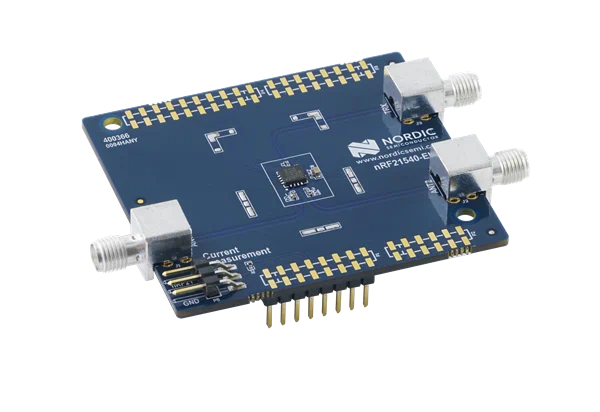
nRF21540 EK shield
You can learn more about the nRF21540 EK in the nRF21540 Front-End Module (including its pin layout) and nRF21540 EK User Guide hardware documentation.
Building and programming with nRF21540 EK
To build for the nRF21540 EK, build for the compatible nRF52 or nRF53 board target with the CMake SHIELD option set to nrf21540ek.
See Providing CMake options for instructions on how to provide CMake options.
For example, if you build for nRF52840 DK on the command line, you can use the following command:
west build -b nrf52840dk/nrf52840 -- -DSHIELD=nrf21540ek
If you use nRF Connect for VS Code, specify -DSHIELD=nrf21540ek in the Extra Cmake arguments field when setting up a build configuration.
Alternatively, add the shield in the project’s CMakeLists.txt file:
set(SHIELD nrf21540ek)
Building for a multicore board
When building for a board with an additional network core, like the nRF5340, add the -DSHIELD parameter to the command line:
west build -b nrf5340dk/nrf5340/cpuapp -- -DSHIELD=nrf21540ek
In this case, the sysbuild will pass the SHIELD=nrf21540ek variable to all images that are built by the command. The build system will automatically pick appropriate overlay and configuration files for images for each core. Please note that the files are different for each of the cores. For the application core, the overlay containing forwarding of the FEM pins to the network core will be used. For the network core, the overlay enabling nRF21540 FEM on the network core will be used. In case the application contains additional images for which the SHIELD variable should not be passed, you must manually pass the SHIELD variable to each relevant image build separately.
west build -b nrf5340dk/nrf5340/cpuapp -- -D<app_name_image>_SHIELD=nrf21540ek -Dipc_radio_SHIELD=nrf21540ek
In this case, the SHIELD=nrf21540ek will be passed to the build of the app_image_name image for the application core.
The build system will automatically pick an overlay file containing forwarding of the FEM pins to the network core.
The SHIELD=nrf21540ek variable will be passed to the build of the ipc_radio image for the network core.
The build system will automatically pick an overlay file enabling nRF21540 FEM on the network core.
In this command, the ipc_radio image is used as default and builds the network core image with support for the combination of 802.15.4 and Bluetooth.
The ipc_radio has been used since the build system migration to sysbuild.
See Migrating to sysbuild page.
Setting the correct sysbuild option enables support for 802.15.4 and Bluetooth IPC radio firmware.
ipc_radio represents all applications with support for the combination of both 802.15.4 and Bluetooth.
You can configure your application using the following sysbuild Kconfig options:
SB_CONFIG_NETCORE_IPC_RADIOfor applications having support for 802.15.4, but not for Bluetooth.SB_CONFIG_NETCORE_IPC_RADIO_BT_HCI_IPCfor applications having support for Bluetooth, but not for 802.15.4.SB_CONFIG_NETCORE_IPC_RADIOandSB_CONFIG_NETCORE_IPC_RADIO_BT_HCI_IPCfor multiprotocol applications having support for both 802.15.4 and Bluetooth.
Note
On nRF53 devices, SPIM0 and UARTE0 are mutually exclusive AHB bus masters on the network core as described in the Product Specification, Section 6.4.3.1, Table 22.
As a result, they cannot be used simultaneously.
For the SPI part of the nRF21540 interface to be functional, you must disable the UARTE0 node in the network core’s devicetree file.
&uart0 {
   status = "disabled";
};