

Managing access port protection
Several Nordic Semiconductor SoCs or SiPs supported in the nRF Connect SDK offer an implementation of the access port protection mechanism (AP-Protect). When enabled, this mechanism blocks the debugger from read and write access to all CPU registers and memory-mapped addresses. Accessing these registers and addresses again requires disabling the mechanism and erasing the flash.
Implementation overview
Nordic Semiconductor devices implement access port protection using the following mechanisms:
- AP-Protect controlled by hardware
Protection is controlled only by the
UICR.APPROTECTregister.Devices ship with AP-Protect disabled (debug access open).
Used on nRF9160 and older HW build codes of nRF52 Series devices.
- AP-Protect controlled by hardware and software
Protection is controlled by both the
UICR.APPROTECTregister and software. For the nRF Connect SDK, the software side is handled using Kconfig options.Devices ship with AP-Protect enabled (debug access blocked) and it re-enables on every hard reset.
Used on nRF53, nRF54L, nRF91x1, and newer HW build codes of nRF52 Series devices.
- Secure AP-Protect
An additional protection layer for SoCs or SiPs that support ARM TrustZone and different Processing environments in the nRF Connect SDK.
Protection is controlled by the
UICR.SECUREAPPROTECTregister and software (nRF9160 is an exception). For the nRF Connect SDK, the software side is handled using Kconfig options.Devices ship with Secure AP-Protect either enabled or disabled, depending on the device.
When enabled, it blocks access only to the Secure Processing Environment (SPE), while allowing non-secure debugging.
Works alongside standard AP-Protect.
Available on nRF5340, nRF54L, and nRF91 Series devices.
The following figure illustrates the relationship between the implementation types:
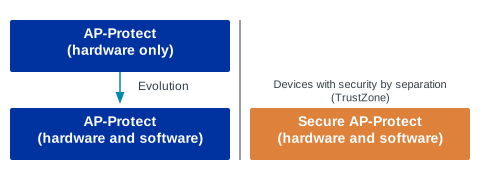
See the following sections for more information about the available implementation types.
Note
Some devices also support UICR.ERASEPROTECT, which prevents the ERASEALL command from executing and stops the device from being erased.
UICR.ERASEPROTECT is independent of access port protection.
If both AP-Protect and UICR.ERASEPROTECT are enabled, the device cannot be unlocked or recovered.
After ERASEALL, UICR.ERASEPROTECT is disabled by default; you cannot program it to a disabled state.
See the hardware documentation for your specific device for details about UICR.ERASEPROTECT availability and configuration.
Flow for AP-Protect controlled by hardware
This flow applies to the nRF9160 and older HW build codes of nRF52 Series devices.
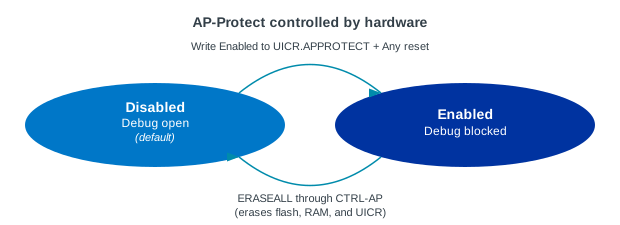
Enabling AP-Protect controlled by hardware
By default, AP-Protect is disabled.
To enable it, write Enabled to UICR.APPROTECT and reset the device.
![msc {
hscale = "1.5";
Debugger, "CTRL-AP", Device, NVM;
Debugger=>"CTRL-AP" [label="Connect"];
|||;
"CTRL-AP" .. Device [label="Access open (AP-Protect disabled by default)"];
...;
Debugger :: NVM [label="To enable AP-Protect:"];
|||;
Debugger=>NVM [label="Program UICR.APPROTECT to enabled state"];
Debugger=>"CTRL-AP" [label="Issue any reset to load the new AP-Protect configuration"];
"CTRL-AP"--Device [label="Access blocked (AP-Protect enabled)"];
}](../_images/mscgen-16b1c87f82f2f59a6027917124af56a2822ef727.png)
Disabling AP-Protect controlled by hardware
To disable AP-Protect, issue an ERASEALL command using CTRL-AP.
If UICR.ERASEPROTECT is enabled on your device, ERASEALL will not execute.
This command erases the flash, RAM, and UICR (including UICR.APPROTECT), and hard resets the device.
![msc {
hscale = "1.5";
Debugger, "CTRL-AP", Device, NVM;
Debugger=>"CTRL-AP" [label="Connect"];
"CTRL-AP"--Device [label="Access closed (AP-Protect enabled)"];
...;
Debugger :: NVM [label="To disable AP-Protect:"];
|||;
Debugger=>"CTRL-AP" [label="Issue ERASEALL"];
"CTRL-AP"..Device [label="Wait until ERASEALL command is executed"];
Device=>"CTRL-AP" [label="AP-Protect disabled"];
"CTRL-AP"..Debugger [label="Full debug access granted"];
}](../_images/mscgen-42cdde287fe1b6269b3715bb0dedda0975c4763f.png)
Flow for AP-Protect controlled by hardware and software
This flow applies to nRF53, nRF54L, nRF91x1, and newer HW build codes of nRF52 Series devices.
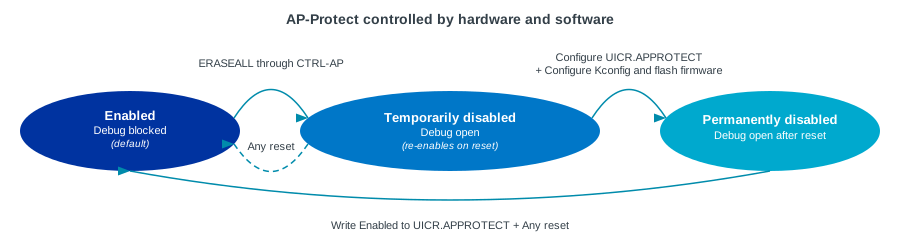
Disabling AP-Protect controlled by hardware and software
By default, AP-Protect is enabled.
To disable it on the hardware side, issue an ERASEALL command.
To disable it on the software side, make sure that UICR.APPROTECT is programmed to a disabled state and the firmware disables AP-Protect.
The disabling in software in the nRF Connect SDK is handled using Kconfig options.
![msc {
hscale = "1.5";
Debugger, "CTRL-AP", Device, Firmware, NVM;
Debugger=>"CTRL-AP" [label="Connect"];
"CTRL-AP"--Device [label="Access blocked (AP-Protect enabled by default)"];
...;
Debugger :: NVM [label="To disable AP-Protect:"];
|||;
Debugger=>"CTRL-AP" [label="Issue ERASEALL"];
"CTRL-AP"..Device [label="Wait until ERASEALL command is executed"];
Device=>"CTRL-AP" [label="AP-Protect disabled on the hardware side"];
"CTRL-AP"..Debugger [label="Full debug access granted, but any reset re-enables AP-Protect"];
...;
Debugger :: NVM [label="To keep AP-Protect permanently disabled (after any reset):"];
|||;
Debugger=>"CTRL-AP" [label="Issue ERASEALL"];
"CTRL-AP"..Device [label="Wait until ERASEALL command is executed"];
Debugger=>NVM [label="Configure UICR.APPROTECT to allow debugging (device-specific)"];
Debugger=>NVM [label="Program firmware that disables AP-Protect in software"];
Device note NVM [label="On every reset the device does the following:"];
NVM=>Device [label="Internal boot mechanism loads the AP-Protect configuration from UICR"];
NVM=>Device [label="Firmware disables AP-Protect in software"];
Device..Debugger [label="Debug access is open"];
}](../_images/mscgen-5eac488ef856cfb74edcdfdde12ef5320784f113.png)
Enabling AP-Protect controlled by hardware and software
To enable AP-Protect, write Enabled to UICR.APPROTECT and reset the device.
![msc {
hscale = "1.5";
Debugger, "CTRL-AP", Device, Firmware, NVM;
Debugger=>"CTRL-AP" [label="Connect"];
"CTRL-AP"..Device [label="Access open (AP-Protect disabled)"];
...;
Debugger :: NVM [label="To enable AP-Protect:"];
|||;
Debugger=>NVM [label="Configure UICR.APPROTECT to enabled state (device-specific)"];
Debugger=>"CTRL-AP" [label="Issue any type of reset"];
"CTRL-AP"--Device [label="Access blocked (AP-Protect enabled)"];
}](../_images/mscgen-3cb84d21d57d5d08594b3e9e7e6bc3dd8ea20843.png)
Flow for Secure AP-Protect
This flow applies to TrustZone-enabled devices (nRF5340, most nRF54L Series devices, nRF91 Series devices, with nRF9160 being an exception) when Secure AP-Protect is enabled. Such devices use Trusted Firmware-M (TF-M) and security by separation, where a Secure Processing Environment (SPE) is isolated from the Non-Secure Processing Environment (NSPE).
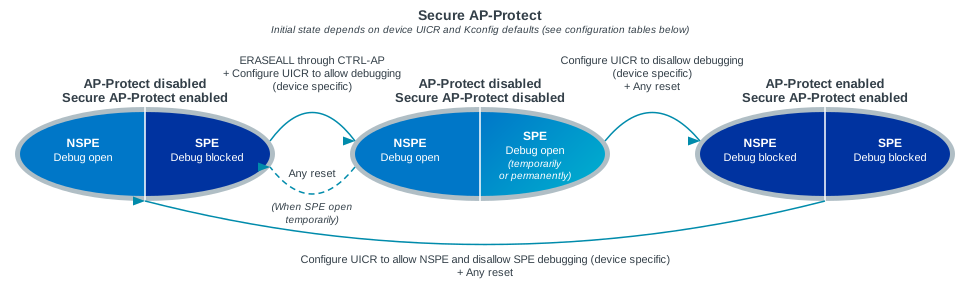
While AP-Protect blocks access to all CPU registers and memories, Secure AP-Protect limits the CPU access to the NSPE side only. This allows debugging of the NSPE, while the SPE debugging is blocked.
Secure AP-Protect works alongside standard AP-Protect:
AP-Protect blocks access to all CPU registers and memories. This means that you have to unlock AP-Protect to debug the NSPE code.
Secure AP-Protect limits access to the CPU to only NSPE access. This means that the CPU is entirely unavailable while it is running the code in the SPE, and only non-secure registers and address-mapped resources can be accessed.
By default, the Secure AP-Protect can be either enabled or disabled, depending on the device.
Disabling Secure AP-Protect
To disable it on the hardware side, issue an ERASEALL command.
To disable it on the software side, make sure that UICR.SECUREAPPROTECT is programmed to a disabled state and the firmware disables Secure AP-Protect.
The disabling in software in the nRF Connect SDK is handled using Kconfig options.
![msc {
hscale = "1.5";
Debugger, "CTRL-AP", Device, "NVM in NSPE", "NVM in SPE";
Debugger=>"CTRL-AP" [label="Connect"];
"CTRL-AP"--"NVM in SPE" [label="NVM access blocked (Secure AP-Protect enabled on the device, AP-Protect disabled)"];
"CTRL-AP".."NVM in NSPE" [label="NSPE access allowed"];
Debugger.."CTRL-AP" [label="Debug NSPE code"];
"CTRL-AP".."NVM in NSPE" [label="Read/write non-secure memory"];
...;
Debugger :: "NVM in SPE" [label="To disable Secure AP-Protect and unlock full SPE + NSPE debugging:"];
|||;
Debugger=>"CTRL-AP" [label="Issue ERASEALL"];
"CTRL-AP"..Device [label="Wait until ERASEALL command is executed"];
Debugger=>"NVM in SPE" [label="Configure UICR.SECUREAPPROTECT and UICR.APPROTECT to allow debugging (device-specific)"];
Debugger=>"CTRL-AP" [label="Issue any type of reset"];
Device..Debugger [label="Full SPE + NSPE debug access, but any reset re-enables Secure AP-Protect"];
...;
Debugger :: "NVM in SPE" [label="To keep Secure AP-Protect permanently disabled (after any reset):"];
|||;
Debugger=>"CTRL-AP" [label="Issue ERASEALL"];
"CTRL-AP"..Device [label="Wait until ERASEALL command is executed"];
Debugger=>"NVM in SPE" [label="Configure UICR.SECUREAPPROTECT and UICR.APPROTECT to allow debugging (device-specific)"];
Device note "NVM in SPE" [label="On every reset the device does the following:"];
"NVM in SPE"=>Device [label="Internal boot mechanism loads the Secure AP-Protect configuration from UICR"];
"NVM in SPE"=>Device [label="Firmware disables Secure AP-Protect and AP-Protect in software"];
Device..Debugger [label="Full SPE + NSPE debug access"];
}](../_images/mscgen-e81e4f7936c81858be7495d1a021848c26c8aafe.png)
Enabling Secure AP-Protect
When the Secure AP-Protect is disabled, write Enabled to UICR.SECUREAPPROTECT and reset the device to enable it.
![msc {
hscale = "1.5";
Debugger, "CTRL-AP", Device, "NVM in NSPE", "NVM in SPE";
Debugger=>"CTRL-AP" [label="Connect"];
"CTRL-AP".."NVM in SPE" [label="NVM access open (Secure AP-Protect disabled on the device, AP-Protect disabled)"];
"CTRL-AP".."NVM in SPE" [label="NSPE and SPE debug access allowed"];
Debugger.."CTRL-AP" [label="Debug NSPE and SPE code"];
"CTRL-AP".."NVM in SPE" [label="Read/write non-secure and secure memory"];
...;
Debugger :: "NVM in SPE" [label="To enable Secure AP-Protect and lock SPE debugging:"];
|||;
Debugger=>"NVM in SPE" [label="Configure UICR.SECUREAPPROTECT and UICR.APPROTECT to disallow debugging of SPE (device-specific)"];
Debugger=>"CTRL-AP" [label="Issue any type of reset"];
Device--Debugger [label="SPE debug access locked"];
Debugger.."CTRL-AP" [label="Debug NSPE code"];
"CTRL-AP".."NVM in NSPE" [label="Read/write non-secure memory"];
}](../_images/mscgen-0aab842be071c094506dde0755f9833e16069727.png)
Configuring AP-Protect per device
The following sections provide device-specific information about AP-Protect configuration.
nRF91 Series
AP-Protect (hardware only) |
AP-Protect (hardware and software) |
Secure AP-Protect |
Hardware documentation |
|---|---|---|---|
✔ |
✗ |
✔ |
Note
This device supports UICR.ERASEPROTECT, which might prevent the ERASEALL command from executing when AP-Protect is enabled.
See hardware documentation for more information.
On the nRF9160, AP-Protect and Secure AP-Protect are hardware-only; there are no nRF Connect SDK Kconfig options for this device. Both mechanisms are controlled solely by writing to the UICR using nRF Util. For more information, see device protection-set command page in the nRF Util documentation.
Enabling AP-Protect on the hardware side:
To enable AP-Protect on the hardware side, write Enabled to UICR.APPROTECT using the following nRF Util command:
nrfutil device protection-set All
This command enables the AP-Protect on the hardware side and hard resets the device.
Enabling Secure AP-Protect on the hardware side:
To enable Secure AP-Protect on the hardware side, use the following nRF Util command:
nrfutil device protection-set SecureRegions
This command enables the Secure AP-Protect on the hardware side and hard resets the device.
Keeping AP-Protect disabled after hard reset:
To keep AP-Protect disabled on the hardware side after hard reset, issue an ERASEALL command using the following nRF Util command:
nrfutil device recover
The device is automatically unlocked after erase. No changes in firmware are required because the nRF9160 does not use AP-Protect controlled by software.
Production programming:
For the devices that are in a production environment, it is highly recommended to lock the UICR.APPROTECT and UICR.SECUREAPPROTECT registers to prevent unauthorized access to the device.
If the access port protection is configured this way, it cannot be disabled without erasing the non-volatile memory.
Check also the following documentation pages for more information:
AP-Protect (hardware only) |
AP-Protect (hardware and software) |
Secure AP-Protect |
Hardware documentation |
|---|---|---|---|
✗ |
✔ |
✔ |
Note
The registers in the NRF_APPROTECT peripheral are not retained in SYSTEM ON IDLE mode. See Errata 36 in the nRF9161 hardware revision 1 errata for more information and workaround.
Note
This device supports UICR.ERASEPROTECT, which might prevent the ERASEALL command from executing when AP-Protect is enabled.
See hardware documentation for more information.
Configuring AP-Protect and Secure AP-Protect on the software side:
The following Kconfig options configure AP-Protect and Secure AP-Protect on the software side in the nRF Connect SDK.
Desired AP-Protect state |
Kconfig option |
Description |
|---|---|---|
Enabled |
With this Kconfig option selected, the MDK locks AP-Protect in
SystemInit() at every boot.It also prevents CPU from disabling AP-Protect in software.
UICR is not modified by this Kconfig option.
For multi-image boot, this option needs to be set in the first image (like a secure bootloader). Otherwise, the software AP-Protect will be opened for subsequent images.
You can set this option manually for each image or use sysbuild’s
SB_CONFIG_APPROTECT_LOCK Kconfig option to set it for all images at once. |
|
Authenticated |
With this Kconfig option selected, AP-Protect is left enabled and it is up to the user-space code to handle unlocking the device if needed.
Reopening the AHB-AP must be configured in firmware and it must be preceded by a handshake operation over UART, CTRL-AP Mailboxes, or some other communication channel.
You can use this Kconfig option for example to implement the authenticated debug and lock. See the SoC or SiP hardware documentation for more information.
For multi-image boot, this option needs to be set for all images. The default value is to open the device. This allows the debugger to be attached to the device.
You can set this option manually for each image or use sysbuild’s
SB_CONFIG_APPROTECT_USER_HANDLING Kconfig option to set it for all images at once. |
|
Disabled |
This option is selected by default in the nRF Connect SDK for this device.
With this Kconfig option selected, AP-Protect follows the UICR register. If UICR is open (
UICR.APPROTECT disabled), AP-Protect is disabled. |
Desired Secure AP-Protect state |
Kconfig option or method |
Description |
|---|---|---|
Enabled |
With this Kconfig option selected, the MDK locks Secure AP-Protect in
SystemInit() at every boot.For multi-image boot, this option needs to be set in the first image (like a secure bootloader). Otherwise, the software Secure AP-Protect will be opened for subsequent images.
You can set this option manually for each image or use sysbuild’s
SB_CONFIG_SECURE_APPROTECT_LOCK Kconfig option to set it for all images at once. |
|
Authenticated |
With this Kconfig option selected, Secure AP-Protect is left enabled and you can handle its state at a later stage.
You can use this option for example to implement the authenticated debug and lock. See the SoC or SiP hardware documentation for more information.
For multi-image boot, this option needs to be set for all images. The default value is to open the device. This allows the debugger to be attached to the device.
You can set this option manually for each image or use sysbuild’s
SB_CONFIG_SECURE_APPROTECT_USER_HANDLING Kconfig option to set it for all images at once. |
|
Disabled |
This option is selected by default in the nRF Connect SDK for this device.
With this Kconfig option selected, Secure AP-Protect follows the UICR register. If UICR is open (
UICR.SECUREAPPROTECT disabled), Secure AP-Protect is disabled. |
Enabling AP-Protect:
To enable AP-Protect, write Enabled to UICR.APPROTECT using the following nRF Util command:
nrfutil device protection-set All
This command enables AP-Protect on the hardware side by modifying the UICR register and hard resets the device.
Enabling Secure AP-Protect:
To enable Secure AP-Protect, write Enabled to UICR.SECUREAPPROTECT using the following nRF Util command:
nrfutil device protection-set SecureRegions
This command enables Secure AP-Protect on the hardware side and hard resets the device.
For more information, see device protection-set command page in the nRF Util documentation.
Note
With devices that use AP-Protect controlled by software, nRF Util cannot enable Secure AP-Protect on the hardware side if the Secure AP-Protect on the software side is already enabled. If you encounter errors with nRF Util, make sure that AP-Protect on the software side and Secure AP-Protect on the software side are disabled.
Disabling AP-Protect or Secure AP-Protect (or both):
To disable AP-Protect or Secure AP-Protect (or both), run the following nRF Util command:
nrfutil device recover
This command issues the ERASEALL command.
Make sure to wait for the command to be completed.
Keeping AP-Protect disabled after hard reset:
If you want to keep the AP-Protect disabled after hard reset, configure and program firmware that writes SwDisable to APPROTECT.DISABLE during boot.
In the nRF Connect SDK, CONFIG_NRF_APPROTECT_USE_UICR handles the unlock for AP-Protect on the software side.
Keeping Secure AP-Protect disabled after hard reset:
If you want to keep the Secure AP-Protect disabled after hard reset, configure and program firmware that writes SwDisable to SECUREAPPROTECT.DISABLE during boot.
In the nRF Connect SDK, CONFIG_NRF_SECURE_APPROTECT_USE_UICR handles the unlock for Secure AP-Protect on the software side.
Forcing AP-Protect to be disabled after hard reset:
To force AP-Protect to be disabled after hard reset, issue an ERASEALL command using the following nRF Util command:
nrfutil device recover
The device is automatically unlocked after erase.
Production programming:
For the devices that are in a production environment, it is highly recommended to lock the UICR.APPROTECT and UICR.SECUREAPPROTECT registers to prevent unauthorized access to the device.
If the access port protection is configured this way, it cannot be disabled without erasing the non-volatile memory.
Check also the following documentation pages for more information:
AP-Protect (hardware only) |
AP-Protect (hardware and software) |
Secure AP-Protect |
Hardware documentation |
|---|---|---|---|
✗ |
✔ |
✔ |
Note
The registers in the NRF_APPROTECT peripheral are not retained in SYSTEM ON IDLE mode. See Errata 36 in the nRF9161 hardware revision 1 errata for more information and workaround.
Configuring AP-Protect and Secure AP-Protect on the software side:
The following Kconfig options configure AP-Protect and Secure AP-Protect on the software side in the nRF Connect SDK.
nRF91x1 AP-Protect software configuration options in the nRF Connect SDK Desired AP-Protect state
Kconfig option
Description
Enabled
SystemInit()at every boot.It also prevents CPU from disabling AP-Protect in software.UICR is not modified by this Kconfig option.For multi-image boot, this option needs to be set in the first image (like a secure bootloader). Otherwise, the software AP-Protect will be opened for subsequent images.You can set this option manually for each image or use sysbuild’sSB_CONFIG_APPROTECT_LOCKKconfig option to set it for all images at once.Authenticated
SB_CONFIG_APPROTECT_USER_HANDLINGKconfig option to set it for all images at once.Disabled
UICR.APPROTECTdisabled), AP-Protect is disabled.
nRF91x1 Secure AP-Protect software configuration options in the nRF Connect SDK Desired Secure AP-Protect state
Kconfig option or method
Description
Enabled
SystemInit()at every boot.For multi-image boot, this option needs to be set in the first image (like a secure bootloader). Otherwise, the software Secure AP-Protect will be opened for subsequent images.You can set this option manually for each image or use sysbuild’sSB_CONFIG_SECURE_APPROTECT_LOCKKconfig option to set it for all images at once.Authenticated
SB_CONFIG_SECURE_APPROTECT_USER_HANDLINGKconfig option to set it for all images at once.Disabled
UICR.SECUREAPPROTECTdisabled), Secure AP-Protect is disabled.Enabling AP-Protect:
To enable AP-Protect, write
EnabledtoUICR.APPROTECTusing the following nRF Util command:nrfutil device protection-set AllThis command enables AP-Protect on the hardware side by modifying the UICR register and hard resets the device.
Enabling Secure AP-Protect:
To enable Secure AP-Protect, write
EnabledtoUICR.SECUREAPPROTECTusing the following nRF Util command:nrfutil device protection-set SecureRegionsThis command enables Secure AP-Protect on the hardware side and hard resets the device.
For more information, see device protection-set command page in the nRF Util documentation.
Note
With devices that use AP-Protect controlled by software, nRF Util cannot enable Secure AP-Protect on the hardware side if the Secure AP-Protect on the software side is already enabled. If you encounter errors with nRF Util, make sure that AP-Protect on the software side and Secure AP-Protect on the software side are disabled.
Disabling AP-Protect or Secure AP-Protect (or both):
To disable AP-Protect or Secure AP-Protect (or both), run the following nRF Util command:
nrfutil device recoverThis command issues the
ERASEALLcommand. Make sure to wait for the command to be completed.Keeping AP-Protect disabled after hard reset:
If you want to keep the AP-Protect disabled after hard reset, configure and program firmware that writes
SwDisabletoAPPROTECT.DISABLEduring boot. In the nRF Connect SDK,CONFIG_NRF_APPROTECT_USE_UICRhandles the unlock for AP-Protect on the software side.Keeping Secure AP-Protect disabled after hard reset:
If you want to keep the Secure AP-Protect disabled after hard reset, configure and program firmware that writes
SwDisabletoSECUREAPPROTECT.DISABLEduring boot. In the nRF Connect SDK,CONFIG_NRF_SECURE_APPROTECT_USE_UICRhandles the unlock for Secure AP-Protect on the software side.Forcing AP-Protect to be disabled after hard reset:
To force AP-Protect to be disabled after hard reset, issue an
ERASEALLcommand using the following nRF Util command:nrfutil device recoverThe device is automatically unlocked after erase.
Production programming:
For the devices that are in a production environment, it is highly recommended to lock the
UICR.APPROTECTandUICR.SECUREAPPROTECTregisters to prevent unauthorized access to the device. If the access port protection is configured this way, it cannot be disabled without erasing the non-volatile memory.Check also the following documentation pages for more information:
AP-Protect (hardware only) |
AP-Protect (hardware and software) |
Secure AP-Protect |
Hardware documentation |
|---|---|---|---|
✗ |
✔ |
✔ |
Documentation not yet available |
Note
The registers in the NRF_APPROTECT peripheral are not retained in SYSTEM ON IDLE mode. See Errata 36 in the nRF9161 hardware revision 1 errata for more information and workaround.
Configuring AP-Protect and Secure AP-Protect on the software side:
The following Kconfig options configure AP-Protect and Secure AP-Protect on the software side in the nRF Connect SDK.
nRF91x1 AP-Protect software configuration options in the nRF Connect SDK Desired AP-Protect state
Kconfig option
Description
Enabled
SystemInit()at every boot.It also prevents CPU from disabling AP-Protect in software.UICR is not modified by this Kconfig option.For multi-image boot, this option needs to be set in the first image (like a secure bootloader). Otherwise, the software AP-Protect will be opened for subsequent images.You can set this option manually for each image or use sysbuild’sSB_CONFIG_APPROTECT_LOCKKconfig option to set it for all images at once.Authenticated
SB_CONFIG_APPROTECT_USER_HANDLINGKconfig option to set it for all images at once.Disabled
UICR.APPROTECTdisabled), AP-Protect is disabled.
nRF91x1 Secure AP-Protect software configuration options in the nRF Connect SDK Desired Secure AP-Protect state
Kconfig option or method
Description
Enabled
SystemInit()at every boot.For multi-image boot, this option needs to be set in the first image (like a secure bootloader). Otherwise, the software Secure AP-Protect will be opened for subsequent images.You can set this option manually for each image or use sysbuild’sSB_CONFIG_SECURE_APPROTECT_LOCKKconfig option to set it for all images at once.Authenticated
SB_CONFIG_SECURE_APPROTECT_USER_HANDLINGKconfig option to set it for all images at once.Disabled
UICR.SECUREAPPROTECTdisabled), Secure AP-Protect is disabled.Enabling AP-Protect:
To enable AP-Protect, write
EnabledtoUICR.APPROTECTusing the following nRF Util command:nrfutil device protection-set AllThis command enables AP-Protect on the hardware side by modifying the UICR register and hard resets the device.
Enabling Secure AP-Protect:
To enable Secure AP-Protect, write
EnabledtoUICR.SECUREAPPROTECTusing the following nRF Util command:nrfutil device protection-set SecureRegionsThis command enables Secure AP-Protect on the hardware side and hard resets the device.
For more information, see device protection-set command page in the nRF Util documentation.
Note
With devices that use AP-Protect controlled by software, nRF Util cannot enable Secure AP-Protect on the hardware side if the Secure AP-Protect on the software side is already enabled. If you encounter errors with nRF Util, make sure that AP-Protect on the software side and Secure AP-Protect on the software side are disabled.
Disabling AP-Protect or Secure AP-Protect (or both):
To disable AP-Protect or Secure AP-Protect (or both), run the following nRF Util command:
nrfutil device recoverThis command issues the
ERASEALLcommand. Make sure to wait for the command to be completed.Keeping AP-Protect disabled after hard reset:
If you want to keep the AP-Protect disabled after hard reset, configure and program firmware that writes
SwDisabletoAPPROTECT.DISABLEduring boot. In the nRF Connect SDK,CONFIG_NRF_APPROTECT_USE_UICRhandles the unlock for AP-Protect on the software side.Keeping Secure AP-Protect disabled after hard reset:
If you want to keep the Secure AP-Protect disabled after hard reset, configure and program firmware that writes
SwDisabletoSECUREAPPROTECT.DISABLEduring boot. In the nRF Connect SDK,CONFIG_NRF_SECURE_APPROTECT_USE_UICRhandles the unlock for Secure AP-Protect on the software side.Forcing AP-Protect to be disabled after hard reset:
To force AP-Protect to be disabled after hard reset, issue an
ERASEALLcommand using the following nRF Util command:nrfutil device recoverThe device is automatically unlocked after erase.
Production programming:
For the devices that are in a production environment, it is highly recommended to lock the
UICR.APPROTECTandUICR.SECUREAPPROTECTregisters to prevent unauthorized access to the device. If the access port protection is configured this way, it cannot be disabled without erasing the non-volatile memory.Check also the following documentation pages for more information:
nRF54L Series
AP-Protect (hardware only) |
AP-Protect (hardware and software) |
Secure AP-Protect |
Hardware documentation |
|---|---|---|---|
✗ |
✔ |
✔ |
Note
This device supports UICR.ERASEPROTECT, which might prevent the ERASEALL command from executing when AP-Protect is enabled.
See hardware documentation for more information.
Configuring AP-Protect and Secure AP-Protect on the software side:
The following Kconfig options configure AP-Protect and Secure AP-Protect on the software side in the nRF Connect SDK:
Desired AP-Protect state |
Kconfig option |
Description |
|---|---|---|
Enabled |
With this Kconfig option selected, the MDK locks AP-Protect in
SystemInit() at every boot.It also prevents CPU from disabling AP-Protect in software.
UICR is not modified by this Kconfig option.
For multi-image boot, this option needs to be set in the first image (like a secure bootloader). Otherwise, the software AP-Protect will be opened for subsequent images.
You can set this option manually for each image or use sysbuild’s
SB_CONFIG_APPROTECT_LOCK Kconfig option to set it for all images at once. |
|
Authenticated |
With this Kconfig option selected, AP-Protect is left enabled and it is up to the user-space code to handle unlocking the device if needed.
Reopening the AHB-AP must be configured in firmware and it must be preceded by a handshake operation over UART, CTRL-AP Mailboxes, or some other communication channel.
You can use this Kconfig option for example to implement the authenticated debug and lock. See the SoC or SiP hardware documentation for more information.
For multi-image boot, this option needs to be set for all images. The default value is to open the device. This allows the debugger to be attached to the device.
You can set this option manually for each image or use sysbuild’s
SB_CONFIG_APPROTECT_USER_HANDLING Kconfig option to set it for all images at once. |
|
Disabled |
This option is selected by default in the nRF Connect SDK for this device.
With this Kconfig option selected, the AP-Protect mechanism is disabled and you can start debugging the firmware.
|
Desired Secure AP-Protect state |
Kconfig option |
Description |
|---|---|---|
Enabled |
With this Kconfig option selected, the MDK locks Secure AP-Protect in
SystemInit() at every boot.For multi-image boot, this option needs to be set in the first image (like a secure bootloader). Otherwise, the software Secure AP-Protect will be opened for subsequent images.
You can set this option manually for each image or use sysbuild’s
SB_CONFIG_SECURE_APPROTECT_LOCK Kconfig option to set it for all images at once. |
|
Authenticated |
With this Kconfig option selected, Secure AP-Protect is left enabled and it is up to the user-space code to handle unlocking the device if needed.
You can use this option for example to implement the authenticated debug and lock. See the SoC or SiP hardware documentation for more information.
For multi-image boot, this option needs to be set for all images. The default value is to open the device. This allows the debugger to be attached to the device.
You can set this option manually for each image or use sysbuild’s
SB_CONFIG_SECURE_APPROTECT_USER_HANDLING Kconfig option to set it for all images at once. |
|
Disabled |
This option is selected by default in the nRF Connect SDK for this device.
With this Kconfig option selected, the Secure AP-Protect mechanism is disabled and you can start debugging the SPE.
|
Enabling AP-Protect on the hardware side:
To enable AP-Protect on the hardware side, write Enabled to UICR.APPROTECT using the following nRF Util command:
nrfutil device protection-set All
This set of commands enables AP-Protect on the hardware side and hard resets the device.
Enabling Secure AP-Protect on the hardware side:
To enable Secure AP-Protect on the hardware side, write Enabled to UICR.SECUREAPPROTECT using the following nRF Util command:
nrfutil device protection-set SecureRegions
This command enables Secure AP-Protect on the hardware side and hard resets the device.
For more information, see device protection-set command page in the nRF Util documentation.
Note
With devices that use software AP-Protect, nRF Util cannot enable hardware Secure AP-Protect if the software Secure AP-Protect is already enabled. If you encounter errors with nRF Util, make sure that software AP-Protect and software Secure AP-Protect are disabled.
Disabling AP-Protect or Secure AP-Protect (or both):
To disable AP-Protect or Secure AP-Protect (or both), run the following nRF Util command:
nrfutil device recover
This command issues the ERASEALL command.
Make sure to wait for the command to be completed.
On this device, this command also programs a piece of firmware that corresponds to selecting CONFIG_NRF_APPROTECT_DISABLE and CONFIG_NRF_SECURE_APPROTECT_DISABLE.
Keeping AP-Protect disabled after hard reset:
If you want to keep the AP-Protect disabled after hard reset, you must flash firmware that opens the debugger signals in Tamper Controller.
In the nRF Connect SDK, CONFIG_NRF_APPROTECT_DISABLE (enabled by default) handles the software unlock for AP-Protect.
Keeping Secure AP-Protect disabled after hard reset:
If you want to keep the Secure AP-Protect disabled after hard reset, you must flash firmware that opens the debugger signals in Tamper Controller.
In the nRF Connect SDK, CONFIG_NRF_SECURE_APPROTECT_DISABLE (enabled by default) handles the software unlock for Secure AP-Protect.
Forcing AP-Protect to be disabled after hard reset:
To force AP-Protect to be disabled after hard reset, issue an ERASEALL command using the following nRF Util command:
nrfutil device recover
The device is automatically unlocked after erase.
Production programming:
For the devices that are in a production environment, it is highly recommended to lock the UICR.APPROTECT and UICR.SECUREAPPROTECT registers to prevent unauthorized access to the device. If the access port protection is configured this way, it cannot be disabled without erasing the non-volatile memory.
Check also the following documentation pages for more information:
AP-Protect (hardware only) |
AP-Protect (hardware and software) |
Secure AP-Protect |
Hardware documentation |
|---|---|---|---|
✗ |
✔ |
✔ |
Configuring AP-Protect and Secure AP-Protect on the software side:
The following Kconfig options configure AP-Protect and Secure AP-Protect on the software side in the nRF Connect SDK:
AP-Protect software configuration options in the nRF Connect SDK Desired AP-Protect state
Kconfig option
Description
Enabled
SystemInit()at every boot.It also prevents CPU from disabling AP-Protect in software.UICR is not modified by this Kconfig option.For multi-image boot, this option needs to be set in the first image (like a secure bootloader). Otherwise, the software AP-Protect will be opened for subsequent images.You can set this option manually for each image or use sysbuild’sSB_CONFIG_APPROTECT_LOCKKconfig option to set it for all images at once.Authenticated
SB_CONFIG_APPROTECT_USER_HANDLINGKconfig option to set it for all images at once.Disabled
Secure AP-Protect software configuration options in the nRF Connect SDK Desired Secure AP-Protect state
Kconfig option
Description
Enabled
SystemInit()at every boot.For multi-image boot, this option needs to be set in the first image (like a secure bootloader). Otherwise, the software Secure AP-Protect will be opened for subsequent images.You can set this option manually for each image or use sysbuild’sSB_CONFIG_SECURE_APPROTECT_LOCKKconfig option to set it for all images at once.Authenticated
SB_CONFIG_SECURE_APPROTECT_USER_HANDLINGKconfig option to set it for all images at once.Disabled
Enabling AP-Protect on the hardware side:
To enable AP-Protect on the hardware side, write
EnabledtoUICR.APPROTECTusing the following nRF Util command:nrfutil device protection-set AllThis set of commands enables AP-Protect on the hardware side and hard resets the device.
Enabling Secure AP-Protect on the hardware side:
To enable Secure AP-Protect on the hardware side, write
EnabledtoUICR.SECUREAPPROTECTusing the following nRF Util command:nrfutil device protection-set SecureRegionsThis command enables Secure AP-Protect on the hardware side and hard resets the device.
For more information, see device protection-set command page in the nRF Util documentation.
Note
With devices that use software AP-Protect, nRF Util cannot enable hardware Secure AP-Protect if the software Secure AP-Protect is already enabled. If you encounter errors with nRF Util, make sure that software AP-Protect and software Secure AP-Protect are disabled.
Disabling AP-Protect or Secure AP-Protect (or both):
To disable AP-Protect or Secure AP-Protect (or both), run the following nRF Util command:
nrfutil device recoverThis command issues the
ERASEALLcommand. Make sure to wait for the command to be completed. On this device, this command also programs a piece of firmware that corresponds to selectingCONFIG_NRF_APPROTECT_DISABLEandCONFIG_NRF_SECURE_APPROTECT_DISABLE.Keeping AP-Protect disabled after hard reset:
If you want to keep the AP-Protect disabled after hard reset, you must flash firmware that opens the debugger signals in Tamper Controller. In the nRF Connect SDK,
CONFIG_NRF_APPROTECT_DISABLE(enabled by default) handles the software unlock for AP-Protect.Keeping Secure AP-Protect disabled after hard reset:
If you want to keep the Secure AP-Protect disabled after hard reset, you must flash firmware that opens the debugger signals in Tamper Controller. In the nRF Connect SDK,
CONFIG_NRF_SECURE_APPROTECT_DISABLE(enabled by default) handles the software unlock for Secure AP-Protect.Forcing AP-Protect to be disabled after hard reset:
To force AP-Protect to be disabled after hard reset, issue an
ERASEALLcommand using the following nRF Util command:nrfutil device recoverThe device is automatically unlocked after erase.
Production programming:
For the devices that are in a production environment, it is highly recommended to lock the
UICR.APPROTECTandUICR.SECUREAPPROTECTregisters to prevent unauthorized access to the device. If the access port protection is configured this way, it cannot be disabled without erasing the non-volatile memory.Check also the following documentation pages for more information:
AP-Protect (hardware only) |
AP-Protect (hardware and software) |
Secure AP-Protect |
Hardware documentation |
|---|---|---|---|
✗ |
✔ |
✔ |
Configuring AP-Protect and Secure AP-Protect on the software side:
The following Kconfig options configure AP-Protect and Secure AP-Protect on the software side in the nRF Connect SDK:
AP-Protect software configuration options in the nRF Connect SDK Desired AP-Protect state
Kconfig option
Description
Enabled
SystemInit()at every boot.It also prevents CPU from disabling AP-Protect in software.UICR is not modified by this Kconfig option.For multi-image boot, this option needs to be set in the first image (like a secure bootloader). Otherwise, the software AP-Protect will be opened for subsequent images.You can set this option manually for each image or use sysbuild’sSB_CONFIG_APPROTECT_LOCKKconfig option to set it for all images at once.Authenticated
SB_CONFIG_APPROTECT_USER_HANDLINGKconfig option to set it for all images at once.Disabled
Secure AP-Protect software configuration options in the nRF Connect SDK Desired Secure AP-Protect state
Kconfig option
Description
Enabled
SystemInit()at every boot.For multi-image boot, this option needs to be set in the first image (like a secure bootloader). Otherwise, the software Secure AP-Protect will be opened for subsequent images.You can set this option manually for each image or use sysbuild’sSB_CONFIG_SECURE_APPROTECT_LOCKKconfig option to set it for all images at once.Authenticated
SB_CONFIG_SECURE_APPROTECT_USER_HANDLINGKconfig option to set it for all images at once.Disabled
Enabling AP-Protect on the hardware side:
To enable AP-Protect on the hardware side, write
EnabledtoUICR.APPROTECTusing the following nRF Util command:nrfutil device protection-set AllThis set of commands enables AP-Protect on the hardware side and hard resets the device.
Enabling Secure AP-Protect on the hardware side:
To enable Secure AP-Protect on the hardware side, write
EnabledtoUICR.SECUREAPPROTECTusing the following nRF Util command:nrfutil device protection-set SecureRegionsThis command enables Secure AP-Protect on the hardware side and hard resets the device.
For more information, see device protection-set command page in the nRF Util documentation.
Note
With devices that use software AP-Protect, nRF Util cannot enable hardware Secure AP-Protect if the software Secure AP-Protect is already enabled. If you encounter errors with nRF Util, make sure that software AP-Protect and software Secure AP-Protect are disabled.
Disabling AP-Protect or Secure AP-Protect (or both):
To disable AP-Protect or Secure AP-Protect (or both), run the following nRF Util command:
nrfutil device recoverThis command issues the
ERASEALLcommand. Make sure to wait for the command to be completed. On this device, this command also programs a piece of firmware that corresponds to selectingCONFIG_NRF_APPROTECT_DISABLEandCONFIG_NRF_SECURE_APPROTECT_DISABLE.Keeping AP-Protect disabled after hard reset:
If you want to keep the AP-Protect disabled after hard reset, you must flash firmware that opens the debugger signals in Tamper Controller. In the nRF Connect SDK,
CONFIG_NRF_APPROTECT_DISABLE(enabled by default) handles the software unlock for AP-Protect.Keeping Secure AP-Protect disabled after hard reset:
If you want to keep the Secure AP-Protect disabled after hard reset, you must flash firmware that opens the debugger signals in Tamper Controller. In the nRF Connect SDK,
CONFIG_NRF_SECURE_APPROTECT_DISABLE(enabled by default) handles the software unlock for Secure AP-Protect.Forcing AP-Protect to be disabled after hard reset:
To force AP-Protect to be disabled after hard reset, issue an
ERASEALLcommand using the following nRF Util command:nrfutil device recoverThe device is automatically unlocked after erase.
Production programming:
For the devices that are in a production environment, it is highly recommended to lock the
UICR.APPROTECTandUICR.SECUREAPPROTECTregisters to prevent unauthorized access to the device. If the access port protection is configured this way, it cannot be disabled without erasing the non-volatile memory.Check also the following documentation pages for more information:
AP-Protect (hardware only) |
AP-Protect (hardware and software) |
Secure AP-Protect |
Hardware documentation |
|---|---|---|---|
✗ |
✔ |
✔ |
Configuring AP-Protect and Secure AP-Protect on the software side:
The following Kconfig options configure AP-Protect and Secure AP-Protect on the software side in the nRF Connect SDK:
AP-Protect software configuration options in the nRF Connect SDK Desired AP-Protect state
Kconfig option
Description
Enabled
SystemInit()at every boot.It also prevents CPU from disabling AP-Protect in software.UICR is not modified by this Kconfig option.For multi-image boot, this option needs to be set in the first image (like a secure bootloader). Otherwise, the software AP-Protect will be opened for subsequent images.You can set this option manually for each image or use sysbuild’sSB_CONFIG_APPROTECT_LOCKKconfig option to set it for all images at once.Authenticated
SB_CONFIG_APPROTECT_USER_HANDLINGKconfig option to set it for all images at once.Disabled
Secure AP-Protect software configuration options in the nRF Connect SDK Desired Secure AP-Protect state
Kconfig option
Description
Enabled
SystemInit()at every boot.For multi-image boot, this option needs to be set in the first image (like a secure bootloader). Otherwise, the software Secure AP-Protect will be opened for subsequent images.You can set this option manually for each image or use sysbuild’sSB_CONFIG_SECURE_APPROTECT_LOCKKconfig option to set it for all images at once.Authenticated
SB_CONFIG_SECURE_APPROTECT_USER_HANDLINGKconfig option to set it for all images at once.Disabled
Enabling AP-Protect on the hardware side:
To enable AP-Protect on the hardware side, write
EnabledtoUICR.APPROTECTusing the following nRF Util command:nrfutil device protection-set AllThis set of commands enables AP-Protect on the hardware side and hard resets the device.
Enabling Secure AP-Protect on the hardware side:
To enable Secure AP-Protect on the hardware side, write
EnabledtoUICR.SECUREAPPROTECTusing the following nRF Util command:nrfutil device protection-set SecureRegionsThis command enables Secure AP-Protect on the hardware side and hard resets the device.
For more information, see device protection-set command page in the nRF Util documentation.
Note
With devices that use software AP-Protect, nRF Util cannot enable hardware Secure AP-Protect if the software Secure AP-Protect is already enabled. If you encounter errors with nRF Util, make sure that software AP-Protect and software Secure AP-Protect are disabled.
Disabling AP-Protect or Secure AP-Protect (or both):
To disable AP-Protect or Secure AP-Protect (or both), run the following nRF Util command:
nrfutil device recoverThis command issues the
ERASEALLcommand. Make sure to wait for the command to be completed. On this device, this command also programs a piece of firmware that corresponds to selectingCONFIG_NRF_APPROTECT_DISABLEandCONFIG_NRF_SECURE_APPROTECT_DISABLE.Keeping AP-Protect disabled after hard reset:
If you want to keep the AP-Protect disabled after hard reset, you must flash firmware that opens the debugger signals in Tamper Controller. In the nRF Connect SDK,
CONFIG_NRF_APPROTECT_DISABLE(enabled by default) handles the software unlock for AP-Protect.Keeping Secure AP-Protect disabled after hard reset:
If you want to keep the Secure AP-Protect disabled after hard reset, you must flash firmware that opens the debugger signals in Tamper Controller. In the nRF Connect SDK,
CONFIG_NRF_SECURE_APPROTECT_DISABLE(enabled by default) handles the software unlock for Secure AP-Protect.Forcing AP-Protect to be disabled after hard reset:
To force AP-Protect to be disabled after hard reset, issue an
ERASEALLcommand using the following nRF Util command:nrfutil device recoverThe device is automatically unlocked after erase.
Production programming:
For the devices that are in a production environment, it is highly recommended to lock the
UICR.APPROTECTandUICR.SECUREAPPROTECTregisters to prevent unauthorized access to the device. If the access port protection is configured this way, it cannot be disabled without erasing the non-volatile memory.Check also the following documentation pages for more information:
AP-Protect (hardware only) |
AP-Protect (hardware and software) |
Secure AP-Protect |
Hardware documentation |
|---|---|---|---|
✗ |
✔ |
✔ |
Configuring AP-Protect and Secure AP-Protect on the software side:
The following Kconfig options configure AP-Protect and Secure AP-Protect on the software side in the nRF Connect SDK:
AP-Protect software configuration options in the nRF Connect SDK Desired AP-Protect state
Kconfig option
Description
Enabled
SystemInit()at every boot.It also prevents CPU from disabling AP-Protect in software.UICR is not modified by this Kconfig option.For multi-image boot, this option needs to be set in the first image (like a secure bootloader). Otherwise, the software AP-Protect will be opened for subsequent images.You can set this option manually for each image or use sysbuild’sSB_CONFIG_APPROTECT_LOCKKconfig option to set it for all images at once.Authenticated
SB_CONFIG_APPROTECT_USER_HANDLINGKconfig option to set it for all images at once.Disabled
Secure AP-Protect software configuration options in the nRF Connect SDK Desired Secure AP-Protect state
Kconfig option
Description
Enabled
SystemInit()at every boot.For multi-image boot, this option needs to be set in the first image (like a secure bootloader). Otherwise, the software Secure AP-Protect will be opened for subsequent images.You can set this option manually for each image or use sysbuild’sSB_CONFIG_SECURE_APPROTECT_LOCKKconfig option to set it for all images at once.Authenticated
SB_CONFIG_SECURE_APPROTECT_USER_HANDLINGKconfig option to set it for all images at once.Disabled
Enabling AP-Protect on the hardware side:
To enable AP-Protect on the hardware side, write
EnabledtoUICR.APPROTECTusing the following nRF Util command:nrfutil device protection-set AllThis set of commands enables AP-Protect on the hardware side and hard resets the device.
Enabling Secure AP-Protect on the hardware side:
To enable Secure AP-Protect on the hardware side, write
EnabledtoUICR.SECUREAPPROTECTusing the following nRF Util command:nrfutil device protection-set SecureRegionsThis command enables Secure AP-Protect on the hardware side and hard resets the device.
For more information, see device protection-set command page in the nRF Util documentation.
Note
With devices that use software AP-Protect, nRF Util cannot enable hardware Secure AP-Protect if the software Secure AP-Protect is already enabled. If you encounter errors with nRF Util, make sure that software AP-Protect and software Secure AP-Protect are disabled.
Disabling AP-Protect or Secure AP-Protect (or both):
To disable AP-Protect or Secure AP-Protect (or both), run the following nRF Util command:
nrfutil device recoverThis command issues the
ERASEALLcommand. Make sure to wait for the command to be completed. On this device, this command also programs a piece of firmware that corresponds to selectingCONFIG_NRF_APPROTECT_DISABLEandCONFIG_NRF_SECURE_APPROTECT_DISABLE.Keeping AP-Protect disabled after hard reset:
If you want to keep the AP-Protect disabled after hard reset, you must flash firmware that opens the debugger signals in Tamper Controller. In the nRF Connect SDK,
CONFIG_NRF_APPROTECT_DISABLE(enabled by default) handles the software unlock for AP-Protect.Keeping Secure AP-Protect disabled after hard reset:
If you want to keep the Secure AP-Protect disabled after hard reset, you must flash firmware that opens the debugger signals in Tamper Controller. In the nRF Connect SDK,
CONFIG_NRF_SECURE_APPROTECT_DISABLE(enabled by default) handles the software unlock for Secure AP-Protect.Forcing AP-Protect to be disabled after hard reset:
To force AP-Protect to be disabled after hard reset, issue an
ERASEALLcommand using the following nRF Util command:nrfutil device recoverThe device is automatically unlocked after erase.
Production programming:
For the devices that are in a production environment, it is highly recommended to lock the
UICR.APPROTECTandUICR.SECUREAPPROTECTregisters to prevent unauthorized access to the device. If the access port protection is configured this way, it cannot be disabled without erasing the non-volatile memory.Check also the following documentation pages for more information:
AP-Protect (hardware only) |
AP-Protect (hardware and software) |
Secure AP-Protect |
Hardware documentation |
|---|---|---|---|
✗ |
✔ |
✔ |
Configuring AP-Protect and Secure AP-Protect on the software side:
The following Kconfig options configure AP-Protect and Secure AP-Protect on the software side in the nRF Connect SDK:
AP-Protect software configuration options in the nRF Connect SDK Desired AP-Protect state
Kconfig option
Description
Enabled
SystemInit()at every boot.It also prevents CPU from disabling AP-Protect in software.UICR is not modified by this Kconfig option.For multi-image boot, this option needs to be set in the first image (like a secure bootloader). Otherwise, the software AP-Protect will be opened for subsequent images.You can set this option manually for each image or use sysbuild’sSB_CONFIG_APPROTECT_LOCKKconfig option to set it for all images at once.Authenticated
SB_CONFIG_APPROTECT_USER_HANDLINGKconfig option to set it for all images at once.Disabled
Secure AP-Protect software configuration options in the nRF Connect SDK Desired Secure AP-Protect state
Kconfig option
Description
Enabled
SystemInit()at every boot.For multi-image boot, this option needs to be set in the first image (like a secure bootloader). Otherwise, the software Secure AP-Protect will be opened for subsequent images.You can set this option manually for each image or use sysbuild’sSB_CONFIG_SECURE_APPROTECT_LOCKKconfig option to set it for all images at once.Authenticated
SB_CONFIG_SECURE_APPROTECT_USER_HANDLINGKconfig option to set it for all images at once.Disabled
Enabling AP-Protect on the hardware side:
To enable AP-Protect on the hardware side, write
EnabledtoUICR.APPROTECTusing the following nRF Util command:nrfutil device protection-set AllThis set of commands enables AP-Protect on the hardware side and hard resets the device.
Enabling Secure AP-Protect on the hardware side:
To enable Secure AP-Protect on the hardware side, write
EnabledtoUICR.SECUREAPPROTECTusing the following nRF Util command:nrfutil device protection-set SecureRegionsThis command enables Secure AP-Protect on the hardware side and hard resets the device.
For more information, see device protection-set command page in the nRF Util documentation.
Note
With devices that use software AP-Protect, nRF Util cannot enable hardware Secure AP-Protect if the software Secure AP-Protect is already enabled. If you encounter errors with nRF Util, make sure that software AP-Protect and software Secure AP-Protect are disabled.
Disabling AP-Protect or Secure AP-Protect (or both):
To disable AP-Protect or Secure AP-Protect (or both), run the following nRF Util command:
nrfutil device recoverThis command issues the
ERASEALLcommand. Make sure to wait for the command to be completed. On this device, this command also programs a piece of firmware that corresponds to selectingCONFIG_NRF_APPROTECT_DISABLEandCONFIG_NRF_SECURE_APPROTECT_DISABLE.Keeping AP-Protect disabled after hard reset:
If you want to keep the AP-Protect disabled after hard reset, you must flash firmware that opens the debugger signals in Tamper Controller. In the nRF Connect SDK,
CONFIG_NRF_APPROTECT_DISABLE(enabled by default) handles the software unlock for AP-Protect.Keeping Secure AP-Protect disabled after hard reset:
If you want to keep the Secure AP-Protect disabled after hard reset, you must flash firmware that opens the debugger signals in Tamper Controller. In the nRF Connect SDK,
CONFIG_NRF_SECURE_APPROTECT_DISABLE(enabled by default) handles the software unlock for Secure AP-Protect.Forcing AP-Protect to be disabled after hard reset:
To force AP-Protect to be disabled after hard reset, issue an
ERASEALLcommand using the following nRF Util command:nrfutil device recoverThe device is automatically unlocked after erase.
Production programming:
For the devices that are in a production environment, it is highly recommended to lock the
UICR.APPROTECTandUICR.SECUREAPPROTECTregisters to prevent unauthorized access to the device. If the access port protection is configured this way, it cannot be disabled without erasing the non-volatile memory.Check also the following documentation pages for more information:
AP-Protect (hardware only) |
AP-Protect (hardware and software) |
Secure AP-Protect |
Hardware documentation |
|---|---|---|---|
✗ |
✔ |
✗ |
Note
This device supports UICR.ERASEPROTECT, which might prevent the ERASEALL command from executing when AP-Protect is enabled.
See hardware documentation for more information.
Configuring AP-Protect on the software side:
The following Kconfig options configure AP-Protect on the software side on nRF54LS05A in the nRF Connect SDK:
Configuring AP-Protect and Secure AP-Protect on the software side:
The following Kconfig options configure AP-Protect and Secure AP-Protect on the software side in the nRF Connect SDK:
AP-Protect software configuration options in the nRF Connect SDK Desired AP-Protect state
Kconfig option
Description
Enabled
SystemInit()at every boot.It also prevents CPU from disabling AP-Protect in software.UICR is not modified by this Kconfig option.For multi-image boot, this option needs to be set in the first image (like a secure bootloader). Otherwise, the software AP-Protect will be opened for subsequent images.You can set this option manually for each image or use sysbuild’sSB_CONFIG_APPROTECT_LOCKKconfig option to set it for all images at once.Authenticated
SB_CONFIG_APPROTECT_USER_HANDLINGKconfig option to set it for all images at once.Disabled
Enabling AP-Protect on the hardware side:
To enable AP-Protect on the hardware side, write Enabled to UICR.APPROTECT using the following nRF Util command:
nrfutil device protection-set All
This set of commands enables AP-Protect on the hardware side and hard resets the device.
For more information, see device protection-set command page in the nRF Util documentation.
Disabling AP-Protect:
To disable AP-Protect, run the following nRF Util command:
nrfutil device recover
This command issues the ERASEALL command.
Make sure to wait for the command to be completed.
On this device, this command also programs a piece of firmware that corresponds to selecting CONFIG_NRF_APPROTECT_DISABLE.
Keeping AP-Protect disabled after hard reset:
If you want to keep the AP-Protect disabled after hard reset, you must flash firmware that opens the debugger signals in Tamper Controller.
In the nRF Connect SDK, CONFIG_NRF_APPROTECT_DISABLE (enabled by default) handles the software unlock.
Forcing AP-Protect to be disabled after hard reset:
To force AP-Protect to be disabled after hard reset, issue an ERASEALL command using the following nRF Util command:
nrfutil device recover
The device is automatically unlocked after erase.
Production programming:
For the devices that are in a production environment, it is highly recommended to lock the UICR.APPROTECT register to prevent unauthorized access to the device. If the access port protection is configured this way, it cannot be disabled without erasing the non-volatile memory.
Check also the following documentation pages for more information:
AP-Protect (hardware only) |
AP-Protect (hardware and software) |
Secure AP-Protect |
Hardware documentation |
|---|---|---|---|
✗ |
✔ |
✗ |
Note
This device supports UICR.ERASEPROTECT, which might prevent the ERASEALL command from executing when AP-Protect is enabled.
See hardware documentation for more information.
Configuring AP-Protect on the software side:
The following Kconfig options configure AP-Protect on the software side on nRF54LS05B in the nRF Connect SDK:
Configuring AP-Protect and Secure AP-Protect on the software side:
The following Kconfig options configure AP-Protect and Secure AP-Protect on the software side in the nRF Connect SDK:
AP-Protect software configuration options in the nRF Connect SDK Desired AP-Protect state
Kconfig option
Description
Enabled
SystemInit()at every boot.It also prevents CPU from disabling AP-Protect in software.UICR is not modified by this Kconfig option.For multi-image boot, this option needs to be set in the first image (like a secure bootloader). Otherwise, the software AP-Protect will be opened for subsequent images.You can set this option manually for each image or use sysbuild’sSB_CONFIG_APPROTECT_LOCKKconfig option to set it for all images at once.Authenticated
SB_CONFIG_APPROTECT_USER_HANDLINGKconfig option to set it for all images at once.Disabled
Enabling AP-Protect on the hardware side:
To enable AP-Protect on the hardware side, write Enabled to UICR.APPROTECT using the following nRF Util command:
nrfutil device protection-set All
This set of commands enables AP-Protect on the hardware side and hard resets the device.
For more information, see device protection-set command page in the nRF Util documentation.
Disabling AP-Protect:
To disable AP-Protect, run the following nRF Util command:
nrfutil device recover
This command issues the ERASEALL command.
Make sure to wait for the command to be completed.
On this device, this command also programs a piece of firmware that corresponds to selecting CONFIG_NRF_APPROTECT_DISABLE.
Keeping AP-Protect disabled after hard reset:
If you want to keep the AP-Protect disabled after hard reset, you must flash firmware that opens the debugger signals in Tamper Controller.
In the nRF Connect SDK, CONFIG_NRF_APPROTECT_DISABLE (enabled by default) handles the software unlock.
Forcing AP-Protect to be disabled after hard reset:
To force AP-Protect to be disabled after hard reset, issue an ERASEALL command using the following nRF Util command:
nrfutil device recover
The device is automatically unlocked after erase.
Production programming:
For the devices that are in a production environment, it is highly recommended to lock the UICR.APPROTECT register to prevent unauthorized access to the device. If the access port protection is configured this way, it cannot be disabled without erasing the non-volatile memory.
Check also the following documentation pages for more information:
nRF54H Series
AP-Protect (hardware only) |
AP-Protect (hardware and software) |
Secure AP-Protect |
Hardware documentation |
|---|---|---|---|
✔* |
✗ |
✗ |
n/a |
Note
This device supports UICR.ERASEPROTECT, which might prevent the ERASEALL command from executing when AP-Protect is enabled.
nRF54H20 is a special case not matching other devices. On the nRF54H20 SoC, AP-Protect is only controlled by the UICR on the hardware side. This hardware module is only managed through the IronSide SE firmware, not by the standard nRF Connect SDK Kconfig options. See the nRF54H20-specific UICR.APPROTECT documentation for how to configure AP-Protect on this device.
Enabling AP-Protect on the hardware side:
To enable AP-Protect on the hardware side, write Enabled to UICR.APPROTECT using IronSide SE and hard reset the device.
For configuration details, see the nRF54H20-specific UICR.APPROTECT documentation.
Forcing AP-Protect to be disabled after hard reset:
To force AP-Protect to be disabled after hard reset, issue an ERASEALL command using the following nRF Util command:
nrfutil device recover
The device is automatically unlocked after erase.
nRF53 Series
AP-Protect (hardware only) |
AP-Protect (hardware and software) |
Secure AP-Protect |
Hardware documentation |
|---|---|---|---|
✗ |
✔ |
✔ |
Note
This device supports UICR.ERASEPROTECT, which might prevent the ERASEALL command from executing when AP-Protect is enabled.
See hardware documentation for more information.
Configuring AP-Protect and Secure AP-Protect on the software side:
The following Kconfig options configure AP-Protect and Secure AP-Protect on the software side in the nRF Connect SDK:
Desired AP-Protect state |
Kconfig option |
Description |
|---|---|---|
Enabled |
With this Kconfig option selected, the MDK locks AP-Protect in
SystemInit() at every boot.It also prevents CPU from disabling AP-Protect in software.
UICR is not modified by this Kconfig option.
For multi-image boot, this option needs to be set in the first image (like a secure bootloader). Otherwise, the software AP-Protect will be opened for subsequent images.
You can set this option manually for each image or use sysbuild’s
SB_CONFIG_APPROTECT_LOCK Kconfig option to set it for all images at once. |
|
Authenticated |
With this Kconfig option selected, AP-Protect is left enabled and it is up to the user-space code to handle unlocking the device if needed.
Reopening the AHB-AP must be configured in firmware and it must be preceded by a handshake operation over UART, CTRL-AP Mailboxes, or some other communication channel.
You can use this Kconfig option for example to implement the authenticated debug and lock. See the SoC or SiP hardware documentation for more information.
For multi-image boot, this option needs to be set for all images. The default value is to open the device. This allows the debugger to be attached to the device.
You can set this option manually for each image or use sysbuild’s
SB_CONFIG_APPROTECT_USER_HANDLING Kconfig option to set it for all images at once. |
|
Disabled |
This option is selected by default in the nRF Connect SDK for this device.
With this Kconfig option selected, AP-Protect follows the UICR register. If UICR is open (
UICR.APPROTECT disabled), AP-Protect is disabled. |
The following Kconfig options configure Secure AP-Protect on the nRF5340 in the nRF Connect SDK when you are using TF-M:
Desired Secure AP-Protect state |
Kconfig option |
Description |
|---|---|---|
Enabled |
With this Kconfig option selected, the MDK locks Secure AP-Protect in
SystemInit() at every boot.For multi-image boot, this option needs to be set in the first image (like a secure bootloader). Otherwise, the software Secure AP-Protect will be opened for subsequent images.
You can set this option manually for each image or use sysbuild’s
SB_CONFIG_SECURE_APPROTECT_LOCK Kconfig option to set it for all images at once. |
|
Authenticated |
With this Kconfig option selected, Secure AP-Protect is left enabled and it is up to the user-space code to handle unlocking the device if needed, for example for authenticated debugging of the SPE.
For multi-image boot, this option needs to be set for all images. The default value is to open the device. This allows the debugger to be attached to the device.
You can set this option manually for each image or use sysbuild’s
SB_CONFIG_SECURE_APPROTECT_USER_HANDLING Kconfig option to set it for all images at once. |
|
Disabled |
This option is selected by default in the nRF Connect SDK for this device.
With this Kconfig option selected, Secure AP-Protect follows the UICR register. If UICR is open (
UICR.SECUREAPPROTECT disabled), Secure AP-Protect is disabled. |
Enabling AP-Protect on the hardware side:
To enable AP-Protect on the hardware side on both cores, write Enabled to UICR.APPROTECT using the following nRF Util command:
nrfutil device protection-set All --core Network
nrfutil device protection-set All
The order of the commands is important. This set of commands enables the hardware AP-Protect and hard resets the device.
Enabling Secure AP-Protect on the hardware side:
To enable Secure AP-Protect on the hardware side, use the following nRF Util command with the serial number of your device:
nrfutil device protection-set SecureRegions --core Application --serial-number <serial_number>
This command enables Secure AP-Protect on the hardware side for the application core and hard resets the device.
nRF5340 only supports Secure AP-Protect for the application core.
You can check the serial number of your device by running the nrfutil device list command.
For more information, see device protection-set command page in the nRF Util documentation.
Note
With devices that use software AP-Protect, nRF Util cannot enable hardware Secure AP-Protect if the software Secure AP-Protect is already enabled. If you encounter errors with nRF Util, make sure that software AP-Protect and software Secure AP-Protect are disabled.
Disabling AP-Protect or Secure AP-Protect (or both):
To disable AP-Protect or Secure AP-Protect (or both), run the following nRF Util command:
nrfutil device recover
This command issues the ERASEALL command.
Make sure to wait for the command to be completed.
Keeping AP-Protect disabled after hard reset:
If you want to keep the AP-Protect disabled after hard reset, you must flash firmware that writes SwDisable to APPROTECT.DISABLE during boot.
In the nRF Connect SDK, CONFIG_NRF_APPROTECT_USE_UICR (enabled by default) handles the software unlock for AP-Protect.
Keeping Secure AP-Protect disabled after hard reset:
If you want to keep the Secure AP-Protect disabled after hard reset, you must flash firmware that writes SwDisable to SECUREAPPROTECT.DISABLE during boot.
In the nRF Connect SDK, CONFIG_NRF_SECURE_APPROTECT_USE_UICR (enabled by default) handles the software unlock for Secure AP-Protect.
Forcing AP-Protect to be disabled after hard reset:
To force AP-Protect to be disabled after hard reset, issue an ERASEALL command using the following nRF Util command:
nrfutil device recover
The device is automatically unlocked after erase.
Production programming:
For the devices that are in a production environment, it is highly recommended to lock the UICR.APPROTECT and UICR.SECUREAPPROTECT registers to prevent unauthorized access to the device. If the access port protection is configured this way, it cannot be disabled without erasing the flash memory.
Check also the following documentation pages for more information:
nRF52 Series
Note
In the tables below, “depending on HW build code” means that the AP-Protect support is different depending on the build code of the device. Check the hardware documentation for the build code differences.
AP-Protect (hardware only) |
AP-Protect (hardware and software) |
Secure AP-Protect |
Hardware documentation |
|---|---|---|---|
✔ |
✔ (depending on HW build code) |
✗ |
Configuring AP-Protect on the software side:
The following Kconfig options configure AP-Protect on the nRF52 Series devices in the nRF Connect SDK:
Desired AP-Protect state |
Kconfig option |
Description |
Applicability |
|---|---|---|---|
Enabled |
With this Kconfig option selected, the MDK locks AP-Protect in
SystemInit() at every boot.It also prevents CPU from disabling AP-Protect in software.
UICR is not modified by this Kconfig option.
|
Only HW build codes supporting AP-Protect controlled by hardware and software |
|
Disabled |
This option is selected by default in the nRF Connect SDK for this device.
With this Kconfig option selected, AP-Protect follows the UICR register. If UICR is open (
UICR.APPROTECT disabled), AP-Protect is disabled. |
All HW build codes |
Enabling AP-Protect on the hardware side:
To enable AP-Protect on the hardware side, write Enabled to UICR.APPROTECT to lock the register and reset the device.
For example, you can use the following nRF Util command:
nrfutil device protection-set All
This command enables AP-Protect on the hardware side and hard resets the device. For more information, see device protection-set command page in the nRF Util documentation.
Keeping AP-Protect disabled after hard reset:
If your device supports hardware and software AP-Protect and you want to keep the AP-Protect disabled after hard reset, you must flash firmware that writes SwDisable to APPROTECT.DISABLE during boot.
In the nRF Connect SDK, CONFIG_NRF_APPROTECT_USE_UICR handles the software unlock.
Forcing AP-Protect to be disabled after hard reset:
To keep AP-Protect disabled after hard reset, issue an ERASEALL command using the following nRF Util command:
nrfutil device recover
The device is automatically unlocked after erase.
AP-Protect (hardware only) |
AP-Protect (hardware and software) |
Secure AP-Protect |
Hardware documentation |
|---|---|---|---|
✔ |
✔ (depending on HW build code) |
✗ |
Configuring AP-Protect on the software side:
The following Kconfig options configure AP-Protect on the nRF52 Series devices in the nRF Connect SDK:
AP-Protect software configuration options in the nRF Connect SDK Desired AP-Protect state
Kconfig option
Description
Applicability
Enabled
SystemInit()at every boot.It also prevents CPU from disabling AP-Protect in software.UICR is not modified by this Kconfig option.Only HW build codes supporting AP-Protect controlled by hardware and software
Disabled
UICR.APPROTECTdisabled), AP-Protect is disabled.All HW build codes
Enabling AP-Protect on the hardware side:
To enable AP-Protect on the hardware side, write
EnabledtoUICR.APPROTECTto lock the register and reset the device. For example, you can use the following nRF Util command:nrfutil device protection-set AllThis command enables AP-Protect on the hardware side and hard resets the device. For more information, see device protection-set command page in the nRF Util documentation.
Keeping AP-Protect disabled after hard reset:
If your device supports hardware and software AP-Protect and you want to keep the AP-Protect disabled after hard reset, you must flash firmware that writes
SwDisabletoAPPROTECT.DISABLEduring boot. In the nRF Connect SDK,CONFIG_NRF_APPROTECT_USE_UICRhandles the software unlock.Forcing AP-Protect to be disabled after hard reset:
To keep AP-Protect disabled after hard reset, issue an
ERASEALLcommand using the following nRF Util command:nrfutil device recoverThe device is automatically unlocked after erase.
AP-Protect (hardware only) |
AP-Protect (hardware and software) |
Secure AP-Protect |
Hardware documentation |
|---|---|---|---|
✔ |
✔ (depending on HW build code) |
✗ |
Configuring AP-Protect on the software side:
The following Kconfig options configure AP-Protect on the nRF52 Series devices in the nRF Connect SDK:
AP-Protect software configuration options in the nRF Connect SDK Desired AP-Protect state
Kconfig option
Description
Applicability
Enabled
SystemInit()at every boot.It also prevents CPU from disabling AP-Protect in software.UICR is not modified by this Kconfig option.Only HW build codes supporting AP-Protect controlled by hardware and software
Disabled
UICR.APPROTECTdisabled), AP-Protect is disabled.All HW build codes
Enabling AP-Protect on the hardware side:
To enable AP-Protect on the hardware side, write
EnabledtoUICR.APPROTECTto lock the register and reset the device. For example, you can use the following nRF Util command:nrfutil device protection-set AllThis command enables AP-Protect on the hardware side and hard resets the device. For more information, see device protection-set command page in the nRF Util documentation.
Keeping AP-Protect disabled after hard reset:
If your device supports hardware and software AP-Protect and you want to keep the AP-Protect disabled after hard reset, you must flash firmware that writes
SwDisabletoAPPROTECT.DISABLEduring boot. In the nRF Connect SDK,CONFIG_NRF_APPROTECT_USE_UICRhandles the software unlock.Forcing AP-Protect to be disabled after hard reset:
To keep AP-Protect disabled after hard reset, issue an
ERASEALLcommand using the following nRF Util command:nrfutil device recoverThe device is automatically unlocked after erase.
AP-Protect (hardware only) |
AP-Protect (hardware and software) |
Secure AP-Protect |
Hardware documentation |
|---|---|---|---|
✔ |
✔ (depending on HW build code) |
✗ |
Configuring AP-Protect on the software side:
The following Kconfig options configure AP-Protect on the nRF52 Series devices in the nRF Connect SDK:
AP-Protect software configuration options in the nRF Connect SDK Desired AP-Protect state
Kconfig option
Description
Applicability
Enabled
SystemInit()at every boot.It also prevents CPU from disabling AP-Protect in software.UICR is not modified by this Kconfig option.Only HW build codes supporting AP-Protect controlled by hardware and software
Disabled
UICR.APPROTECTdisabled), AP-Protect is disabled.All HW build codes
Enabling AP-Protect on the hardware side:
To enable AP-Protect on the hardware side, write
EnabledtoUICR.APPROTECTto lock the register and reset the device. For example, you can use the following nRF Util command:nrfutil device protection-set AllThis command enables AP-Protect on the hardware side and hard resets the device. For more information, see device protection-set command page in the nRF Util documentation.
Keeping AP-Protect disabled after hard reset:
If your device supports hardware and software AP-Protect and you want to keep the AP-Protect disabled after hard reset, you must flash firmware that writes
SwDisabletoAPPROTECT.DISABLEduring boot. In the nRF Connect SDK,CONFIG_NRF_APPROTECT_USE_UICRhandles the software unlock.Forcing AP-Protect to be disabled after hard reset:
To keep AP-Protect disabled after hard reset, issue an
ERASEALLcommand using the following nRF Util command:nrfutil device recoverThe device is automatically unlocked after erase.
AP-Protect (hardware only) |
AP-Protect (hardware and software) |
Secure AP-Protect |
Hardware documentation |
|---|---|---|---|
✔ |
✔ (depending on HW build code) |
✗ |
Configuring AP-Protect on the software side:
The following Kconfig options configure AP-Protect on the nRF52 Series devices in the nRF Connect SDK:
AP-Protect software configuration options in the nRF Connect SDK Desired AP-Protect state
Kconfig option
Description
Applicability
Enabled
SystemInit()at every boot.It also prevents CPU from disabling AP-Protect in software.UICR is not modified by this Kconfig option.Only HW build codes supporting AP-Protect controlled by hardware and software
Disabled
UICR.APPROTECTdisabled), AP-Protect is disabled.All HW build codes
Enabling AP-Protect on the hardware side:
To enable AP-Protect on the hardware side, write
EnabledtoUICR.APPROTECTto lock the register and reset the device. For example, you can use the following nRF Util command:nrfutil device protection-set AllThis command enables AP-Protect on the hardware side and hard resets the device. For more information, see device protection-set command page in the nRF Util documentation.
Keeping AP-Protect disabled after hard reset:
If your device supports hardware and software AP-Protect and you want to keep the AP-Protect disabled after hard reset, you must flash firmware that writes
SwDisabletoAPPROTECT.DISABLEduring boot. In the nRF Connect SDK,CONFIG_NRF_APPROTECT_USE_UICRhandles the software unlock.Forcing AP-Protect to be disabled after hard reset:
To keep AP-Protect disabled after hard reset, issue an
ERASEALLcommand using the following nRF Util command:nrfutil device recoverThe device is automatically unlocked after erase.
AP-Protect (hardware only) |
AP-Protect (hardware and software) |
Secure AP-Protect |
Hardware documentation |
|---|---|---|---|
✔ |
✔ (depending on HW build code) |
✗ |
Configuring AP-Protect on the software side:
The following Kconfig options configure AP-Protect on the nRF52 Series devices in the nRF Connect SDK:
AP-Protect software configuration options in the nRF Connect SDK Desired AP-Protect state
Kconfig option
Description
Applicability
Enabled
SystemInit()at every boot.It also prevents CPU from disabling AP-Protect in software.UICR is not modified by this Kconfig option.Only HW build codes supporting AP-Protect controlled by hardware and software
Disabled
UICR.APPROTECTdisabled), AP-Protect is disabled.All HW build codes
Enabling AP-Protect on the hardware side:
To enable AP-Protect on the hardware side, write
EnabledtoUICR.APPROTECTto lock the register and reset the device. For example, you can use the following nRF Util command:nrfutil device protection-set AllThis command enables AP-Protect on the hardware side and hard resets the device. For more information, see device protection-set command page in the nRF Util documentation.
Keeping AP-Protect disabled after hard reset:
If your device supports hardware and software AP-Protect and you want to keep the AP-Protect disabled after hard reset, you must flash firmware that writes
SwDisabletoAPPROTECT.DISABLEduring boot. In the nRF Connect SDK,CONFIG_NRF_APPROTECT_USE_UICRhandles the software unlock.Forcing AP-Protect to be disabled after hard reset:
To keep AP-Protect disabled after hard reset, issue an
ERASEALLcommand using the following nRF Util command:nrfutil device recoverThe device is automatically unlocked after erase.
AP-Protect (hardware only) |
AP-Protect (hardware and software) |
Secure AP-Protect |
Hardware documentation |
|---|---|---|---|
✔ |
✔ (depending on HW build code) |
✗ |
Configuring AP-Protect on the software side:
The following Kconfig options configure AP-Protect on the nRF52 Series devices in the nRF Connect SDK:
AP-Protect software configuration options in the nRF Connect SDK Desired AP-Protect state
Kconfig option
Description
Applicability
Enabled
SystemInit()at every boot.It also prevents CPU from disabling AP-Protect in software.UICR is not modified by this Kconfig option.Only HW build codes supporting AP-Protect controlled by hardware and software
Disabled
UICR.APPROTECTdisabled), AP-Protect is disabled.All HW build codes
Enabling AP-Protect on the hardware side:
To enable AP-Protect on the hardware side, write
EnabledtoUICR.APPROTECTto lock the register and reset the device. For example, you can use the following nRF Util command:nrfutil device protection-set AllThis command enables AP-Protect on the hardware side and hard resets the device. For more information, see device protection-set command page in the nRF Util documentation.
Keeping AP-Protect disabled after hard reset:
If your device supports hardware and software AP-Protect and you want to keep the AP-Protect disabled after hard reset, you must flash firmware that writes
SwDisabletoAPPROTECT.DISABLEduring boot. In the nRF Connect SDK,CONFIG_NRF_APPROTECT_USE_UICRhandles the software unlock.Forcing AP-Protect to be disabled after hard reset:
To keep AP-Protect disabled after hard reset, issue an
ERASEALLcommand using the following nRF Util command:nrfutil device recoverThe device is automatically unlocked after erase.