

Enhanced ShockBurst (ESB)
This user guide describes what Enhanced ShockBurst (ESB) is and how to use it with an nRF5 Series device.
Enhanced ShockBurst (ESB) is a basic protocol supporting two-way data packet communication including packet buffering, packet acknowledgment, and automatic retransmission of lost packets. ESB provides radio communication with low power consumption, and the implementation is small in code size and easy to use.
The ESB protocol was embedded in hardware in the legacy nRF24L Series. The Enhanced ShockBurst module enables an nRF5 Series device to communicate with an nRF5 or nRF24L Series device using the ESB protocol.
ESB features automatic packet transaction handling for easy implementation of a reliable bidirectional data link. A transaction is a packet exchange between two transceivers, with one transceiver acting as the Primary Receiver (PRX) and the other transceiver acting as the Primary Transmitter (PTX).
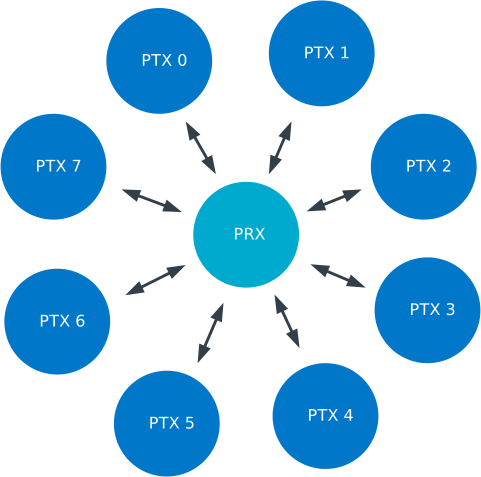
Enhanced ShockBurst network
Features
Supports a star network topology with typically one Primary Receiver (PRX) and up to 8 Primary Transmitters (PTX)
1 to 32 bytes dynamic payload length in legacy mode
1 to 252 bytes static payload length between nRF5 Series devices
Bidirectional data transfer between each PTX and the PRX
Packet acknowledgment and automatic packet retransmission functionality
Individual TX and RX FIFOs for every pipe
Backward compatible with legacy nRF24Lxx Enhanced ShockBurst
Support for external front-end modules.
Monitor mode for protocol debugging purposes.
Configurable support for concurrent operation with other protocols.
Security
The ESB protocol does not provide built-in security mechanisms. Communication over ESB is transmitted in plaintext and is not secure.
Caution
Do not transmit sensitive or security-relevant data over ESB without additional cryptographic protection.
Applications requiring secure communication must apply an additional security layer on top of ESB. Such layer must ensure confidentiality, integrity, and authentication of transmitted sensitive data using appropriate cryptographic mechanisms.
Resources
ESB requires exclusive access to all fixed and configured resources for the Enhanced ShockBurst library to ensure correct operation:
Resource type |
Resource |
Required |
|---|---|---|
Radio |
NRF_RADIO |
fixed |
Timer |
NRF_TIMER2 |
configurable for non-concurrent operation |
DPPI/PPI channels |
6 channels (7 channels for nRF53 and nRF54 Series devices) |
automatically allocated |
Event generator unit |
NRF_EGU0 events 6 - 7 (event 8 for nRF54 Series devices) |
fixed |
Software interrupt |
NRF_SWI0 (unused in nRF54 Series devices) |
fixed |
Note
There is no MPU enforcement of this exclusive access, so manipulating these resources gives undefined behavior.
The radio and timer interrupt handlers run at priority level 0 (highest level), and the ESB callback functions run at priority level 1. Other interrupts used by the application must use priority level 2 or lower (level 2 to 7) to ensure correct operation.
ESB requires the MPSL library for front-end module support. This library is always linked into the build, however, it is not initialized by default to provide your application and the ESB protocol with access to all hardware resources. See MPSL FEM-only configuration for more details.
Backward compatibility
The Enhanced ShockBurst library is compatible with the legacy nRFgo SDK.
To ensure that your application built with the nRF Connect SDK can communicate with nRF24 devices that run applications built with the nRFgo SDK, use the configuration ESB_LEGACY_CONFIG.
Note, however, that the provided samples in the two SDKs do not correspond, so that you cannot use the Transmitter sample from one SDK with the Receiver sample from the other SDK.
Packet transaction
An Enhanced ShockBurst packet transaction is initiated by a packet transmission from the PTX and successfully completed when the PTX has received an acknowledgment packet (ACK packet) from the PRX.
To enable a bidirectional data link, the PRX is allowed to attach a data payload to the ACK packet. To do so, the PRX adds a packet to its TX FIFO, which is sent as the payload in the next ACK packet.
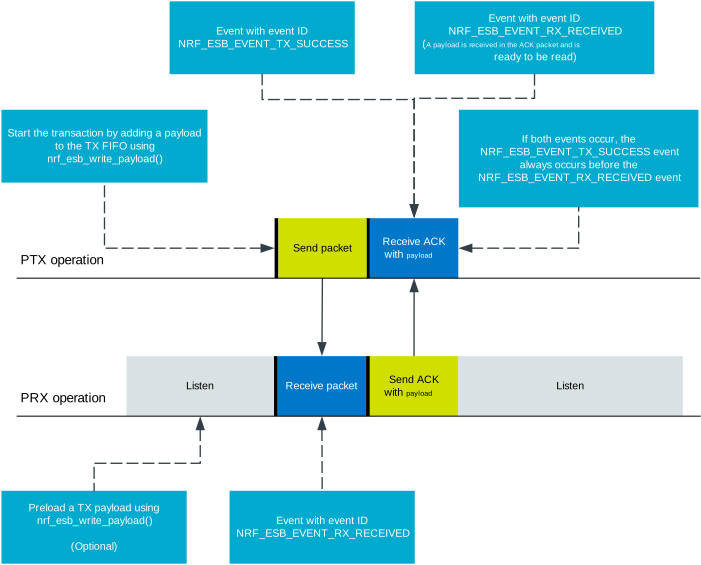
PTX to PRX packet transaction
If the PTX does not receive the ACK after the initial transmitted packet, it attempts to retransmit the packet until the ACK is finally being received.
The maximum number of allowed retransmission attempts and the delay between each attempt is specified by the most recent call to either esb_init() (where the values of esb_config.retransmit_count and esb_config.retransmit_delay in the esb_config structure specify the number of retransmission attempts and the delay between them, respectively) or the functions esb_set_retransmit_count() and esb_set_retransmit_delay().
The retransmission delay is defined as the duration between the start of each transmission attempt.
Note that this differs from the legacy nRF24L Series hardware implementation, where the delay was defined as the duration from the end of a packet transmission until the start of the retransmission.
If the ACK packet sent from the PRX to the PTX is lost, but both the initial packet and the subsequent retransmission attempts are being successfully received by the PRX, the repeated packets will be discarded by the PRX. This prevents the PRX application from receiving duplicate packets. However, repeated packets will always be ACKed by the PRX, even though they are being discarded.
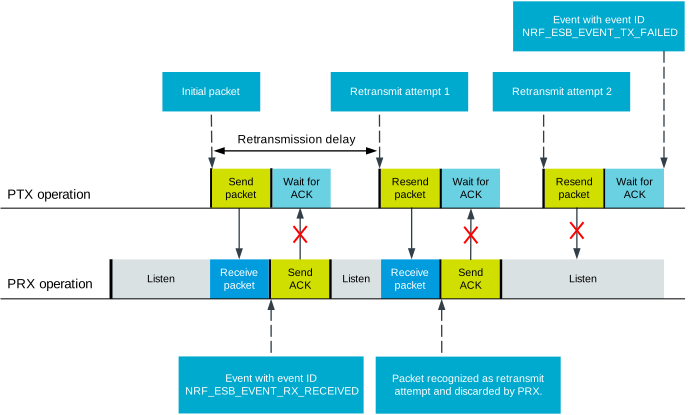
Failed package transaction
A PTX can select that individual packets that are transmitted to the PRX do not require an ACK to be sent in return from the PRX.
This decision is taken by the application when uploading a packet to the TX FIFO using the esb_payload.noack field of the esb_payload parameter that is passed to the esb_write_payload() function.
When the esb_config.selective_auto_ack field in the esb_config configuration structure is disabled, all packets will be acknowledged, ignoring the esb_payload.noack field.
The esb_config.selective_auto_ack field must be configured with the same value on both the PTX and PRX sides to ensure consistent behavior.
When the PRX receives a packet that does not require an ACK, it does not send an ACK packet to the PTX.
In this case, when esb_payload.noack = true, packet retransmission does not occur.
ESB Monitor mode
ESB Monitor mode feature allows you to capture both packets and ACKs sent by other ESB devices, which can be useful when analyzing or debugging the protocol.
Concurrent operation
You can use the ESB protocol concurrently with other protocols using Nordic Semiconductor’s Timeslot feature.
To enable this experimental feature, use the CONFIG_ESB_MPSL_TIMESLOT Kconfig option.
In the PTX mode, it introduces unspecified extra latency between starting transmission from the application and starting radio transmission, because it is performed in the nearest available timeslot.
Similarly, retransmission of packet can be performed later than the value specified in the esb_config.retransmit_delay field.
In the PRX mode, ESB tries to use all available time provided by the MPSL timeslot. It must not be used with any other constantly listening protocol. When using concurrent operation in PRX mode, the packet delivery rate might be lower and require more retransmissions. This depends strongly on other systems using timeslots.
All timeslots requested by ESB have a priority as specified in MPSL_TIMESLOT_PRIORITY_NORMAL.
The ESB Monitor mode is not supported.
Setting up an ESB application
Perform the following steps to set up an application to send and receive packets:
Initialize ESB using
esb_init(). You can use the default parameters inESB_DEFAULT_CONFIGas starting point for thep_configparameter and reconfigure them if needed.If necessary, use any of the following functions to update the addresses, the address prefix, the channel, and the bitrate:
Make sure that the high-frequency clock is running before starting radio activity. There are two ways to handle this:
Automatic: Enable the
CONFIG_ESB_CLOCK_INITKconfig option. When enabled, theesb_init()function automatically starts the required high-frequency clock and applies platform-specific errata workarounds. Calling theesb_disable()function automatically stops the clocks and reverts the workarounds.Manual: Leave the
CONFIG_ESB_CLOCK_INITKconfig option disabled (default). The application is responsible for starting the required high-frequency clock and applying platform-specific errata workarounds before callingesb_init().
Start sending or receiving packets:
If the node is a PTX:
Add packets to the TX FIFO by calling
esb_write_payload().Depending on the value of
esb_config.tx_modethat was used in the most recent call toesb_init(), you might have to callesb_start_tx()to start the transmission.After the radio has received an acknowledgment or timed out, handle
ESB_EVENT_TX_SUCCESS,ESB_EVENT_TX_FAILED, andESB_EVENT_RX_RECEIVEDevents.
If the node is a PRX:
Handle
ESB_EVENT_RX_RECEIVEDevents as packets are coming in. Multiple packets might arrive in the RX FIFO between each event.To attach payloads to acknowledgment packets, add them to the TX FIFO using
esb_write_payload(). The payload must be queued before a packet is received. After a queued payload is sent with an acknowledgment, it is assumed that it reaches the other device. Therefore, anESB_EVENT_TX_SUCCESSevent is queued.
To set up an application as MONITOR, complete the following steps:
Initialize the ESB module using the
esb_init()function with default parameters fromESB_DEFAULT_CONFIG. Set theesb_config.modeparameter toESB_MODE_MONITORvalue and setesb.config.event_handlercallback.You can adjust the following parameters:
These parameters as well as addresses and prefixes must be the same as those configured in the PTX and PRX nodes that you want to monitor.
Set up the high-frequency clock in the same manner as in the PRX or PTX mode.
Start monitoring using the
esb_start_rx()function.Handle the
ESB_EVENT_RX_RECEIVEDevents using theesb_read_rx_payload()function.Stop monitoring using the
esb_stop_rx()function.
To stop the ESB module, call esb_disable().
Note, however, that if a transaction is ongoing when you disable the module, it is not completed.
Therefore, you might want to check if the module is idle before disabling it.
Frequency selection
ESB can send or receive packets using any of the channels that the nRF5 chip can use.
The channel is selected by calling the esb_set_rf_channel() function.
The PTX and PRX must be configured to use the same frequency to exchange packets.
Pipes and addressing
Each logical address on the nodes is termed a pipe. Each pipe maps to one on-air address that is used when transmitting or receiving packets.
The on-air addresses are composed of a 2-4 byte long base address in addition to a 1 byte prefix address. Note that the nRF5 radio uses an alternating sequence of 0 and 1 as the preamble of the packet. Therefore, for packets to be received correctly, the most significant byte of the base address must not be an alternating sequence of 0 and 1, that is, it must not be 0x55 or 0xAA.
Pipe 0 has its own unique base address (base address 0), while pipes 1-7 use the same base address (base address 1). Each of the 8 pipes have a unique byte-long prefix address.
On-air, the most significant bit of each address byte is transmitted first. The most significant byte of the 2-4 byte long base address is the first transmitted address byte, while the prefix byte is transmitted last.
Addresses cannot consist of a 0x00 prefix and an address on the format 0x00XXXXXX (length 4)/0x0000XXXX (length 5).
Such a zero address will cause error code NRF_ERROR_INVALID_PARAM to be returned.
Note that the byte ordering in ESB and the nRF5 radio peripheral are not the same, because the address bytes are rearranged in ESB to match the nRF24L radios.
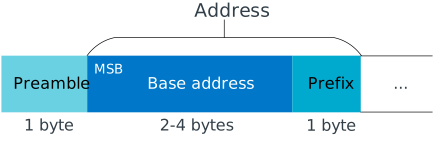
Address part of an ESB packet
Packet identification
Any packet that is transmitted from a PTX to a PRX is uniquely identified by a two-bit packet ID field (PID) in the packet header together with the packet’s Cyclic Redundancy Check (CRC) field. This packet ID is used to distinguish a new packet from the previous packet if it has the same payload.
At the PRX, retransmitted packets are discarded and not added to an RX FIFO.
The ESB_EVENT_RX_RECEIVED event is not called.
The CRC is used in addition to the PID to identify a unique packet. This reduces the likelihood of a packet being falsely identified as a retransmission attempt and discarded by the PRX when several consecutive failed packet transmission attempts occur. This feature is helpful as the PID is only two bits.
FIFOs
On each node, there is one FIFO queue for RX and one for TX.
The FIFOs are shared by all pipes, and esb_payload.pipe indicates a packet’s pipe.
For received packets, this field specifies from which pipe the packet came.
For transmitted packets, it specifies through which pipe the packet will be sent.
When multiple packets are queued, they are handled in a FIFO fashion, ignoring pipes.
PTX FIFO handling
When ESB is enabled in PTX mode, any packets that are uploaded to a TX FIFO will be transmitted at the next opportunity.
When an ACK is successfully received from a PRX, the PTX assumes that the payload was successfully received and added to the PRX’s RX FIFO. The successfully transmitted packet is removed from the TX FIFO, so that the next packet in the FIFO can be transmitted.
If an ACK received by a PTX contains a payload, this payload is added to the PTX’s RX FIFO.
PRX FIFO handling
When ESB is enabled in PRX or Monitor mode, all enabled pipes (addresses) are simultaneously monitored for incoming packets.
PRX:
If a new packet that was not previously added to the PRX’s RX FIFO is received, and RX FIFO has available space for it, the packet is added to the RX FIFO and an ACK is sent in return to the PTX. If the TX FIFO contains any packets, the next serviceable packet in the TX FIFO is attached as a payload in the ACK packet. This TX packet must have been uploaded to the TX FIFO before the packet is received.
Monitor:
All received packets are added to the RX FIFO if it has available space, without sending ACKs. Packets in the TX FIFO are ignored.
Event handling
When there is an event on the radio, the Enhanced ShockBurst module analyzes its cause and, if necessary, queues an event to the application. This event indicates a successful operation, a failed operation, or new data available in the RX FIFO.
Events are queued as flags that are read out on the first opportunity to trigger a software interrupt.
Therefore, there might be multiple radio interrupts between each event that is actually sent to the application.
A single ESB_EVENT_TX_SUCCESS or ESB_EVENT_TX_FAILED event indicates one or more successful or failed operations, respectively.
An ESB_EVENT_RX_RECEIVED event indicates that there is at least one new packet in the RX FIFO.
The event handler should make sure to completely empty the RX FIFO when appropriate.
Front-end module support
The ESB protocol supports external front-end modules. See Developing with Front-End Modules for more details.
Errata workarounds and nRF52832 chip revisions
The module implementation on nRF52832 devices include a set of workarounds for hardware erratas.
These erratas require a few hundred bytes of code space to determine runtime which workarounds are applicable to the device running the firmware.
This is to ensure that firmware based on newer SDKs function as intended on both older and newer revision chips.
If you know that your firmware will only on certain devices, you may save a few hundred bytes of code space by removing the workaround.
If you are sure that you do not require support for revision 1 chips, you may remove all code blocks within if statements on the format if((NRF_FICR->INFO.VARIANT & 0x0000FF00) == 0x00004200).
If you are sure that you do not require support for revision 2 chips, you may remove all code blocks within if statements on the format if((NRF_FICR->INFO.VARIANT & 0x0000FF00) == 0x00004500).
Examples
The nRF Connect SDK provides the following samples that show how to use the ESB protocol:
Fast ramp-up
The ESB driver is designed for bidirectional data transfer between devices. This implies that the radio peripheral is continuously switching between reception and transmission mode. When switching to transmission or reception mode, the radio peripheral needs some time to start internal analog components. On the nRF51 and nRF24L Series devices, a hardware-limited 130 µs delay is implemented. If the ESB connection is established only between nRF52 and/or nRF53 Series devices, this delay can be reduced to 40 µs.
When the value of the use_fast_ramp_up parameter is true, fast ramp-up is enabled, resulting in reduced ramp-up delay of 40 µs.
Furthermore, for the nRF54H20 SoC, you can activate fast switching using the CONFIG_ESB_FAST_SWITCHING Kconfig option and enable the ramp-up by setting the use_fast_ramp_up parameter to true.
The fast switching option enables direct switching between RX to TX and TX to RX radio states without entering the DISABLED state.
For the PTX node, this switching occurs after transmitting a packet and before waiting for acknowledgment (TX -> RX).
For the PRX node, this switching occurs after receiving a packet and before transmitting an acknowledgment (RX -> TX).
Enabling this feature can improve the responsiveness and efficiency of the radio communication system by reducing latency.
Enabling the CONFIG_ESB_FAST_CHANNEL_SWITCHING Kconfig for the nRF54H20 SoC allows radio channel switching in RX radio state without transitioning to the DISABLED state.
Experimental feature: Never disable transmission stage
If you need to reduce the delay between TX FIFO filling and reception to minimum, enabling fast ramp-up might not be sufficient.
In this case, you can use the CONFIG_ESB_NEVER_DISABLE_TX Kconfig option.
It changes the ESB driver’s behavior.
If a packet is not acknowledged, the radio peripheral remains in TXIDLE state instead of TXDISABLE when transmission is pending.
Using this experimental feature can reduce transmission delay below 100 µs for a 32 bits (four bytes) payload.
However, this process consumes more energy, because the radio transmitter stage remains enabled when transmission is taking place.
In this mode, the esb_config.retransmit_delay field specifies the delay between consecutive packet transmissions from the TX FIFO.
Depending on the reception processing time, a minimum value might be required.