

Building and configuring TF-M
TF-M is one of the images that are built as part of a multi-image application.
To build with TF-M, complete the following steps:
Select a board target supported by TF-M. The board files for these board targets have the
CONFIG_BUILD_WITH_TFMKconfig option enabled by default.Configure the TF-M build to use the configurable or minimal version. By default, TF-M is built with the configurable version on most devices. The exceptions are Thingy:91 and the Thingy:91 X, which default to the minimal version.
If you are using custom devicetree partitions, make sure to update the devicetree files to reflect the custom memory region sizes.
Build your application using standard building instructions for the development environment of your choice.
When building with TF-M, the nRF Connect SDK build system defines memory regions for the TF-M partitions using Zephyr’s devicetree-based partitioning. The nRF Connect SDK build system then calls the TF-M build system to define the TF-M partitions within these memory regions.
The following figure shows a generalized overview of the pre-build configuration and the build-time dependency between the nRF Connect SDK and TF-M build systems.
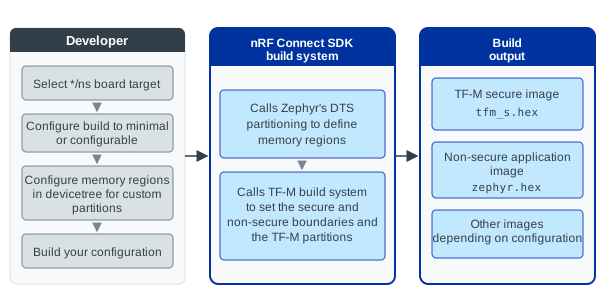
TF-M build overview
For more information about the devicetree memory regions and TF-M partitions, see TF-M memory partitioning. For the description of the build output files, see Output build files (image files).
Board targets supported by TF-M
The boards supported by the SDK distinguish entries according to which CPU is to be targeted (for multi-core SoCs) and whether the security by separation is to be used or not (addition of the */ns variant if it is used).
To build with TF-M in the nRF Connect SDK, you must use a board target with the */ns variant.
The following table lists the board targets that you can use to build with TF-M. See Board support for the complete list of boards and board targets supported by the SDK.
Hardware platform |
PCA number |
Board name |
TF-M board target |
|---|---|---|---|
nRF9161 DK |
PCA10153 |
|
|
nRF9160 DK |
PCA10090 |
|
|
nRF9151 DK |
PCA10171 |
|
|
nRF9131 EK |
PCA10165 |
|
|
nRF54LV10 DK |
PCA10188 |
|
|
nRF54LM20 DK |
PCA10184 |
nrf54lm20dk/nrf54lm20a/cpuapp/nsnrf54lm20dk/nrf54lm20b/cpuapp/ns |
|
nRF54L15 DK |
PCA10156 |
|
|
nRF54L10 emulated on the nRF54L15 DK |
PCA10156 |
|
|
nRF5340 DK |
PCA10095 |
|
|
Thingy:53 |
PCA20053 |
|
|
nRF7002 DK |
PCA10143 |
|
|
Thingy:91 |
PCA20035 |
|
|
Thingy:91 X |
PCA20065 |
|
Enabling secure services
To enable the secure services in TF-M, you must use the TF-M Crypto Service PSA Crypto API implementation.
Complete the following steps to enable the secure services in TF-M:
Enable
CONFIG_PSA_CRYPTOto use the PSA Crypto API through nRF Security.Configure PSA Crypto API Kconfig options.
Build the application for a board target supported by TF-M with Minimal build or Configurable build.
After building the application, the TF-M secure image enables the use of the hardware acceleration, while the Kconfig configurations in the nRF Security subsystem control the features enabled in TF-M.
See Crypto service for more information about the TF-M Crypto partition.
Note
Depending on the implementation you are using, the nRF Connect SDK build system uses different versions of the PSA Crypto API.
Implementation |
|
|---|---|
Minimal build
The default configuration of TF-M has all supported features enabled, which results in a significant memory footprint. For this reason, the nRF Connect SDK provides a minimal version of the TF-M secure application, which shows how to configure a reduced version of TF-M.
The secure services supported by the minimal version allow for:
Generating random numbers using the random generator available in the device (see
psa_generate_random()in crypto.h).Using the platform services with tfm_platform_api.h from the non-secure side (except the
tfm_platform_nv_counter_*functions). This includes sending platform-specific service requests using tfm_ioctl_core_api.h and tfm_ioctl_api.h.Reading secure memory from the non-secure application (strictly restricted to a list of allowed addresses). Depending on the device, this lets you read metadata in the bootloader, verify FICR or UICR values, or access a peripheral that is secure-only.
Rebooting from the non-secure side.
The minimal build uses an image of 32 kB.
It is set with the CONFIG_TFM_PROFILE_TYPE_MINIMAL Kconfig option that is enabled by default on the Thingy:91 and Thingy:91 X devices.
With the minimal build, the configuration of TF-M is severely limited.
The only configurable option is to enable a security service for cryptographic hashes.
For example, you can enable the PSA_WANT_ALG_SHA_256 Kconfig option to provide SHA-256 support using TF-M.
Configurable build
The configurable build is the full TF-M implementation that lets you configure all of its features. It does not have the constraints of the minimal build.
To enable the configurable, full TF-M build, make sure the following Kconfig options are configured:
CONFIG_BUILD_WITH_TFMis enabledCONFIG_TFM_PROFILE_TYPE_NOT_SETis enabled
For description of the build profiles, see TF-M Profiles. It is not recommended to use predefined TF-M profiles as they might result in a larger memory footprint than necessary.
Configuring TF-M profile type and partitions
When the CONFIG_TFM_PROFILE_TYPE_NOT_SET Kconfig option is enabled, the build process will not set a specific TF-M profile type.
This allows for a more flexible configuration where individual TF-M features can be enabled or disabled as needed.
It also provides more control over the build process and allows for a more fine-grained configuration of the TF-M secure image.
To configure the features of the TF-M secure image, you must choose which TF-M partitions and which secure services to include in the build.
Note
A “TF-M partition” in this context refers to partitions specific to TF-M and located within the secure devicetree memory region (devicetree partition). These partitions are isolated from each other and from the non-secure application code. A service running inside TF-M would typically be implemented within one of these secure partitions.
For more information about the relationship between TF-M partitions and devicetree memory regions, see TF-M memory partitioning.
Each service is implemented as a separate TF-M partition, which provides the execution environment for the service. It handles secure function calls and ensures that the service’s code and data are protected from unauthorized access.
Following are the available Kconfig options for TF-M partitions:
Option name |
Description |
Default value |
Dependencies |
|---|---|---|---|
Provides Platform service. |
Enabled |
||
Provides Crypto service. |
Enabled |
||
Provides Protected Storage service. |
Enabled |
PLATFORM, CRYPTO |
|
Provides Internal Trusted Storage service. |
Enabled |
||
Provides Initial Attestation service. |
Disabled |
CRYPTO |
Configuring Secure Partition Manager backend
TF-M’s Secure Partition Manager (SPM) is responsible for managing the secure partitions and the secure services.
Depending on the isolation requirements of the application, you can configure the SPM backend to use. The following table lists the available SPM backends and the isolation levels they support:
Backend |
Option |
Description |
Allowed isolation levels |
|---|---|---|---|
Secure Function (SFN) |
With SFN, the Secure Partition is made up of a collection of callback functions that implement secure services. |
Level 1 |
|
Inter-Process Communication (IPC) |
With IPC, each Secure Partition processes signals in any order, and can defer responding to a message while continuing to process other signals. |
Levels 1, 2 and 3 |
Configuring SPM logging
To control the number of logging messages, set the CONFIG_TFM_SPM_LOG_LEVEL Kconfig option.
To disable logging, set the CONFIG_TFM_LOG_LEVEL_SILENCE option.
Configuring GPIO pin security for secure peripherals
When building with TF-M, the GPIO controller implements security by separation at the pin level.
Each pin on a GPIO port is marked either secure or non-secure.
The CONFIG_NRF_GPIO0_PIN_MASK_SECURE, CONFIG_NRF_GPIO1_PIN_MASK_SECURE, and CONFIG_NRF_GPIO2_PIN_MASK_SECURE Kconfig options set a bitmask that defines which pins on each port are secure.
These options default to 0x00000000, meaning every pin is non-secure unless you configure them explicitly.
Caution
Marking a peripheral as secure (for example, with CONFIG_NRF_*_SECURE=y) or assigning it in a partition manifest does not automatically mark its GPIO pins as secure.
If a secure peripheral uses a pin that remains non-secure, the peripheral continues to operate, but the non-secure application can read the pin state and potentially snoop on secrets carried over that signal.
If your secure peripheral uses GPIO pins, you must explicitly include those pins in the appropriate GPIO pin mask Kconfig option in your application’s prj.conf file (for example, CONFIG_NRF_GPIO0_PIN_MASK_SECURE).
Include every pin used directly by the peripheral, and any pin used indirectly (for example, chip-select or interrupt lines).
TF-M automatically adds GPIO pins to the secure mask for secure UART and SPIM instances from the devicetree pinctrl definitions. For all other secure peripherals, TF-M does not derive pin security from devicetree. Do not rely on devicetree pin assignments alone to protect GPIO lines used by other secure peripherals.
See the TF-M secure peripheral sample for an example configuration.