

Configuring and building
After you have created an application, you need to configure and build it in order to be able to run it.
The nRF Connect SDK configuration and build system is based on the one from Zephyr, with some additions.
The following figure lists the main tools and configuration methods in the nRF Connect SDK. All of them have a role in the creation of an application, from configuring the libraries or applications to building them.
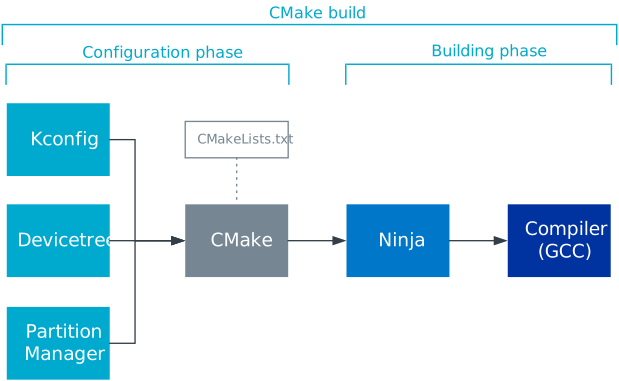
nRF Connect SDK tools and configuration methods
Devicetree describes the hardware.
Kconfig generates definitions that configure the software.
CMake generates build files based on the provided
CMakeLists.txtfiles, which use information from devicetree files and Kconfig.Ninja (comparable to Make) uses the build files to build the program.
The compiler (for example, GCC) creates the executables.
For a more detailed overview, see Build and configuration system.
Depending on the board you are working with, check also its hardware guide, as some nRF Series families have specific exceptions and rules to be applied on top of the general configuration procedures.
Make sure to consider Bootloaders and DFU and MCUboot and NSIB already at this stage of the application development.
Note
If you want to go through dedicated training related to some of the topics covered here, enroll in the nRF Connect SDK Intermediate course in the Nordic Developer Academy.