

Data storage in the nRF Connect SDK
The nRF Connect SDK offers multiple solutions for storing data persistently in non-volatile memory.
This page provides an overview of the available storage solutions to help you make an informed choice for your application’s data storage needs.
For information about storing cryptographic keys, see Key storage in the nRF Connect SDK.
General recommendations
For general data storage needs, Nordic Semiconductor recommends starting with the following options:
NVMC - For applications requiring direct access to non-volatile memory.
RRAMC - For applications requiring advanced RRAM memory management.
NVS - For most applications requiring simple persistent storage. Stores data as values identified by a 16-bit integer ID.
ZMS - Recommended for nRF54H and nRF54L Series devices, instead of NVS. Stores data as values identified by a 32-bit integer ID.
File Systems - For applications requiring file-based data organization.
Settings - For storing configuration data and runtime state. Organizes data in a tree structure, with values identified by a string key.
PSA Protected Storage - For sensitive data.
Choose the storage mechanism that best matches your security requirements, performance needs, and platform capabilities.
Storage features
This section describes the key features that are provided by storage mechanisms in the nRF Connect SDK.
See the following table for an overview of the storage features supported by each storage alternative. For definitions of the storage features, see Feature descriptions.
Storage Alternative |
Partitioning |
Integrity |
Isolation |
Authentication and encryption |
|---|---|---|---|---|
No |
No |
No |
No |
|
Yes |
Yes |
No |
No |
|
Yes |
Yes |
No |
No |
|
Yes |
Yes |
No |
No |
|
Yes |
Yes |
No |
No |
|
Yes |
Yes |
No |
No |
|
Yes |
Yes |
Yes |
Yes |
|
Yes |
Yes |
No |
Yes |
Feature descriptions
See the following sections for descriptions of the storage features from the table above.
Partitioning
Partitioning prevents storage subsystems from overwriting each other’s data by giving them ownership over different non-volatile memory regions. The nRF Connect SDK uses devicetree-based memory partitioning from Zephyr to manage non-volatile memory partitions. See Zephyr’s devicetree documentation and Flash map documentation for how to define non-volatile memory partitions in devicetree.
Integrity
Data integrity ensures that the data you read is the same as the data you wrote. This is typically implemented using Cyclic Redundancy Check (CRC).
The integrity can be inherited between a subsystem and its backends. For example, the Settings subsystem inherits the integrity from its backend.
Isolation
Isolation provides security separation between the Non-Secure Processing Environment (NSPE) and Secure Processing Environment (SPE) as part of the Arm Platform Security Architecture (PSA). This feature is available when using Trusted Firmware-M (TF-M).
Authentication and encryption
The authentication and encryption feature provides additional data-at-rest protection for stored data. This adds confidentiality to prevent unauthorized access to sensitive information stored in non-volatile memory.
Storage mechanisms
The nRF Connect SDK provides several storage mechanisms for storing data persistently in non-volatile memory. Each alternative offers different features and trade-offs in terms of security, performance, ease of use, and code and flash size.
NVMC
Feature |
Partitioning |
Integrity |
Isolation |
Encryption |
|---|---|---|---|---|
NVMC |
No |
No |
No |
No |
The Non-Volatile Memory Controller (NVMC) provides the most basic method for writing directly to non-volatile memory. The nRF Connect SDK provides the NVMC driver through nrfx as a helper for this functionality.
Note
Nordic Semiconductor does not recommend this method for persistent storage, as it places significant responsibility on the developer. For simple data storage needs, consider using NVS or ZMS instead.
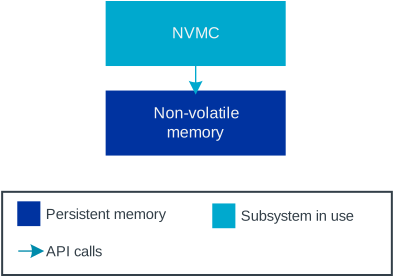
Data storage using NVMC
When using NVMC directly, manually ensure that the following requirements are met:
Your writes do not conflict with other subsystems.
You stay within designated memory regions.
You handle error conditions appropriately.
To use NVMC safely, consider the following points:
Create a custom partition for your memory usage.
Keep all NVMC writes within this designated region.
Coordinate with other subsystems that may use non-volatile memory.
Since NVMC allows writing to any part of non-volatile memory, it can easily overwrite memory used by other subsystems if not used carefully.
RRAMC
Note
RRAMC is only available on the nRF54L Series and should not be used directly, but through ZMS.
Feature |
Partitioning |
Integrity |
Isolation |
Encryption |
|---|---|---|---|---|
RRAMC |
Yes |
Yes |
No |
No |
The Resistive Random Access Memory Controller (RRAMC) provides advanced functionality for managing RRAM memory, including the secure information configuration region (SICR) and user information configuration registers (UICR).
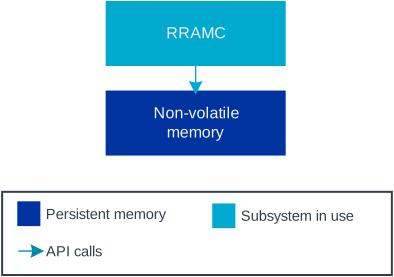
Data storage using RRAMC
This option offers the following features:
Error correction - Built-in ECC (Error Correction Code) can detect and correct up to two bit errors per 128-bit word line.
Power management - Automatic standby or power-down modes with configurable latency.
Region protection - Configurable memory regions with read, write, and execute permissions, among others.
Write-once support - Optional write-once protection for memory regions.
Buffered writes - Support for fast buffered writes to contiguous memory regions.
Power failure protection - Built-in power failure comparator to prevent writes during low voltage conditions.
The RRAMC provides several protection mechanisms, including:
Immutable boot region - Configurable read-only boot region starting at address
0x00000000.One-time programmable protection - Hardware-fixed to write-once for UICR. Other regions can optionally be configured to be write-once.
Erase protection - Ability to block
ERASEALLoperations.
When using RRAMC directly, manually ensure that the following requirements are met:
Your writes do not conflict with other subsystems.
You stay within designated memory regions.
You handle error conditions appropriately.
For more information, see the nRF54L Series SoC datasheets.
NVS
Feature |
Partitioning |
Integrity |
Isolation |
Encryption |
|---|---|---|---|---|
NVS |
Yes |
Yes |
No |
No |
The Non-Volatile Storage (NVS) subsystem is Zephyr’s default persistent storage solution. NVS stores data as values identified by a 16-bit integer ID in non-volatile memory using a FIFO-managed circular buffer.
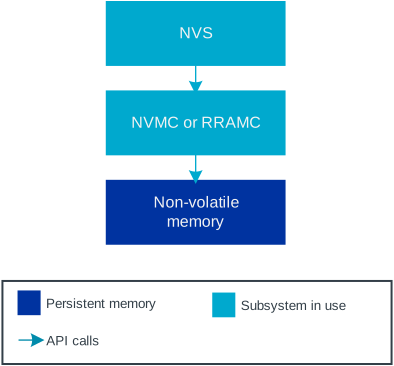
Data storage using NVS
This option offers the following features:
Simple API - Basic functionality requires only three functions:
nvs_mount(),nvs_write(), andnvs_read().Automatic integrity - Uses CRC to verify data integrity automatically.
Wear leveling - Distributes writes across flash sectors to extend memory lifetime.
Atomic operations - Ensures data consistency during power loss.
Settings integration - Can be used directly or through the Settings subsystem.
NVS automatically manages metadata for stored elements, including the following components:
Element ID
Data offset in the sector
Data length
CRC for integrity checking
During initialization, NVS verifies all stored data and ignores any data with missing or incorrect metadata.
Configuration
To use NVS, enable the following Kconfig options:
Usage example
See Zephyr’s Non-Volatile Storage (NVS) sample for an example of how to use NVS.
ZMS
Note
Use ZMS with the nRF54L and nRF54H Series devices as it works best with RRAMC.
Feature |
Partitioning |
Integrity |
Isolation |
Encryption |
|---|---|---|---|---|
ZMS |
Yes |
Yes |
No |
No |
The Zephyr Memory Storage (ZMS) is the recommended storage solution for the nRF54L and nRF54H Series. ZMS uses a flexible data management system that reduces write and erase cycles, extending the lifespan of non-volatile memory. ZMS stores data as values identified by a 32-bit integer ID.
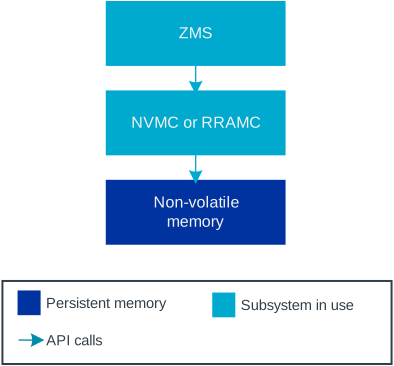
Data storage using ZMS
This option offers the following features:
Simple API - Basic functionality requires only three functions:
zms_mount(),zms_write(), andzms_read().Automatic integrity - Uses CRC to verify data integrity automatically.
Wear leveling - Distributes writes across flash sectors to extend memory lifespan.
Flexible data management - Efficient handling of data storage and retrieval.
Cache support - Optional lookup cache for improved performance.
Atomic operations - Ensures data consistency during power loss.
Settings integration - Can be used directly or through the Settings subsystem.
Configuration
To use ZMS, enable the CONFIG_ZMS Kconfig option.
For more information, see also Enabling Zephyr Memory Storage in the nRF Connect SDK documentation and ZMS documentation in Zephyr.
File Systems
Feature |
Partitioning |
Integrity |
Isolation |
Encryption |
|---|---|---|---|---|
File Systems |
Yes |
Yes |
No |
No |
Zephyr’s Virtual Filesystem Switch (VFS) allows applications to mount multiple file systems at different mount points using the File System API.
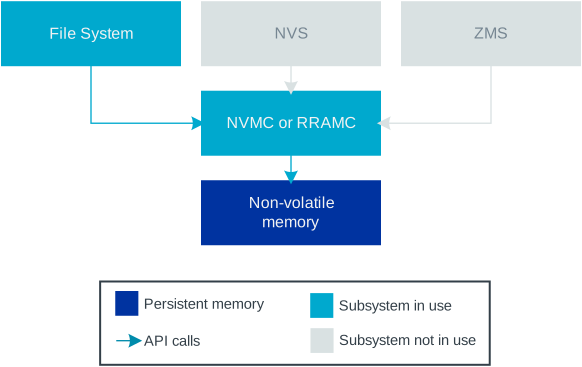
Data storage using file systems
The following file systems are supported:
FAT Filesystem - Cross-platform compatible format for data sharing.
LittleFS - Power loss-resilient filesystem optimized for microcontrollers.
Configuration
To use VFS, enable the CONFIG_FILE_SYSTEM Kconfig option.
File systems require storage media configuration (flash, SD card) and the appropriate Kconfig option to be enabled:
CONFIG_FAT_FILESYSTEM_ELM- Enable FAT filesystemCONFIG_FILE_SYSTEM_LITTLEFS- Enable LittleFS
Usage examples
For usage examples, see the following Zephyr samples:
Settings
Feature |
Partitioning |
Integrity |
Isolation |
Encryption |
|---|---|---|---|---|
Settings |
Yes |
Yes |
No |
No |
The Settings subsystem provides a method for organizing and storing configuration data and runtime state. It gives modules a way to store per-device configuration, which is organized in a tree structure. While NVS and ZMS store data as values identified by an integer ID, Settings stores data values identified by a string key.
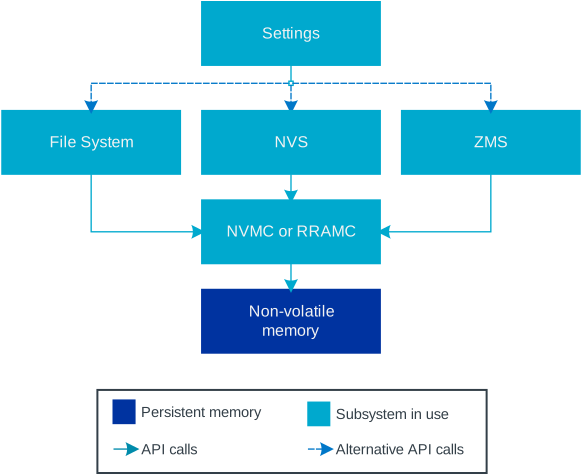
Data storage using Settings
Key features:
Hierarchical organization - Settings are organized in a tree structure.
Automatic loading - Call
settings_load()to restore all settings after reboot.Backend flexibility - Settings can use different storage backends.
The Settings subsystem does not write to non-volatile memory directly. Instead, it uses other subsystems as backends, with NVS being the recommended choice for most devices and ZMS for nRF54L Series and nRF54H20 devices.
You can use the settings_load_one() function to load only the value defined by the tree name given in the arguments.
This is a very fast way to get a value from the storage if you know its tree name.
It is particularly suitable for use with ZMS because it does not need to load all settings before getting the right one.
Settings are used by various subsystems, including Bluetooth host stack and Matter.
Configuration
To use Settings, enable the CONFIG_SETTINGS Kconfig option.
Depending on the backend you want to use, enable the appropriate Kconfig options:
For the NVS backend:
For the ZMS backend:
For the File System backend:
CONFIG_FILE_SYSTEM- with the appropriate file system enabled, as mentioned in File Systems
Usage example
See Zephyr’s Settings API sample for an example of how to use the Settings subsystem. You can also check the examples in the Settings subsystem documentation.
PSA Protected Storage
Feature |
Partitioning |
Integrity |
Isolation |
Encryption |
|---|---|---|---|---|
PSA Protected Storage with TF-M |
Yes |
Yes |
Yes |
Yes |
PSA Protected Storage without TF-M |
Yes |
Yes |
No |
Yes |
The PSA Protected Storage API provides functionality for writing and reading data from non-volatile memory with enhanced security features. This storage solution is part of the PSA Secure Storage API, which in turn is part of the Platform Security Architecture (PSA) framework.
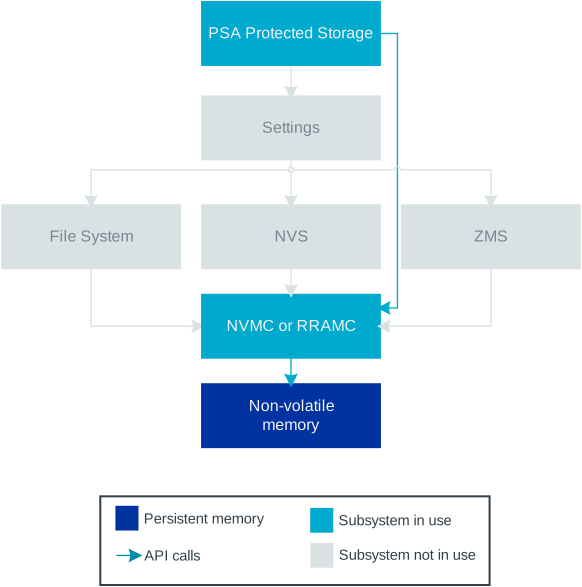
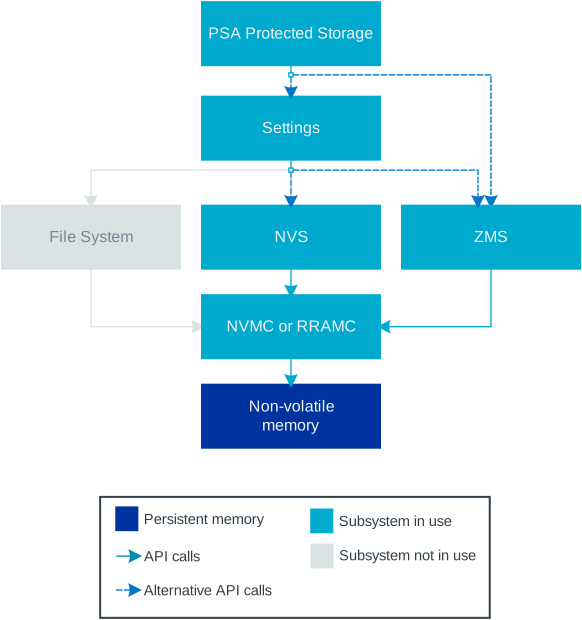
Key features:
Authentication and encryption - Data is authenticated and encrypted at rest for confidentiality.
Isolation - Provides security separation between NSPE and SPE.
Integrity - Automatic integrity verification.
Write-once support - Supports write-once flags for immutable data.
PSA compliance - Compliant with PSA Certified standards.
Note
PSA Protected Storage does not currently support storing data to external flash. The data stored through the PSA Protected Storage API will be written to the same location as the PSA Internal Trusted Storage.
PSA Protected Storage and TF-M
PSA Protected Storage is provided by TF-M when TF-M is used. When using TF-M, PSA Protected Storage is an Application RoT Service that runs in the Secure Processing Environment (SPE). It is available to both NSPE and SPE, but data stored from one environment is not accessible from the other. See also TF-M memory partitioning for more information about how TF-M partitions are organized in the nRF Connect SDK.
When to use PSA Protected Storage
Consider using PSA Protected Storage in the following cases:
You need encryption and authentication for your data at rest.
You require PSA Certified compliant storage.
You are building security-critical applications.
When comparing PSA Protected Storage with NVS or ZMS, consider the following:
Choose PSA Protected Storage when you need:
Encrypted data storage
Security isolation between environments (when using TF-M)
PSA Certified compliance
Write-once functionality (only enforced by software)
Choose NVS or ZMS when you need:
Simple key-value storage
Lower overhead
No security requirement for data stored directly using NVS or ZMS
Configuration
When using TF-M, PSA Protected Storage is enabled when its requirements are met and the CONFIG_TFM_PARTITION_PROTECTED_STORAGE Kconfig option is enabled.
When not using TF-M, you must enable the following Kconfig options:
Usage example
For a usage example, see Zephyr’s TF-M PSA Protected Storage sample.