

CAF: Power manager module
The power manager module of the Common Application Framework (CAF) is responsible for reducing the energy consumption of battery-powered devices. The module achieves this reduction by switching to low power modes when the device is not used for a longer period of time.
Configuration
To enable the power manager module, set the CONFIG_CAF_POWER_MANAGER Kconfig option in the configuration.
Implied features
The CONFIG_CAF_POWER_MANAGER option implies the following features that can be used to reduce power consumption:
System power off support (
CONFIG_POWEROFF). The option is not implied for an nRF54H Series SoC (CONFIG_SOC_SERIES_NRF54H), because thesys_poweroff()API is not yet fully supported on the nRF54H Series SoC.Device Power Management (
CONFIG_PM_DEVICE). The option allows to reduce the power consumption of device drivers while they are inactive. It is recommended to disable the feature if your application does not use device drivers that integrate device power management. Disabling the feature reduces the memory footprint.
nRF54H Series SoC
For the nRF54H Series SoC (CONFIG_SOC_SERIES_NRF54H), the module also implies the following features:
Zephyr’s System Power Management (
CONFIG_PM). The nRF54H Series SoC (CONFIG_SOC_SERIES_NRF54H) integrates the system power management to reduce power consumption when inactive.Zephyr’s Device Runtime Power Management (
CONFIG_PM_DEVICE_RUNTIME). The option extends device power management and depends on theCONFIG_PM_DEVICEKconfig option. Enabling the device runtime power management also prevents using system-managed device power management (CONFIG_PM_DEVICE_SYSTEM_MANAGED) by default. The system-managed device power management does not work properly with some drivers (for example, nrfx UARTE) and should be avoided.
Timeout configuration options
With the CONFIG_CAF_POWER_MANAGER_TIMEOUT Kconfig option, you can set the period of time after which the application enters the low power mode.
By default, the timeout is set to 120 seconds.
The CONFIG_CAF_POWER_MANAGER_ERROR_TIMEOUT option sets the period of time after which the device is turned off upon an internal error.
Blocking system off
The CONFIG_CAF_POWER_MANAGER_STAY_ON Kconfig option prevents system off (sys_poweroff()) even if there are no active power state restrictions.
If you enable the option, the device stays in a suspended state, but will not enter the system off state.
If you disable the power off functionality (CONFIG_POWEROFF), the module never enters the system off state (CONFIG_CAF_POWER_MANAGER_STAY_ON is enabled and has no prompt, and you cannot change the Kconfig option).
Forcing power down
If force_power_down_event is enabled in the configuration (CONFIG_CAF_FORCE_POWER_DOWN_EVENTS), any application module can submit the event to force a quick power down without waiting.
The event triggers instantly suspending the application.
Clearing reset reason
The module by default clears the reset reason register (RESETREAS) right before entering the system off state (right before calling sys_poweroff()).
This is done to avoid starting MCUboot serial recovery if nobody has cleared it already.
Disable the CONFIG_CAF_POWER_MANAGER_CLEAR_RESET_REASON Kconfig option to prevent this behavior.
Clearing reset reason functionality is not used for the nRF54H Series SoC (CONFIG_SOC_SERIES_NRF54H) as it uses SUIT DFU.
Note
The reset reason register is not cleared in case system is turned off after a fatal error.
Implementation details
The power manager module is started when the “main” is ready (which is reported using module_state_event).
The module is responsible for controlling the application power state:
If the device is in use, the power manager module keeps everything active and temporarily allows for bigger power consumption to ensure high responsiveness.
When the device is not used for a longer period of time, the power manager module suspends the application to reduce the power consumption. In case of user action while in a suspended state, the power manager module switches the application back to the active state.
In case of an error, the power manager module reports the error to the user and then turns off the application.
A dedicated set of application events can be used to communicate with the power manager module. The predefined set of events is used while suspending or waking up the application. Another events can be used to affect policy used by the power manager module.
See the following sections for detailed information about the used application power states, transitions between them and interactions of the power manager module with other application modules.
Application power state
The application can be in the following power states:
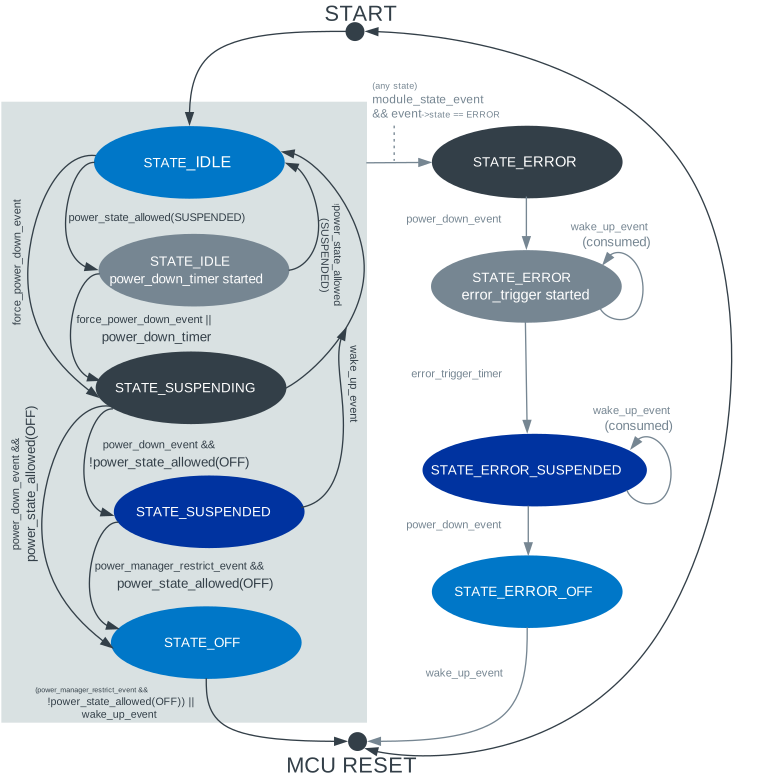
Power manager state handling in CAF
See the following sections for more details on every application power state.
Idle
In this state, the power manager module does not perform any actions to limit power consumption of the application modules. The application modules can remain active and keep the controlled peripherals turned on, including LEDs.
If no application module applies Power state restrictions, the power-down counter is active. On timeout, the power manager module enters the suspended state.
There are some events that reset the power-down counter:
The moment when the last module stops restricting
POWER_MANAGER_LEVEL_ALIVE- that is, at the moment when any power-down state is allowed, the counter is cleared too.
Suspended
Upon the power-down timeout, the power manager module switches the application to the suspended state.
The power manager module suspends application modules to reduce power consumption.
After suspending the application modules, the power manager module might call sys_poweroff(), so that system enters the off state to reduce the power consumption further.
Suspending application modules
The power manager module submits power_down_event.
While handling the event, application modules turn off the used peripherals or switch them to standby to conserve power.
Only after all application modules confirm that they have entered the low power state (by not consuming the power_down_event), the power manager module sets the required application power state.
The power manager module registers itself as the final subscriber of power_down_event.
Reception of power_down_event indicates that the power manager module can continue power down sequence.
See the power_down_event documentation for details regarding handling the event in application modules.
Suspending application modules is done to reduce CPU workload and suspend the peripherals.
It is assumed that the operating system will conserve power by setting the CPU state to idle whenever possible.
If the system power management (CONFIG_PM) is enabled, reducing CPU workload also allows the system power management to enter deeper CPU sleep states.
Wake-up scenarios
Any module can trigger the application to switch from the suspended state back to the idle state by submitting wake_up_event.
This is normally done on some external event, for example, your interaction on the device.
The power manager module sets the application to the idle state.
Then application modules receive wake_up_event, which switches them back to the normal operation.
Off
After suspending the application modules, the power manager module can trigger entering the system off state (sys_poweroff()) to reduce the power consumption further.
The power manager module switches the application to the deep sleep (system off) mode if no module restricts the system off state and CONFIG_CAF_POWER_MANAGER_STAY_ON Kconfig option is disabled.
Switching the application to the system off state is performed by submitting power_off_event.
The power manager module registers itself as the final subscriber of power_off_event.
Reception of power_off_event indicates that the power manager module can safely call the sys_poweroff() API to enter the system off state.
See the power_off_event documentation for details regarding handling the event in application modules.
Eventually all of the application modules are suspended, and the CPU is switched to the deep sleep (off) mode. In the system off state, the CPU is not running.
Wake-up scenarios
Before the application enters the off state, an application module must configure the peripheral under its control, so that it issues a hardware-related event capable of rebooting the CPU (that is, capable of leaving the CPU off mode) when you interact on the device. After the reboot, the application reinitializes itself.
Error
When any application module switches to the error state (that is, broadcasts MODULE_STATE_ERROR through module_state_event), the power manager module puts the application into the error state.
The application modules are suspended using power_down_event with power_down_event.error set to true.
The error field indicates that some of the application modules can stay active to report the error condition to the user (for example, CAF: LEDs module can keep working in the error state to display information about the error).
Then, after the period of time defined by the CONFIG_CAF_POWER_MANAGER_ERROR_TIMEOUT Kconfig option, the power manager module suspends the remaining application modules using power_down_event with power_down_event.error set to false.
Note
In the error state, power manager module prevents waking up application by consuming the submitted wake_up_event.
Error Off
In the error state, after suspending all of the application modules, the power manager module unconditionally triggers entering the system error off state using power_off_event with power_off_event.error set to true.
If entering the system off after the error, the power state restrictions and value of the CONFIG_CAF_POWER_MANAGER_STAY_ON Kconfig option are ignored.
Power state restrictions
Any application module can restrict the power state allowed by the usage of power_manager_restrict_event.
It provides the module ID and the deepest allowed power state.
The power manager module uses flags to track restrictions imposed by an application module.
This means that you can repeatedly send the power_manager_restrict_event to update restrictions applied by a given application module.