

Trusted storage
The trusted storage library enables its users to provide integrity, confidentiality and authenticity of stored data using Authenticated Encryption with Associated Data (AEAD) algorithms or cryptographic hash, without the use of TF-M Platform Root of Trust (PRoT). The library implements the PSA Certified Secure Storage API for use on builds without TF-M (no security by separation).
Note
The trusted storage library is deprecated and will be removed in a future release.
Use the Secure Storage subsystem instead (CONFIG_SECURE_STORAGE).
If you have an existing installation that uses the Trusted Storage library with entries stored in non-volatile memory, you can switch to using Secure Storage without losing any data by enabling the CONFIG_SECURE_STORAGE_TRUSTED_STORAGE_COMPATIBILITY Kconfig option.
See also Secure storage in the nRF Connect SDK for an overview of the PSA Secure Storage API implementation in the nRF Connect SDK.
Overview
The following subsections give an overview of the library architecture, its interfaces, choices and backends.
Architecture
The trusted storage library is designed and implemented in a modular way, which allows and simplifies customization. This is realized by using backends for the different tasks performed within the trusted storage.
The library provides users two choices that are interfacing backends: TRUSTED_STORAGE_BACKEND and TRUSTED_STORAGE_STORAGE_BACKEND.
The backends are also modular, allowing customization of what crypto implementation and the key nonce are provided.
The following image gives an overview of the default architecture of the trusted storage library.
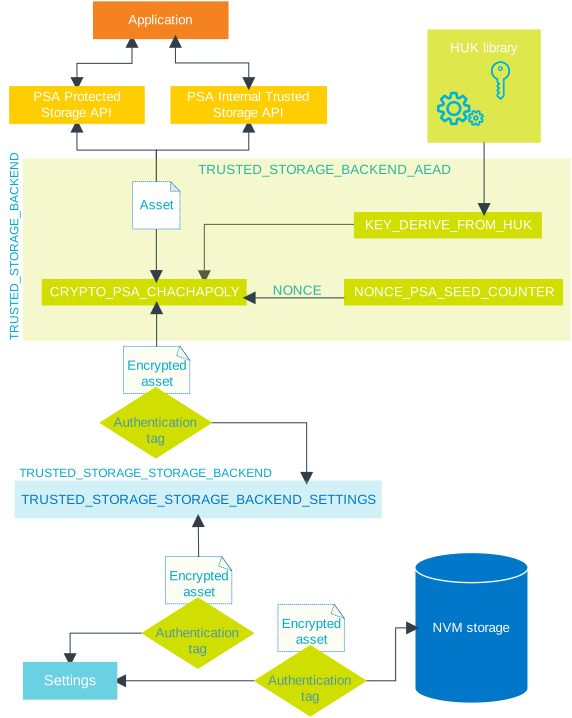
Overview of the trusted storage library architecture
External storage is not supported by the trusted storage library by default. To add support for external storage, implement a custom storage backend.
Data handling contexts
The trusted storage library handles sensitive data in the following two contexts:
Volatile - Before data is forwarded to the non-volatile storage and after it is retrieved from the non-volatile storage.
Non-volatile - When data is written to the non-volatile memory in encrypted form.
In the case of the volatile context, the trusted storage library leverages the Authenticated Encryption with Associated Data (AEAD) encryption backend (CONFIG_TRUSTED_STORAGE_BACKEND_AEAD).
It is used to encrypt and decrypt the assets that are securely stored in the non-volatile memory with authentication.
You can configure AEAD with the set of Kconfig options described in the Configuration section.
Interfaces
The trusted storage library provides two storage interfaces for use with device-protected storage:
PSA internal trusted storage, designed to store critical data that must be placed inside internal non-volatile memory. The size of the storage available by the internal trusted storage API is expected to be limited, and therefore should be used for small, security-critical values. Examples of assets that require this kind of storage are replay protection values for external storage and keys for use by components of the PSA Root of Trust.
PSA protected storage, designed to store all other critical data that do not need to be stored inside internal non-volatile memory.
The two interfaces provide a consistent way for applications to access the storage types, through PSA Internal Trusted Storage API and PSA Protected Storage API.
Choices and backends
The trusted storage library comes with two choices:
TRUSTED_STORAGE_BACKENDthat defines a backend for handling of encryption, authentication or other means of validation of the stored data. It is responsible for what is happening with the data before and after they are read from or written to non-volatile storage.TRUSTED_STORAGE_STORAGE_BACKENDthat defines a backend that handles how the data are written to non-volatile storage.
In other words, TRUSTED_STORAGE_BACKEND is responsible for modifying the assets before they are forwarded to the TRUSTED_STORAGE_STORAGE_BACKEND, which again handles storing of data in the non-volatile storage.
The following backends are used in the trusted storage library:
TRUSTED_STORAGE_BACKEND_AEADUses an AEAD scheme to provide integrity, confidentiality and authenticity. The trusted storage library provides the
TRUSTED_STORAGE_BACKEND_AEADbackend, but it has support for adding other secure implementation backends to provide various levels of trust, depending on the device security features.Uses a separate backend to perform the AEAD operation, set by the Kconfig option
CONFIG_TRUSTED_STORAGE_BACKEND_AEAD_CRYPTO. The nonce and the key for the AEAD operation are provided by separate backends, allowing a custom implementation.For the key, the default choice is to use the
CONFIG_TRUSTED_STORAGE_BACKEND_AEAD_KEY_DERIVE_FROM_HUKKconfig option. With this option, a Hardware unique key and the UID are used to derive an AEAD key.TRUSTED_STORAGE_STORAGE_BACKEND_SETTINGSStores the given assets by using Zephyr’s settings subsystem. The backend requires that Zephyr’s settings subsystem is enabled for use (Kconfig option
CONFIG_SETTINGShas to be set).The trusted storage library provides the
TRUSTED_STORAGE_STORAGE_BACKEND_SETTINGSas a storage backend, but it has support for adding other memory types for storage.
Security functional requirement standards
The trusted storage library addresses two of the PSA Certified Level 2 and Level 3 optional security functional requirements (SFRs):
Secure Encrypted Storage (internal storage)
Secure Storage (internal storage)
The Secure External Storage SFR is not covered by the trusted storage library, but you can implement a custom storage backend.
Requirements
Before using the trusted storage library with its default settings and options, make sure to meet the following requirements:
The hardware unique key (HUK) library and sample are enabled and ready for use to derive an AEAD key.
Zephyr’s settings subsystem has to be enabled for use by setting the Kconfig option
CONFIG_SETTINGS.The library supports two storage options for the settings subsystem, Zephyr Memory Storage (ZMS) and Non-Volatile Storage (NVS). ZMS is the only allowed storage option for nRF54L Series devices, while other devices using the trusted storage library can choose between the two options.
You have to mount the file system to a mount point at application startup. For more information about how to do this, see File Systems. Also, see the Mounting the Storage system section of the ZMS documentation.
Currently, the Hardware unique key library is supported on nRF52840, nRF5340, and nRF54L devices (more may be supported in the future), but for most samples in the nRF Connect SDK, it is only enabled for the nRF5340 and nRF54L devices:
For nRF5340 devices, the HUK is generated at first boot and stored in the Key Management Unit (KMU). No changes to the existing partition layout are needed for products in the field.
For nRF54L15 devices using TF-M, the HUK generation and management is handled by TF-M.
You can use the Hardware unique key library with the nRF52840 SoC, but it requires employing the nRF Secure Immutable Bootloader that would generate the AEAD key at first boot and store it in the dedicated HUK partition that can be accessed only by the CryptoCell peripheral.
Note
Modifying the partition layout, such as adding another partition in the FLASH layout, will break the firmware backward compatibility in already deployed devices.
Devices that do not have TrustZone separation (for example, nRF52840) use hardware unique keys to reach level 1 PSA certification.
Note
Any nRF52 Series devices that do not use NSIB need to use for example UID hashing for key derivation.
Configuration
Set the Kconfig option CONFIG_TRUSTED_STORAGE to enable the trusted storage library.
Use the Kconfig option CONFIG_TRUSTED_STORAGE_BACKEND to define the backend that handles encryption and authentication.
If this Kconfig option is set, the configuration defaults to the only currently available option CONFIG_TRUSTED_STORAGE_BACKEND_AEAD to use an AEAD scheme for encryption and authentication of stored data.
Use the Kconfig option CONFIG_TRUSTED_STORAGE_STORAGE_BACKEND to define the backend that handles how the data are written to and from the non-volatile storage.
If this Kconfig option is set, the configuration defaults to the CONFIG_TRUSTED_STORAGE_STORAGE_BACKEND_SETTINGS option to use Zephyr’s settings subsystem.
Alternatively, you can use a custom storage backend by setting the Kconfig option CONFIG_TRUSTED_STORAGE_STORAGE_BACKEND_CUSTOM.
The following options are used to configure the AEAD backend and its behavior:
CONFIG_TRUSTED_STORAGE_BACKEND_AEAD_MAX_DATA_SIZEDefines the maximum data storage size for the AEAD backend (256 as default value).
CONFIG_TRUSTED_STORAGE_BACKEND_AEAD_CRYPTOSelects what implementation is used to perform the AEAD cryptographic operations. This option defaults to
CONFIG_TRUSTED_STORAGE_BACKEND_AEAD_CRYPTO_PSA_CHACHAPOLYusing the ChaCha20Poly1305 AEAD scheme using PSA APIs.CONFIG_TRUSTED_STORAGE_BACKEND_AEAD_NONCESelects what implementation provides AEAD nonce. You can choose one of the following values when this configuration option is set:
CONFIG_TRUSTED_STORAGE_BACKEND_AEAD_NONCE_PSA_SEED_COUNTER- Selects the PSA Crypto for nonce initial random seed and a counter incrementing nonce for each AEAD encryption. This is the default option for the AEAD nonce.CONFIG_TRUSTED_STORAGE_BACKEND_AEAD_NONCE_CUSTOM- Selects a custom implementation for AEAD nonce provider.
CONFIG_TRUSTED_STORAGE_BACKEND_AEAD_KEYSelects what implementation provides the AEAD keys. You can choose one of the following values when this configuration option is set:
CONFIG_TRUSTED_STORAGE_BACKEND_AEAD_KEY_DERIVE_FROM_HUK- Selects HUK to derive a key based on the UID file. This is the default selection for the AEAD key provider, and also the only really secure option.CONFIG_TRUSTED_STORAGE_BACKEND_AEAD_KEY_HASH_UID- Selects the use of SHA-256 of the UID file as the key. This option is not as secure as when using HUKs for key derivation as it will only provide integrity of the data. Use this option only when HUK is not possible to use.CONFIG_TRUSTED_STORAGE_BACKEND_AEAD_KEY_CUSTOM- Selects a custom implementation for the AEAD key provider.
Usage
The trusted storage library can only be used on a build without Trusted Firmware-M.
This means that you must use a board target without security by separation (/cpuapp).
When you build for /cpuapp, you build the firmware for the application core without Cortex-M Security Extensions (CMSE) and so without TF-M.
The library can be used directly on such a build to store important assets.
However, for cryptographic keys, use the PSA functions for key management.
These APIs will internally use this library to store persistent keys.
Dependencies
This library has dependencies to the following libraries: