

Developing with nRF7002-EB II
The nRF7002 Expansion Board (EB) II (PCA63571), part of the nRF70 Series Family, can be used to provide Wi-Fi® connectivity to compatible development or evaluation boards through the nRF7002 Wi-Fi 6 companion IC.
You can use the nRF7002-EB II to provide Wi-Fi connectivity to the nRF54L15 DK and nRF54LM20 DK board targets.
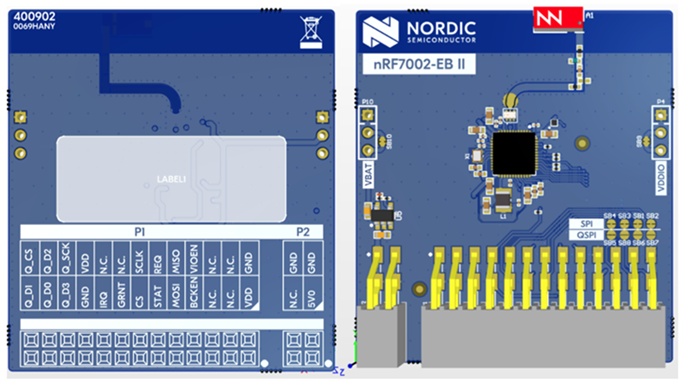
nRF7002-EB II
Pin mapping for the nRF54L15 DK and the nRF54LM20 DK
For the nRF54L15 DK and nRF54LM20 DK, refer to the following tables for the pin mappings for these kits. The board can be mounted on the P1 connector of the nRF54L15 DK and the P17 (Expansion) connector of the nRF54LM20 DK.
nRF70 Series pin name (EB name) |
nRF54L15 DK pins |
Function |
|---|---|---|
CLK (CLK) |
P1.11 |
SPI Clock |
CS (CS) |
P1.101 |
SPI Chip Select |
MOSI (D0) |
P1.06 |
SPI MOSI |
MISO (D1) |
P1.07 |
SPI MISO |
BUCKEN (EN) |
P1.04 |
Enable Buck regulator |
IOVDDEN |
P1.05 |
Enable IOVDD regulator |
IRQ (IRQ) |
P1.14 |
Interrupt from nRF7002 |
GRANT (GRT) |
P1.12 |
Coexistence grant from nRF7002 |
REQ (REQ) |
P1.09 |
Coexistence request to nRF7002 |
STATUS (ST0) |
P1.08 |
Coexistence status from nRF7002 |
[1]: There is a pin conflict with LED1 on P1.10 (CS) on the nRF54L15 DK, use other LEDs for status indication.
nRF70 Series pin name (EB name) |
nRF54LM20 DK pins |
Function |
|---|---|---|
CLK (CLK) |
P3.03 |
SPI Clock |
CS (CS) |
P3.02 |
SPI Chip Select |
MOSI (D0) |
P3.00 |
SPI MOSI |
MISO (D1) |
P3.01 |
SPI MISO |
BUCKEN (EN) |
P1.04 |
Enable Buck regulator |
IOVDDEN |
P1.13 |
Enable IOVDD regulator |
IRQ (IRQ) |
P1.05 |
Interrupt from nRF7002 |
GRANT (GRT) |
P1.07 |
Coexistence grant from nRF7002 |
REQ (REQ) |
P0.04 |
Coexistence request to nRF7002 |
STATUS (ST0) |
P0.03 |
Coexistence status from nRF7002 |
Building and programming with nRF7002-EB II
To build an application with support for Wi-Fi using the nRF7002-EB II, use a compatible board target with the CMake SHIELD option set to the corresponding shield name.
See Providing CMake options for instructions on how to provide CMake options.
For example, if you build the Wi-Fi: Shell sample for the nRF54L15 DK from the command line, use the following command:
west build -p -b nrf54l15dk/nrf54l15/cpuapp -- -Dshell_SHIELD="nrf7002eb2" -Dshell_SNIPPET=nrf70-wifi
If you use nRF Connect for VS Code, specify -DSHIELD=nrf7002eb2 in the Extra Cmake arguments field when setting up a build configuration.
Alternatively, add the shield in the project’s CMakeLists.txt file by using the following command:
set(SHIELD nrf7002eb2)
To build an application with support for Wi-Fi using the nRF7002-EB II with the nRF54LM20 DK, use the nrf54lm20dk/nrf54lm20a/cpuapp board target with the CMake SHIELD variable set to nrf7002eb2.
To build an application with support for Wi-Fi for a custom target, set -DSHIELD="nrf7002eb2" when you invoke west build or cmake in your nRF Connect SDK application.
Alternatively, you can add the shield in the project’s CMakeLists.txt file by using the set(SHIELD nrf7002eb2) command.
To build an application with support for Wi-Fi using the nRF7002-EB II with the nRF54L15 DK, use the nrf54l15dk/nrf54l15/cpuapp board target with the CMake SHIELD variable set to nrf7002eb2.
To build for a custom target, set -DSHIELD="nrf7002eb2" when you invoke west build or cmake in your nRF Connect SDK application.
Alternatively, you can add the shield in the project’s CMakeLists.txt file by using the set(SHIELD nrf7002eb2) command.
To build with coexistence mode enabled, set -DSHIELD="nrf7002eb2;nrf7002eb2_coex" when you invoke west build or cmake in your nRF Connect SDK application.
For optimal build configuration, use the nrf70-wifi snippet.
Limitations when building with nRF54L15 DK and nRF54LM20 DK
The Wi-Fi support is experimental and has the following limitations:
It is suitable only for low-throughput applications.
The Wi-Fi performance is not optimized. Refer to the Wi-Fi samples documentation for the supported samples.