

External execute in place (XIP) configuration on the nRF5340 SoC
This guide describes the external execute in place (XIP) support for the nRF5340 SoC. The nRF5340 SoC is equipped with a Quad Serial Peripheral Interface (QSPI) memory interface, which is capable of exposing QSPI flash as memory for the CPU used to fetch and execute the program code. The QSPI is available for the application core. Therefore, it is possible to relocate a part of the application’s code to an external memory. The external flash memory supports on-the-fly encryption and decryption. NCS supports dividing an application into an internal and external part, along with the MCUboot support.
For more information about QSPI XIP hardware support, the Execute in place page in the nRF5340 Product Specification.
For placing individual source code files into defined memory regions, check the Code relocation nocopy sample in Zephyr.
Enabling configuration options
Application configuration must support an external XIP and image splitting.
Enable the following sysbuild options in a sysbuild.conf file:
SB_CONFIG_BOOTLOADER_MCUBOOT=y
SB_CONFIG_NETCORE_APP_UPDATE=y
SB_CONFIG_SECURE_BOOT_NETCORE=y
SB_CONFIG_QSPI_XIP_SPLIT_IMAGE=y
SB_CONFIG_MCUBOOT_NRF53_MULTI_IMAGE_UPDATE=y

# This will enable the hci_ipc image for the network core, change to the desired image
SB_CONFIG_NETCORE_HCI_IPC=y
SB_CONFIG_BOOTLOADER_MCUBOOT=y
SB_CONFIG_QSPI_XIP_SPLIT_IMAGE=y
SB_CONFIG_NETCORE_NONE=y
SB_CONFIG_SECURE_BOOT_NETCORE=n
Additionally, set the following application options:
CONFIG_CUSTOM_LINKER_SCRIPTto"<linker_file_for_relocation>"CONFIG_FLASH_INIT_PRIORITYto40- You must ensure the QSPI device initialization priority, as it makes the external XIP code accessible before it is executed. If any initialization code is expected to be run from the QSPI XIP, then its initialization priority value must be lower than the QSPI device initialization priority.
Setting up QSPI flash
The QSPI flash DTS must be available for the application and the MCUboot. You must correctly set up the QSPI flash chip in the board devicetree file, including the operating mode. The flash chip does not have to run in the QSPI mode for XIP to function, but using other modes will reduce the execution speed of the application.
See the following snippet for an example of the Nordic Thingy:53 configuration that supports DSPI:
    &qspi {
    status = "okay";
    pinctrl-0 = <&qspi_default>;
    pinctrl-1 = <&qspi_sleep>;
    pinctrl-names = "default", "sleep";
    mx25r64: mx25r6435f@0 {
        compatible = "nordic,qspi-nor";
        reg = <0>;
        writeoc = "pp2o";
        readoc = "read2io";
        sck-frequency = <8000000>;
        jedec-id = [c2 28 17];
        sfdp-bfp = [
            e5 20 f1 ff  ff ff ff 03  44 eb 08 6b  08 3b 04 bb
            ee ff ff ff  ff ff 00 ff  ff ff 00 ff  0c 20 0f 52
            10 d8 00 ff  23 72 f5 00  82 ed 04 cc  44 83 68 44
            30 b0 30 b0  f7 c4 d5 5c  00 be 29 ff  f0 d0 ff ff
        ];
        size = <67108864>;
        has-dpd;
        t-enter-dpd = <10000>;
        t-exit-dpd = <35000>;
    };
};
Note
Due to QSPI peripheral product anomaly, the QSPI peripheral must be run with the HFCLK192MCTRL=0 setting.
Any other value may cause undefined operation of the device.
Setting up NVM memory layout with devicetree
Complete a setup to use the expected NVM memory layout with devicetree partitioning. The configuration must have 3 images with 2 slots each:
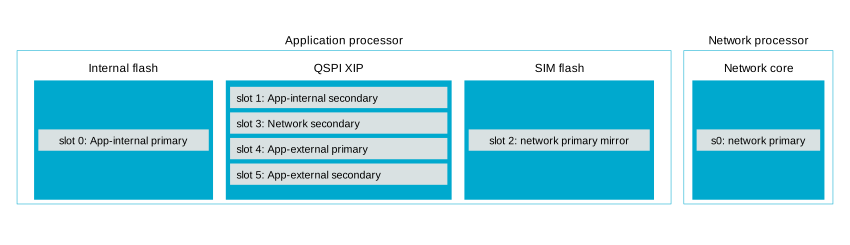
Partitioning slots in the nRF5340 SoC.
The first set of slots is for the internal flash part of the application. Use the partition nodes
slot0_partitionandslot1_partition.The second set of slots is for the network core update. Use the partition nodes
slot2_partitionandslot3_partition. The partition nodeslot2_partitionis defined in the MCUboot flash simulator devicetree overlay. You only need to align its size withslot3_partitionto match the expected NVM memory layout. Both slots should be the same size as thes0_partitionpartition node in thecpunetimages.The third set of slots is for the QSPI XIP part of the application. Use the partition nodes
slot4_partitionandslot5_partition.
See the following snippet for an example of the memory layout configuration for devicetree:
/*
 * Copyright (c) 2026 Nordic Semiconductor ASA
 *
 * SPDX-License-Identifier: LicenseRef-Nordic-5-Clause
 *
 * Memory map for QSPI XIP split image with network core update.
 * External slots: slot1 = app secondary, slot3 = netcore secondary,
 * slot4/5 = QSPI XIP primary/secondary.
 */

/delete-node/ &boot_partition;
/delete-node/ &slot0_partition;
/delete-node/ &slot1_partition;
/delete-node/ &storage_partition;

&flash0 {
	partitions {
		boot_partition: partition@0 {
			compatible = "zephyr,mapped-partition";
			label = "mcuboot";
			reg = <0x00000000 DT_SIZE_K(64)>;
		};

		slot0_partition: partition@10000 {
			compatible = "zephyr,mapped-partition";
			label = "image-0";
			reg = <0x00010000 0x000d4000>;
		};

		storage_partition: partition@f0000 {
			compatible = "zephyr,mapped-partition";
			label = "storage";
			reg = <0x000f0000 DT_SIZE_K(64)>;
		};
	};
};

&mx25r64 {
	status = "okay";

	partitions {
		compatible = "fixed-partitions";
		#address-cells = <1>;
		#size-cells = <1>;

		slot1_partition: partition@0 {
			label = "image-1";
			reg = <0x00000000 0x000d4000>;
		};

		slot3_partition: partition@d4000 {
			label = "image-3";
			reg = <0x000d4000 DT_SIZE_K(256)>;
		};

		slot4_partition: partition@120000 {
			label = "image-4";
			reg = <0x00120000 DT_SIZE_K(256)>;
		};

		slot5_partition: partition@160000 {
			label = "image-5";
			reg = <0x00160000 DT_SIZE_K(256)>;
		};
	};
};
Partitioning for the cpunet images (b0n and hci_ipc) is expected to follow the nRF5340 SoC configuration.
See sysbuild/b0n.overlay in the SMP Server with external XIP sample.
Configuring linker script
To relocate code to the external flash, you need to configure a linker script.
The script needs to describe the EXTFLASH flash memory block to which the code will be linked.
The ORIGIN of the area can be calculated using following elements:
The QSPI memory starting with the 0x10000000 internal memory address.
The offset of an external application part image within the QSPI flash. The external application code is mapped by the partition node
slot4_partition.The image header size of the MCUboot image (0x200).
See the following example of the calculation:
#include <zephyr/linker/sections.h>
#include <zephyr/devicetree.h>
#include <zephyr/linker/linker-defs.h>
#include <zephyr/linker/linker-tool.h>

MEMORY
{
    /* This maps the partition node slot4_partition from the application devicetree overlay.
    * components for ORIGIN calculation:
    *  - 0x10000000: offset of QSPI external memory in SoC memory mapping.
    *  - 0x120000: slot4_partition offset in QSPI external memory
    *  - 0x200: image header size.
    * The size of this region is size of slot4_partition reduced by the
    * image header size.
    */
    EXTFLASH (wx) : ORIGIN = 0x10120200, LENGTH = 0x3FE00
}

#include <zephyr/arch/arm/cortex_m/scripts/linker.ld>
Setting up code relocation
Relocating code to QSPI XIP is a part of the project’s CMakeLists.txt file.
You can set up the relocation on a file or library basis using the zephyr_code_relocate() function.
For example, to relocate a file in the application, use the following configuration:
zephyr_code_relocate(FILES ${CMAKE_CURRENT_SOURCE_DIR}/src/bluetooth.c LOCATION EXTFLASH_TEXT NOCOPY)
zephyr_code_relocate(FILES ${CMAKE_CURRENT_SOURCE_DIR}/src/bluetooth.c LOCATION RAM_DATA)
where the first line relocates the XIP code (.text) and the second line relocates the data initialization content section (.data).
Similarly, it is possible to relocate certain libraries, for example:
zephyr_code_relocate(LIBRARY mcumgr_mgmt LOCATION EXTFLASH_TEXT NOCOPY)
zephyr_code_relocate(LIBRARY mcumgr_mgmt LOCATION RAM_DATA)
Building the project
Use the standard Building an application procedure. The XIP QSPI sample supports and uses sysbuild by default.
Programming the project
For the nRF5340 DK and other boards equipped with flash working in the QSPI mode, use the standard programming command (west flash).
For other cases, set up a configuration file for nRF Util, as described in the following section.
Programming to external flash in SPI/DSPI mode
Programming an application with west triggers the nRF Util runner.
The runner uses the default system settings that configure the application in the QSPI mode when programming the external flash.
You can change this behavior by using a custom Qspi.json configuration file.
This file is used to set up the QSPI flash device and its parameters.
Note
The Qspi.json file is required to work on the Nordic Thingy:53.
Its QSPI configuration is different from the default one, for example, it uses the PP command for programming and READ2IO for reading.
To use such a file automatically in a project, update the CMakeLists.txt file by adding the mention of the new file.
This way, the file can be applied globally for every board built with a project or applied to specific boards if a project supports multiple board targets, each with different configurations.
The following code shows how to set the configuration file used when flashing the Thingy:53 only.
Note
This code must be placed before the find_package line.
cmake_minimum_required(VERSION 3.20.0)

macro(app_set_runner_args)
  if(CONFIG_BOARD_THINGY53_NRF5340_CPUAPP)
    # Use alternative QSPI configuration file when flashing Thingy53
    board_runner_args(nrfutil "--ext-mem-config-file=${CMAKE_CURRENT_SOURCE_DIR}/qspi_thingy53.json")
  endif()
endmacro()

find_package(Zephyr REQUIRED HINTS $ENV{ZEPHYR_BASE})

project(smp_svr_ext_xip)
Note
The external flash chip must be connected to the dedicated QSPI peripheral port pins of the nRF5340 SoC. It is not possible to program an external flash chip that is connected to different pins using nRF Util.
Troubleshooting
Refer to the following sections for information on how to solve the most common issues.
Module does not appear to start
When using QSPI XIP, a frequent issue is the module not starting or crashing before the application runs.
This often results from a mismatch in init priorities between the code on QSPI flash and the QSPI flash device.
To debug this issue, you can use a debugger such as GNU Debugger (GDB) to single-step through the application code until a QSPI address is encountered.
The backtrace functionality can then show which part of the code is responsible for the issue, and you can adjust the init priority of that module accordingly.
Given that the QSPI flash init priority defaults to 41 at the POST_KERNEL level, take into account the following points:
There should be no QSPI flash residing code that has an
initpriority value that is less than or equal to thePOST_KERNELlevel41.No interrupt handlers in the QSPI flash should be enabled until the QSPI flash driver has been initialized.
Module does not boot after update
This issue can occur if there is a mismatch between the internal flash code and the QSPI XIP code. Both slots must be running the same build to successfully boot. The application will fail to boot in the following cases:
If one of the updates is not loaded.
If a different build is loaded to one of the slots.
If one of the loaded updates is corrupt and deleted.
Indication of XIP performance
The XIP code execution performance measurement was conducted to evaluate the expected performance in different operating conditions.
The following table lists performance numbers that were measured under different operating conditions.
Note
The numbers in the table refer to current consumed only by the nRF5340 SoC. For complete numbers, you must add the current used by external flash, which varies between manufacturers.
CPU frequency |
Memory |
Cache |
QSPI speed |
Mode |
Time [ms] |
Current @3.0V [mA] |
Current @1.8V [mA] |
Total energy @3.0V [µJ] |
Total energy @1.8V [µJ] |
|---|---|---|---|---|---|---|---|---|---|
64 MHz |
Internal flash |
Yes |
n/a |
n/a |
63 |
3.2 |
5.1 |
605 |
578 |
64 MHz |
External flash |
Yes |
48 MHz |
Quad |
68.9 |
5.63 |
8.51 |
1164 |
1055 |
64 MHz |
External flash |
Yes |
24 MHz |
Quad |
73.7 |
5.58 |
8.44 |
1234 |
1120 |
128 MHz |
Internal flash |
Yes |
n/a |
n/a |
31 |
7.65 |
12.24 |
711 |
683 |
128 MHz |
External flash |
Yes |
96 MHz |
Quad |
34.1 |
8.99 |
14.1 |
920 |
865 |
128 MHz |
External flash |
No |
96 MHz |
Quad |
88.5 |
9.15 |
12.95 |
2429 |
2063 |
128 MHz |
External flash |
Yes |
48 MHz |
Quad |
36.4 |
8.85 |
13.9 |
966 |
911 |
Additional information
For additional information regarding the QSPI XIP mode of nRF Connect SDK and how to use it, see Using QSPI XIP split image.