

nRF Connect Docs
nRF Connect SDK Add-ons Add-ons nRF Connect SDK Bare Metal Bare Metal
Documentation sets
  • nRF Connect SDK

  • nrfxlib

  • Zephyr Project

  • MCUboot

  • Trusted Firmware-M

  • Matter

  • Kconfig Reference

★ Feedback
nRF Connect SDK
3.3.99

Contents

  • Quick Start
  • Installation
    • Installing the nRF Connect SDK
    • Updating repositories and tools
    • Requirements reference
  • Application development
    • Creating an application
    • Board support
      • nRF54LS05 DK
      • nRF54LV10 DK
    • Configuring and building
      • Build and configuration system
      • Adding files and configuring CMake
      • Configuring devicetree
        • Adding new drivers
        • Adding a dimmable LED node
        • Pin control
        • Driving a GPIO pin directly
      • Configuring Kconfig
      • Configuring sysbuild
        • Configuring sysbuild usage in west
        • Sysbuild images
        • Using Zephyr samples with sysbuild
        • Sysbuild forced options
      • Building an application
      • Output build files (image files)
    • Programming an application
    • Using companion components
    • Bootloaders and DFU
      • MCUboot and NSIB
        • Quick start guide
        • Enabling a bootloader chain using sysbuild
        • Secure bootloader chain
        • Essential MCUboot configuration items
        • Partitioning device memory
        • Image versions
        • Customizing the bootloader
        • Signature keys
        • Downgrade protection
      • Using QSPI XIP split image
      • MCUmgr Command-line tool
      • MCUboot serial recovery
      • MCUboot image compression
      • Sysbuild-assigned image IDs
      • MCUboot devicetree configuration
    • Data storage in the nRF Connect SDK
    • Working with the KMU and CRACEN
      • KMU and CRACEN hardware peripherals overview
      • PSA Crypto API programming model for KMU keys
      • Provisioning the KMU
    • Developing with nRF91 Series
      • Features of nRF91 Series
      • Configuring board controller
      • Connecting the nRF91 Series DK to nRF Cloud
      • Updating the DK firmware using Programmer
      • Configuring and building with nRF91 Series
      • Programming onto nRF91 Series devices
      • Testing the cellular connection on nRF91 Series DK
      • Snippets for an nRF91 Series device
      • Configuring external flash memory on the nRF9160 DK
    • Developing with nRF70 Series
      • Features of nRF70 Series
      • Networking stack partitioning
      • Host device considerations
      • Firmware patches in the external memory
      • Firmware patch update
      • Power profiling of nRF7002 DK
      • Developing with nRF7002 EK
      • Developing with nRF7002 EB
      • Developing with nRF7002-EB II
      • nRF70 Series advanced security modes
    • Developing with nRF54L Series
      • Enabling Zephyr Memory Storage
      • Working with the FLPR core
      • Building and programming with nRF54L SoC series
      • Signing applications with integrated FLPR payload
      • FOTA updates on nRF54L Series devices
      • Configuring DFU and MCUboot
      • MCUboot AES image encryption with ECIES-X25519 key exchange
      • nRF54L One-Time Programmable memory map for nRF Connect SDK
      • nRF54L pin mapping
      • nRF54L Errata support in nRF Connect SDK
    • Developing with nRF54H Series
      • Getting started with the nRF54H20 DK
      • nRF54H20 architecture
        • nRF54H20 domains
        • nRF54H20 memory layout
        • nRF54H20 interprocessor communication
        • nRF54H20 boot sequence
        • nRF54H20 SoC lifecycle states
        • nRF54H20 power management
        • nRF54H20 clock management
        • nRF54H20 reset behavior
        • nRF54H20 pin mapping
      • Configuring your application for a custom PCB
      • Configuring the nRF54H20 SoC
      • Configuring logging on the nRF54H20
      • Debugging on the nRF54H20
      • Working with the FLPR core
      • Working with the PPR core
      • Enabling Zephyr Memory Storage
      • IronSide Secure Enclave
        • Updating IronSide SE
        • Configuring global resources using UICR
        • Protecting a device with IronSide SE
        • Configuring secure storage
        • Using IronSide SE snapshot services
        • Managing boot flows
        • IronSide SE services
      • Provisioning keys on the nRF54H20 SoC
      • Configuring DFU and MCUboot
      • Configuring nRF54H20 applications for updates using a merged slot
      • Configuring nRF54H20 applications for updates using a manifest
      • Configuring bootloader requests on the nRF54H20 SoC
      • MCUboot AES image encryption with ECIES-X25519 key exchange
      • nRF54H20 power management optimization
      • Assigning peripherals to cores on the nRF54H20 SoC
    • Developing with nRF53 Series
      • Features of nRF53 Series
      • Building and programming with nRF53 Series
      • FOTA updates with nRF5340 DK
      • Simultaneous multi-image DFU with nRF5340 DK
      • MCUboot’s serial recovery of the networking core image
      • Getting logging output with nRF5340 DK
      • External execute in place (XIP) configuration on the nRF5340 SoC
    • Developing with nRF52 Series
      • Features of nRF52 Series
      • Building and programming on nRF52 Series devices
      • FOTA updates on nRF52 Series devices
    • Developing with Thingy:91 X
      • Features of Thingy:91 X
      • Connecting the Thingy:91x to nRF Cloud
      • Updating the Thingy:91 X firmware using nRF Util
      • Building and programming with Thingy:91 X
      • Recovering the Thingy:91 X to factory firmware
    • Developing with Thingy:91
      • Features of Thingy:91
      • Connecting to Thingy:91
      • Connecting the Thingy:91 to nRF Cloud
      • Updating the Thingy:91 firmware using nRF Connect for Desktop apps
      • Building and programming with Thingy:91
    • Developing with Thingy:53
      • Preloaded and precompiled Thingy:53 firmware
      • Building and programming with Thingy:53
      • Application guide for Thingy:53
    • Developing with PMICs
      • Developing with the nPM1300 PMIC
      • Developing with the nPM1304 PMIC
      • Developing with the nPM2100 PMIC
    • Developing with Front-End Modules
      • Enabling FEM support
        • MPSL FEM-only configuration
        • Enabling GPIO mode support for nRF21540
        • Enabling GPIO+SPI mode support for nRF21540
        • Optional FEM properties for nRF21540 GPIO and GPIO+SPI
        • Enabling support for front-end modules using Simple GPIO interface
        • Use case of incomplete physical connections to the FEM module
      • Using FEM power models
      • Developing with the nRF21540 EK
    • Developing with custom boards
      • Defining custom board
      • Connecting custom boards for programming
    • Coexistence of short-range radio and other radios
    • Developing with coprocessors
      • Introduction to Soft Peripherals and High-Performance Framework
      • High-Performance Framework (HPF)
        • Assembly management
        • Event handling
        • Fault handling
        • Power management
        • Real-time peripherals
  • Testing and optimization
    • Debugging an application
    • Logging in nRF Connect SDK
    • Test framework
      • Writing tests with Unity and CMock
      • Running unit tests
    • Optimizing application
      • Memory footprint optimization
      • Power optimization
        • Power optimization recommendations
        • Power optimization with Online Power Profiler
  • Security
    • PSA Certified Security Framework overview
    • Cryptography in the nRF Connect SDK
      • Cryptographic architecture overview
      • Cryptographic drivers
      • Configuring PSA Crypto API
      • Supported cryptographic operations in the nRF Connect SDK
    • Trusted Firmware-M in the nRF Connect SDK
      • TF-M support and limitations in the nRF Connect SDK
      • Trusted Firmware-M architecture
      • Security by separation and processing environments
      • Building and configuring TF-M
      • TF-M Services
      • TF-M provisioning
      • TF-M logging
    • Managing access port protection
    • Secure storage in the nRF Connect SDK
    • Key storage in the nRF Connect SDK
  • Protocols
    • Aliro
    • Amazon Sidewalk
    • Bluetooth
      • Bluetooth solution areas
      • Bluetooth stack architecture
      • Bluetooth Mesh
        • Bluetooth Mesh overview
        • Configuring Bluetooth Mesh in nRF Connect SDK
        • Configuring Bluetooth Mesh models using the nRF Mesh mobile app
        • Device Firmware Updates (DFU) in Bluetooth Mesh
        • Removing a node from a Bluetooth Mesh network
        • Creating a new Bluetooth Mesh model
        • Running Bluetooth Mesh samples on other platforms
      • Bluetooth qualification
    • Cellular
      • Cellular overview
      • Getting started with cellular products
      • Power saving techniques
      • Power profiling cellular applications
    • DECT NR+
    • Enhanced ShockBurst (ESB)
    • Gazell
      • Gazell Link Layer
      • Gazell Pairing
    • Matter
      • Matter overview
        • Matter architecture
        • Matter Data Model and device types
        • Matter Interaction Model and interaction types
        • Matter network topology and concepts
        • Matter network security
        • Matter network commissioning
        • Matter multiple fabrics feature
        • Matter Group Communication
        • Matter OTA
        • Matter Bridge
        • Matter development model and compatible ecosystems
        • Matter integration in the nRF Connect SDK
      • Getting started with Matter
        • Matter hardware and memory requirements
        • Testing Matter in the nRF Connect SDK
        • Matter tools
        • Enabling Matter in Kconfig
        • Advanced Matter Kconfig options
        • Configuring transmission power
        • Creating manufacturer-specific clusters in Matter application
        • Adding clusters to Matter application
        • Matter APIs
        • Adding Bluetooth LE services to Matter application
        • Reducing power consumption in Matter
        • Optimizing memory usage in Matter applications
        • Testing with commercial Matter ecosystems
      • How to create Matter end product
        • Matter device development prerequisites
        • Matter Compliant Platform and Derived Matter Product (DMP)
        • Factory provisioning in Matter
        • Matter Device Attestation
        • Matter Distributed Compliance Ledger
        • Matter certification
        • Ecosystems certification
        • Bootloader configuration in Matter
        • Security
        • Storing Certification Declaration in firmware
        • Maintaining firmware version
        • Matter fabric removal
        • Matter test event triggers
        • Matter watchdog
    • Multiprotocol support
    • Near Field Communication (NFC)
    • Thread
      • OpenThread overview
        • Supported Thread features
        • OpenThread architectures
        • OpenThread co-processor communication
        • OpenThread integration
        • OpenThread memory requirements
        • OpenThread power consumption
        • OpenThread commissioning
        • OpenThread security
      • Configuring Thread in the nRF Connect SDK
      • Pre-built libraries
      • Thread tools
      • Thread certification
      • Thread device types
      • Sleepy End Device types in Thread
      • Thread Commissioning Over Authenticated TLS
    • Wi-Fi
      • Wi-Fi overview
      • Wi-Fi certification
      • Station mode
        • Memory requirements for Wi-Fi applications in Station mode
        • Operating in power save modes
      • Scan mode
        • Memory requirements for Wi-Fi applications in Scan mode
        • Optimizing scan operation
      • SoftAP mode
        • Memory requirements for Wi-Fi applications in SoftAP mode
        • SoftAP mode
      • Wi-Fi Direct (P2P mode)
      • Advanced modes
        • Memory requirements for Wi-Fi applications in Raw mode
        • Raw IEEE 802.11 packet transmission
        • Raw IEEE 802.11 packet reception using Monitor mode
        • Raw IEEE 802.11 packet reception using Promiscuous mode
        • Offloaded raw transmit operation
      • Wi-Fi provisioning
        • Memory requirements for Bluetooth LE based provisioning
        • Memory requirements for SoftAP based provisioning
      • Operating with regulatory support
      • Debugging
      • Wi-Fi stack configuration and performance
      • Regulatory Certification Testing for nRF70 Series Devices
        • Test setup
        • Regulatory test cases
        • Antenna gain compensation
        • Band edge compensation
        • Using the Wi-Fi Radio test sample
        • Using the Radio test (short-range) sample
        • Using the Wi-Fi Shell sample
        • Using the Wi-Fi Station sample
        • EN 301 893 V2.1.1 based adaptivity test procedure
    • Wireless coexistence
    • Zigbee
  • Applications
    • Asset Tracker Template
    • Serial Modem
    • Connectivity bridge
    • IPC radio firmware
    • Matter bridge
      • Application guide
        • Matter bridge application configuration options
      • Extending the application
        • Adding support for a new Matter device type
        • Adding support for a new Bluetooth LE service
        • Adding support for a proprietary protocol
    • nRF Audio applications
      • nRF Audio overview and firmware architecture
      • nRF Audio feature support and QDIDs
      • nRF Audio application requirements
      • User interface
      • Configuring the nRF Audio applications
      • Building and running nRF Audio applications
      • nRF Audio: Broadcast sink
      • nRF Audio: Broadcast source
      • nRF Audio: Unicast client
      • nRF Audio: Unicast server
      • Adapting nRF Audio applications for end products
      • nRF Audio: Application-specific Kconfig options
      • Audio applications: API documentation
    • nRF Desktop
      • nRF Desktop: Application description
      • nRF Desktop: Application-specific Kconfig options
      • nRF Desktop: Board configuration
      • nRF Desktop: Adding nRF21540 EK shield support
      • nRF Desktop: Memory layout
      • nRF Desktop: Bluetooth
      • nRF Desktop: Bootloader and Device Firmware Update
      • nRF Desktop: fwupd support
      • nRF Desktop: Integrating your own hardware
      • nRF Desktop: Application internal modules
        • Basic module (main)
        • Battery charger module
        • Battery measurement module
        • Bluetooth LE advertising module
        • Bluetooth LE advertising control module
        • Bluetooth LE bond module
        • Bluetooth LE connection parameters module
        • Bluetooth LE discovery module
        • Bluetooth LE latency module
        • Bluetooth LE passkey module
        • Bluetooth LE Quality of Service module
        • Bluetooth LE scanning module
        • Bluetooth state power manager module
        • Bluetooth LE state module
        • Board module
        • Buttons module
        • Button simulator module
        • Click detector module
        • CPU measurement module
        • Device description module
        • Device Firmware Upgrade module
        • Device Firmware Upgrade MCUmgr module
        • DVFS module
        • Factory reset module
        • Failsafe module
        • Fast Pair module
        • Function key module
        • GATT Battery Service module
        • HID forward module
        • HID provider consumer control module
        • HID provider keyboard module
        • HID provider mouse module
        • HID provider system control module
        • HID state module
        • HID state power manager module
        • HID Service module
        • Info module
        • LED state module
        • LED stream module
        • LEDs module
        • Motion module
        • Passkey module
        • Power manager module
        • nRF Profiler synchronization module
        • Quality of Service module
        • Selector module
        • Simple Management Protocol module
        • Settings loader module
        • Swift Pair module
        • USB state power manager module
        • USB state module
        • Watchdog module
        • Wheel module
        • Constant latency hotfix module
        • High frequency clock lock hotfix module
        • Source and sink module lists
      • nRF Desktop: Application internal utilities
        • Configuration channel
        • DFU lock utility
        • HID event queue utility
        • HID keymap utility
        • HID report queue utility
        • Keys state utility
      • nRF Desktop: Application Kconfig options scheme
      • nRF Desktop: API documentation
    • High-Performance Framework
      • High-Performance Framework GPIO
      • High-Performance Framework MSPI
    • Matter weather station
    • Installer (MCUboot Firmware Loader installer)
  • Samples
    • Amazon Sidewalk samples
    • Bluetooth Fast Pair samples
      • Bluetooth Fast Pair: Input device
      • Bluetooth Fast Pair: Locator tag
    • Bluetooth Mesh samples
      • Bluetooth Mesh: Coexistence with other LE services
      • Bluetooth Mesh: Chat
        • Sample description
        • Chat Client model
      • Bluetooth Mesh: Light
      • Bluetooth Mesh NLC: Lightness Controller/Energy Monitor
      • Bluetooth Mesh NLC: Dimming Control/Scene Selector
      • Bluetooth Mesh: Light switch
      • Bluetooth Mesh NLC: HVAC Integration (Sensor observer)
      • Bluetooth Mesh NLC: Ambient Light Sensor/Occupancy Sensor
      • Bluetooth Mesh: Silvair EnOcean
      • Bluetooth Mesh: Device Firmware Update (DFU) distributor
      • Bluetooth Mesh: Device Firmware Update (DFU) target
    • Bluetooth samples
      • Bluetooth: Central and Peripheral HRS
      • Bluetooth: Central BAS
      • Bluetooth: Central HIDS
      • Bluetooth: Central Heart Rate Monitor with Coded PHY
      • Bluetooth: Central NFC pairing
      • Bluetooth: Central SMP Client
      • Bluetooth: Central UART
      • Bluetooth: Connection time synchronization
      • Bluetooth: Direct Test Mode
      • Bluetooth: Direction finding central
      • Bluetooth: Direction finding connectionless locator
      • Bluetooth: Direction finding connectionless beacon
      • Bluetooth: Direction finding peripheral
      • Bluetooth: EnOcean
      • Bluetooth: Event Trigger
      • Bluetooth: HCI low power UART
      • Bluetooth: ISO combined BIS and CIS
      • Bluetooth: ISO time synchronization
      • Bluetooth: LLPM
      • Bluetooth: Multiple advertising sets
      • nRF Auraconfig
      • Bluetooth: nRF Distance Measurement with Bluetooth LE discovery
      • Bluetooth: Path loss monitoring
      • Bluetooth: Peripheral AMS client
      • Bluetooth: Peripheral ANCS client
      • Bluetooth: Peripheral Bond Management Service (BMS)
      • Bluetooth: Continuous Glucose Monitoring Service (CGMS)
      • Bluetooth: Peripheral CTS client
      • Bluetooth: Peripheral GATT Discovery Manager
      • Bluetooth: Peripheral HIDS keyboard
      • Bluetooth: Peripheral HIDS mouse
      • Bluetooth: Peripheral Heart Rate Monitor with Coded PHY
      • Bluetooth: Peripheral LBS
      • Bluetooth: Peripheral Memfault Diagnostic Service (MDS)
      • Bluetooth: NFC pairing
      • Bluetooth: Peripheral power profiling
      • Bluetooth: Peripheral Running Speed and Cadence Service (RSCS)
      • Bluetooth: Peripheral Status
      • Bluetooth: Peripheral UART
      • Bluetooth: Peripheral with multiple identities
      • Bluetooth: External radio coexistence using 1-wire interface
      • Bluetooth: Radio Notification callback
      • Bluetooth: Host for nRF RPC Bluetooth Low Energy
      • Bluetooth: Automated power control
      • Bluetooth: Scanning while connecting
      • Bluetooth: NUS shell transport
      • Bluetooth: Shorter Connection Intervals
      • Bluetooth: Connection Subrating
      • Bluetooth: Throughput
      • Bluetooth: Channel Sounding Initiator with Inline PCT Transfer
      • Bluetooth: Channel Sounding Reflector with Inline PCT Transfer
      • Bluetooth: Channel Sounding Initiator with Ranging Requestor
      • Bluetooth: Channel Sounding Reflector with Ranging Responder
      • nRF Auraconfig test
      • nRF Auraconfig tester test
      • Bluetooth: Bluetooth LE master test app
    • Cellular samples
      • Cellular: AT Client
      • Cellular: AT monitor
      • Cellular: Battery
      • Cellular: Full modem firmware update using SMP Server
      • Cellular: GNSS
      • Cellular: Location
      • Cellular: LwM2M carrier
        • Sample description
        • Preparing for production
      • Cellular: LwM2M Client
        • Sample description
        • Evaluating LwM2M Advanced Firmware Update
        • Evaluating LwM2M Advanced Firmware Update for external MCU
        • Preparing for production
      • Cellular: Modem callbacks
      • Cellular: Modem Shell
      • Cellular: Modem trace backend
      • Cellular: Modem trace external flash backend
      • Cellular: NIDD
      • Cellular: nRF Cloud CoAP cellular location
      • Cellular: nRF Cloud CoAP device message
      • Cellular: nRF Cloud CoAP FOTA
      • Cellular: nRF Cloud MQTT cellular location
      • Cellular: nRF Cloud MQTT device message
      • Cellular: nRF Cloud MQTT FOTA
      • Cellular: nRF Device provisioning
      • Cellular: PDN
      • Cellular: SMP Server
      • Cellular: SMS
      • Cellular: TLS cipher suites
      • Cellular: UDP
      • Cellular: UICC LwM2M
      • Cellular: HTTP application update
      • Cellular: HTTP modem delta update
      • Cellular: HTTP full modem update
    • Cryptographic samples
      • Crypto: AES CBC
      • Crypto: AES CCM
      • Crypto: AES CTR
      • Crypto: AES GCM
      • Crypto: AES KW
      • Crypto: Chacha20-Poly1305 example
      • Crypto: ECDH
      • Crypto: ECDSA
      • Crypto: EC J-PAKE
      • Crypto: EdDSA
      • Crypto: HKDF
      • Crypto: HMAC
      • Crypto: KMU usage with CRACEN
      • Crypto: PBKDF2
      • Crypto: Persistent key usage
      • Crypto: PSA TLS
      • Crypto: RNG
      • Crypto: RSA
      • Crypto: SHA-256
      • Crypto: Spake2+
    • IronSide Secure Enclave samples
      • Protected Memory with PERIPHCONF Partition
      • Secondary boot
      • Secondary boot with APPLICATIONLOCKUP trigger
    • Debug samples
      • Memfault
      • PPI trace
    • DECT NR+ samples
      • nRF91x1: DECT NR+ Shell
      • nRF91x1: Hello DECT
      • nRF91x1: DECT NR+ PHY Shell
      • nRF91x1: DECT NR+ PHY hello
    • DFU samples
      • MCUboot SMP Server
      • A/B with MCUboot
      • A/B with MCUboot and separated slots
      • DFU Multi-image
      • DFU Target
      • Single-slot DFU with MCUboot
      • Minimal Bluetooth LE SMP firmware loader
      • Minimal USB virtual serial port SMP firmware loader
      • Firmware loader entrance
      • MCUboot with encryption enabled
      • MCUboot minimal configuration
      • MCUboot with decompression enabled
      • nRF Secure Immutable Bootloader
    • Enhanced ShockBurst samples
      • Enhanced ShockBurst: Monitor
      • Enhanced ShockBurst: Receiver
      • Enhanced ShockBurst: Receiver with Bluetooth LE
      • Enhanced ShockBurst: Transmitter
      • Enhanced ShockBurst: Transmitter with Bluetooth LE
    • Gazell samples
      • Gazell ACK Payload Device
      • Gazell ACK Payload Host
      • Gazell Dynamic Pairing Device
      • Gazell Dynamic Pairing Host
    • Keys samples
      • Hardware unique key
      • Identity key generation
      • Identity key usage
    • Matter samples
      • Matter: Closure
      • Matter: Contact sensor
      • Matter: Light bulb
      • Matter: Light switch
      • Matter: Door lock
      • Matter: Manufacturer-specific
      • Matter: Smoke CO Alarm
      • Matter: Temperature Sensor
      • Matter: Template
      • Matter: Thermostat
      • Matter: Window covering
      • Shared configurations in Matter samples
      • Shared configurations in Matter stack
      • Matter Sample Checker
      • Matter snippet collection
        • Matter debug snippet (matter-debug)
        • Matter diagnostic logs snippet (matter-diagnostic-logs)
    • Networking samples
      • AWS IoT
      • Azure IoT Hub
      • CoAP Client
      • Download
      • HTTP Server
      • HTTPS Client
      • MQTT
        • Sample description
        • Architecture
        • Provisioning
      • UDP
    • NFC samples
      • NFC: Launch App
      • NFC: Text record
      • NFC: Shell
      • NFC: System OFF
      • NFC: Tag reader
      • NFC: TNEP poller
      • NFC: TNEP tag
      • NFC: Writable NDEF message
    • nRF5340 samples
      • nRF5340: Empty firmware for application core
      • nRF5340: SMP Server with external XIP
      • nRF5340: Network core bootloader
      • nRF5340: Remote IPC shell
      • nRF5340: nRF RPC Entropy
    • Peripheral samples
      • IEEE 802.15.4 PHY test tool
      • IEEE 802.15.4 Sniffer
      • Low Power UART
      • PPI Sequencer with SPI
      • Radio test (short-range)
    • PMIC samples
      • nPM1300 and nPM1304: Fuel gauge
      • nPM1300 and nPM1304: One button
      • nPM2100: Fuel gauge
      • nPM2100: One button
    • Protocol serialization samples
      • nRF RPC: Protocols serialization client
      • nRF RPC: Protocols serialization server
    • Sensor samples
      • BH1749: Ambient Light Sensor IC
      • BME68X: Gas Sensor
    • Thread samples
      • Thread: CLI
      • Thread: CoAP Client
      • Thread: CoAP Server
      • Thread: Co-processor
      • OpenThread snippet collection
        • OpenThread snippet for CI purpose (ot-ci)
        • OpenThread snippet for debugging purpose (ot-debug)
        • OpenThread snippet for diagnostic GPIO commands (ot-diag-gpio)
        • OpenThread snippet for logging (ot-logging)
        • OpenThread snippet for USB transport (ot-usb)
        • OpenThread snippet for Zephyr L2 networking layer (ot-zephyr-l2)
    • Trusted Firmware-M (TF-M) samples
      • TF-M: Provisioning image
      • TF-M: Provisioning image for network core
      • TF-M Hello World
      • TF-M: PSA template
      • TF-M secure peripheral partition
      • TF-M: Platform security architecture test
    • Wi-Fi samples
      • Wi-Fi: Bluetooth LE coexistence
      • Wi-Fi: Monitor
      • Wi-Fi: nRF Cloud
      • Wi-Fi: Offloaded raw TX
      • Wi-Fi: P2P
      • Wi-Fi: Promiscuous
      • Wi-Fi: Raw TX packet
      • Wi-Fi: Scan
      • Wi-Fi: Shell
      • Wi-Fi: Shutdown
      • Wi-Fi: SoftAP
      • Wi-Fi: Station
      • Wi-Fi: Thread coexistence
      • Wi-Fi: Throughput
      • Wi-Fi: TWT
      • Wi-Fi: WFA QuickTrack control application
      • Wi-Fi: Radio test samples
        • Wi-Fi: Radio test (Multi domain)
        • Wi-Fi: Bluetooth LE Wi-Fi Radio test (Single domain)
      • Wi-Fi: Provisioning samples
        • Wi-Fi: Bluetooth LE based provision
        • Wi-Fi: Provisioning Internal
        • Wi-Fi: SoftAP based provision
      • Wi-Fi: Zephyr networking samples
    • Zigbee samples
    • Other samples
      • Application Event Manager
      • Application Event Manager profiling tracer
      • Application JWT
      • Common Application Framework preview
      • CAF: Sensor manager
      • Event Manager Proxy
      • Hardware ID
      • nRF Profiler
      • IPC service
      • MPSL timeslot
      • CoreMark
      • Protected Memory with PERIPHCONF Partition
      • Secondary boot
      • Secondary boot with APPLICATIONLOCKUP trigger
      • Multicore idle test
      • Multicore idle GPIO test
      • PWM in low power states test
      • Empty firmware for multiple core SoCs
      • Multicore idle test with firmware relocated to radio core TCM
  • Drivers
    • BH1749 driver
    • BME68X IAQ driver
    • CC3XX entropy driver
    • Ethernet over RTT driver
    • CC3XX hardware driver
    • sQSPI MSPI shim driver
    • PAW3212 driver
    • PMW3360 driver
    • PPI Sequencer
    • PPI Sequencer for I2C/SPI
    • Simulated sensor driver
    • Sensor stub driver
    • UART driver
    • IPC UART driver
    • Low power UART driver
    • Wi-Fi drivers
      • nRF Wi-Fi driver
      • nRF Wi-Fi portable driver
      • Low-level API
  • Libraries
    • Binary libraries
      • LwM2M carrier
        • Certification and version dependencies
        • Application integration
        • Requirements and application limitations
        • Message sequence charts
        • API documentation
        • Changelog
    • Bluetooth libraries and services
      • Google Fast Pair libraries
        • Google Fast Pair Service (GFPS)
        • Fast Pair Advertising Manager
      • Bluetooth LE advertising providers
      • Bluetooth connection context
      • Bluetooth Channel Sounding Distance Estimation
      • DTM 2-wire UART to HCI Converter
      • Bluetooth EnOcean
      • GATT Discovery Manager
      • Bluetooth GATT attribute pools
      • Bluetooth Mesh libraries
        • Bluetooth Mesh models
        • Bluetooth Mesh properties
        • Bluetooth Mesh provisioning handler for Nordic DKs
        • Bluetooth Mesh sensors
        • Bluetooth Mesh sensor formats and sensor types
      • Radio Notification callback
      • Bluetooth Low Energy Remote Procedure Call
      • Bluetooth LE scanning
      • Apple Media Service (AMS) Client
      • Apple Notification Center Service (ANCS) Client
      • GATT Battery Service (BAS) Client
      • GATT Bond Management Service (BMS)
      • GATT Continuous Glucose Monitoring Service (CGMS)
      • GATT Current Time Service (CTS) Client
      • Direction and Distance Finding Service (DDFS)
      • GATT DFU SMP Service Client
      • Generic Attribute (GATT) Profile
      • GATT Human Interface Device (HID) Service
      • GATT Human Interface Device Service (HIDS) Client
      • GATT Heart Rate Service (HRS) Client
      • GATT Latency Service
      • GATT Latency Client
      • LED Button Service (LBS)
      • Memfault Diagnostic Service (MDS)
      • Nordic Status Message Service (NSMS)
      • Nordic UART Service (NUS)
      • Nordic UART Service (NUS) Client
      • Ranging Requestor (RREQ)
      • Ranging Responder (RRSP)
      • Running Speed and Cadence Service (RSCS)
      • GATT Throughput Service
      • Wi-Fi provisioning Bluetooth LE transport
    • Common Application Framework
      • Common Application Framework overview
      • CAF: Bluetooth LE advertising module
      • CAF: Bluetooth LE bond module
      • CAF: Simple Management Protocol module
      • CAF: Bluetooth LE state module
      • CAF: Bluetooth state power manager module
      • CAF: Buttons module
      • CAF: Power manager keep alive module for buttons
      • CAF: Shell module
      • CAF: Click detector module
      • CAF: LEDs module
      • CAF: Network state module
      • CAF: Power manager module
      • CAF: Sensor data aggregator module
      • CAF: Sensor manager module
      • CAF: Settings loader module
    • Debug libraries
      • CPU load measurement
      • ETB trace
      • Memfault
      • PPI trace
    • DFU libraries
      • DFU extra image extensions
      • DFU multi-image
      • DFU target
      • Full modem firmware update from flash device
      • Mcumgr-based full modem update
      • Peripheral CPU DFU (PCD)
    • Gazell libraries
      • Gazell Link Layer glue
      • Gazell Pairing
    • Modem libraries
      • Modem library integration layer
        • Library wrapper
        • Socket offloading
        • OS abstraction layer
        • Devicetree integration
        • Partition manager integration
        • Network interface driver
        • Modem trace module
        • Modem fault handling
        • Diagnostic functionality
        • API documentation
      • Custom AT commands
      • AT Host
      • AT monitor
      • AT parser
      • AT shell
      • GCF SMS
      • Location
      • LTE link control
      • Modem antenna
      • Modem attestation token
      • Modem battery
      • Modem information
      • Modem JWT
      • Modem key management
      • NTN
      • SMS
      • UICC LwM2M
      • China Telecom ZZHC library
    • Multiprotocol Service Layer libraries
      • Multiprotocol Service Layer assert
      • Multiprotocol Service Layer library control
      • Multiprotocol Service Layer workqueue
    • Libraries for networking
      • AWS FOTA
      • AWS IoT
      • AWS jobs
      • Azure FOTA
      • Azure IoT Hub
      • CoAP utils
      • Downloader
      • FOTA download
      • iCalendar parser
      • LwM2M client utils
      • LwM2M location assistance
      • MQTT helper
      • nRF 802.15.4 callbacks dispatcher
      • nRF Cloud
      • nRF Cloud A-GNSS
      • nRF Cloud CoAP
      • nRF Cloud location
      • nRF Cloud P-GPS
      • nRF Cloud device provisioning
      • OpenThread Remote Procedure Call
      • REST client
      • SoftAP Wi-Fi provision
      • Wi-Fi management extension
      • Wi-Fi Provisioning Core
      • Wi-Fi Provisioning Configuration Generator
      • Wi-Fi ready
    • Libraries for NFC
      • NFC Data Exchange Format (NDEF)
        • Connection Handover messages and records
        • Parser for Connection Handover records
        • Launch App
        • Bluetooth LE OOB records
        • Parser for Bluetooth LE OOB records
        • Messages and records
        • Parser for messages and records
        • Text records
        • URI messages and records
      • NFC Remote Procedure Call
      • Type 2 Tag
        • Type 2 Tag parser
      • Type 4 Tag
        • APDU reader and writer
        • Parser for CC files
        • Type 4 Tag procedures
        • ISO-DEP protocol
        • NDEF file
      • Tag NDEF Exchange Protocol (TNEP)
        • NFC TNEP Connection Handover
        • TNEP for polling device
        • TNEP for tag device
    • nRF RPC libraries
      • nRF RPC IPC Service transport
      • nRF RPC UART transport
      • nRF RPC utility commands
    • Other libraries
      • Accel to angle
      • adp536x
      • Application Event Manager
      • Application Event Manager profiler tracer
      • Application JWT
      • Audio module
      • Continuous array
      • Data FIFO
      • Date-Time
      • DK Buttons and LEDs
      • Distance Measurement
      • Detecting Unwanted Location Trackers (DULT)
      • Emergency data storage
      • Enhanced ShockBurst
      • Event Manager Proxy
      • FEM abstraction layer
      • Partition Manager flash map
      • Hardware ID
      • Logging Remote Procedure Call
      • Network core monitor
      • nRF Compression
      • nRF Life Cycle State
      • nRF Profiler
      • Pulse Code Modulation audio mixer
      • PCM Stream Channel Modifier
      • Quality of Service
      • RAM power-down
      • Short float (SFLOAT)
      • NFC Reader ST25R3911B
      • SUPL client and SUPL client OS integration
      • Tone generator
      • UART async adapter
      • Wave generator
    • Security libraries
      • Bootloader libraries
        • Bootloader crypto
        • Bootloader storage
        • Bootloader firmware validation
        • Flash patch
        • Hardware flash write protection
        • Firmware information
      • nRF Security
        • Enabling nRF Security
        • Configuring nRF Security with legacy crypto APIs
      • TF-M libraries
        • TF-M input/output control (IOCTL)
      • Fatal error handler
      • Hardware unique key
      • Identity key
      • Trusted storage
    • Shell libraries
      • Nordic UART Service (NUS) shell transport
      • IPC service shell transport
      • NFC shell transport
  • Scripts
    • nRF Connect SDK toolchain Docker image
    • Enhanced ShockBurst Sniffer
    • PSA Key Attributes generator script
    • HID configurator for nRF Desktop
    • MDS BLE gateway script
    • nRF Profiler host tools
    • Fast Pair provision script
    • Partition Manager
    • Bluetooth LE NUS shell script
    • Bluetooth LE Console
    • Software Bill of Materials
  • Integrations
    • Google Fast Pair integration
      • Integration overview
      • Google Fast Pair Advertising Manager integration
    • nRF Cloud powered by Memfault integration
    • AVSystem integration
    • Using nRF Cloud with the nRF Connect SDK
    • CoreMark integration
    • Detecting Unwanted Location Trackers (DULT) integration
  • Development model and contributions
    • nRF Connect SDK code base
    • Managing the code base
    • Adding your own code
    • Redistributing the nRF Connect SDK
    • Licenses
    • Contribution guidelines in the nRF Connect SDK
    • nRF Connect SDK documentation
      • Documentation structure
      • Documentation build process
      • Building the nRF Connect SDK documentation
      • Documentation guidelines
      • Documentation templates
        • Template: Integration
        • Template: Application
        • Custom service template
        • Template: Library
        • Mesh model template
        • Template: Sample
  • Releases and maturity
    • Release notes
      • Changelog for nRF Connect SDK v3.3.99
      • nRF Connect SDK v3.3.1 Release Notes
      • nRF Connect SDK v3.3.0 Release Notes
      • Changelog for nRF Connect SDK v3.3.0-preview3
      • Changelog for nRF Connect SDK v3.3.0-preview2
      • Changelog for nRF Connect SDK v3.3.0-preview1
      • nRF Connect SDK v3.2.4 Release Notes
      • nRF Connect SDK v3.2.3 Release Notes
      • nRF Connect SDK v3.2.2 Release Notes
      • nRF Connect SDK v3.2.1 Release Notes
      • nRF Connect SDK v3.2.0 Release Notes
      • Changelog for nRF Connect SDK v3.2.0-preview3
      • Changelog for nRF Connect SDK v3.2.0-preview2
      • Changelog for nRF Connect SDK v3.2.0-preview1
      • nRF Connect SDK v3.1.1 Release Notes
      • nRF Connect SDK v3.1.0 Release Notes
      • Changelog for nRF Connect SDK v3.1.0-preview3
      • Changelog for nRF Connect SDK v3.1.0-preview2
      • Changelog for nRF Connect SDK v3.1.0-preview1
      • nRF Connect SDK v3.0.2 Release Notes
      • nRF Connect SDK v3.0.1 Release Notes
      • nRF Connect SDK v3.0.0 Release Notes
      • Changelog for nRF Connect SDK v3.0.0-preview2
      • Changelog for nRF Connect SDK v3.0.0-preview1
      • nRF Connect SDK v2.9.3 Release Notes
      • nRF Connect SDK v2.9.2 Release Notes
      • nRF Connect SDK v2.9.1 Release Notes
      • nRF Connect SDK v2.9.0-nRF54H20-1 Release Notes
      • nRF Connect SDK v2.9.0 Release Notes
      • nRF Connect SDK v2.8.0 Release Notes
      • Changelog for nRF Connect SDK v2.8.0-preview1
      • nRF Connect SDK v2.7.99-cs2 Release Notes
      • nRF Connect SDK v2.7.99-cs1 Release Notes
      • nRF Connect SDK v2.7.0 Release Notes
      • nRF Connect SDK v2.6.99-cs2 Release Notes
      • nRF Connect SDK v2.6.99-cs1 Release Notes
      • nRF Connect SDK v2.6.6 Release Notes
      • nRF Connect SDK v2.6.5 Release Notes
      • nRF Connect SDK v2.6.4 Release Notes
      • nRF Connect SDK v2.6.3 Release Notes
      • nRF Connect SDK v2.6.2 Release Notes
      • nRF Connect SDK v2.6.1 Release Notes
      • nRF Connect SDK v2.6.0 Release Notes
      • nRF Connect SDK v2.5.3 Release Notes
      • nRF Connect SDK v2.5.2 Release Notes
      • nRF Connect SDK v2.5.1 Release Notes
      • nRF Connect SDK v2.5.0 Release Notes
      • nRF Connect SDK v2.4.4 Release Notes
      • nRF Connect SDK v2.4.3 Release Notes
      • nRF Connect SDK v2.4.2 Release Notes
      • nRF Connect SDK v2.4.1 Release Notes
      • nRF Connect SDK v2.4.0 Release Notes
      • nRF Connect SDK v2.3.0 Release Notes
      • nRF Connect SDK v2.2.0 Release Notes
      • nRF Connect SDK v2.1.4 Release Notes
      • nRF Connect SDK v2.1.3 Release Notes
      • nRF Connect SDK v2.1.2 Release Notes
      • nRF Connect SDK v2.1.1 Release Notes
      • nRF Connect SDK v2.1.0 Release Notes
      • nRF Connect SDK v2.0.2 Release Notes
      • nRF Connect SDK v2.0.1 Release Notes
      • nRF Connect SDK v2.0.0 Release Notes
      • nRF Connect SDK v1.9.2 Release Notes
      • nRF Connect SDK v1.9.1 Release Notes
      • nRF Connect SDK v1.9.0 Release Notes
      • nRF Connect SDK v1.8.0 Release Notes
      • nRF Connect SDK v1.7.1 Release Notes
      • nRF Connect SDK v1.7.0 Release Notes
      • nRF Connect SDK v1.6.1 Release Notes
      • nRF Connect SDK v1.6.0 Release Notes
      • nRF Connect SDK v1.5.2 Release Notes
      • nRF Connect SDK v1.5.1 Release Notes
      • nRF Connect SDK v1.5.0 Release Notes
      • nRF Connect SDK v1.4.2 Release Notes
      • nRF Connect SDK v1.4.1 Release Notes
      • nRF Connect SDK v1.4.0 Release Notes
      • nRF Connect SDK v1.3.2 Release Notes
      • nRF Connect SDK v1.3.1 Release Notes
      • nRF Connect SDK v1.3.0 Release Notes
      • nRF Connect SDK v1.2.1 Release Notes
      • nRF Connect SDK v1.2.0 Release Notes
      • nRF Connect SDK v1.1.0 Release Notes
      • nRF Connect SDK v1.0.0 Release Notes
      • nRF Connect SDK v0.4.0 Release Notes
      • nRF Connect SDK v0.3.0 Release Notes
      • nRF Connect SDK v0.1.0 Release Notes
    • Migration guides
      • Migration notes for nRF Connect SDK v3.5.0 (Working draft)
      • Migration notes for nRF Connect SDK v3.4.0 (Working draft)
      • Migration notes for nRF Connect SDK v3.3.0
      • Migration notes for nRF Connect SDK v3.2.0
      • Migration notes for nRF Connect SDK v3.1.0
      • Migration notes for nRF Connect SDK v3.0.0
      • Migration notes for nRF Connect SDK v2.9.0
      • Migration notes for nRF Connect SDK v2.8.0
      • Migration notes for nRF Connect SDK v2.7.0
      • Migration notes for nRF Connect SDK v2.6.0
      • Migration notes for nRF Connect SDK v2.5.0
      • Migration notes for nRF Connect SDK v2.0.0
      • Migration notes for nRF Connect SDK v2.9.0-nRF54H20-1
      • Migrating applications from nRF Connect SDK v3.0.0 (SUIT) to nRF Connect SDK v3.1.0 (IronSide SE) on the nRF54H20 SoC
      • Migrating nRF54H20 SoC BICR from DTS to JSON
      • Migration notes for nRF Connect SDK v2.6.99_cs2 for v2.4.99-cs3 users
        • Update your development environment for nRF Connect SDK v2.6.99_cs2 (for v2.4.99-cs3 users)
        • Migrate your application to nRF Connect SDK v2.6.99_cs2 (for v2.4.99-cs3 users)
      • Migration notes for nRF Connect SDK v2.7.99-cs2 and the nRF54H20 DK
      • Migration notes for nRF Connect SDK v2.7.99-cs1 and the nRF54H20 DK
      • Migration notes for nRF Connect SDK v2.7.0 and the nRF54H20 DK
        • Transition your development environment to nRF Connect SDK v2.7.0 (for v2.4.99-cs3 users)
        • Migrate your application for the nRF54H20 DK to nRF Connect SDK v2.7.0 (for v2.4.99-cs3 users)
        • Migrate your development environment to nRF Connect SDK v2.7.0 (for v2.6.99-cs2 users)
        • Migrate your application for the nRF54H20 DK to nRF Connect SDK v2.7.0 (for v2.6.99-cs2 users)
      • Migrating from multi-image builds to sysbuild
      • Migrating partition configuration from Partition Manager to devicetree (DTS)
    • nRF Connect SDK repository revisions
    • Software maturity levels
    • IronSide SE ABI compatibility
    • Known issues
  • Glossary
nRF Connect SDK
  • Protocols
  • Gazell
  • Gazell Link Layer
  • Open on GitHub

Gazell Link Layer

  • Features

  • Configuration

  • Resources required

  • Gazell network

  • Setting up a Gazell application

    • Setting up a Device

    • Setting up a Host

  • Disabling Gazell

  • Packet transactions

  • Packet identification

    • Pipes and addressing

  • FIFOs

    • Device FIFO handling

    • Host FIFO handling

  • Callback queueing

  • Timeslots

  • Frequency hopping

  • Synchronization

  • Backwards compatibility

    • Channel tables

    • Timeslot periods

    • Emulating legacy Gazell roles

  • Transmission statistics

Gazell Link Layer minimizes the power consumption of the power-sensitive peripheral devices. Gazell uses the central hub (Host side) with its more relaxed power constraints to keep the link open while the peripheral devices can sleep and save on power consumption. A typical example of this is a wireless mouse communicating with a USB dongle that is inserted into a computer.

Gazell provides a switching and synchronization scheme that reduces interference and provides wireless coexistence features, enabling high throughput and low latency.

Features

Gazell Link Layer provides the following features:

  • Support for star network topology with one Host and up to eight Devices.

  • Bidirectional data transfer between each Host and Device.

  • Channel hopping functionality that gives a reliable wireless link in environments with interference from other radio sources.

  • Packet acknowledgment and automatic packet retransmission functionality to prevent data loss.

  • Individual TX and RX FIFOs for every data pipe.

  • Backward compatible with legacy nRF24L IC Gazell.

  • Devices self-synchronize to the Host, meaning:

    • No connection packets are required to setup a link.

    • No polling packets are required to maintain a link.

    • Devices can enter and remove themselves from the network at any time.

  • Generates transmission statistics for each RF channel.

Configuration

To enable the Gazell support in the nRF Connect SDK, set the following Kconfig options:

  • CONFIG_GZLL - This option enables the Gazell Link Layer library.

  • CONFIG_CLOCK_CONTROL_NRF - This option enables HFCLK controller support for the nRF52 Series devices.

  • CONFIG_GAZELL - This option enables the Gazell Link Layer glue module.

Resources required

Gazell uses a fixed set of peripheral resources in System on Chips of the nRF52 series. To ensure correct operation, Gazell requires exclusive access to the following resources:

  • Radio

  • Timer

  • Three PPI channels

  • Software interrupt (SWI)

The Gazell Link Layer glue module specifies the resources used by the Gazell Link Layer library.

The Gazell interrupt priorities are configured by applications. The radio and timer interrupt handlers should run at priority level 0 (highest priority), and the Gazell callback functions can run at priority level 1. To avoid blocking Gazell operations, applications can run at priority level 2 or higher.

You can customize Gazell at runtime for a range of different applications. See the Gazell Link Layer and API documentation for a list of configuration functions as well as the default and constant parameters.

Note

Editing the header file containing the default and constant parameters does not change their value when compiling a new project. These values are provided as a useful reference when making an application with the precompiled library.

Gazell network

Gazell has the following two roles available in its network:

  • Device: an initiator role, where the Device transmits packets periodically.

  • Host: a listening role, where the Host works mainly as a receiver and only transmits ACK packets back to the Device. The ACK packets can optionally carry payload (enabling duplex communication).

One application can only work in a single Gazell role at a time. However, the role can be switched during runtime.

A member of a Gazell star network is either a Host or Device, and up to eight Devices can communicate with a single Host. Each Host can communicate with up to eight Devices, and each Device communicates to a single Host.
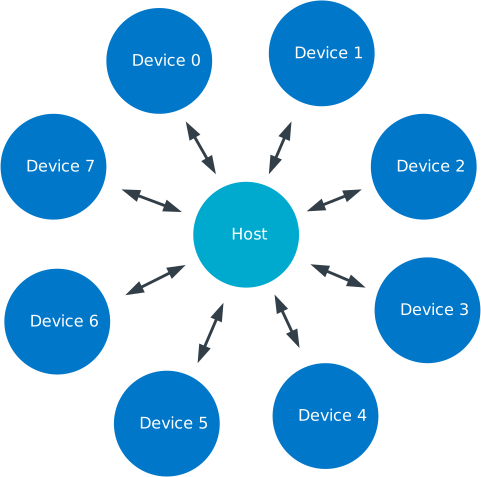
Gazell star network

Gazell star network

Once enabled, the Host in a Gazell network is always listening, and the Device always initiates the communication. Each packet that a Device sends is required to be acknowledged by the Host. The Host can send data to the Device by piggybacking data in an acknowledgment (ACK) packet. Therefore, the Host must wait for a packet from the Device before it can send any data to it.

You can build more sophisticated Gazell networks, since a single Device can speak to at least two Hosts and any node can change between the two roles. However, this requires the application to coordinate such a network.

This document focuses on the typical use case of a star network with static roles.

Setting up a Gazell application

Gazell automatically takes care of all synchronization and packet handling. You need to add payloads to the transmit (TX) FIFOs and read payloads from the receive (RX) FIFOs. Gazell automatically notifies the application when a packet is received.

To set up a Gazell application, complete the following steps:

  1. Initialize Gazell Link Layer glue code using gzll_glue_init().

  2. Initialize Gazell using nrf_gzll_init() and choose either Host or Device.

  3. Reconfigure Gazell’s default parameters.

    At a minimum, reconfigure the addresses and channels to avoid interfering with other Gazell networks.

  4. Enable Gazell using nrf_gzll_enable().

  5. Continue to either Setting up a Device to set up a Device, or Setting up a Host to setup a Host.

Setting up a Device

If the node is a Device, complete the following steps:

  1. Add payloads to the TX FIFO using nrf_gzll_add_packet_to_tx_fifo().

  2. Handle the returned ACK packet when the nrf_gzll_device_tx_success() callback is called.

    Fetch the payloads from the RX FIFO using nrf_gzll_fetch_packet_from_rx_fifo().

  3. Handle the failed packet transmissions when the nrf_gzll_device_tx_failed() callback is called.

    Failed packets are automatically removed from the TX FIFO.

Setting up a Host

If the node is a Host, start listening by completing the following steps:

  1. Handle the received data packets when the nrf_gzll_host_rx_data_ready() callback is called.

    Fetch the packets from the RX FIFO using nrf_gzll_fetch_from_rx_fifo().

  2. Add any payloads to send to the TX FIFO using nrf_gzll_add_packet_to_tx_fifo().

Disabling Gazell

You can also disable Gazell at any time using the nrf_gzll_disable() function.

When this is called, Gazell completes any ongoing transmission or reception before being disabled. (That is, until the end of the current timeslot, see Timeslots). When the disabling operation is complete, Gazell calls the nrf_gzll_disabled() function. When this callback is completed, the Gazell CPU context, radio and Gazell timer stop.

You can now call any of the configuration set functions, which will be valid, once Gazell is enabled again.

Packet transactions

A typical packet transaction between a Device and a Host consists of a Device initiating the transaction by sending a data packet to the Host and the Host sending an ACK packet in return.

When the Device receives an ACK packet, it knows that the initial packet was successfully transmitted and the nrf_gzll_device_tx_success() callback function is called to notify the application of this.

Similarly, when the Host receives the initial packet, the nrf_gzll_host_rx_data_ready() callback function is called to notify to the application that a new packet has been received.

Note

These callback functions are actually queued so that the application avoids race conditions. See Callback queueing.
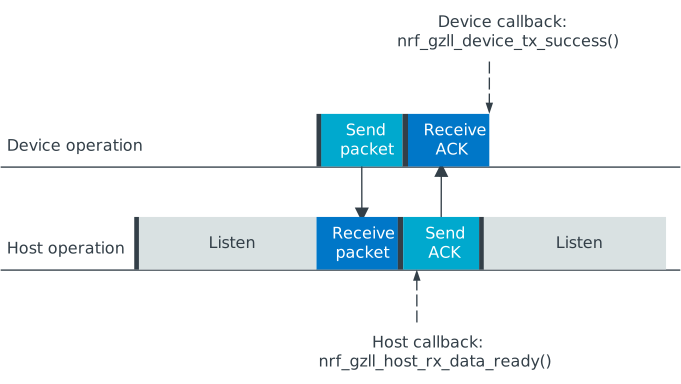
Successful packet transaction

Successful packet transaction

A transaction can fail if the Host did not receive the initial packet from the Device, or the Device did not receive the corresponding ACK packet correctly. Gazell ignores packets with a failing Cyclic Redundancy Check (CRC).

If a transaction fails, the Device makes an attempt to retransmit the initial packet to the Host until the ACK is finally received or the maximum number of transmission attempts is reached. If the maximum number of transmission attempts is reached, the retransmissions stop and the nrf_gzll_device_tx_failed() callback is called.

If only the ACK packet sent from the Host to the Device is lost, but the Host receives successfully both the initial packet and the subsequent retransmission attempts, the Host discards the repeated packets. The ACK packets are still sent in return to the Device. This prevents the application receiving duplicate data packets at the Host.
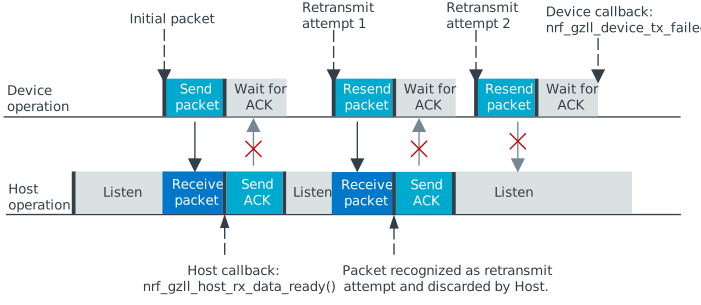
Example on failing packet transaction.

Example on failing packet transaction.

In the figure, the maximum number of allowed transmission attempts is set to 3.

Packet identification

Any packet transmitted from a Device to a Host is uniquely identified by a two bit packet ID field in the packet header together with the packet’s 16-bit Cyclic Redundancy Check (CRC). This packet ID is used to distinguish a new packet from the previous packet, if it has the same payload.

On the Host side, retransmitted packets are discarded and not added to an RX FIFO.

Pipes and addressing

Each logical address on the nodes is termed a pipe. Each pipe maps to one on-air address used when transmitting or receiving packets.

The on-air addresses are composed of a 2-4 bytes long “base address” in addition to a 1-byte prefix address. The radio of the nRF52 Series uses an alternating sequence of 0s and 1s as the preamble of the packet. Therefore, for packets to be received correctly, the most significant byte of the base address should not be an alternating sequence of 0s and 1s, that is, it should not be 0x55 or 0xAA.

Pipe 0 has its own unique base address, which is base address 0, while pipes 1-7 use the same base address, which is base address 1.

Each of the eight pipes have a unique byte-long prefix address.

On-air, the most significant bit of each address byte is transmitted first. The most significant byte of the four bytes long base address is the first transmitted address byte, while the prefix byte is transmitted last.

Note

The byte order in Gazell and the nRF52 Series radio peripheral are not the same. This is because the address bytes are rearranged in Gazell to match radio of the nRF24L IC.

FIFOs

All eight pipes on both the Device and the Host have two first in first out (FIFO) buffers that can hold packets. Each pipe has a TX FIFO and an RX FIFO. The total number of packets in the FIFOs is six, while every individual TX or RX FIFO (8 pipes x 2 = 16 in total) can store three packets.

Device FIFO handling

When Gazell is enabled in Device role, any packets uploaded to a TX FIFO will be transmitted at the next opportunity. If several TX FIFOs contain packets, the various TX FIFOs are serviced in a round robin fashion, meaning that no TX FIFOs will experience starvation even when packets are continuously added to other TX FIFOs.

When an ACK is successfully received from a Host, it implies that the payload was successfully received and added to the Host’s RX FIFO. The successfully transmitted packet is removed from the TX FIFO so that the next packet in the FIFO can be transmitted.

If an ACK received by a Device contains a payload, it is added to the pipe’s RX FIFO.

If the RX FIFO for a specific pipe on a Device is full and cannot accommodate any new packets, no new packets are sent from the Device on this pipe. A payload received in an ACK does not need to be discarded due to a full RX FIFO.

Host FIFO handling

When Gazell is enabled in Host role, all enabled pipes (addresses) are simultaneously monitored for incoming packets.

If a new packet is received and the pipe’s RX FIFO has available space, it is added to the RX FIFO and an ACK is sent in return to the Device. If the pipe’s TX FIFO contains any packets, the next serviceable packet is attached as a payload in the ACK packet. To have a TX packet attached to an ACK, it needs to be uploaded to the TX FIFO before the packet is received.

Since the Device does not always receive the ACK successfully, the data payload added to the ACK is not removed from the TX FIFO immediately. The TX packet is removed from the TX FIFO when a new packet (new packet ID or CRC) is received on the same pipe. The new packet sent from the Device serves as an acknowledgment of the ACK sent previously by the Host. ACKs sent in reply to retransmission attempts contain the same TX payload.

When the Host is handling packets on multiple pipes, ensure the ACK payloads in the TX FIFOs on pipes that are no longer used, are not taking up space in the memory pool and consequently blocking communication on other pipes. To avoid such congestion, the application on the Host can flush the TX FIFOs on the unused pipes.

Callback queueing

Gazell has an internal callback queue for queueing pending callbacks. This queue steps in when Gazell attempts to call a new callback function while the application is already servicing the previous one.

For example, if a new packet is received by the Host while the application is already servicing the nrf_gzll_host_rx_data_ready() callback from a previously received packet, the callback for the latest packet is added to the callback queue and serviced at a later opportunity. In this case, nrf_gzll_host_rx_data_ready() is called once for every received packet, and the application does not need to handle the potential race condition scenario where a new packet is being received just before the application is about to exit the nrf_gzll_host_rx_data_ready() function.

In a Device, the nrf_gzll_device_tx_success() callback is called once for every packet receiving an ACK, even when a new packet is receiving an ACK while the application is servicing the callback of a previously transmitted packet.

The size of the callback queue is given by NRF_GZLL_CONST_CALLBACK_QUEUE_LENGTH but it cannot be configured.

Timeslots

Timeslot is a core parameter in Gazell. It can be seen as the internal Gazell “heartbeat.”

In a Device, any packet transmission (both new packets and retransmitted packets) starts at the beginning of a timeslot, and only one packet transmission (including ACK) can take place within a timeslot.
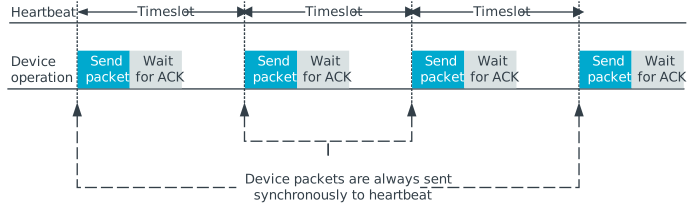
Relation between Device operation and timeslot

Relation between Device operation and timeslot

On the Host side, the radio initiates a radio startup at the beginning of the timeslot to start listening. In addition, it may optionally change the RF channel it listens to.
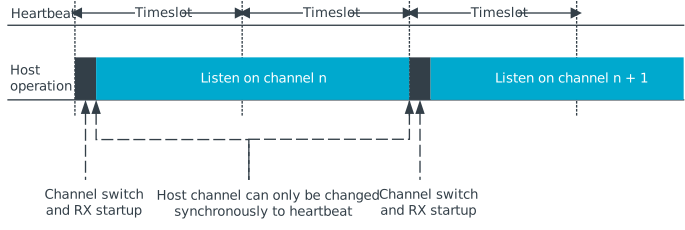
Relation between Host operation and timeslot

Relation between Host operation and timeslot

To set the period for the heartbeat, use the nrf_gzll_set_timeslot_period() function.

Frequency hopping

To ensure good coexistence performance with other radio products operating in the same 2.4 GHz frequency band as Gazell, such as Wi-Fi® or Bluetooth®, Gazell implements mechanisms for hopping between various radio frequency channels.

When enabled, Gazell picks channels from a predefined channel table.

The application can reconfigure the contents and size of the channel table. The Device and Host must be configured to have the exact same channel table. The application can pick from a full set of 80 channels. A table of 3-7 channels is proven to give a satisfactory coexistence performance in most environments.

Too large channel table may increase the transmission latency and power consumption, while using a too small channel table may decrease the coexistence performance.

Following are the core parameters deciding the channel hopping behavior:

  • timeslots_per_channel (applies to Host and “in sync” Device, set by nrf_gzll_set_timeslots_per_channel()).

  • timeslots_per_channel_when_device_out_of_sync (applies to “out of sync” Device only, set by nrf_gzll_set_timeslots_per_channel_when_device_out_of_sync()).

  • channel_selection_policy (applies to “in sync” Device only, set by nrf_gzll_set_device_channel_selection_policy()).

Which one to use depends on whether Gazell is “in sync” or “out of sync,” see Synchronization. Therefore, timeslots_per_channel is used instead of these terms.

The timeslots_per_channel parameter sets the number of timeslots Gazell has on a single channel before the channel is changed. In the next timeslot with a channel shift, Gazell picks the next channel from the predefined channel table, cycling back to the beginning of the channel table if required.
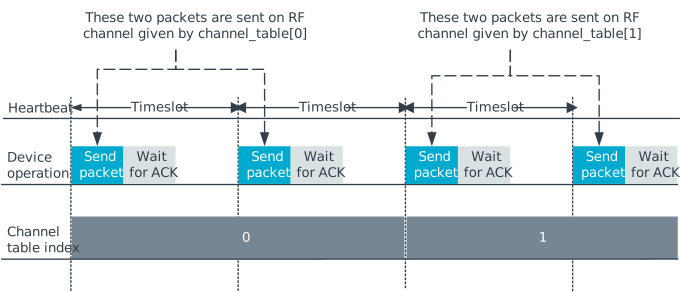
Host and Device channel switching. Here, timeslots_per_channel = 2.

Host and Device channel switching. Here, timeslots_per_channel = 2.

Note

Host channel switching is the same as Device channel switching.

In the Device role, timeslots_per_channel can also be seen as the number of transmission attempts spent on each channel before switching the channel. This is because there is at least one transmission attempt for every timeslot.

The channel_selection_policy parameter is used by a Device in sync to decide the initial channel to be used when sending a new packet to a Host (that is, for the first time the new packet is sent, not for the retransmission attempts).

Once synchronized with the Host, the Device can send either on the current channel that it believes the Host is on or on the last successful channel. To configure this, use the nrf_gzll_set_device_channel_selection_policy() function.

The channel_selection_policy parameter can take the following two values:

  • NRF_GZLL_DEVICE_CHANNEL_SELECTION_POLICY_USE_SUCCESSFUL

  • NRF_GZLL_DEVICE_CHANNEL_SELECTION_POLICY_USE_CURRENT

If you choose the NRF_GZLL_DEVICE_CHANNEL_SELECTION_POLICY_USE_SUCCESSFUL policy, the Device starts sending packets on the channel it last had a successfully acknowledged transmission. This policy is the most robust against static interference. Once the Device finds a quiet channel, it should be able to continue using this channel.

If you choose the NRF_GZLL_DEVICE_CHANNEL_SELECTION_POLICY_USE_CURRENT policy, the Device sends on the channel it believes the Host is currently listening to. This achieves the lowest latency and highest throughput of the two policies as the Device does not have to wait for the Host to be listening to a specific channel. This policy is frequency hopping. The disadvantage of this policy is that if there is static interference on a particular channel, the Device wastes packets attempting to send on this channel. The application can reconfigure the channel table during runtime to overcome this.

The channel selection policy only applies to the initially transmitted packet. If the transmission of this initial packet fails, the following retransmission attempts are always sent in the channel the Device believes the Host is monitoring.

If Gazell is “out of sync,” it always starts the packet transmission immediately using the previous successful transmission channel. If Gazell has not transmitted a successful packet and thus has no previous successful channel to relate to, it starts using the first channel in the channel table.

Synchronization

The internal timeslot, or “heartbeat,” mechanism of Gazell is used to obtain synchronous communication while still enabling efficient channel switching. This mechanism is useful when a Device needs to switch to a new channel while there is radio interference on the current channel.

Each Gazell Device has two synchronization states: in sync and out of sync.

On the Host, the internal heartbeat timer is always running when Gazell is enabled, independent of the Devices’ synchronization state.

On the Device, the heartbeat timer only runs as long as the Device is “in sync” or as long as there are packets to be sent. If the timer has been stopped and packets are added to a TX FIFO, the timer starts immediately.

Before any packets have been successfully received and acknowledged, the Device is out of sync. In this state, the Device switches channel determined by the timeslots_per_channel_when_device_out_of_sync parameter. The Device switches channel at a slower rate than the Host (as determined by timeslots_per_channel) so that the Device eventually transmits a packet on the same channel that the Host is on.

When a Device successfully transmits a packet, that is when an ACK packet is received from the Host, it enters the in sync state, as it now has the information needed for continuing to guess the following channels the Host is listening to.

For knowing when to change channel, Gazell has an internal timeslot_counter to count the number of timeslots it has on a single channel. When this counter reaches timeslots_per_channel, the timeslot_counter is reset and the channel_index is incremented (cyclically). When the Device has received an ACK, it knows the Host is using the current channel, but it does not know the timeslot_counter state on the Host. As a result, only in the timeslots where the timeslot_counter equals zero the Device can be confident that it “guesses” the correct channel that the Host is monitoring. Therefore, when an ACK is received, the timeslot_counter for the current timeslot is reset to zero, and a new Device transmission starts when the timeslot_index counter on the Device is zero. Retransmission attempts, however, are sent on all timeslots.

Once the Device is in sync, it keeps an internal timer running to maintain the internal heartbeat in order to remain synchronized with the Host. The duration the Device stays in the in sync state is the sync_lifetime and is measured in timeslots. The sync_lifetime is reset whenever a packet is received. Once the sync_lifetime has expired on a Device, the internal timer is stopped and the Device returns to out of sync state.

Note

When a Device that is in sync sends a packet but does not receive an ACK, it continues to transmit until it reaches the maximum number of attempts.

If you set the sync_lifetime to zero, the Device will never be in sync. The sync_lifetime should be chosen with regard to how often packets are required to be sent and the fact that synchronization can only be maintained for a finite time due to clock drift and radio interference. To configure the sync lifetime, use the nrf_gzll_set_sync_lifetime() function.

The Device knows it is in sync when the number of retransmissions gets close to zero. The nrf_gzll_device_tx_info_t structure is passed to the Device callback functions, and it contains the number of transmit attempts required for the current packet. In addition, the structure contains the num_channel_switches parameter that the application can use to determine whether the RF channels are reliable. This enables the application to track bad channels and update the channel tables on Host and Device if desired.

Backwards compatibility

The Gazell Link Layer examples are not fully compatible out of the box with the legacy examples provided in the nRFgo SDK for the nRF24L IC.

The default timeslot period and channel tables require adjustment, as well as some setup to emulate the Gazell roles. The Gazell Low Power Host role (Host role 1) is not supported in the nRF52 Series.

Channel tables

The default channel tables require adjustment.

Depending on your project, do one of the following:

  • Edit the gzll_params.h file used in the nRF24L IC projects.

  • Use the nrf_gzll_set_channel_table() function in the nRF52 Series projects.

Timeslot periods

The Gazell Link Layer supports the following minimum timeslot periods:

  • 600 us timeslot period, nRF52 Series Gazell Device to nRF52 Series Gazell Host.

  • 504 us timeslot period, nRF52 Series Gazell Device to nRF24L IC Gazell Host.

When using 504 us timeslot period, the following restrictions apply:

  • The maximum payload size is 17 bytes.

  • The maximum ACK payload size is 10 bytes.

In addition, the relation between the Device and Host timing parameters should be as follows:

  • The Host listens to each channel in a GZLL_RX_PERIOD number of microseconds, where GZLL_RX_PERIOD is the heartbeat interval in the nRF24L IC.

  • The Host GZLL_RX_PERIOD must be greater than the time required to make two full transmission attempts on the Device (including ACK wait time).

Depending on your project, do one of the following:

  • Edit the gzll_params.h file used in the nRF24L IC projects.

  • Use the nrf_gzll_set_timeslot_period() function in the nRF52 Series projects (nRF52 Series Gazell timeslot period = 0.5*GZLL_RX_PERIOD).

Emulating legacy Gazell roles

The Gazell Link Layer protocol for the nRF52 Series is compatible with the most useful roles of the Gazell Link Layer for the nRF24L IC.

Emulating legacy Gazell Device role 2 and Host role 0 on the nRF24 IC

You can emulate the legacy Device role 2 as follows:

  • The channel selection policy is equivalent to NRF_GZLL_DEVICE_CHANNEL_SELECTION_POLICY_USE_SUCCESSFUL.

  • When Gazell is out of sync, a large number of attempts may occur on each channel before the channel is switched.

  • When Gazell is in sync, a low number of transmission attempts, typically two, are allowed on each channel before the channel is switched.

The legacy Host role 0 behaves as follows:

  • Host is always on while it is enabled.

  • When enabled, the Host will continuously cycle through the channel table.

See the example on how to achieve such behavior. Assuming a channel table my_channel_table[] with three channels:

/* On Host and Device */
timeslots_per_channel = 2;
channel_table_size = 3;
nrf_gzll_set_timeslot_period(GZLL_RX_PERIOD / 2);
nrf_gzll_set_channel_table(my_channel_table, channel_table_size);
nrf_gzll_set_timeslots_per_channel(timeslots_per_channel);
/* On the Device */
nrf_gzll_set_timeslots_per_channel_when_device_out_of_sync(channel_table_size*timeslots_per_channel);
nrf_gzll_set_device_channel_selection_policy(NRF_GZLL_DEVICE_CHANNEL_SELECTION_POLICY_USE_SUCCESSFUL);
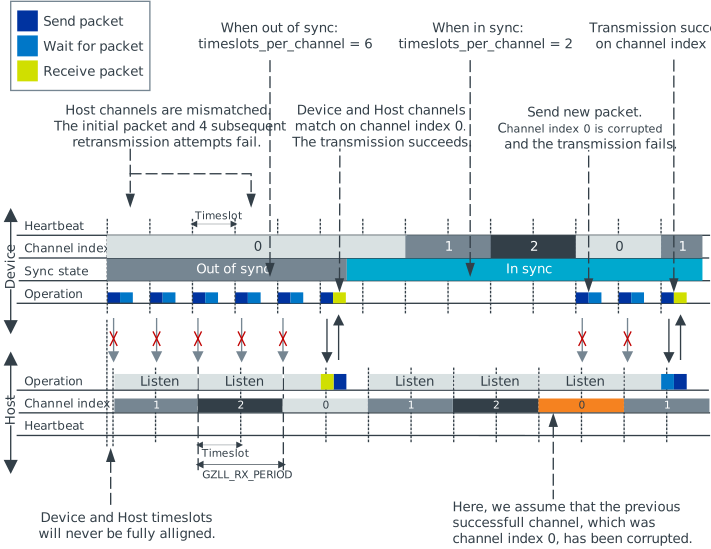
Emulating legacy Gazell

Emulating legacy Gazell

Transmission statistics

The Gazell stack allows to automatically gather transmission information, such as:

  • Total number of transmitted packets.

  • Total number of transmission timeouts.

  • Number of transmitted packets on each RF channel.

  • Number of transmission failures on each RF channel.

The stack can also track packet transaction failure events, such as transmission timeout or receiving a packet with incorrect CRC.

To turn on transmission statistics, perform the following steps:

  1. Define the nrf_gzll_tx_statistics_t structure. This is a buffer for transmission statistics data, so it must remain in memory as long as the transmission statistics are used.

  2. Call nrf_gzll_init() to initialize Gazell.

  3. Call the nrf_gzll_tx_statistics_enable() function to enable transmission information gathering.

After this, transmission statistics can be read from the defined structure. To reset the recording, call the nrf_gzll_reset_tx_statistics() function.

To track packet transaction failures, perform the following steps:

  1. Define the nrf_gzll_tx_timeout_callback or nrf_gzll_crc_failure_callback functions that will be called on a proper event.

  2. Call nrf_gzll_init() to initialize Gazell.

  3. Register the defined callbacks by calling nrf_gzll_tx_timeout_callback_register() or nrf_gzll_crc_failure_callback_register().

After this, each transmission timeout and received packet CRC failure will be reported by the respective callback.


© Copyright 2019-2026, Nordic Semiconductor. Last updated on Jun 10, 2026.

nRF Connect SDK
nRF Connect SDK
nrfxlib
Zephyr Project
MCUboot
Trusted Firmware-M
Matter
Kconfig Reference