

Architecture
The sample has a modular structure, where each module has a defined scope of responsibility. The communication between modules is handled by the Zephyr bus (zbus) using messages that are passed over channels. If a module has internal state handling, it is implemented using the Zephyr State Machine Framework. The following figure illustrates the relationship between modules, channels, and network stacks in the sample:
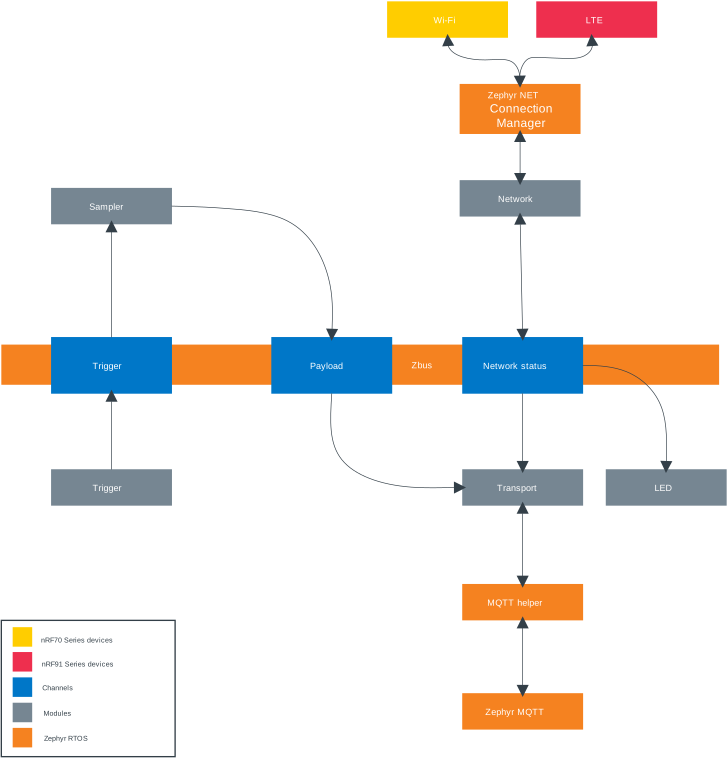
Architecture
Definitions and payloads of the channel are owned by the system and placed in a common folder that is included by all modules.
See the src/common/channel.c and src/common/channel.h files for more details.
Note
The sample does not include a main.c file.
Instead, the application uses a modular architecture where each module defines its own thread using the K_THREAD_DEFINE macro.
This approach eliminates the need for a traditional main() function and allows each module to initialize and run independently.
The modules communicate with each other through the Zephyr bus (zbus) message passing system.
This creates a loosely coupled, event-driven architecture.
To follow the typical flow of the application, see the Sequence diagram section.
Application Entry Points
Instead of a single main() function, the MQTT sample uses multiple entry points:
Trigger Module - Creates a thread that periodically sends trigger messages and handles button presses.
Sampler Module - Creates a thread that responds to trigger messages by sampling data.
Transport Module - Creates a thread that manages MQTT connections and handles message publishing/subscribing.
Network Module - Creates a thread that manages network connectivity (LTE or Wi-Fi®).
LED Module - Uses a listener callback (no dedicated thread) to control LEDs based on network status.
Error Module - Uses a listener callback (no dedicated thread) to handle fatal errors.
Each module’s thread is defined using K_THREAD_DEFINE and starts automatically during system initialization.
This distributed approach provides better modularity, easier testing, and clearer separation of concerns compared to a monolithic main() function.
Modules
The Module list tables lists all the modules in the sample together with information on each module’s channel handling and general behavior. A common feature for almost all the modules in the sample is that they each have a dedicated thread. The thread is used to initialize functionality specific to each module, and to process incoming messages in case the module is set up as a subscriber.
Subscribers use its thread primarily to monitor and process incoming messages from other modules by continuously polling on zbus_sub_wait().
When a channel that a module subscribes to, is invoked, the subscriber will handle the incoming message depending on its content.
The following code snippet shows how a module thread polls for incoming messages on a subscribed channel:
static void sampler_task(void)
{
	const struct zbus_channel *chan;

	while (!zbus_sub_wait(&sampler, &chan, K_FOREVER)) {
		if (&TRIGGER_CHAN == chan) {
			sample();
		}
	}
}

K_THREAD_DEFINE(sampler_task_id,
		CONFIG_MQTT_SAMPLE_SAMPLER_THREAD_STACK_SIZE,
		sampler_task, NULL, NULL, NULL, 3, 0, 0);
Note
Zbus implements internal message queues for subscribers.
In some cases, depending on the use case, it might be necessary to increase the queue size for a particular subscriber.
Especially if the module thread can block for some time.
To increase the message queue associated with a subscriber, increase the value of the corresponding Kconfig option, CONFIG_MQTT_SAMPLE_SAMPLER_MESSAGE_QUEUE_SIZE or CONFIG_MQTT_SAMPLE_TRANSPORT_MESSAGE_QUEUE_SIZE.
Modules that are set up as listeners have dedicated callbacks that are invoked every time there is a change to an observing channel.
The difference between a listener and a subscriber is that listeners do not require a dedicated thread to process incoming messages.
The callbacks are called in the context of the thread that published the message.
The following code snippet shows how a listener is set up in order to listen to changes to the NETWORK channel:
void led_callback(const struct zbus_channel *chan)
{
	int err = 0;
	const enum network_status *status;

	if (&NETWORK_CHAN == chan) {

		if (!device_is_ready(led_device)) {
			LOG_ERR("LED device is not ready");
			return;
		}

		/* Get network status from channel. */
		status = zbus_chan_const_msg(chan);

		switch (*status) {
		case NETWORK_CONNECTED:
			err = led_on(led_device, LED_1_GREEN);
			if (err) {
				LOG_ERR("led_on, error: %d", err);
			}
			break;
		case NETWORK_DISCONNECTED:
			err = led_off(led_device, LED_1_GREEN);
			if (err) {
				LOG_ERR("led_off, error: %d", err);
			}
			break;
		default:
			LOG_ERR("Unknown event: %d", *status);
			break;
		}
	}
}

/* Register listener - led_callback will be called everytime a channel that the module listens on
 * receives a new message.
 */
ZBUS_LISTENER_DEFINE(led, led_callback);
A module publishes a message to a channel by calling the zbus_chan_pub() function.
The following code snippet shows how this is typically carried out throughout the sample:
static void sample(void)
{
	struct payload payload = { 0 };
	uint32_t uptime = k_uptime_get_32();
	int err, len;

	/* The payload is user defined and can be sampled from any source.
	 * Default case is to populate a string and send it on the payload channel.
	 */

	len = snprintk(payload.string, sizeof(payload.string), FORMAT_STRING, uptime);
	if ((len < 0) || (len >= sizeof(payload))) {
		LOG_ERR("Failed to construct message, error: %d", len);
		SEND_FATAL_ERROR();
		return;
	}

	err = zbus_chan_pub(&PAYLOAD_CHAN, &payload, K_SECONDS(1));
	if (err) {
		LOG_ERR("zbus_chan_pub, error:%d", err);
		SEND_FATAL_ERROR();
	}
}
Module name |
Observes channel |
Subscriber / Listener |
Description |
|---|---|---|---|
Trigger |
None |
Sends messages on the trigger channel at an interval set by the CONFIG_MQTT_SAMPLE_TRIGGER_TIMEOUT_SECONDS and upon a button press. |
|
Sampler |
Trigger |
Subscriber |
Samples data every time a message is received on the trigger channel. The sampled payload is sent on the payload channel. |
Transport |
Network Payload |
Subscriber |
Handles MQTT connection. Will auto connect and keep the MQTT connection alive as long as the network is available. Receives network status messages on the network channel. Publishes messages received on the payload channel to a configured MQTT topic. |
Network |
None |
Auto connects to either Wi-Fi or LTE after boot, depending on the board and the sample configuration. Sends network status messages on the network channel. |
|
LED |
Network |
Listener |
Listens to changes in the network status received on the network channel. Displays LED pattern accordingly. If network is connected, LED 1 on the board will light up. On Thingy:91 and Thingy:91 X, the LED turns green |
Error |
Fatal error |
Listener |
Listens to messages sent on the fatal error channel. If a message is received on the fatal error channel, the default behavior is to reboot the device. |
Channels
Name |
Channel payload |
Payload description |
|---|---|---|
Trigger channel |
None |
|
Network channel |
network status |
Enumerator. Signifies if the network is connected or not.
Can be either |
Payload channel |
string |
String buffer that contains a message that is sent to the MQTT broker. |
Fatal error channel |
None |
States
Currently, only the sample’s transport module implements state handling.
Transport module
The following figure explains the state transitions of the transport module:
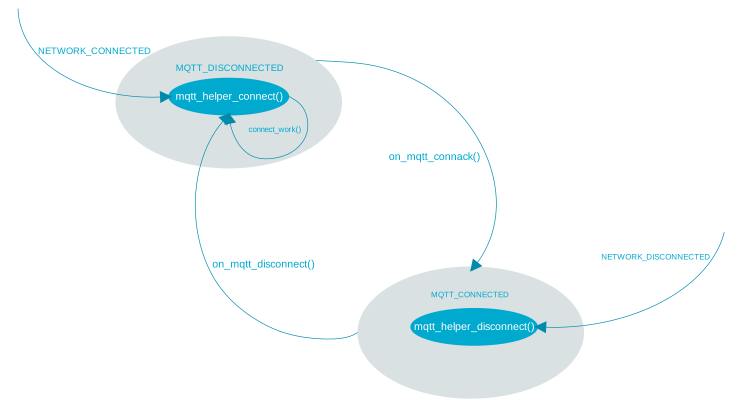
Transport module state transitions
Sequence diagram
The following sequence diagram illustrates the most significant chain of events during normal operation of the sample:
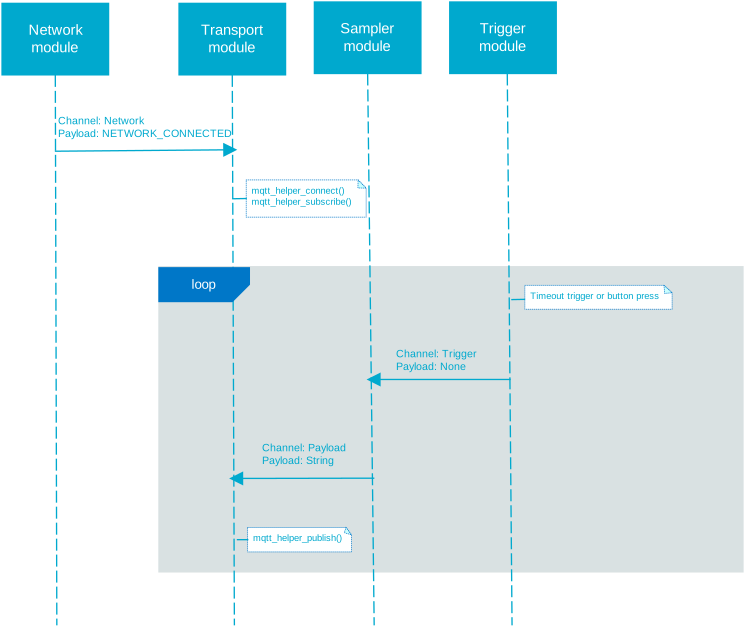
Sequence diagram