

Raw IEEE 802.11 packet transmission
The Nordic Semiconductor Wi-Fi device supports the transmission of raw IEEE 802.11 packets. Raw IEEE 802.11 packets are packets that are not modified by the 802.11 Medium Access Control (MAC) layer during transmission by the Nordic Wi-Fi device.
It is the responsibility of the application that intends to send the raw 802.11 packet to construct and provide a fully-conformant 802.11 packet along with the required set of packet TX and PHY parameters. The MAC layer on the Nordic Wi-Fi device will transmit the raw 802.11 packets over-the-air using the provided packet data, TX, and PHY parameters.
Enabling raw packet transmit feature
To use the raw packet transmit feature in your applications, you must enable the CONFIG_NRF70_RAW_DATA_TX Kconfig option in the project configuration.
This Kconfig option applies to the nRF70 companion ICs.
TX injection mode
The Nordic Wi-Fi device supports raw 802.11 packet transmission when TX injection mode is enabled in the nRF Wi-Fi driver.
The TX injection mode can be enabled when the primary mode of operation for the Nordic Wi-Fi device is set to either Station mode or Monitor mode. When the Nordic Wi-Fi device is configured in Station mode, TX injection mode can be enabled regardless of whether the device is connected to an Access Point (AP) or not.
Use the net_eth_txinjection_mode functional API to enable or disable TX injection mode in the nRF Wi-Fi driver as required by the application.
You can also use the NET_REQUEST_ETHERNET_SET_TXINJECTION_MODE network management API to enable or disable TX injection mode, however it is recommended to use the functional API (net_eth_txinjection_mode).
The network management API NET_REQUEST_ETHERNET_GET_TXINJECTION_MODE can be used to obtain the current TX injection configured setting in the nRF Wi-Fi driver.
When TX injection mode is enabled, you need to configure the operating channel. This channel will be used as the transmit channel when the Nordic Wi-Fi device operates in Station mode, but is not connected to an AP. When the Nordic Wi-Fi device operates in Station mode and is connected to an AP on a given channel, the connected channel will be used for raw 802.11 packet transmission. When the Nordic Wi-Fi device operates in Monitor mode, the configured channel for Monitor mode will be used as the transmit channel for TX injection operation.
To set the desired channel for raw 802.11 packet transmission, you can use the NET_REQUEST_WIFI_CHANNEL network management API.
See the Wi-Fi: Shell sample for more information on configuring mode and channel settings for raw packet transmission through shell commands.
The following table lists the shell commands and network management APIs used to switch the primary modes of operation needed for raw packet transmission.
Network management APIs |
Wi-Fi shell command |
Example usage |
Description |
|---|---|---|---|
net_mgmt(NET_REQUEST_WIFI_MODE) |
|
|
Configure interface instance 1 to Monitor mode |
net_mgmt(NET_REQUEST_WIFI_MODE) |
|
|
Configure interface instance 1 to Station mode |
The following table provides the parameter details for the net_eth_txinjection_mode API, which is used to enable or disable TX injection mode for raw packet transmission.
API parameter |
description |
|---|---|
iface |
Network interface on which TX injection mode is to be enabled |
enable |
Boolean value to enable or disable TX injection mode |
The following table provides the network management API used to set the channel of operation for raw packet transmission.
Network management APIs |
Wi-Fi shell command |
Example usage |
Description |
|---|---|---|---|
net_mgmt(NET_REQUEST_WIFI_CHANNEL) |
|
|
Set the raw transmission channel to |
TX injection mode usage requirements
The raw packet to be transmitted by an application must be a fully conformant IEEE 802.11 packet and must ensure that:
The packet has a valid 802.11 MAC header.
The Frame Check Sequence (FCS) is not added to the packet by the application and is concatenated by the Nordic Wi-Fi device.
Note
If the packet is not a properly framed 802.11 packet, it will be dropped by the Nordic Wi-Fi device and will not be transmitted over-the-air.
Additionally, the raw packet must provide transmit parameters that inform the nRF Wi-Fi driver on how the packet must be transmitted. It must also provide a packet marker identifying itself as a special packet, which must be handled differently by the nRF Wi-Fi driver. The transmit parameters and the packet marker together form the raw packet transmit header. The raw packet transmit header is prepended to the 802.11 conformant raw packet before the packet is passed to the nRF Wi-Fi driver by the application.
The following table lists the raw packet transmit header elements:
Transmit and PHY parameters |
Description |
|---|---|
magic_num |
Magic number to identify a raw packet. It is set to |
data_rate |
Data rate at which a packet is to be transmitted. It depends on the |
packet_length |
Packet length of the 802.11 raw packet, excluding the raw transmit packet header length. |
tx_mode |
Mode describing if the packet is VHT, HT, HE, or Legacy. |
queue |
Wi-Fi access category mapping for packet. |
raw_tx_flag |
Flag indicating raw packet transmission. This is reserved for driver use. |
You can refer to the relevant structures in the modules/lib/nrf_wifi/fw_if/umac_if/inc/system/fmac_structs.h file:
raw_tx_pkt_header- For the raw packet header.nrf_wifi_fmac_ac- For setting thequeueparameter in the raw packet transmit header.nrf_wifi_fmac_rawtx_mode- For setting thetx_modeparameter in the raw packet transmit header.
Raw 802.11 packet transmit operation
The raw packet data has to be encompassed in an 802.11 packet and prepended with the raw transmit header before it is transmitted through raw socket to the nRF Wi-Fi driver for transmission. The packet is forwarded to the Nordic Wi-Fi device, which transmits the packet over-the-air. All 802.11 MAC layer rules for the 802.11 packet (such as, link-layer acknowledgements, retransmissions) are handled by the Nordic Wi-Fi device.
The following figure illustrates the packet structure and raw packet operation flow:
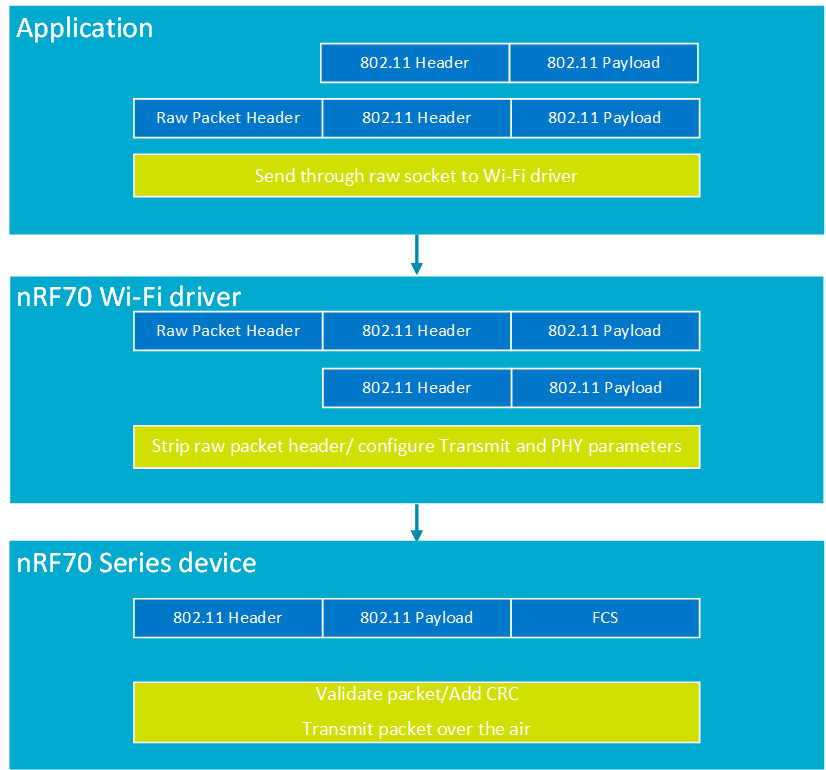
Raw packet transmit packet structure and raw packet operation flow
Operating channel for raw packet transmission
The channel configuration for raw packet transmission will be applied as follows:
Non-connected Station with TX injection mode configured and channel not set: The raw packet is transmitted on channel 1.
Non-connected Station with TX injection mode configured and channel set by the user: The raw packet is transmitted on configured channel.
Connected Station with TX injection mode configured: The raw packet is transmitted on the channel on which the device is connected to the AP.
Station disconnected from the AP and TX injection mode configured (channel configured before connection to the AP): The raw packet is transmitted on the configured channel
Station disconnected from the AP and TX injection mode configured (channel not configured before connection to the AP): The raw packet is transmitted on channel 1 (fallback channel).
Note
You must explicitly configure the channel for raw packet transmission when the device operates in non-connected Station mode. The device will use a fallback channel for raw packet transmission if one is not configured.
Performance profiling
You can profile raw transmit throughput in a lab setup by combining Zephyr’s zperf raw upload command on the device with host-side capture and aggregation on a separate device.
The SDK includes two helper scripts under nrf/scripts/wifi_test/ that automate common steps.
These are provided as optional conveniences.
You can also manually create the equivalent hexadecimal strings and tshark commands.
Run either script with --help for the full option list and defaults.
Important
These scripts are developed and validated on Linux hosts only.
Zephyr and the nRF Connect SDK are typically built and flashed from Windows, WSL, macOS, and other environments, however, the profiling flow described here assumes a Linux host with tshark and a capture-capable Wi-Fi interface (for example, Monitor mode on mon0).
Adaptation for non-Linux systems is not covered.
Note
Monitor mode settings such as channel, regulatory domain, interface name, sudo, and capture filters depend on your driver, hardware, and lab setup.
Configuring Monitor mode, selecting an interface, and ensuring that frames are visible to tshark are outside the scope of this section and the provided scripts.
You must establish a working capture path before using the tools described below.
Scripts
The following scripts are intended for performance profiling workflows and must not be used for product configuration.
nrf_wifi_gen_raw_tx.pyThis script generates a zperf raw upload shell line for the Zephyr shell. It builds the raw transmit header (including the
packet_lengthfield, which is consistent with the MPDU size) and a fixed 802.11 + LLC/SNAP + IPv4 + UDP header template, encoded in hex. Zperf pads the remainder of the packet to the requested size on the device; the script does not embed that padding in the hexadecimal string.Run the script on the Linux host, copy the printed command, and then paste it into the Zephyr shell on the DUT when you are ready to transmit. You can adjust command line options such as length, rate, duration, and interface index. See
--helpfor details. Ensure that theCONFIG_NET_ZPERF_RAW_TX_MAX_HDR_SIZEKconfig option is set large enough in the Zephyr build for the hexadecimal header length output by the script, as the default limit may be too small.nrf_wifi_zperf_raw_tx.pyThis script runs tshark on a live interface or reads a PCAP/PCAPNG file (
-r/--read/--pcap) and prints an estimated throughput per second based on the sum of frame lengths for frames matching a TCP or UDP port (the default is the iperf2 port). For live capture, it reports results line-by-line as each second completes and can stop after a timeout. For a saved capture, run the script after the test to avoid missing the start of the transmission, and use the same port filter as the traffic under test. It is a measurement aid on the sniffer side. Wireshark may label the traffic as iPerf2 or display malformed application data when the payload consists of zperf padding, and the script simply sumsframe.lenwithout validating iPerf2 semantics. Throughput is reported in SI megabits per second (Mbps, divisor10^6), consistent with typical iperf2 Mbits/sec output.
Example workflow (no throughput figures)
Complete the following steps to perform a typical raw TX profiling workflow using zperf and a Linux sniffer host, without presenting throughput figures:
On a Linux sniffer host, bring up Monitor mode and confirm tshark can see frames.
On the Linux host, generate a
zperf raw uploadcommand using thenrf_wifi_gen_raw_tx.pyscript. See--helpfor details.On the Zephyr device shell, run the
zperf raw uploadcommand first, so that the DUT is already transmitting when you begin measuring.On the sniffer host, run
nrf_wifi_zperf_raw_tx.pyscript against the monitor interface (using a port that matches your test) for the same wall-clock interval as the test, so that capture does not begin only after the device has stopped transmitting.Alternatively, record a complete PCAP using a separate tool for the duration of the test, and then run
nrf_wifi_zperf_raw_tx.pycommand with-ron that file to ensure the entire transmission burst is included.Compare the per-second and average results reported by the script with your expectations for the test conditions, do not treat a single run as a specification.
Error handling for raw packet transmission
The raw packet transmission errors can be obtained by invoking the NET_REQUEST_STATS_GET_WIFI network management API.
After invoking the API, you can use the struct net_stats_wifi struct in the zephyr/include/zephyr/net/net_stats.h header file.
The error member in struct net_stats_wifi will provide the transmit errors for all packets including raw packet transmit failure.