

Feather nRF52840 (Express, Sense)
Overview
The Adafruit Feather nRF52840 provides support for the Nordic Semiconductor nRF52840 ARM Cortex-M4F CPU and the following devices:
ADC
CLOCK
FLASH
GPIO
I2C
MPU
NVIC
PWM
RADIO (Bluetooth Low Energy and 802.15.4)
RTC
Segger RTT (RTT Console)
SPI
UART
USB
WDT
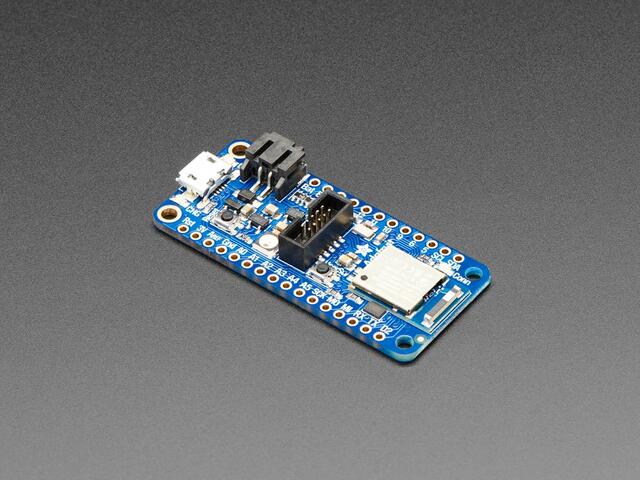
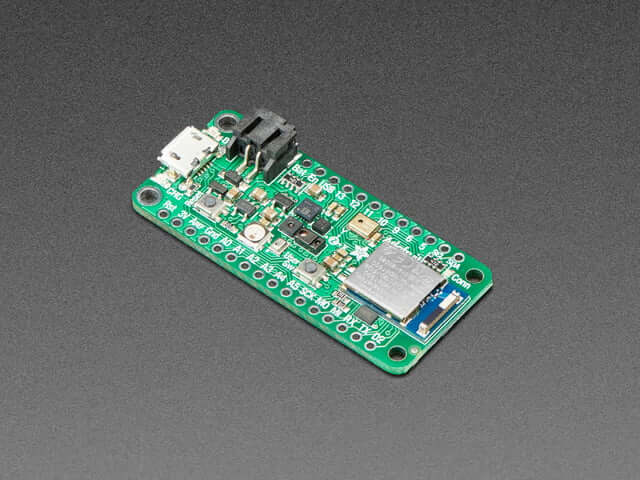
Hardware
nRF52840 ARM Cortex-M4F processor at 64 MHz
1 MB flash memory and 256 KB of SRAM
Battery connector and charger for 3.7 V lithium polymer batteries
Charging indicator LED
2 User LEDs
1 NeoPixel LED
Reset button
SWD connector (Express only)
SWD solder pads on bottom of PCB (Sense only)
LSM6DS33 Accel/Gyro (Sense only)
LIS3MDL magnetometer (Sense only)
APDS9960 Proximity, Light, Color, and Gesture Sensor (Sense only)
MP34DT01-M PDM Microphone sound sensor (Sense only)
SHT3X Humidity sensor (Sense only)
BMP280 temperature and barometric pressure/altitude (Sense only)
Supported Features
The adafruit_feather_nrf52840 board supports the hardware features listed below.
- on-chip / on-board
- Feature integrated in the SoC / present on the board.
- 2 / 2
-
Number of instances that are enabled / disabled.
Click on the label to see the first instance of this feature in the board/SoC DTS files. -
vnd,foo -
Compatible string for the Devicetree binding matching the feature.
Click on the link to view the binding documentation.
Connections and IOs
The Adafruit Feather nRF52840 Express Learn site [1] has detailed information about the board including pinouts (Express) [2] and the schematic (Express) [3].
The Adafruit Feather nRF52840 Sense Learn site [4] has detailed information about the board including pinouts (Sense) [5] and the schematic (Sense) [6].
LED
LED0 (red) = P1.15 (Express)
LED0 (red) = P1.9 (Sense)
LED1 (blue) = P1.10
Programming and Debugging
The adafruit_feather_nrf52840 board supports the runners and associated west commands listed below.
| flash | debug |
|---|
Flashing
Flashing Zephyr onto both the Feather nRF52840 Express and Sense is possible using the SWD headers. Only the Express board has an SWD connector however.
Both the Feather nRF52840 Express and Sense ship with the Adafruit nRF52 Bootloader [7] which supports flashing using UF2 [8]. This allows easy flashing of new images, but does not support debugging the device.
Build the Zephyr kernel and the Blinky sample application.
west build -b adafruit_feather_nrf52840 samples/basic/blinky
west build -b adafruit_feather_nrf52840/nrf52840/uf2 samples/basic/blinky
west build -b adafruit_feather_nrf52840/nrf52840/sense samples/basic/blinky
west build -b adafruit_feather_nrf52840/nrf52840/sense/uf2 samples/basic/blinky
If using UF2, connect the board to your host computer using USB.
Tap the reset button twice quickly to enter bootloader mode. A mass storage device named
FTHR840BOOTfor (Express) orFTHRSNSBOOT(Sense) should appear on the host. Ensure this is mounted.Flash the image.
west build -b adafruit_feather_nrf52840 samples/basic/blinky
west flash
west build -b adafruit_feather_nrf52840/nrf52840/uf2 samples/basic/blinky
west flash
west build -b adafruit_feather_nrf52840/nrf52840/sense samples/basic/blinky
west flash
west build -b adafruit_feather_nrf52840/nrf52840/sense/uf2 samples/basic/blinky
west flash
You should see the red LED blink.