

RA6M2 Evaluation Kit
Overview
The Renesas RA6M2 microcontroller is the entry point to the Renesas RA6 product series for applications that require a high-performance Arm® Cortex®-M4 core at a very attractive price point. The RA6M2 is suitable for IoT applications requiring security, large embedded RAM and low power consumption.
The key features of the EK-RA6M2 board are categorized in three groups as follow:
MCU Native Pin Access
120MHz Arm Cortex-M4 based RA6M2 MCU in 144 pins, LQFP package
Native pin access through 4 x 40-pin male headers
MCU and USB current measurement points for precision current consumption measurement
Multiple clock sources - RA6M2 MCU oscillator and sub-clock oscillator crystals, providing precision 12.000 MHz and 32,768 Hz reference clock. Additional low precision clocks are available internal to the RA6M2 MCU
System Control and Ecosystem Access
USB Full Speed device
5V input through USB debug
Three Debug modes
Debug on-board (SWD)
Debug in (SWD and JTAG)
Debug out (SWD)
User LEDs and buttons
One User LEDs
One User buttons
One Reset button
Three most popular ecosystems expansions
Two Digilent Pmod (SPI and UART) connectors
Arduino (Uno R3) connector
MikroElektronika mikroBUS connector
MCU boot configuration jumper
Special Feature Access
USB Full Speed Host and Device (micro-AB connector)
Hardware
Detailed hardware features for the RA6M2 MCU group can be found at RA6M2 Group User’s Manual Hardware
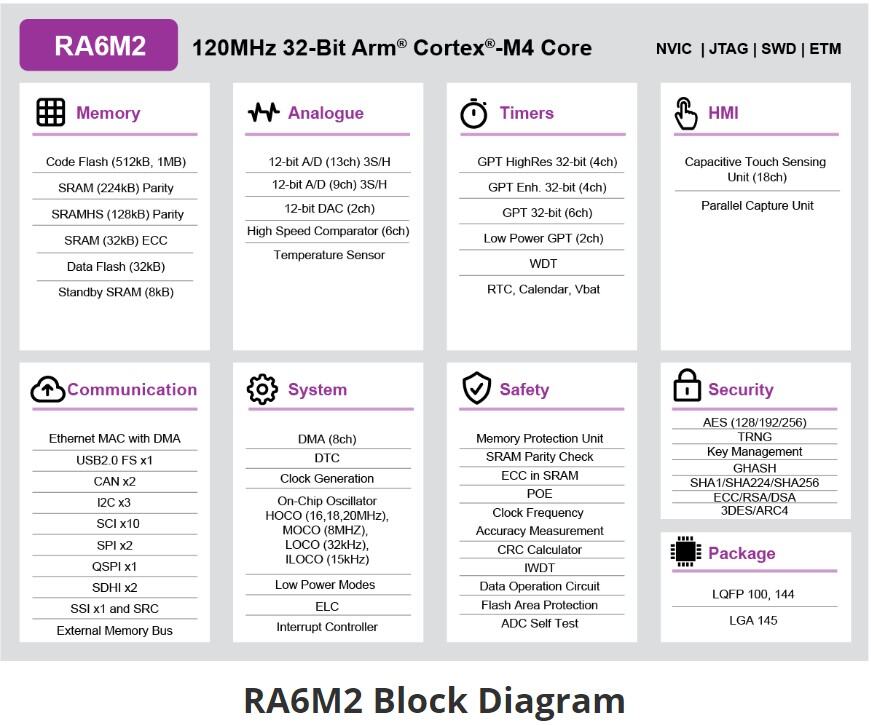
RA6M2 Block diagram (Credit: Renesas Electronics Corporation)
Detailed hardware features for the EK-RA6M2 MCU can be found at EK-RA6M2 - User’s Manual
Supported Features
The ek_ra6m2 board supports the hardware features listed below.
- on-chip / on-board
- Feature integrated in the SoC / present on the board.
- 2 / 2
-
Number of instances that are enabled / disabled.
Click on the label to see the first instance of this feature in the board/SoC DTS files. -
vnd,foo -
Compatible string for the Devicetree binding matching the feature.
Click on the link to view the binding documentation.
Programming and Debugging
The ek_ra6m2 board supports the runners and associated west commands listed below.
| flash | debug |
|---|
Applications for the ek_ra6m2 board target configuration can be
built, flashed, and debugged in the usual way. See
Building an Application and Run an Application for more details on
building and running.
Flashing
Program can be flashed to EK-RA6M2 via the on-board SEGGER J-Link debugger. SEGGER J-link’s drivers are available at https://www.segger.com/downloads/jlink/
To flash the program to board
Connect to J-Link OB via USB port to host PC
Make sure J-Link OB jumper is in default configuration as describe in EK-RA6M2 - User’s Manual
Execute west command
west flash -r jlink
Debugging
You can use Segger Ozone (Segger Ozone Download) for a visual debug interface
Once downloaded and installed, open Segger Ozone and configure the debug project like so:
Target Device: R7FA6M2AD
Target Interface: SWD
Target Interface Speed: 4 MHz
Host Interface: USB
Program File: <path/to/your/build/zephyr.elf>
Note: It’s verified that we can debug OK on Segger Ozone v3.30d so please use this or later version of Segger Ozone