

RA8T1 Motor Control Kit
Overview
The MCK-RA8T1 is a development kit that enables easy evaluation of motor control using permanent magnet synchronous motors (brushless DC motors). More detailed information about the features of this toolkit and it’s applications can be found here: MCK-RA8T1 Website
MCK-RA8T1 kit includes the items below:
RA8T1 CPU board (MCB-RA8T1)
Inverter board (MCI-LV-1)
Communication board (MC-COM)
Permanent magnet synchronous motors
Accessories (cables, standoffs, etc.)
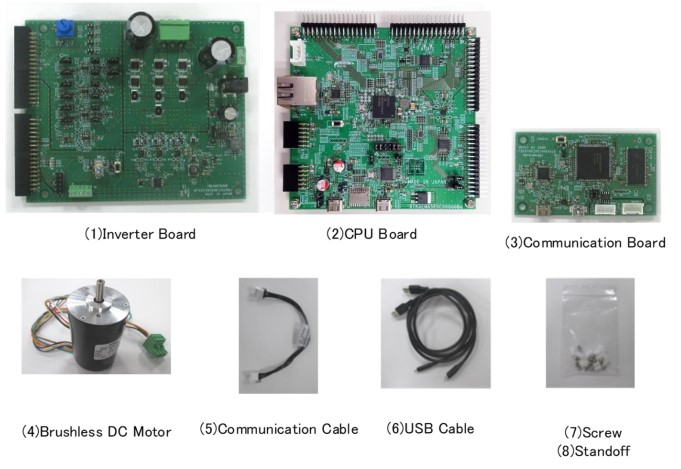
MCK-RA8T1 product contents (Credit: Renesas Electronics Corporation)
MCB-RA8T1 is a CPU board for motor control equipped with RA8T1. Motor control using RA8T1 can be easily realized by using it in combination with a supported inverter board. The RA8T1 MCU can be evaluated using this board alone.
By using a supported communication board, the CPU board can be electrically isolated from the PC for safe motor control evaluation and debugging.
The specifications of the CPU board are shown below:
MCU specifications
480MHz Arm Cortex-M85 based RA8T1 MCU in 224 pins, BGA package
ROM/RAM size: 2MB/1MB
MCU input clock: 24MHz (Generate with external crystal oscillator)
Power supply: DC 5V, select one way automatically from the below:
Power is supplied from compatible inverter board
Power is supplied from USB connector
Connector
Inverter board connector (2 pair)
USB connector for J-Link OB
USB connector for RA8T1
SCI connector for Renesas Motor Workbench communication
Through hole for CAN communication
20 pin through hole for Arm debugger
Pmod connectors (Type6A + Type2A/3A)
Ethrnet connector
microSD card connector
Onboard debugger
This product has the onboard debugger circuit, J-Link On-Board (hereinafter called “J-Link-OB”). You can write a program (firmware) of RA8T1 with it.
Hardware
Detailed Hardware features for the RA8T1 MCU group can be found at RA8T1 Group User’s Manual Hardware
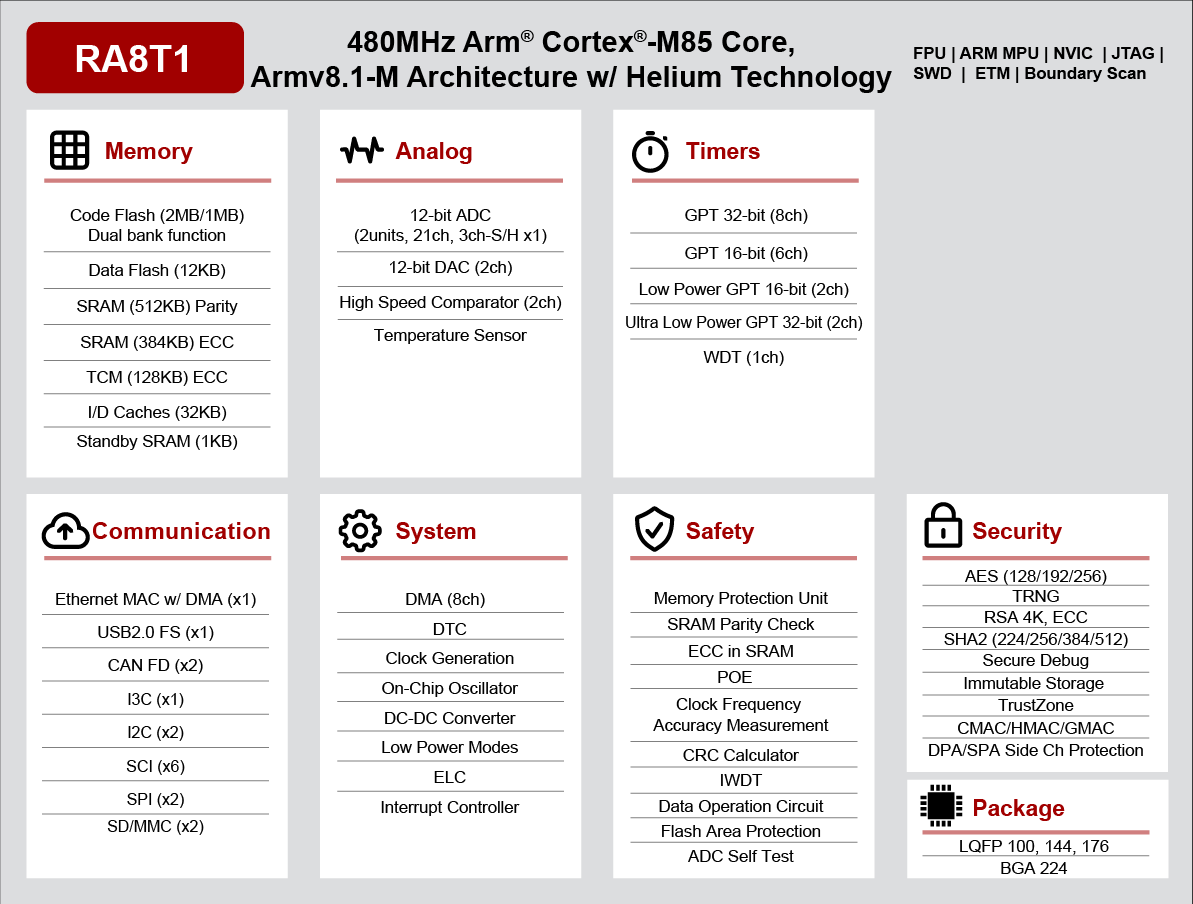
RA8T1 Block diagram (Credit: Renesas Electronics Corporation)
Detailed Hardware features for the MCB-RA8T1 board can be found at MCB-RA8T1 - User’s Manual
Supported Features
The mck_ra8t1 board supports the hardware features listed below.
- on-chip / on-board
- Feature integrated in the SoC / present on the board.
- 2 / 2
-
Number of instances that are enabled / disabled.
Click on the label to see the first instance of this feature in the board/SoC DTS files. -
vnd,foo -
Compatible string for the Devicetree binding matching the feature.
Click on the link to view the binding documentation.
Note
For using SDHC module on EK-RA8M1, Connect microSD Card to microSD Socket (CN12)
Programming and Debugging
The mck_ra8t1 board supports the runners and associated west commands listed below.
| flash | debug |
|---|
Applications for the mcb_ra8t1 board configuration can be
built, flashed, and debugged in the usual way. See
Building an Application and Run an Application for more details on
building and running.
Note: Only support from SDK v0.16.6 in which GCC for Cortex Arm-M85 was available. To build for EK-RA8M1 user need to get and install GNU Arm Embedded toolchain from https://github.com/zephyrproject-rtos/sdk-ng/releases/tag/v0.16.6
Flashing
Program can be flashed to MCB-RA8T1 via the on-board SEGGER J-Link debugger. SEGGER J-link’s drivers are available at https://www.segger.com/downloads/jlink/
To flash the program to board
Connect to J-Link OB via USB port to host PC
Make sure J-Link OB jumper is in default configuration as describe in MCB-RA8T1 - User’s Manual
Execute west command
west flash -r jlink
Debugging
You can use Segger Ozone (Segger Ozone Download) for a visual debug interface
Once downloaded and installed, open Segger Ozone and configure the debug project like so:
Target Device: R7FA8T1AH
Target Interface: SWD
Target Interface Speed: 4 MHz
Host Interface: USB
Program File: <path/to/your/build/zephyr.elf>
Note: It’s verified that debug is OK on Segger Ozone v3.30d so please use this or later version of Segger Ozone