

Arduino Nicla Sense ME
Overview
The Arduino Nicla Sense ME [1] is designed around Nordic Semiconductor’s nrf52832 ARM Cortex-M4F CPU. The board houses 4 low power industrial grade sensors that can measure rotation, acceleration, pressure, humidity, temperature, air quality and CO2 levels.
Hardware
nRF52832 ARM Cortex-M4 processor at 64 MHz
512 kB flash memory, 64 kB SRAM
Bluetooth Low Energy
Micro USB (USB-B)
JST 3-pin 1.2 mm pitch battery connector
10 Digital I/O pins
2 Analog input pins
12 PWM pins
One reset button
RGB LED (I2C)
On board sensors:
Accelerometer/Gyroscope: Bosch BHI260AP
Gas/Pressure/Temperature/Humidity: Bosch BME688
Geomagnetic: Bosch BMM150
Digital Pressure: Bosch BMP390
Supported Features
The arduino_nicla_sense_me board supports the hardware features listed below.
- on-chip / on-board
- Feature integrated in the SoC / present on the board.
- 2 / 2
-
Number of instances that are enabled / disabled.
Click on the label to see the first instance of this feature in the board/SoC DTS files. -
vnd,foo -
Compatible string for the Devicetree binding matching the feature.
Click on the link to view the binding documentation.
Connections and IOs
Available pins:
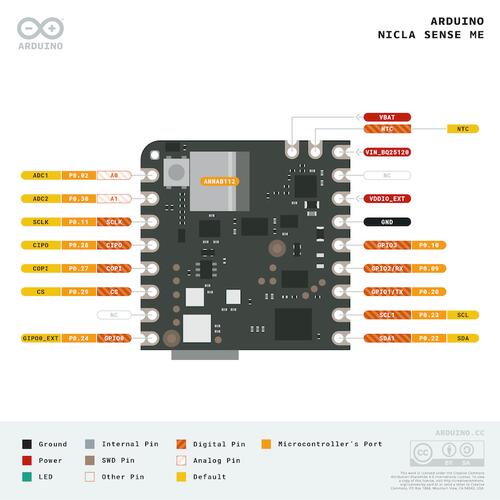
Arduino Nicla Sense ME pinout (Credit: Arduino)
For more details please refer to the datasheet [2], full pinout [3] and the schematics [4].
Programming and Debugging
The arduino_nicla_sense_me board supports the runners and associated west commands listed below.
| flash | debug |
|---|
Applications for the arduino_nicla_sense_me board configuration can be built and
flashed in the usual way (see Building an Application and
Run an Application for more details).
Flashing
First, connect the Arduino Nicla Sense ME board to your host computer using the USB port to prepare it for flashing. Then build and flash your application.
Here is an example for the Hello World application.
# From the root of the zephyr repository
west build -b arduino_nicla_sense_me samples/hello_world
west flash
Run a serial host program to connect with your board:
$ minicom -D /dev/ttyACM0
You should see the following message on the console:
Hello World! arduino_nicla_sense_me
Debugging
You can debug an application in the usual way. Here is an example for the Hello World application.
# From the root of the zephyr repository
west build -b arduino_nicla_sense_me samples/hello_world
west debug