

Nucleo F410RB
Overview
The Nucleo F410RB board features an ARM Cortex-M4 based STM32F410RB MCU with a wide range of connectivity support and configurations. Here are some highlights of the Nucleo F410RB board:
STM32 microcontroller in QFP64 package
Two types of extension resources:
Arduino Uno V3 connectivity
ST morpho extension pin headers for full access to all STM32 I/Os
On-board ST-LINK/V2-1 debugger/programmer with SWD connector
Flexible board power supply:
USB VBUS or external source(3.3V, 5V, 7 - 12V)
Power management access point
Three LEDs: USB communication (LD1), user LED (LD2), power LED (LD3)
Two push-buttons: USER and RESET
More information about the board can be found at the Nucleo F410RB website.
Hardware
Nucleo F410RB provides the following hardware components:
STM32F410RBT6 in LQFP64 package
ARM® 32-bit Cortex®-M4 CPU with FPU
Adaptive real-time accelerator (ART Accelerator)
100 MHz max CPU frequency
VDD from 1.7 V to 3.6 V
128 KB Flash
32 KB SRAM
General purpose timer (4)
Low-power timer (1)
Advanced-control timer (1)
Random number generator (TRNG for HW entropy)
SPI/I2S (3)
I2C (3)
USART (3)
GPIO (50) with external interrupt capability
12-bit ADC with 16 channels
12-bit DAC with 1 channel
RTC
More information about STM32F410RB can be found here:
Supported Features
The nucleo_f410rb board supports the hardware features listed below.
- on-chip / on-board
- Feature integrated in the SoC / present on the board.
- 2 / 2
-
Number of instances that are enabled / disabled.
Click on the label to see the first instance of this feature in the board/SoC DTS files. -
vnd,foo -
Compatible string for the Devicetree binding matching the feature.
Click on the link to view the binding documentation.
Connections and IOs
Nucleo F410RB Board has 8 GPIO controllers. These controllers are responsible for pin muxing, input/output, pull-up, etc.
Available pins:
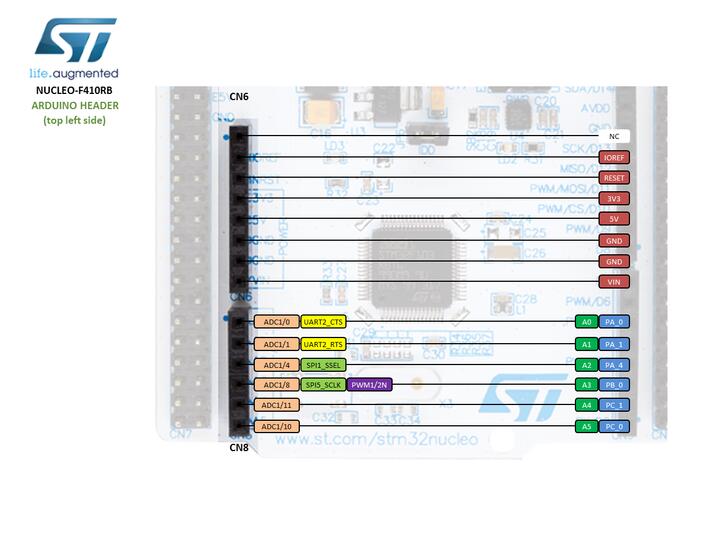
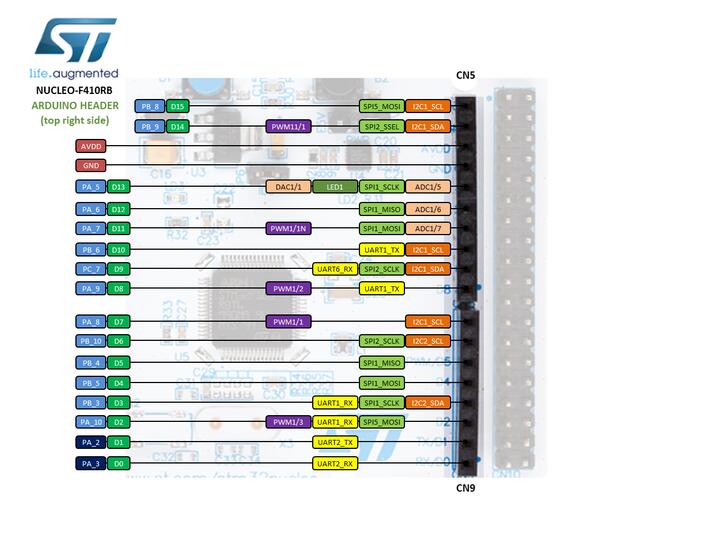
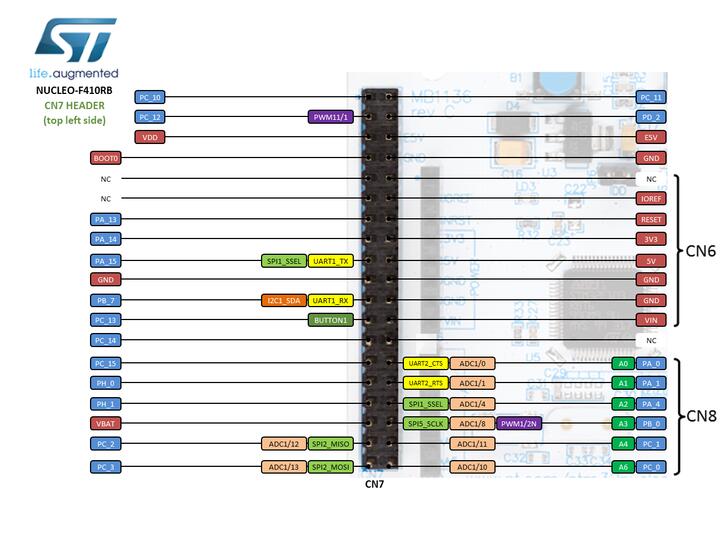
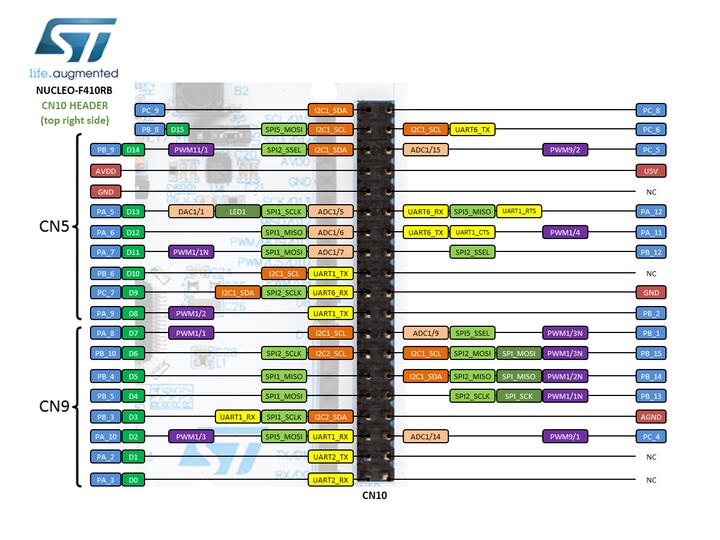
For more details please refer to STM32 Nucleo-64 board User Manual.
Default Zephyr Peripheral Mapping:
UART_1_TX : PB6
UART_1_RX : PB7
UART_2_TX : PA2
UART_2_RX : PA3
USER_PB : PC13
LD2 : PA5
I2C1_SDA : PB9
I2C1_SCL : PB8
I2C2_SDA : PB3
I2C2_SCL : PB10
System Clock
Nucleo F410RB System Clock could be driven by an internal or external oscillator, as well as the main PLL clock. By default, the System clock is driven by the PLL clock at 84MHz, driven by an 8MHz high-speed external clock.
Serial Port
Nucleo F410RB board has 3 USARTs. The Zephyr console output is assigned to UART2. Default settings are 115200 8N1.
Programming and Debugging
The nucleo_f410rb board supports the runners and associated west commands listed below.
| flash | debug |
|---|
Nucleo F410RB board includes an ST-LINK/V2-1 embedded debug tool interface.
Applications for the nucleo_f410rb board configuration can be built and
flashed in the usual way (see Building an Application and
Run an Application for more details).
Flashing
The board is configured to be flashed using west STM32CubeProgrammer runner, so its installation is required.
Alternatively, OpenOCD or JLink can also be used to flash the board using
the --runner (or -r) option:
$ west flash --runner openocd
$ west flash --runner jlink
Flashing an application to Nucleo F410RB
Here is an example for the Hello World application.
Run a serial host program to connect with your Nucleo board.
$ minicom -b 115200 -D /dev/ttyACM0
Build and flash the application:
# From the root of the zephyr repository
west build -b nucleo_f410rb samples/hello_world
west flash
You should see the following message on the console:
$ Hello World! arm
Debugging
You can debug an application in the usual way. Here is an example for the Hello World application.
# From the root of the zephyr repository
west build -b nucleo_f410rb samples/hello_world
west debug