

EVK-ANNA-B11x
u-blox EVK-ANNA-B11x
Overview
The u-blox ANNA-B1 Evaluation Kit hardware is a Bluetooth low energy module based on the Nordic Semiconductor nRF52832 ARM Cortex-M4F CPU and has support for the following features:
ADC
CLOCK
FLASH
GPIO
I2C
MPU
NVIC
PWM
RADIO (Bluetooth Low Energy)
RTC
Segger RTT (RTT Console)
SPI
UART
WDT
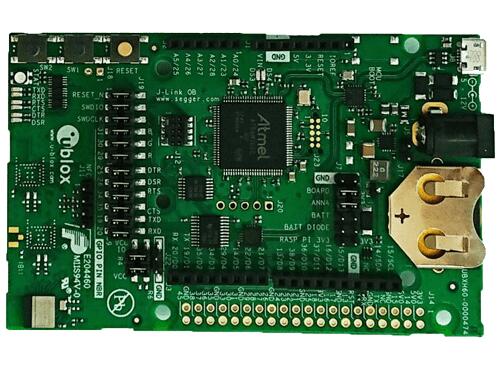
EVK ANNA-B1
More information about the ANNA-B1 module and the EVK-ANNA-B1 can be found at ANNA-B1 product page [1] and EVK-ANNA-B1 product page [2].
Supported Features
The ubx_evkannab1 board supports the hardware features listed below.
- on-chip / on-board
- Feature integrated in the SoC / present on the board.
- 2 / 2
-
Number of instances that are enabled / disabled.
Click on the label to see the first instance of this feature in the board/SoC DTS files. -
vnd,foo -
Compatible string for the Devicetree binding matching the feature.
Click on the link to view the binding documentation.
Connections and IOs
LED
LED0 (red) = P0.27
LED1 (green) = P0.25
LED2 (blue) = P0.26
General information on module pin numbering
The numbering of the pins on the module and EVK do not follow the GPIO numbering on the nRF52832 SoC. Please see the ANNA-B1 Data Sheet [3] for information on how to map ANNA-B1 pins to the pin numbering on the nRF52832 SoC.
The reason for this is the u-blox module family concept where different modules share the same pinout and can be interchanged.
Programming and Debugging
Applications for the ubx_evkannab1/nrf52832 board configuration can be
built and flashed in the usual way (see Building an Application
and Run an Application for more details); however, the standard
debugging targets are not currently available.
Flashing
Build and flash applications as usual (see Building an Application and Run an Application for more details).
Here is an example for the Hello World application.
Open a terminal program to the USB Serial Port installed when connecting the board and listen for output.
Settings: 115200, 8N1, no flow control.
Then build and flash the application in the usual way.
# From the root of the zephyr repository
west build -b ubx_evkannab1/nrf52832 samples/hello_world
west flash
Debugging
Refer to the Nordic nRF5x Segger J-Link page to learn about debugging boards containing a Nordic Semiconductor chip with a Segger IC.