

Nucleo C071RB
Overview
The STM32 Nucleo-64 development board with STM32C071RB MCU, supports Arduino and ST morpho connectivity.
The STM32 Nucleo board provides an affordable, and flexible way for users to try out new concepts, and build prototypes with the STM32 microcontroller, choosing from the various combinations of performance, power consumption and features.
The STM32 Nucleo board integrates the ST-LINK/V2-1 debugger and programmer.
The STM32 Nucleo board comes with the STM32 comprehensive software HAL library together with various packaged software examples.
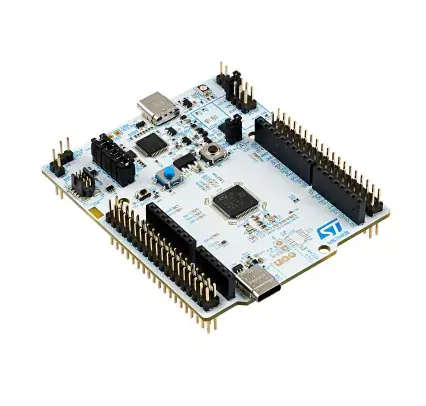
More information about the board can be found at the Nucleo C071RB website [1].
Hardware
Nucleo C071RB provides the following hardware components:
STM32 microcontroller in 64-pin package featuring 128 Kbytes of Flash memory and 24 Kbytes of SRAM.
Extension resource:
Arduino* Uno V3 connectivity
On-board ST-LINK/V2-1 debugger/programmer with SWD connector:
Flexible board power supply:
USB VBUS or external source (3.3V, 5V, 7 - 12V)
Current consumption measurement (IDD)
Four LEDs:
USB communication (LD1), USB power fault LED (LD2), power LED (LD3), user LED (LD4)
Two push-button: USER and RESET
USB re-enumeration capability. Three different interfaces supported on USB:
Virtual COM port
Mass storage
Debug port
More information about STM32C071RB can be found here: STM32C0x1 reference manual [2]
Supported Features
The nucleo_c071rb board supports the hardware features listed below.
- on-chip / on-board
- Feature integrated in the SoC / present on the board.
- 2 / 2
-
Number of instances that are enabled / disabled.
Click on the label to see the first instance of this feature in the board/SoC DTS files. -
vnd,foo -
Compatible string for the Devicetree binding matching the feature.
Click on the link to view the binding documentation.
Connections and IOs
Each of the GPIO pins can be configured by software as output (push-pull or open-drain), as input (with or without pull-up or pull-down), or as peripheral alternate function. Most of the GPIO pins are shared with digital or analog alternate functions. All GPIOs are high current capable except for analog inputs.
Default Zephyr Peripheral Mapping:
I2C1 SCL/SDA : PB8/PB9 (Arduino I2C)
LD1 : PA5
LD2 : PC9
SPI1 NSS/SCK/MISO/MOSI : PA15/PA5/PA6/PA7 (Arduino SPI)
UART_2 TX/RX : PA2/PA3 (ST-Link Virtual Port Com)
USER_PB : PC13
For more details please refer to STM32 Nucleo-64 board User Manual [3].
Programming and Debugging
The nucleo_c071rb board supports the runners and associated west commands listed below.
| flash | debug |
|---|
Nucleo C071RB board includes an ST-LINK/V2-1 embedded debug tool interface.
Applications for the nucleo_c071rb board can be built and
flashed in the usual way (see Building an Application and
Run an Application for more details).
Flashing
The board is configured to be flashed using west STM32CubeProgrammer [4] runner, so its installation is required.
Alternatively, an external JLink can also be used to flash the board using
the --runner (or -r) option:
$ west flash --runner jlink
Flashing an application to Nucleo C071RB
Here is an example for the Blinky application.
# From the root of the zephyr repository
west build -b nucleo_c071rb samples/basic/blinky
west flash
You will see the LED blinking every second.