

YJ-16019
Overview
The Holyiot [1] YJ-16019 hardware provides support for the Nordic Semiconductor nRF52832 ARM Cortex-M4 CPU and the following devices:
CLOCK
FLASH
GPIO
MPU
NVIC
PWM
RADIO (Bluetooth Low Energy)
RTC
Segger RTT (RTT Console)
WDT
The board is equipped with one LED, one push button, and is powered by a CR2032 coin cell. The Nordic Semiconductor Infocenter [2] contains the processor’s information and the datasheet.
Hardware
The nRF52832 of the Holyiot YJ-16019 is clocked by an external crystal with a frequency of 32 MHz (Y1). The 32.768 kHz crystal (Y2) shown on the board schematics is not mounted.
Supported Features
The holyiot_yj16019 board supports the hardware features listed below.
- on-chip / on-board
- Feature integrated in the SoC / present on the board.
- 2 / 2
-
Number of instances that are enabled / disabled.
Click on the label to see the first instance of this feature in the board/SoC DTS files. -
vnd,foo -
Compatible string for the Devicetree binding matching the feature.
Click on the link to view the binding documentation.
Connections and IOs
Programming and Debugging
The holyiot_yj16019 board supports the runners and associated west commands listed below.
| flash | debug |
|---|
Applications for the holyiot_yj16019 board configuration can be
built and flashed in the usual way (see Building an Application
and Run an Application for more details); however, an external
Segger J-Link is required since the board does not have any on-board
debug IC.
The following pins of the Segger J-Link must be connected to the following test pads on the PCB (see image):
VTref = VCC
GND = GND
SWDIO = SDO
SWCLK = SCK
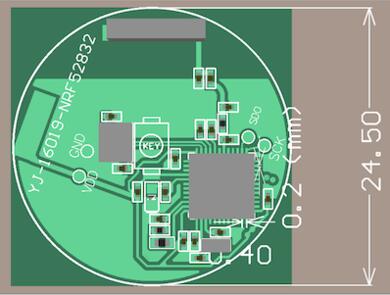
Holyiot YJ-16019 PCB (Credit: Holyiot)
Flashing
Follow the instructions in the Nordic nRF5x Segger J-Link page to install and configure all the necessary software. Further information can be found in Flashing. Then build and flash applications as usual (see Building an Application and Run an Application for more details).
Here is an example for the Blinky application.
# From the root of the zephyr repository
west build -b holyiot_yj16019 samples/basic/blinky
west flash
Debugging
Refer to the Nordic nRF5x Segger J-Link page to learn about debugging Nordic nRF52x-based boards with a Segger debugger.