

21014 Module
Overview
The Holyiot [1] 21014 module is built around the Nordic Semiconductor nRF52810 [2] Arm Cortex-M4 SoC with 192 KiB of flash and 24 KiB of RAM. The module have one user button and an RGB LED.
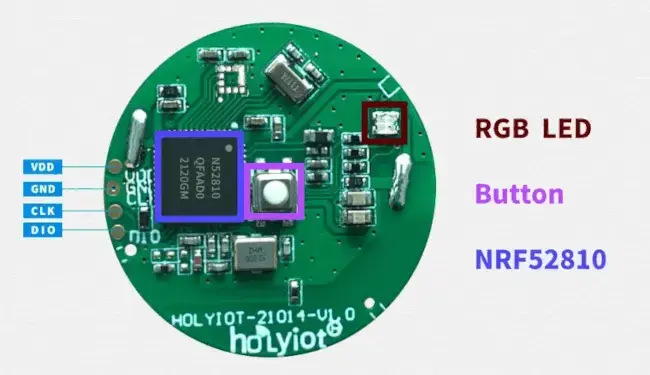
Holyiot 21014 module
Supported Features
The holyiot_21014 board supports the hardware features listed below.
- on-chip / on-board
- Feature integrated in the SoC / present on the board.
- 2 / 2
-
Number of instances that are enabled / disabled.
Click on the label to see the first instance of this feature in the board/SoC DTS files. -
vnd,foo -
Compatible string for the Devicetree binding matching the feature.
Click on the link to view the binding documentation.
Connections and IOs
Button:
P0.31RGB LED:
P0.29(red),P0.30(green),P0.28(blue)SPI0:
P0.5(SCK),P0.2(MOSI),P0.3(MISO)
Programming and Debugging
The holyiot_21014 board supports the runners and associated west commands listed below.
| flash | debug |
|---|
The board must be programmed using an external SWD probe (for example, a Segger J-Link) connected to the SWDIO, SWCLK, VDD, and GND pads.
Flashing
Follow the instructions in the Nordic nRF5x Segger J-Link page to install and configure the required software. Then build and flash applications as usual (see Building an Application and Run an Application for more details).
Here is an example for the Blinky application:
# From the root of the zephyr repository
west build -b holyiot_21014 samples/basic/blinky
west flash