

Renesas Starter Kit+ for RZ/T2M
Overview
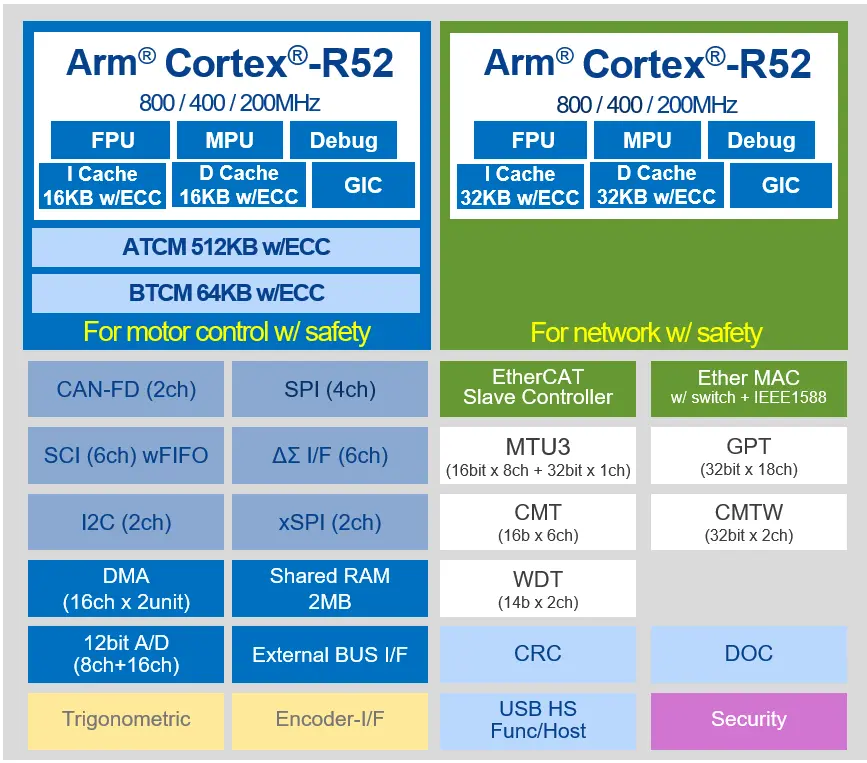
The Renesas Starter Kit+ for RZ/T2M is an evaluation and development kit for the RZ/T2M MPU. The board is powered through a 5V input via a DC Power Jack or USB Type-C Connector.
On-board RZ/T2M MPU 320-pin (R9A07G075M24GBG)
Rich functional ICs such as Gigabit Ethernet PHY and Octal Flash are mounted, functions of target MPU can be fully evaluated
Generic interface such as Pmod/Grove/QWIIC/mikroBUS
The pin header enables users to freely combine with the user’s hardware system and evaluate RZ/T2M
Emulator circuit is mounted, can start program debugging by simply connecting USB cable to PC (two USB cables are bundled: one for emulator, and the other for power supply)
On-board memory components:
SDRAM (256MBit)
NOR Flash (256MBit)
Octa Flash (512MBit)
HyperRAM (512Mbit)
QSPI Serial Flash (512Mbit)
I2C EEPROM (32Kbit)
Communication interfaces include:
Debug interfaces (J-Link OB, MIPI-10, MIPI-20)
Ethernet
CAN
USB
RS485
UART
I2C
SPI
Hardware
The Renesas RZ/T2M MPU documentation can be found at RZT2M Product page [1]
Supported Features
The rzt2m_rsk board supports the hardware features listed below.
- on-chip / on-board
- Feature integrated in the SoC / present on the board.
- 2 / 2
-
Number of instances that are enabled / disabled.
Click on the label to see the first instance of this feature in the board/SoC DTS files. -
vnd,foo -
Compatible string for the Devicetree binding matching the feature.
Click on the link to view the binding documentation.
Connections and IOs
By default, the board is configured for use with:
UART0 connected to the USB serial port (pins K18, K19),
UART3 connected to the PMOD Header (J25, pins H16, G20),
LEDs defined as
led0,led1,led2andled3,
The Zephyr console uses UART0.
Programming and Debugging
The rzt2m_rsk board supports the runners and associated west commands listed below.
| flash | debug |
|---|
Applications for the rzt2m_rsk board can be built in the usual way as
documented in Building an Application.
To use J-Link OB on RSK+RZT2M,
Open the jumper pin (J9) for switching the debug connection.
Connect the micro-USB type-B to J-Link OB USB connector (J10), and then the LED4 is lighted.
Console
The UART port is accessed by USB-Serial port (CN16).
Debugging
Here is an example for building and debugging with the Hello World application.
# From the root of the zephyr repository
west build -b rzt2m_rsk/r9a07g075m24gbg/cr520 samples/hello_world
west debug
Flashing
Before using flash command, the board must be set to xSPI boot mode.
# From the root of the zephyr repository
west build -b rzt2m_rsk/r9a07g075m24gbg/cr520 samples/hello_world
west flash